Status
SteamPeaks
ChartsSalesUpcomingPatchesEventsCalculator
New on SteamEvery app, DLC and depot the minute Steam creates itAppsEvery app on Steam, newest change firstPackagesSubs and bundles, and what each containsDepotsDepots, manifests and install sizesTagsSteam's user tags and the games under themDevelopers & publishersCompanies and their cataloguesTechnologiesEngines, SDKs and anti-cheat found in the filesChange historyEvery PICS changelist as it lands
SignalsNineteen readings of the whole catalogueCompareAny games side by sideRecordsAll-time peaks and the days they were setReportsWeekly and monthly write-upsAlerts & newsroomWatch a game, get told when it movesSteam statusIs Steam up, right nowWeb API explorerTry the endpoints in the browser
EventsSteam's own events and the sales calendarCalculatorWhat a Steam account is worth, and its pile of shame
/
Sign in
/
SteamPeaks
The ultimate resource for Steam data.
ExploreChartsSalesSales and festsUpcomingPatchesEventsRecordsTrendingSignals
DatabaseAppsPackagesDepotsTagsDevelopersTechnologiesChange history
ToolsCalculatorCompareSearchAlertsSteam statusAPI
SiteMethodologyFAQDiscordSupportSign in via Steam
Not affiliated with Valve or Steam. Game names and artwork belong to their owners. All times UTC.
PrivacyCookiesFair useStatus
FluxWerks Demo›Events›Plan mode and other things!
In-game event

Plan mode and other things!

FluxWerks Demo · published 3 months ago

All eventsPlayers around this dateRead on Steam

Plan mode is here!

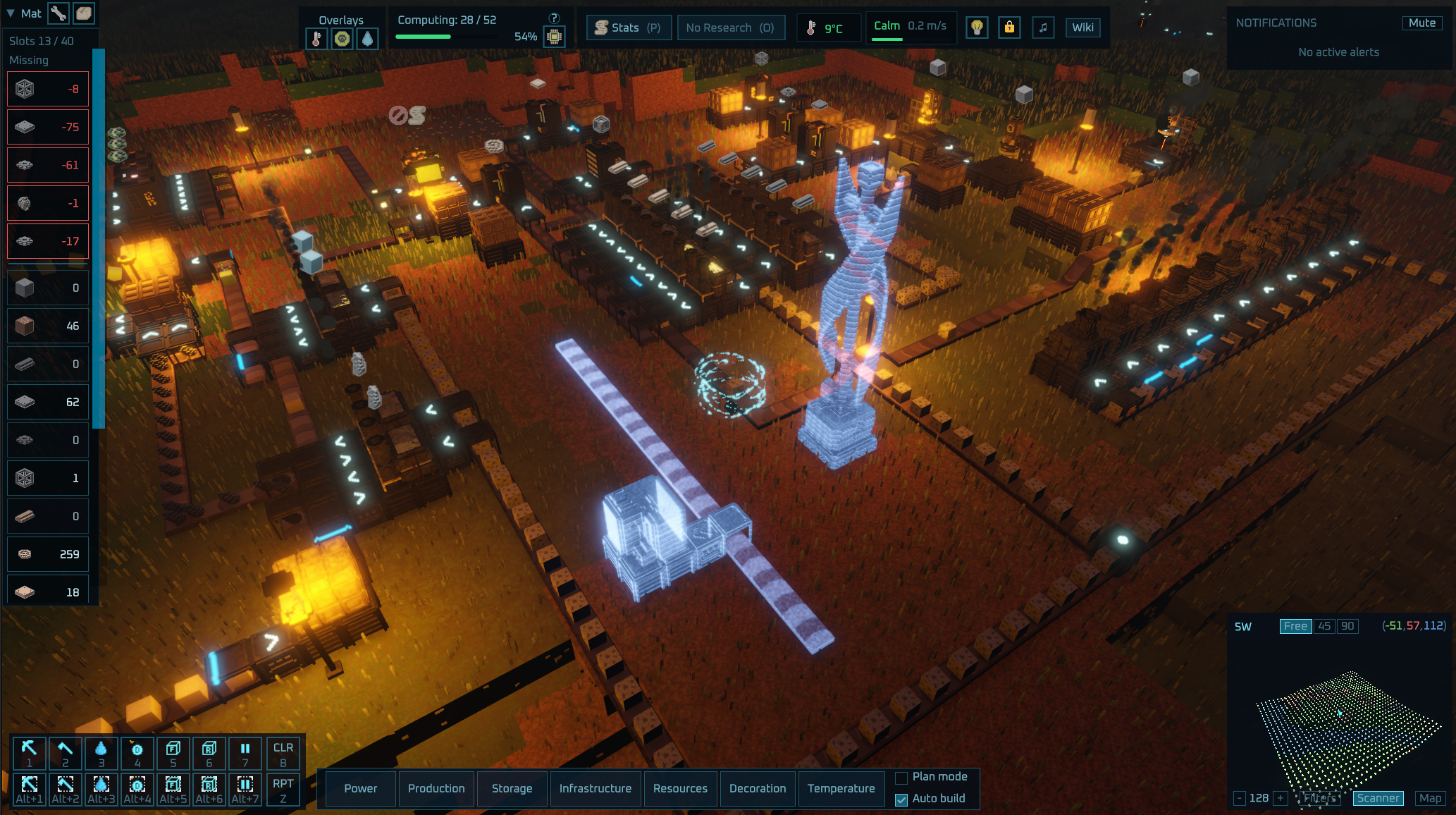
Buildings can now be placed down as plan holograms without spending materials.
In the explicit plan mode all buildings are placed as plans so you can easily try out different placements to see how they fit and finally use the new Toggle tool to build them.

When not in plan mode all buildings you place, but have no materials for are also placed down as plans so you are not interrupted when running out of materials. The materials bar shows at glance what materials you are missing from existing plans and if auto build is enabled, any nearby plans turn into active constructions as soon as you have enough materials in your inventory.

This was a necessary pre-work to make saveable blueprints possible and I'm planning (hehe) to have blueprints at latest for the Early Access release, but probably sooner already for the demo too.

FluxWerks v0.2.24 - 24-06-2026

New Features

  • Plan Mode - A new build-bar toggle places buildings, belts, and pipes as free blue holograms so you can lay out your factory before committing materials. Anything you try to build without enough materials is placed as a plan instead of failing.
  • Auto Build - A build-bar toggle that automatically builds your nearby plans as soon as you can afford them.
  • Plan Materials - The materials bar now shows what your outstanding plans still need.
  • Toggle Tool - A new tool for pausing and resuming buildings, and for manually building plans on demand.

Improvements

  • Belt Surface - Belt strips now show a moving chevron tread, with the number of chevrons marking the tier.
  • Pipette - Copying a building now also carries over its light settings (color, brightness, range) and any custom note.
  • Mining Feedback - When your inventory fills up while mining, all pending orders for that full resource are now cancelled at once instead of one at a time, while orders for resources you still have room for keep going.
  • Clear Designations - The clear designations key (B) now only clears pending non-construction orders. Use the demolish tool to cancel an in-progress building.
  • Inserter Placement - Placing an inserter with its belt side pointed straight into a building now auto-rotates it to face the building, so it snaps to a valid orientation and you only need to flip the transfer direction.

Bug Fixes

  • Fixed the floating resource popups (e.g. "+3 Copper Ore" when mining) appearing in the wrong place when UI scale was not 1.
  • Fixed marking an area to mine reporting "No valid targets in area" when your inventory was actually full.
More from FluxWerks Demo

Other announcements

All events
In-game event6 Sep 2026v0.5.5 to v0.5.8 - QoL and better light configurations.FluxWerks v0.5.8 - 06-09-2026 New Features · Light Block - A one-block lamp that attaches to any solid block, walls and ceilings included, with the Light Post's color, brightness and night-only settings. Researched with Illumination, under Decoration in the build menu. · Light Palette - Sixteen swatches shared by every lamp in the save, each storing a color, strength and always-on setting. Link…In-game event2 Sep 2026v0.5.1 to 0.5.4 - Achievements, Cloud saves and QoLFluxWerks v0.5.4 - 02-09-2026 New Features · Named Worlds - New worlds get a name, and the load screen now groups every save under its world, with autosaves kept per world. Older saves keep working and ask for a name the next time you save. · Continue - The main menu now has a Continue button that loads your most recent save. · Steam Cloud - Save files and blueprints now sync through Steam Clou…In-game event29 Aug 2026v0.5.0 - End game goal, events, farming...FluxWerks v0.5.0 - 29-08-2026 New Features · Saves - Saves from before v0.5.0 will not load. To continue an old game, install the v0.4 branch from the Steam Betas tab. · The Log - A new panel that gathers your mission orders, world events, recovered records and survey progress in one place. Open it with L. · Events - Encountering some things or specific events happening, writes a short entry in…