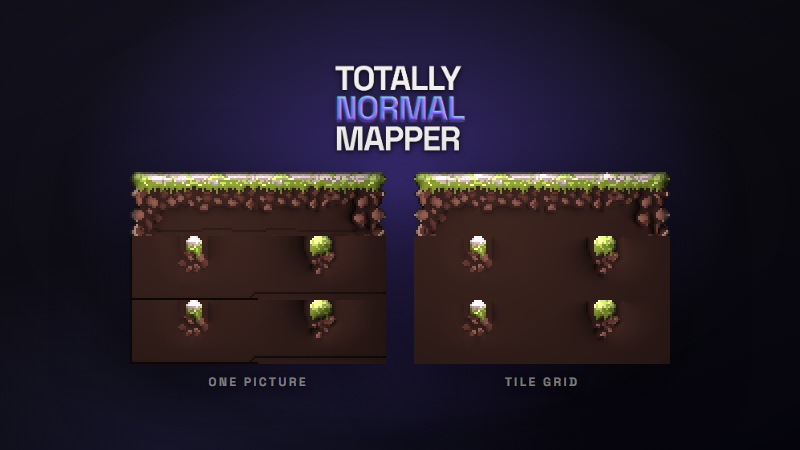
Public release is still December. This build solves a tile sheet the way a tilemap uses it, and it puts the batch tool in the Steam install, so a whole folder of sprites can take the look you tuned on one.
Tile sheets without seams
A tile sheet is not a picture. Unity cuts it into cells and places each one beside cells it never touched in the sheet. Solved as one picture, a tile was smoothed into whatever was packed beside it, and flat fill that stopped on a tile line was lit as an edge. In a tilemap, that is a line at every seam.
Turn on Tile grid in the Solver tab and enter the numbers you gave Unity's Slice > Grid By Cell Size: cell size, offset and padding. Each tile is then solved on its own. Where its art carries on into the next tile, its edge is held level, so any tile meets any other cleanly. A rock drawn across the tile line keeps its shape. The viewport draws the cells, and a brush stroke stays inside the tile it started in.
Do not leave a pixel of space between tiles to get rid of seams. That makes every flat edge an outline, and the sheet comes out as a grid of pillows.
totallynormalmapper.com/docs/tiles
Outline edge
The grid cannot tell from the pixels whether a flat edge on a tile line is the top of the ground or fill that carries on below. It assumes fill. Paint Outline edge (G) along the tops of platforms and ledges, and those edges roll over like any other outline. Paint right into the corners with any size of brush: an edge opens only where your stroke runs along it, so the spill down a tile's sides, or a roof's slope crossing the tile line, opens nothing.
It works without a grid too, on a sprite cropped tight to its art.
Quick to paint
With a grid on, tiles are solved on the CPU and the status bar says Tiles. Only the tiles you change are solved again. A 512x288 sheet of 32-pixel tiles solves in about a third of a second, and a stroke comes back in about fifteen milliseconds.
Height and ambient occlusion are worked out per tile, on one shared scale, so a neighbor in the sheet never shades a tile.
Batch processing, in the install
A scenery set is two hundred sprites that have to match. tnmap, the batch tool, applies one look to all of them, and from this build Steam installs it: tnmap.exe sits beside totally-normal-mapper.exe, with nothing else to download.
Tune the look on one sprite in the editor. Then choose Edit > Copy batch command, pick your shell, and paste. Or save a preset and point tnmap at it:
tnmap sprites/ --preset knight.tnpreset --out normals/
It runs the same solver as the editor and reads the same presets, so the folder comes out the way the sprite you tuned did. It exports for the same engines, writes height, AO and specular maps when asked, and takes the tile grid as --tile-width and --tile-height. On a folder you care about, run it with --dry-run first: it lists what it would write, and stops.
Hand it a Photoshop or Aseprite file and the hint layers come along. A layer named hint: front, hint: cut, hint: flatten and so on is that hint, visible or not. A hidden layer named for a hint is that hint too. Every other visible layer is the artwork, and other hidden layers are skipped. There is no dialog to confirm any of that, so the report for each file lists what became of every layer, and --dry-run shows it before anything is written.
Steam has to be running, and the account logged in there has to own the app. The batch tool solves on the CPU, one sprite at a time. Hints painted in the editor stay with the project; File > Export every frame solves a set of hinted frames, each with its own.
totallynormalmapper.com/docs/cli
Fixed
- Outline blur reaches every export. At any setting other than 2, the preview and exports made through Export every frame or the batch tool disagreed about the fold at each drawn line. Exports now match what the preview showed.
For testers
If the app is already in your library, Steam will offer this build. Start it from your Steam library. A copy started some other way asks Steam to relaunch it. The About dialog should read 1.4.0.
The woods tiles are by karsiori, released CC0: karsiori.itch.io/woods-tileset-and-background