Status
SteamPeaks
ChartsSalesUpcomingPatchesNewsCalculator
New on SteamEvery app, DLC and depot the minute Steam creates itAppsEvery app on Steam, newest change firstPackagesSubs and bundles, and what each containsDepotsDepots, manifests and install sizesTagsSteam's user tags and the games under themDevelopers & publishersCompanies and their cataloguesTechnologiesEngines, SDKs and anti-cheat found in the filesChange historyEvery PICS changelist as it lands
SignalsNineteen readings of the whole catalogueCompareAny games side by sideRecordsAll-time peaks and the days they were setReportsWeekly and monthly write-upsAlerts & newsroomWatch a game, get told when it movesSteam statusIs Steam up, right nowWeb API explorerTry the endpoints in the browser
NewsSteam's own announcements and the sales calendarCalculatorWhat a Steam account is worth, and its pile of shame
/
Sign in
/
SteamPeaks
The ultimate resource for Steam data.
ExploreChartsSalesSales and festsUpcomingPatchesNewsRecordsTrendingSignals
DatabaseAppsPackagesDepotsTagsDevelopersTechnologiesChange history
ToolsCalculatorCompareSearchAlertsSteam statusAPI
SiteMethodologyFAQDiscordSupportSign in via Steam
Not affiliated with Valve or Steam. Game names and artwork belong to their owners. All times UTC.
PrivacyCookiesFair useStatus
Future PerfectNewsDev Update 7
Game update

Dev Update 7

Future Perfect · published 21 Jan 2015, 20:47 UTC

All newsPlayers around this dateRead on Steam

For Update 7 we’ve continued working on the Heist game mode.

Bomb

One of the new elements for the Heist game is a bomb. The bomb is a throwable item that counts down before it explodes.
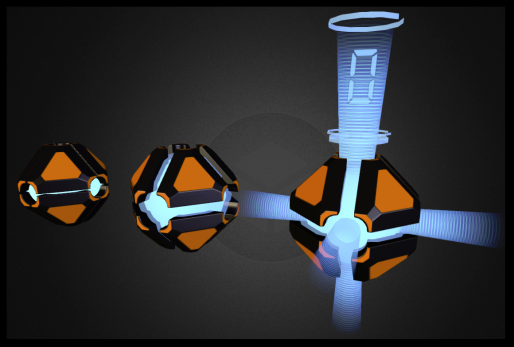
Like everything we’re making, we designed the artwork for the bomb to be “universal”. The goal is to have a distinctive look, but allow the model to be re-used for other purposes; our bomb has an explosive payload, but you can re-use it in your own game modes in new ways.

https://www.youtube.com/watch?v=Q6G3-PKm-GQ

Damage Types:

To support some things we have planned for the robot on the Heist mode, we’ve upgraded our damage code to include multiple types. Now when a player takes damage, you’ll hear a different sound depending the source of the damage. We’ve added melee, projectile (like bullets), fire, explosion and poison types, and no doubt we’ll add a few more in the future.

https://www.youtube.com/watch?v=0-qdzKZebtA

One of the elements this will support in a gas cloud that will be released by an alerted robot.

Robot

Speaking of the robot, we’ve given it a few updates to its AI. Now the robot can sense the player and will go into “seek and destroy” mode.

https://www.youtube.com/watch?v=n8nzodijUEw

The art we’re using right now is a placeholder, but we’re working on a new design that you’ll be seeing soon.

If you’d like to see all of the changes that went into this update, check out our Trello Board.

You can get access to all this progress, and more, by purchasing Future Perfect Architect Edition.

More from Future Perfect

Other announcements

All news
Game update26 Mar 2015Update 16 Released!Future Perfect Update 16 is now live on Steam! As usual, we update the Steam “beta” branch daily with the latest, and then once a week we push that out to the main branch along with a post summarizing the most interesting bits. Over the last couple weeks we’ve been focusing on the things we need to get done to bring Future Perfect to a wider audience. The main goal is to allow new players to ju…Game update17 Mar 2015Update 15 Released!The weekly update for Future Perfect is now live on Steam! Here are some of the changes in this update. Improved Thumbnails In the last update we added support the thumbnail images in the asset browser. This week we’ve improved them by adding images for collision, material, and particles assets. We also fixed a few issues with thumbnails; thumbnails will now always use high quality textures, em…Game update10 Mar 2015Update 14 ReleasedThe weekly update for Future Perfect is now live on Steam! Here are some of the changes in this update. Asset Thumbnails This week we implemented a long planned feature: asset thumbnails. Now when you open the asset browser in the editor you’ll see preview icons: Right now we only have thumbnails for models and blueprints (that use models), but we’ll be adding support for texture, material and…