
Weekly Update 8 is now live on Steam! Here’s a summary of the biggest changes.
If you’d like to see some more detail on all of the changes that went into this update, check out our Trello Board. The board shows all of the tasks we have planned, we’re working on and have completed for the next update.
You can help support the project and get access to all this progress by purchasing Future Perfect Architect Edition from our website.
Automator Optimization
This week we finished a two-week-long task to optimize the execution of Automators. Automators are a special type of script component that runs inside the editor to help with tasks like placing modular pieces for procedural objects. The way the Automators work is by destroying any entities it previously placed and creating new ones each time the user adjusts any of the properties of the Automator. For example, if you resize a room, all of the existing wall, floor and ceiling pieces are destroyed and new ones are created in their places. Starting fresh each runs makes the Automator scripts a lot easier to write than if we tried to selective update only the parts that needed it.
When we started building levels with lots of Automators in it, optimizing this became really important. When one Automator runs it can trigger others to run; for example a door will trigger the room to regenerate since it needs to cut out a hole for the door to fill. In our big level, adjusting a single door would trigger a cascade of Automators that could cause most of the world to regenerate. We made some small adjustments to limit the cascading effect (we’ll be making more in the future), but we really wanted to make the whole process faster even in the worst case.
https://www.youtube.com/watch?v=Z_K9qwEtyfg
To do this we made the engine a bit smarter when executing Automators. For the Automator script’s perspective it still looks like entities are being destroyed and created fresh, but under the hood the engine will try to find existing entities that match the new ones being created. If one is found, it will be reused. This avoids a lot of the work involved in creating new entities.
We also changed the engine to use a binary representation of blueprints. If you’ve taken a peek at any of the blueprint files on disk, you’ll see that there 6are written in a JSON-like text format. We’re still using that on disk, but once they’re loaded into memory they’re “compiled” into a binary format that game uses when spawning a blueprint. This was important for making the Automators faster, since in previous versions those text files were parsed every time a blueprint was spawned. This also makes spawning of blueprints in general faster, and ultimately we’ll use those binary formats on disk to make loading faster as well. It’s easier to keep them as text for the time being so we don’t have to make the binary format backwards compatible whenever we make a change.
Physics
If played around with the physics objects at all you might have noticed they tended to behave like Weeble wobbles. This was due to the physics engine using the origin of the object as the center of mass, which is often located at the base. We’ve fixed this so that the center of mass and moment of inertia will be properly calculated based on the collision shapes.
https://www.youtube.com/watch?v=D_7bhYsduu8
It turned out we wanted the Weeble wobble effect for some objects so they’d tend to stand up vertically. The collision objects can be made up of multiple shapes, so to enable that effect we enhanced the system to allow each of those shapes to specify their own mass (to keep the objects upright they have a heavy mass at the base).
Sentry Robot
We’re working on making the sentries in the Heist game present more of a challenge for the player. One new idea is for sentries to turn into a turret when they spot the player. Everything is still placeholder as we develop this idea further:
https://www.youtube.com/watch?v=BJ9H-AnzgAg
Timed Callbacks
Lately we’ve found a few places where we’ve wanted to have some code run at some interval or after a certain amount of time has elapsed. While this can be implemented by checking every frame if the desired amount of time has elapsed, it’s neither the most efficient or the most convenient.
To address that we’ve added a new API function called timedcallback that will execute a Lua function after a certain delay. To make it recur, you just have to call timedcallback from inside the callback. For example:
local function Think()
    ...
    timedcallback(1, Think)
end

function OnCreate()
    timedcallback(1, Think)
end
Laser Walls
We’ve been experimenting with different ways to combine the elements we’ve built to get new types of interactions for the Heist game. The laser wall now responds to damage by temporarily flickering and disabling. Now the rocket launcher, bomb and other weapons can be used to affect the electronics:
https://www.youtube.com/watch?v=HTQRnxqfMG4
Art
We added in a new model for the “buying station” which is a futuristic vending machine the player can use to purchase equipment in the Heist game.
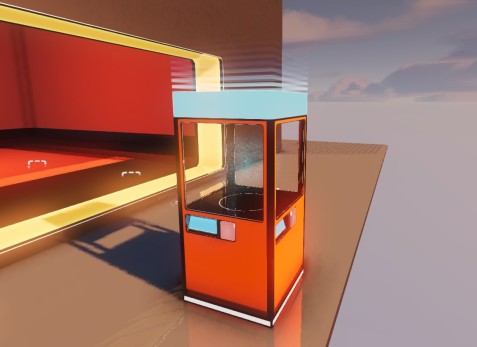
We also fixed up some artifacts on the “server” model and took a pass on a variety of other art bugs, like missing texture error messages and other materials. We’ve also adjusted the alignment of the floor so that newly placed objects sit on top of it rather than sunken inside it.