
Weekly Update 9 is now live on Steam. Here’s a summary of the biggest changes.
Player Movement
One long standing issue we tackled in this update is player movement bugs. In earlier versions, trying to walk over a pile of physics objects would cause the player to be shot directly upwards with a huge velocity.
https://www.youtube.com/watch?v=BlucIZFTjf8
While this was a pretty fun, it completely broke the game. The bug was caused by the “stair stepping” code that allows a character to step over small obstacles; that stepping motion would translate into a large vertical velocity causing the player to be propelled upwards.
We also fixed another bug that prevented characters from being knocked around by trigger forces until they are pressing movement keys or are in the air.
Improved Shadows
Another long standing issue we’ve made some progress on is shadow quality. Because of the clean art style we’re using, the method Natural Selection 2 used for shadows doesn’t work very well in Future Perfect.
We’re very fortunate that Ignacio Castaño already tackled the same issue for The Witness and wrote up a detailed explanation of their solution (Ignacio also enhanced the HLSLParser code we open sourced with the features necessary to implement this — double win!).
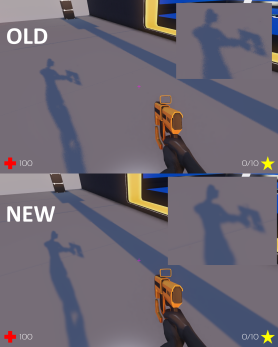
We’re still working on some other improvements to the shadows that we hope to release shortly.
Entity Size
When scripting an AI unit it’s often necessary to target another entity. This requires choosing a point on the target entity to serve as the “bullseye”. The easiest thing to do is to choose the position of the entity, but for characters the position is often located at the feet.
Instead, we’d like to choose some point which is more in the center of the object. To allow this, we added a new function called Entity_GetLocalBoundingBox that gives you the size and location of the box that fits around the entity.
In this screenshot, you can see the bounding boxes for a few entities drawn in red:
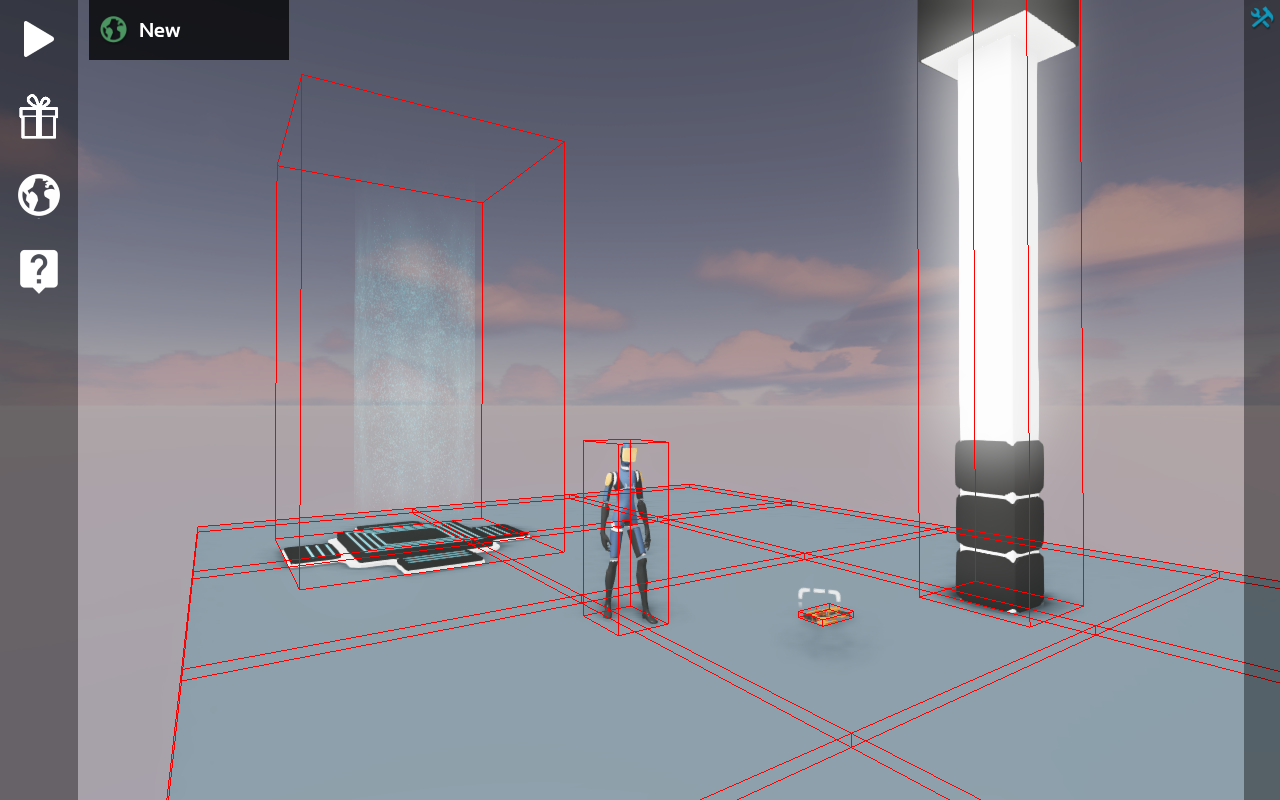
AI code can use the center of the bounding box to get a reasonable idea of where to target. We’ll probably also add in some mechanisms to query an entity for a specific bone position to allow a target bone to be specified for certain models where the box method doesn’t work well.
Renaming Skins
It’s now possible to rename skins on a model directly inside the model editing GUI. All you have to do is double click to start the renaming process:
https://www.youtube.com/watch?v=e16oynnVmLg
Animation Events
The animation system now includes events, which are simply frames that are tagged in an animation with a name. When playback of the animation hits one of those frames, an event is generated that’s sent to the script as a message. In code it looks like this:
function OnAnimationEvent(message)
    if message.name == "step" then
      -- Play a foot step sound
    end
end
This type of system can be used to synchronize all sorts of things with an animation, such as sound effects, particle effects, and even game play effects like dealing the damage from an attack.
User Interface
We’re continuing to work on smoothing over some of the stumbling blocks people have encountered with the user interface. The behavior of the rotation gizmo was a bit non-intuitive when rotation snapping was enabled. To address this we’ve changed the gizmo to show the snapped rotation and added tick marks to show the snapping increments.
https://www.youtube.com/watch?v=Sd32zQu5JgQ
Another usability issue we received feedback on was that there was no button to switch from “inspect” mode to “play” mode. This can be accomplished with the F5 hotkey, but if you didn’t know that you might be stuck. To address this we added a new button to the tool bar:

Platforms
We enhanced the procedural platform automators to support ramps as well as the existing flat pieces:
https://www.youtube.com/watch?v=4Dx-qwF_b1s
Robots
The robots now take damage when shot or exploded. They were already being physically simulated so it was easy enough to add a bit of force when they sustain damage which makes them a lot more dynamic.
https://www.youtube.com/watch?v=civ7Ncy7nBM
Timed Callbacks
A lot of gameplay code involves timing. The below is an example of some common code:
function OnThink(message)
    if World_GetTime() - lastSoundTime > 0.5 then
      World_PlaySound(sound, Self_GetPosition(), SoundType.Effect, 1, 1)
      lastSoundTime = World_GetTime()
    end
end
Unfortunately, this code needs to run every frame just to check if it is time to play the sound. Last week we added the timedcallback mechanism which allows us to write it like this:
function PlaySound(message)
    World_PlaySound(sound, Self_GetPosition(), SoundType.Effect, 1, 1)
    timedcallback(0.5, PlaySound)
end

timedcallback(0.5, PlaySound)
This is more efficient and easier to read. This week we updated much of our existing gameplay code to take advantage of timed callbacks.
Health and Ammo Packs
Finally a way to replenish health and ammo! Well, there wasn’t a concept of ammo until now but don’t worry about that.
https://www.youtube.com/watch?v=m2u-Cjm208s
As usual, if you’d like to see some more detail on all of the changes that went into this update, check out our Trello Board. The board show all of the tasks we have planned, we’re working on and have completed for the next update.
If you’d like to help support the project and get access to all this progress on Steam, you can do so by purchasing Future Perfect Architect Edition from our website.