
Weekly Update 11 is now live on Steam! Here’s a summary of the biggest changes...
Revised UI
This week we overhauled the layout of the editor UI. As we’ve developed Future Perfect, we’ve been adding new editor features and concepts as we discovered the need. As a result there wasn’t too much rhyme or reason to the layout. Although we still have more to implement, it feels like we’ve got a pretty good handle on all of the major functional pieces, so it was time to step back and think how they could be better integrated into a single UI.
https://www.youtube.com/watch?v=6TehCCCACdM
We’ll be iterating more on the UI, so please let us know what you think.
Although the new UI is primarily just a new organization of the existing one, it did give us the opportunity to add in an entity search feature. This should be helpful when you’re trying to locate a player spawner, sun light, or some other entity which might otherwise be easy to lose in a big environment.
Contact Message
We added a new message which is sent to a script when two collision objects come in contact. This is especially useful for implementing projectiles which are supposed to react when they hit something. Previously to accomplish this you had to add a slightly larger trigger around the object. The new contact message is an easier, more efficient and robust way to handle this.
https://www.youtube.com/watch?v=3T8ZufnGPAM
The crate in this video has a single script on it which plays a particle effect when a contact occurs:
function OnContact(message)
    World_PlayParticles("explosions/explosion_small.particles", message.position)
end
You can find more information about how the message works in the documentation (see docs/messages.html in the game install directory).
Automator Selection
Selecting an entity with an Automator component on it will now also highlight any entities it generated.
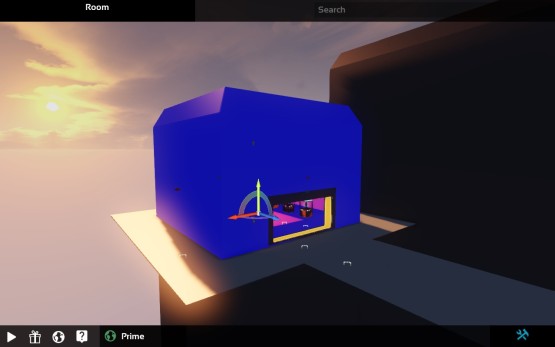
This should make it a lot easier to tell what’s going on when you’re editing a level with a lot of Automators in it.
Lumberjacked
On the game development side work continues on a lumberjack game.
https://www.youtube.com/watch?v=3I0ibO1C93o
With the lumberjack game we’re experimenting with a slightly different art style, which has more of a hand-drawn or painted quality. Here you can see a new tree model in this style (along with it’s “being chopped” animation), and some wooden blocks that the play can use to build defenses against bears.
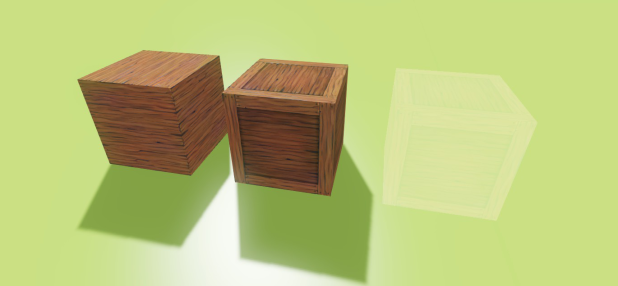
Most of the artwork in the game right now is still placeholder, but you can see some of the progress that we’ve made. There’s a new hammer tool for building out your defenses, and a beehive where the player can collect honey (just watch out for the bees!).
https://www.youtube.com/watch?v=Jmu17WZ8_sI
As usual, if you’d like to see some more detail on all of the changes that went into this update, check out our Trello Board. In addition to the things highlighted here, a bunch of bug fixes went into this build. The board shows all of the tasks we have planned, we’re working on and have completed for the next update.
If you’d like to help support the project and get access to all this progress, you can do so by purchasing Future Perfect Architect Edition from our website.