Deois on the Move: Navigation, Driving & Flight Improvements
Rise: The Vieneo Province · published · build 25266401
Since our August 18 Steam update, we've been working on how you travel around Vieneo—from finding a street in Deois to bringing an aircraft home. This major update brings together expanded city navigation, improved ground handling, clearer flight instructions, and a wide range of everyday fixes.
Find your way through Deois
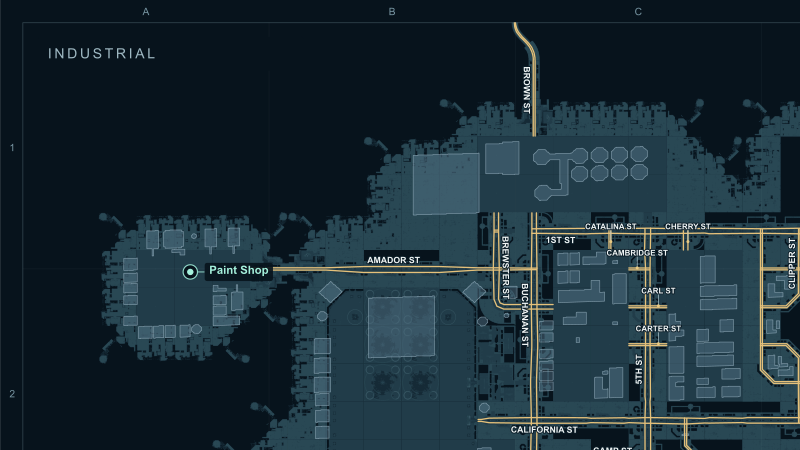
Deois has received a substantial street-network update across Financial, Industrial, City Center, Transit, and Port. Road connections, lane directions, intersection turns, street names, and speed data have been revised to support navigation across the five districts.
- Reworked turn-by-turn guidance: instructions account for your speed, give voice prompts time to finish, and treat short intersection links as a single maneuver.
- Clearer directions: distinguish slight bends from turns, explain when a turn continues along the same street, and give clearer instructions when joining a route.
- Better recovery: guidance can pick up the road ahead after a missed short segment and recalculate when you leave the route.
- More useful route starts and destinations: improved road-entry selection, direction-aware U-turn instructions, remaining-distance calculations, and recognition of arrival at the destination's road access point.
- Improved speech and subtitles: clearer road names, distance wording, and pronunciation, plus explanations when a navigation request cannot be fulfilled.
- Reskin Way connects the Transit district's street network to the player-built road approach.
- Kendall Drive identifies the Port's northern control-tower road; Kearny Street remains the southern fuel-facility route.
Explore the interactive Deois atlas
The Deois website has a refreshed layout and an Interactive Map tab. The atlas covers 175 street names, 23 public waypoints, and five districts, with searchable streets and destinations, building outlines, district selection, and optional map layers.
Pan and zoom to plan your next trip, select a street or waypoint to find it on the map, or download the SVG map and street index. Your selected location and zoom are retained when switching between website sections.
Vehicle handling and instruments
- Revised tire grip: tires hold against sideways movement within their grip limit and transition to sliding friction when that limit is exceeded.
- T-27 Mammoth skid steering: steering now models different wheel speeds on each side, with fixed-angle wheels.
- C-98 power increase: engine output has been raised to 202 horsepower.
- Updated wheelbase measurements for multiple ground vehicles and aircraft.
- Corrected tire-chirp behavior and brake lights that previously depended on another lighting state.
- Improved the E-11 primary flight display, including true and desired heading readouts and clearer instrument placement.
- Night-vision goggles now respond to lightning with temporary overexposure and gradual recovery, with a reduced effect in daylight.
Clearer flight operations
- Improved landing-zone arrivals: district, east colony, and west colony pad approaches ask you to report the correct landing zone in sight before releasing you to a visual approach and landing at your discretion.
- More flexible long descents: qualifying arrivals receive a pilot-discretion descent with a crossing altitude at the inbound fix.
- Changing from a departure to an arrival clears superseded instructions and provides the new route's initial vector promptly.
- Priority handling routes aircraft through the arrival's final-approach fix.
- ATIS special observations report the changed weather values, including visibility, ceiling, and precipitation.
- Fixed the Flight Options submenu and shortened repetitive heading instructions.
- Smoothed automated flight playback between recorded samples, and corrected roll and heading-card presentation in the Player Portal's flight playback.
Controls, characters, and community
- A keyboard chart that matches your controls: the binding display is generated from your current assignments and changes with interior, ground-vehicle, and aerospace contexts. Long labels use shorter names where available and scroll when necessary.
- Refresh your character at annual immigration: update hair and facial hair, hair and eye color, supported appearance options, and weight within the annual limits. Appearance edits are preserved when changing the form's language.
- Update your account email through the annual immigration form, with validation before saving.
- Added Unicode support for waypoint names and improved selection when waypoint data arrives out of order.
- Added Steam Enhanced Rich Presence for login, loading, immigration, and gameplay activity in the friends list.
- Updated Discord activity integration and improved account linking, verification handling, and automatic role management.
Docking, sound, and reliability
- Attacks against a dock can be heard by players docked there.
- Improved docking-port availability calculations and consistency across in-game and web displays.
- Corrected shockwave handling while docked and removed an incorrect evacuation trigger from weapon explosions.
- Car alarms triggered by sonic booms now respect the sound's travel time.
- Fixed external camera selection and street-map updates when your vehicle is inside another vehicle.
- Improved display recovery after moving the game to another monitor.
- Improved network-packet validation, vehicle appearance/removal ordering, and drawing and sound robustness.
Supporting world-building improvements
Behind the scenes, Makeship gained street-node editing and street-name/speed properties for city road networks, along with tools to clean up malformed road connections. Its vehicle analysis now calculates wheelbase and has corrected volume measurements. These changes support the updated city assets and vehicle data in this release.
Thanks to everyone who has been driving, flying, testing, and reporting problems. Your reports have helped shape this update.