Thank you very much for always using Textvas.
New Features
・Music Player

Dragging and dropping a music file onto a board now places it as a player card. It is useful for tasks such as selecting tracks.
Supported formats are MP3 / WAV / FLAC and others (M4A, AAC, OGG, Opus).
It supports play/pause and volume adjustment (drag the icon up or down; click to mute), and clicking the loop icon enables single-track loop playback.
If you place several of them, only one will produce sound. When you play another track, the one that was playing stops. If you move to another board during playback and then come back, it resumes from where it left off.
The width of the music player can be changed.
Music files are not imported into the project; instead, the path to their storage location is referenced.
As a result, the .txv file size barely increases. On the other hand, if you move or delete the original music file, it can no longer be played. From the ⋯ menu at the top right of the player, you can open the referenced music file in Explorer. It can also be linked with connection lines. It is included in auto-alignment as well, so it can be aligned too.
・Formatted Import of Markdown Files
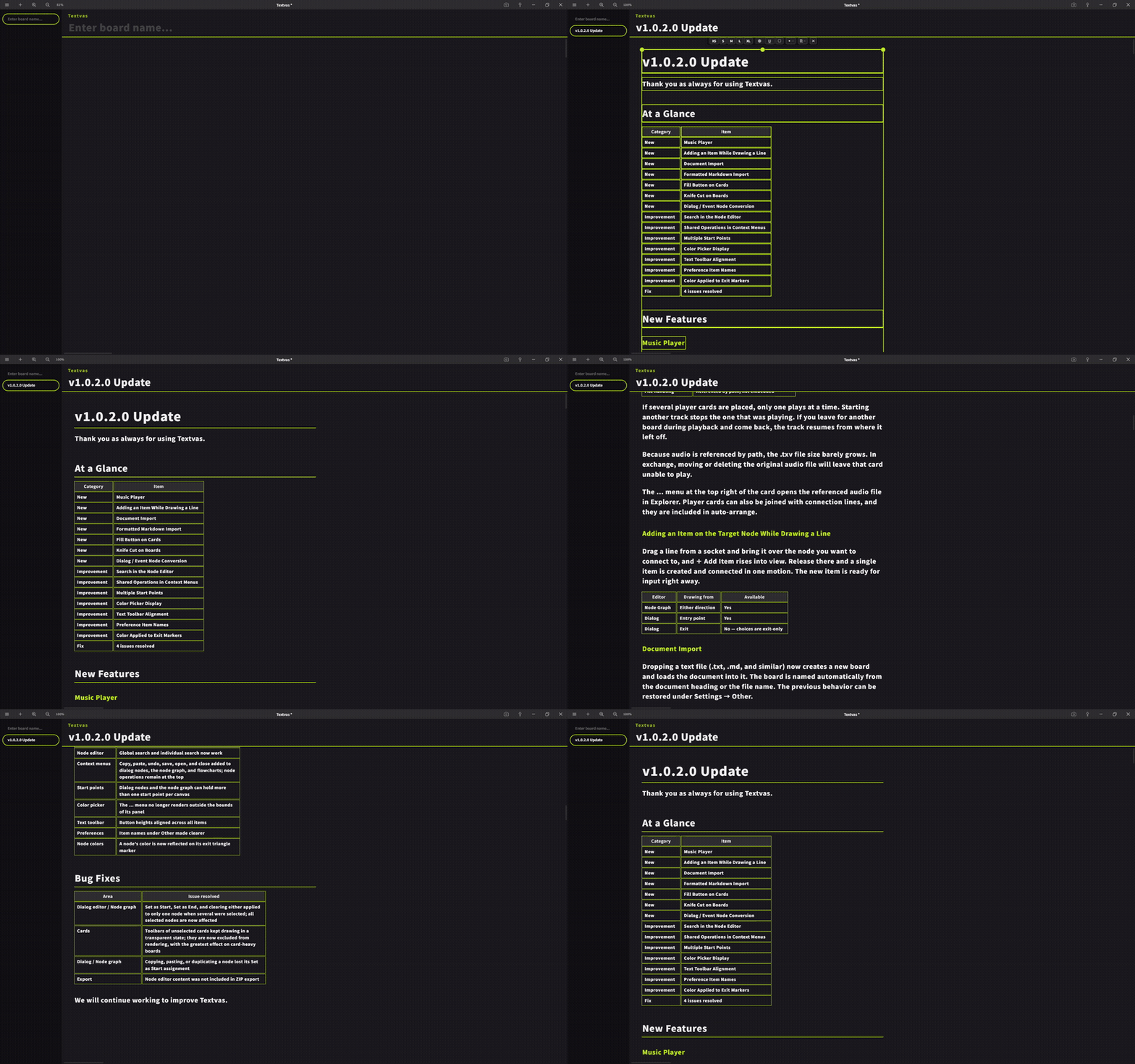
When you drag and drop a .md file onto a board, symbols such as # and ** are no longer placed as plain characters; instead, they are converted into Textvas cards and laid out accordingly.
By default, files are imported with formatting. If you want to load the text as a single card with the symbols left as they are, you can switch this in Other under Preferences.
・Document Import
Dropping a text file (.txt / .md, etc.) now creates a new board and loads the file there. The board name is set automatically from the document's heading or the file name. You can restore the previous behavior from Settings → Other.
・Add an Item on a Node and Connect It
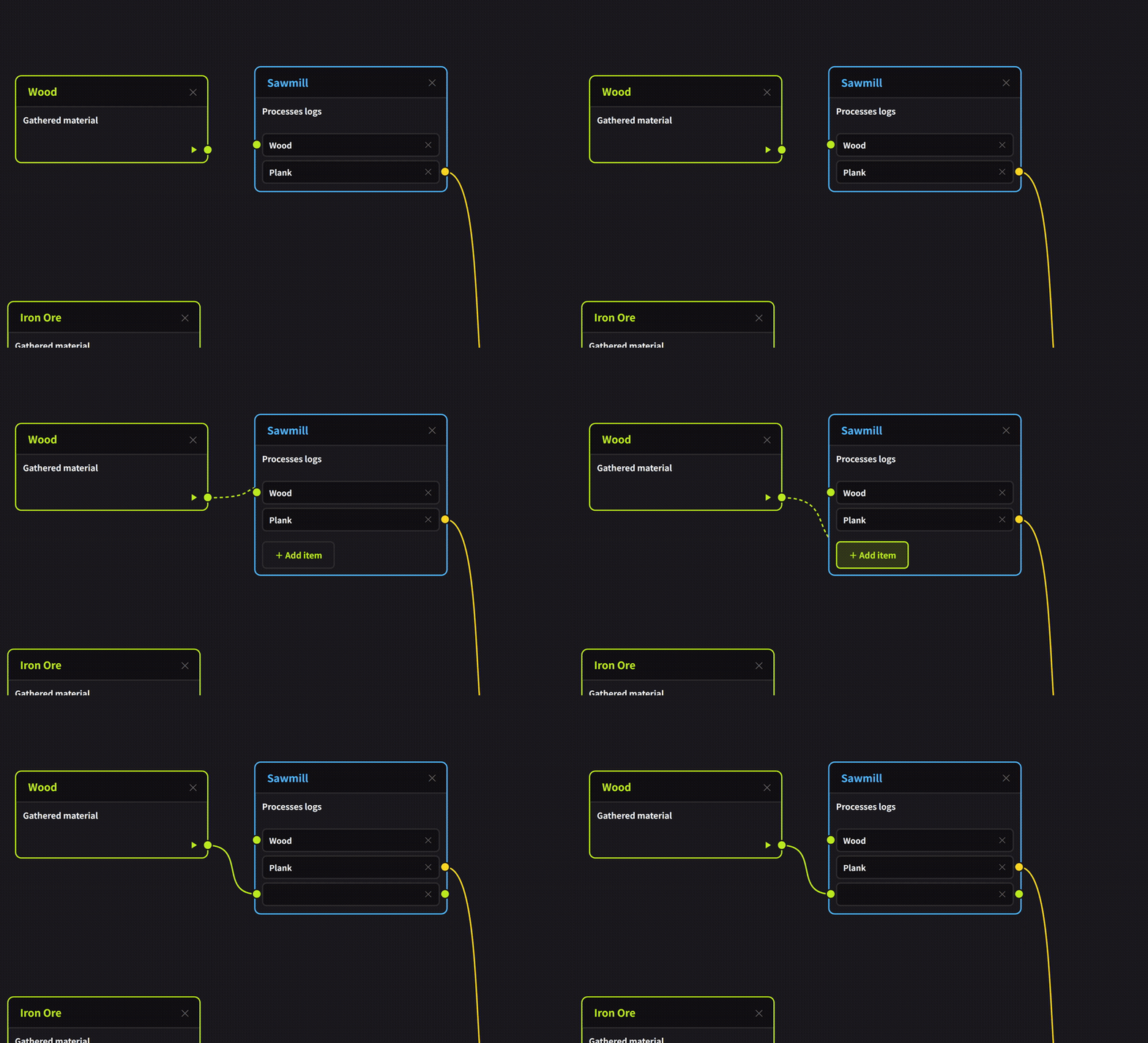
When you drag a line from a socket and bring it over the node you want to connect to, + Add Item appears. Release it there and one item is created and connected right away. The created item is immediately ready for input.
In the node graph, it works no matter which direction you draw the line. In dialogues, it is available while drawing a line from an entry point (since choices are exit-only, it is not shown when drawing from an exit).
・Text Fill Button

A fill button has been added to the text toolbar. It sits next to the border button. Pressing it opens a color palette, letting you add a color to the text background. The background colors of tables, quotes, and code imported from Markdown can now also be changed or cleared with this button.
・Knife Cut for Connection Lines on Boards
Knife cutting of connection lines has also been implemented on the board side. The operation and appearance are the same as in the node editor.
To use it, hold Ctrl on the board, press and hold the right mouse button, drag, and release; the connection lines crossed by that dashed line disappear.
・Converting Between Dialogue Nodes and Event Nodes
In the dialogue tree, you can now right-click a node to convert between a dialogue node and an event node after the fact. This is only possible when there are no choices.
Improvements
・Search in the Node Editor
Global search and individual search were unavailable in the node editor; they now work.
・Common Operations in the Right-Click Menu
Operations shared with boards, such as copy, paste, undo, save, open, and close, have been added to the right-click menu of dialogue nodes / node graphs / flowcharts. Node operations remain placed at the top as before.
・Placing Multiple Start Points
In dialogue nodes / node graphs, you can now place multiple start points on a single canvas. Previously, setting a new start point released the other one.
・Color Picker Display
Fixed an issue where the ⋯ menu of the color picker could be displayed extending outside the panel.
・Text Toolbar
Button heights differed slightly from item to item; they have all been made the same height.
・Preference Item Names
The item names under Other in Preferences have been made easier to understand.
・Applying Node Colors
When a color is set on a node, the color is now also applied to the triangle mark of the exit.
・Display of Unnamed Tabs
When a tab has not been given a name, the tab name field now shows the placeholder “Enter a board name” in faint text. This makes unnamed tabs recognizable at a glance.
Bug Fixes
・Fixed an issue where, in the dialogue editor / node graph, selecting multiple nodes and choosing to set them as start points or end points, or to release that setting, was applied to only one node. It is now applied to all selected nodes.
・Fixed an issue where the toolbar of unselected cards kept being drawn in a transparent state. It has been changed so that it is excluded from rendering targets. The effect is greater on boards with many cards placed.
・Fixed an issue where, when copying and pasting or duplicating a node, the "set as start point" designation was not carried over and reverted. This applies to both dialogues and node graphs.
・Fixed an issue where node editor related content did not support exporting to ZIP.
We will continue striving to improve Textvas.