Status
SteamPeaks
ChartsSalesUpcomingPatchesNewsCalculator
New on SteamEvery app, DLC and depot the minute Steam creates itAppsEvery app on Steam, newest change firstPackagesSubs and bundles, and what each containsDepotsDepots, manifests and install sizesTagsSteam's user tags and the games under themDevelopers & publishersCompanies and their cataloguesTechnologiesEngines, SDKs and anti-cheat found in the filesChange historyEvery PICS changelist as it lands
SignalsNineteen readings of the whole catalogueCompareAny games side by sideRecordsAll-time peaks and the days they were setReportsWeekly and monthly write-upsAlerts & newsroomWatch a game, get told when it movesSteam statusIs Steam up, right nowWeb API explorerTry the endpoints in the browser
NewsSteam's own announcements and the sales calendarCalculatorWhat a Steam account is worth, and its pile of shame
/
Sign in
/
SteamPeaks
The ultimate resource for Steam data.
ExploreChartsSalesSales and festsUpcomingPatchesNewsRecordsTrendingSignals
DatabaseAppsPackagesDepotsTagsDevelopersTechnologiesChange history
ToolsCalculatorCompareSearchAlertsSteam statusAPI
SiteMethodologyFAQDiscordSupportSign in via Steam
Not affiliated with Valve or Steam. Game names and artwork belong to their owners. All times UTC.
PrivacyCookiesFair useStatus
TextvasNewsv1.0.4.3 Update
In-game event

v1.0.4.3 Update

Textvas · published 25 Aug 2026, 00:45 UTC

All newsPlayers around this dateRead on Steam

Thank you for always using Textvas.


New Features

・Node Editor Memos
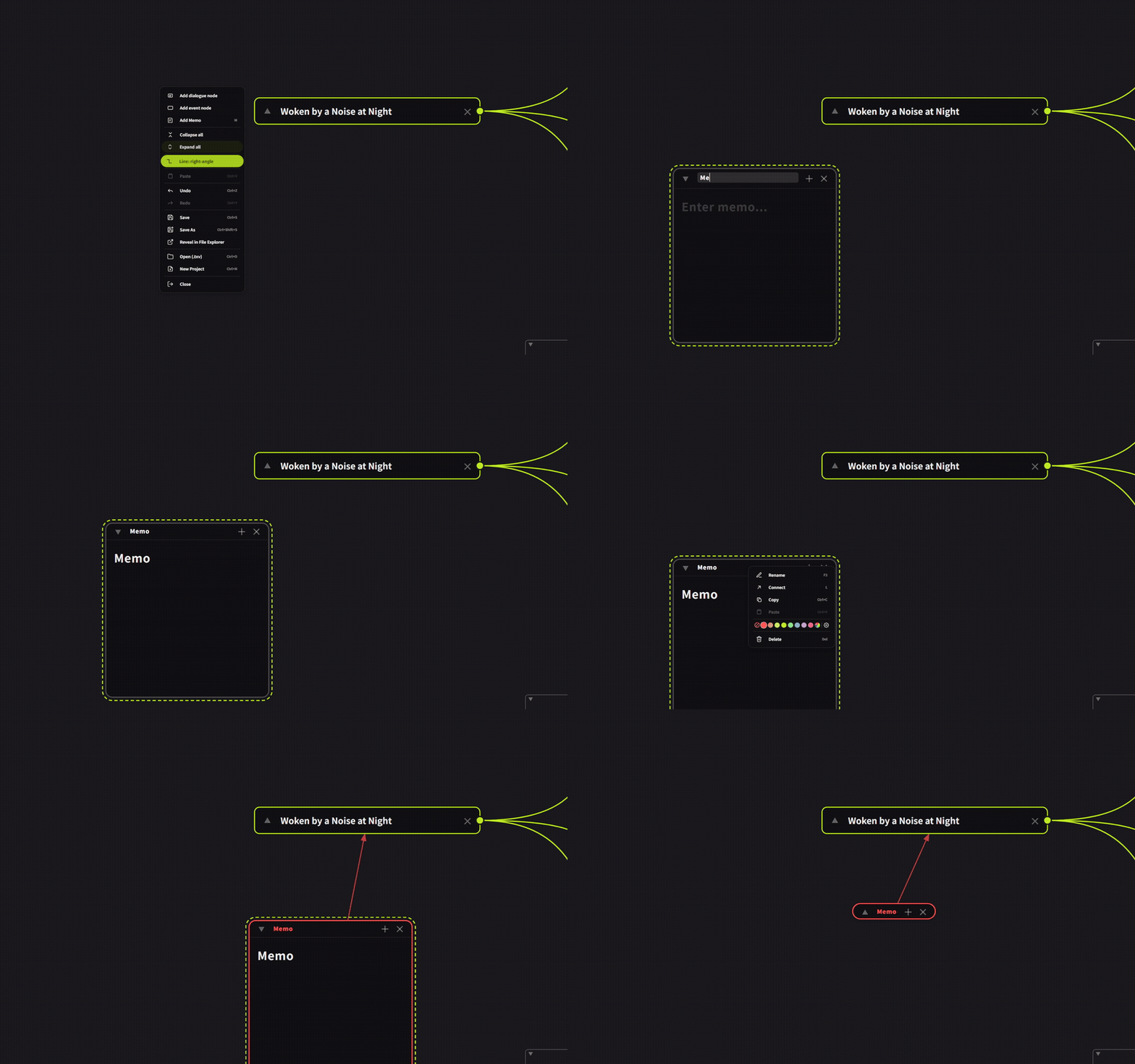

In all three node editors (Dialog, Node Graph, and Flowchart), you can now add memos by right-clicking the background or pressing the M key. Moving, resizing, collapsing, renaming, multi-selecting, copy and paste, and Ctrl+F search all work exactly like memos on the Board. Memos you create are saved with the file. Note that connections between memos and nodes work differently from regular node-to-node connections: you can connect a memo to a node, but not a node to a memo.

・Memo Coloring


You can now change the color of a memo's outline and title bar by right-clicking it.
The color of memos inside a node editor follows the node color.

Improvements

・Memo Width When Collapsed
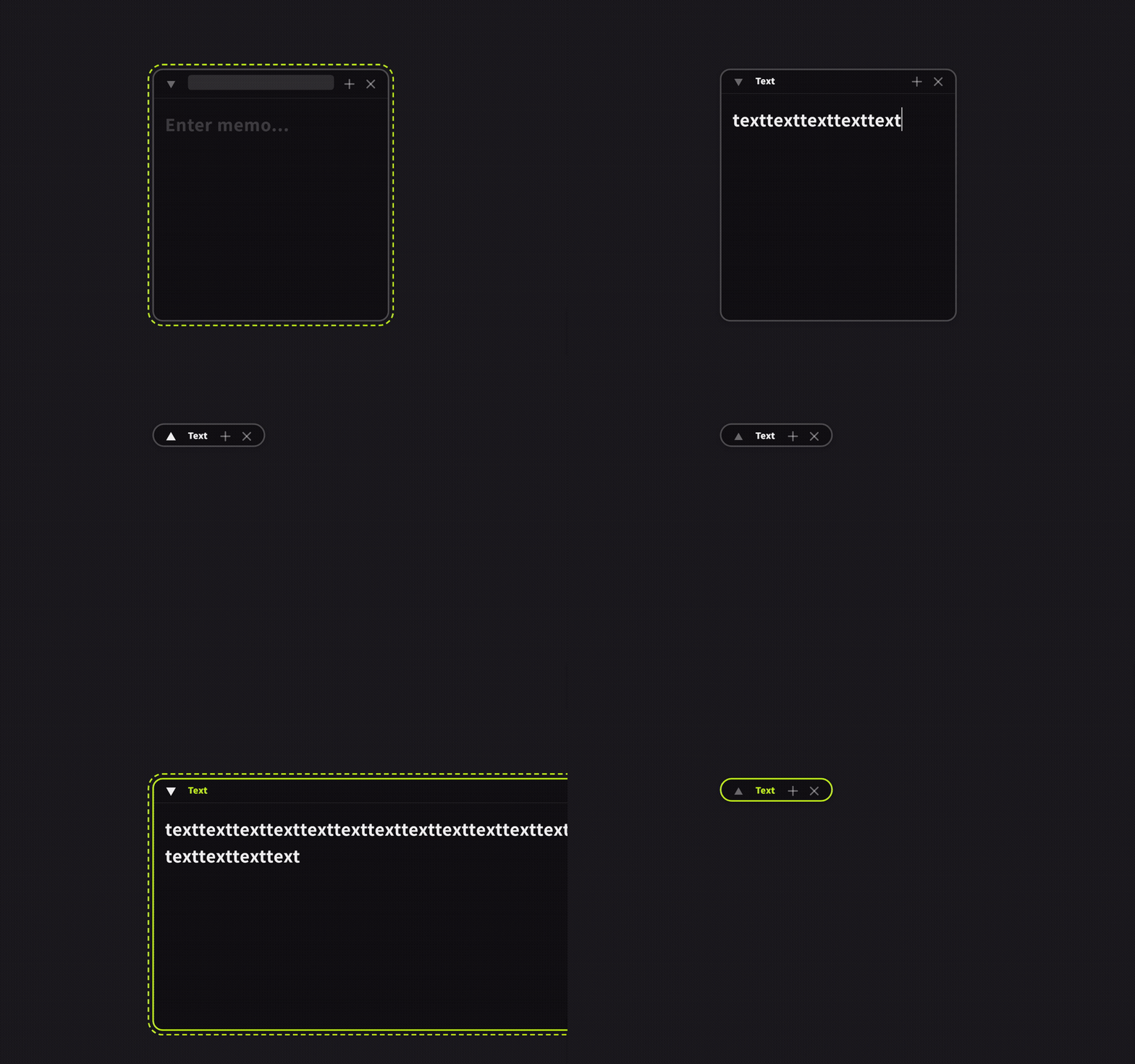

When a memo is collapsed, its width now narrows to fit the heading. Expanding it restores the original width. If the heading is long, the width stays within the expanded size.

・Memo Control Button Appearance


The ▼▲・+・✕ control buttons are now shown faintly by default and become colored only when you hover over them. This matches the same buttons on nodes, and Board memos now look the same way.

・Dashed Border When Selected


The dashed border shown when selecting a memo or node now follows the rounded corners of the box.


Bug Fixes

・Fixed an issue in the node editors (Dialog / Node Graph) where copying and pasting multiple selected items would duplicate only one of them. Now all selected nodes and memos are duplicated together, and connection lines fully contained within the selection are preserved. The Flowchart behaves as before.

・Fixed an issue where repeatedly toggling checkbox display would keep doubling the number of blank lines, stretching out the text.

・Fixed an issue where, for timestamp backups, a backup folder that could neither be opened nor deleted would be created if the filename ended with a half-width space or period.

・Fixed the text right-click → "Wrap" 15 / 25 / 40 / 50 options
Fixed an issue where, after selecting a smaller character count, you couldn't switch back to a larger one. Previously, once you selected 15, pressing 25, 40, or 50 did nothing. Now you can switch to any character count as many times as you like.
Also fixed an issue where switching from a larger character count to a smaller one caused uneven line lengths. Line breaks (paragraphs) you entered yourself are preserved when switching.

・Fixed an issue where pressing the TAB key on a memo's heading would not move focus to the memo's body text.


We will continue to improve Textvas.

More from Textvas

Other announcements

All news
In-game event20 Sep 2026v1.0.5.4 UpdateThank you as always for using Textvas. New Features ・Auto-Align: added alignment edge options When arranging images of different heights, you can now choose whether to align them by the top, center, or bottom edge. For example, you can line up the bottom edges perfectly. Switch this from the Auto-Align menu on right-click. Your chosen setting is kept for next time. The default is top edge, so e…In-game event5 Sep 2026v1.0.5.0 UpdateThank you very much for always using Textvas. New Features ・Text Wrapping You can now drag the handles on the left and right of a text box to freely set the wrap width. No actual line breaks are inserted, so copying the text won't add unwanted line breaks. The handles are hidden while you're typing. To undo this, right-click and choose to remove the wrapping. The existing option to wrap to the…In-game event17 Aug 2026v1.0.3.6 UpdateThank you very much for using Textvas. New Features ・Minimap A minimap has been added to the lower right of the board and node editor so you can see the whole canvas at a glance. A frame shows where you are currently looking, and you can move by clicking and dragging or zoom in and out with the wheel. You can collapse it with the upper triangle button or the CTRL+M shortcut. You can also hide i…