Thank you as always for using Textvas.
New Features
・Auto-Align: added alignment edge options
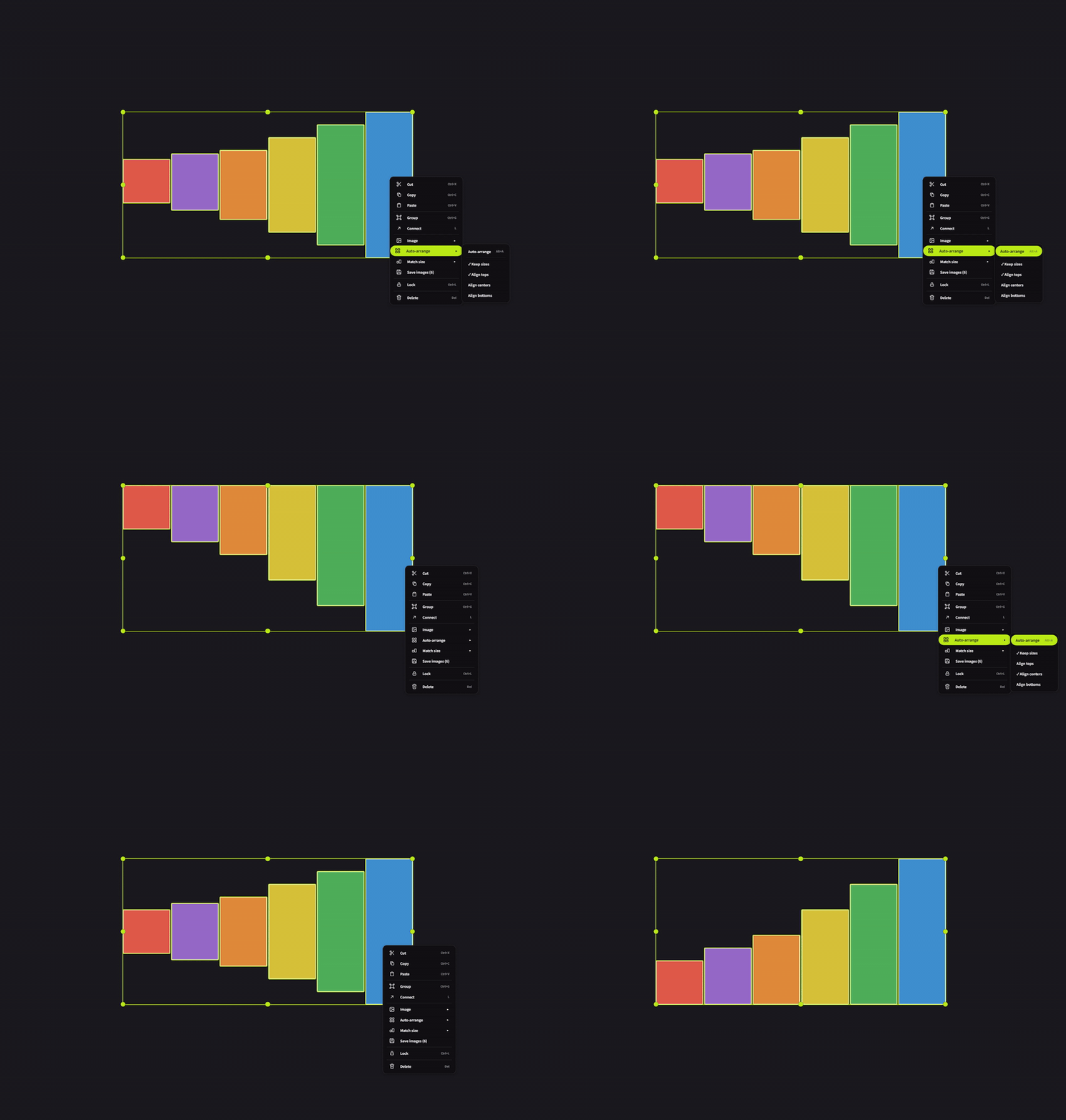
When arranging images of different heights, you can now choose whether to align them by the top, center, or bottom edge. For example, you can line up the bottom edges perfectly. Switch this from the Auto-Align menu on right-click. Your chosen setting is kept for next time. The default is top edge, so existing layouts won't change.
These 3 options are available when Keep Size is turned on. When it's off, the heights are equalized before arranging, so every edge produces the same layout and the option is not shown.
Improvements
・Renaming headers
You can now rename a header just by double-clicking it. Previously this required the right-click menu or F2.
・Guidance text for empty boards
An empty board now shows guidance for the next action. It's now immediately clear that the board is empty.
Bug Fixes
・Fixed an issue where notes and tables moved via select-all would stick out of the selection box and fail to follow it.
・Fixed an issue where removing trailing whitespace also removed color or bold formatting applied to part of the text. Only the whitespace itself is now removed, and line/blank-line structure is unchanged.
・Fixed an issue where, after moving to another item through a right-click submenu, the previous item remained visually shown as selected.
We will continue to improve Textvas.