Thank you for always using Textvas.
New Features & Improvements
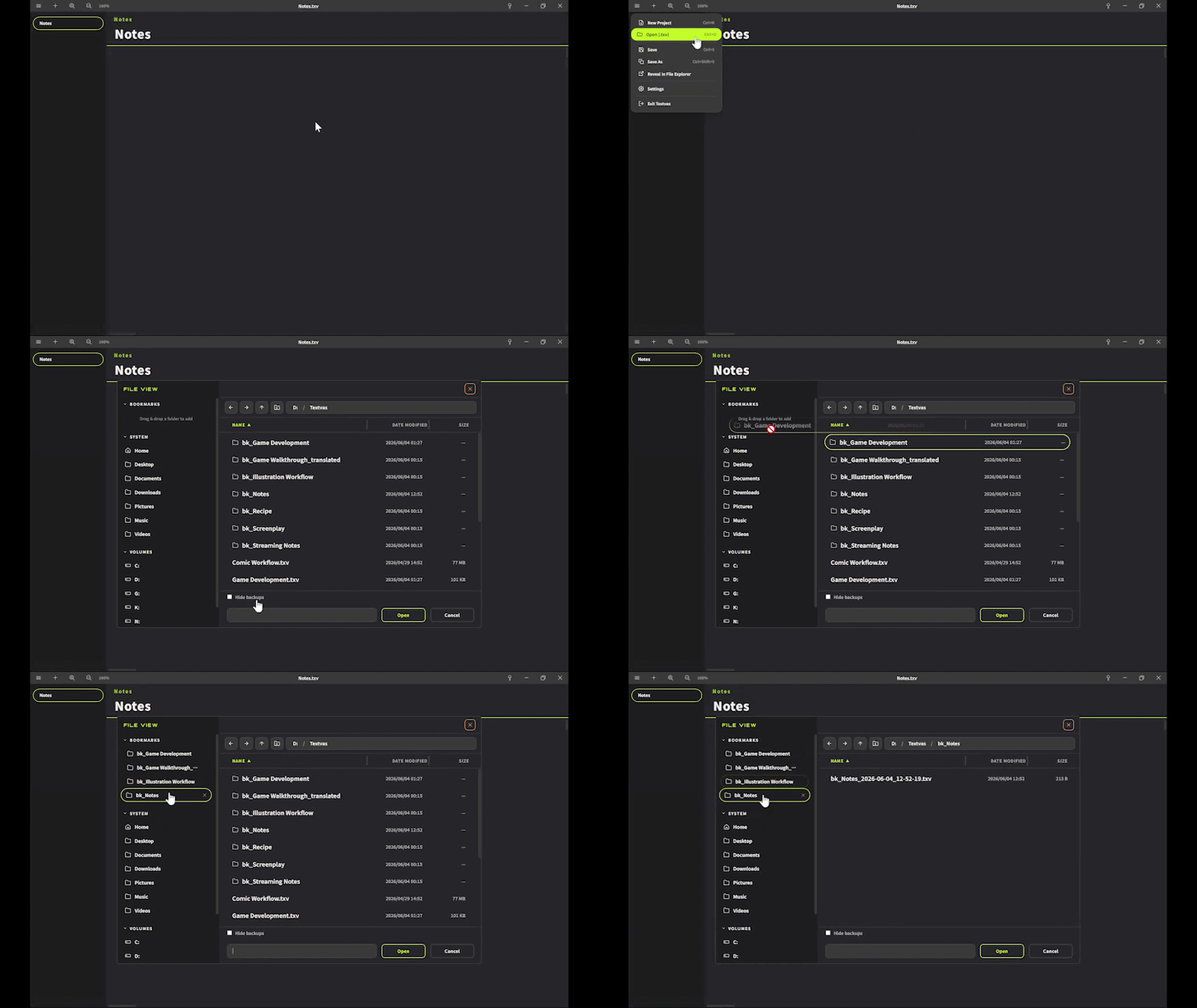
- Added a File View window.
It is a file browser that opens in its own window, so you can open files without having to launch them directly from an external device or via the file extension. - Implemented real file system integration in File View (Bookmarks / System / Volumes) and added support for adding and removing bookmarks.
- Bookmarks can now be added by drag-and-drop, and they can also be intuitively reordered by dragging.
- Added a Hide backups checkbox.
You can temporarily hide bk_ entries saved with a timestamp, so that even when there are many backups it is easier to find the file you are working on. - The File View can now be opened with the Ctrl+O shortcut.
- The gear icon for the menu has been changed to a three-line (hamburger) icon, and the menu can now be invoked by clicking it.
From the menu you can use New Project, Open (.txv), Save, Save As, Open File Location, and Preferences. - Added a Guide feature.
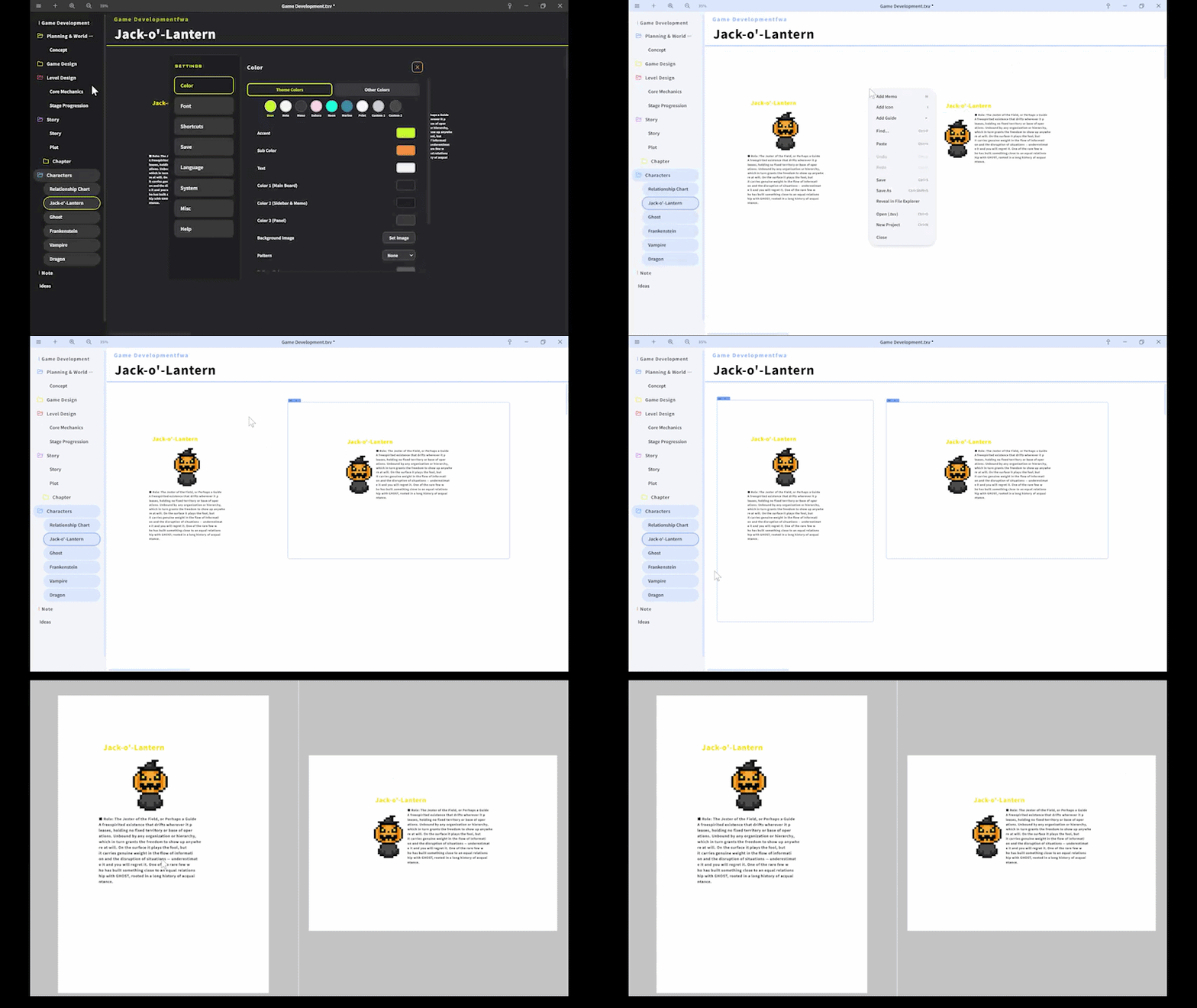
By selecting Add Guide from the right-click menu on the board, you can place an A4-size guide frame (portrait/landscape), which can be used for laying out presentation materials and printed documents.
You can duplicate it with the + button and delete it with the × button. - Added an Export with Guide feature.
From Export with Guide in the tab menu, you can export the contents inside the guide frame as an A4-size image (300 dpi, print quality).
If you have placed multiple guides on a single tab, they will all be saved together after you choose the save destination folder just once.
Please note that the project name and title name are not included in images exported with Guide, so if you need them, please write them inside the guide yourself. - Added Print to the theme colors.
This is a theme with a white background and black text. By using this theme when exporting with Guide, you can keep your printing costs down. - The names in the sidebar right-click menu have been changed to Add Board / Duplicate Board / Duplicate Folder / Delete Folder / Delete Board.
- The design of the × button on the Preferences window has been refreshed.
Bug Fixes
- Fixed an issue where line breaks were lost when writing text containing line breaks on the board and copying it with Ctrl+C to paste it into an external application.
- Fixed an issue where, when multiple cards were selected and aligned with Ctrl+Arrow keys, the top/bottom (left/right) order of cards overlapping in the same column or row would be swapped on its own.
- Fixed an issue where the zoom / UI size was not reflected when adding a memo, causing its display position to be off.
- Fixed an issue where memos would be hidden behind a card when the card was brought to the front.
- Fixed an issue where folders could not be created inside another folder.
- Fixed an issue where shortcut keys did not work on non-Latin keyboard layouts (Russian, Greek, Hangul, etc.).
We will continue working to improve Textvas.
More from Textvas
Other announcements
v1.0.5.4 UpdateThank you as always for using Textvas. New Features ・Auto-Align: added alignment edge options When arranging images of different heights, you can now choose whether to align them by the top, center, or bottom edge. For example, you can line up the bottom edges perfectly. Switch this from the Auto-Align menu on right-click. Your chosen setting is kept for next time. The default is top edge, so e…v1.0.5.0 UpdateThank you very much for always using Textvas. New Features ・Text Wrapping You can now drag the handles on the left and right of a text box to freely set the wrap width. No actual line breaks are inserted, so copying the text won't add unwanted line breaks. The handles are hidden while you're typing. To undo this, right-click and choose to remove the wrapping. The existing option to wrap to the…v1.0.4.3 UpdateThank you for always using Textvas. New Features ・Node Editor Memos In all three node editors (Dialog, Node Graph, and Flowchart), you can now add memos by right-clicking the background or pressing the M key. Moving, resizing, collapsing, renaming, multi-selecting, copy and paste, and Ctrl+F search all work exactly like memos on the Board. Memos you create are saved with the file. Note that con…