Charting, Drawing Tools and Global Markets Update
MarginCall · published · build 24640612
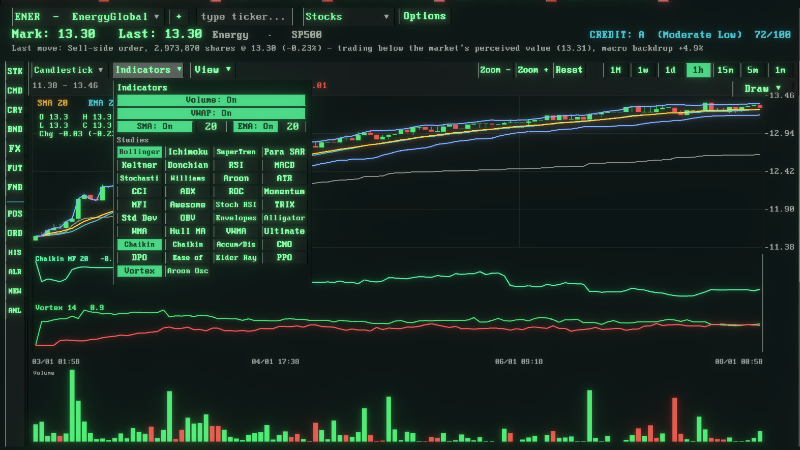
This update rebuilds the trading chart into a full charting workstation, gives the Global Markets screen proper buy and sell tickets with live costs and profit and loss, turns subsidiaries into companies you can actually run, and clears out a batch of data, sizing and performance problems, including lag at the fastest speed.
Existing saves are compatible.
Added
A full technical study suite on the trading chart, around forty indicators gathered into a single Indicators menu, covering moving averages, Bollinger Bands, MACD, RSI, Stochastics, ATR, ADX, CCI, Ichimoku, SuperTrend, Keltner and Donchian channels, VWAP, Parabolic SAR, Vortex, Aroon and many more.
Studies that belong below the price now get their own oscillator pane, so they no longer draw over the candles.
New chart types chosen from a Mode dropdown: Candlestick, Heikin Ashi, Line, HLOC and Mountain, plus Hollow Candle, Step Line and Baseline styles.
A full drawing toolbar with the professional tool set: Trend, Ray, Horizontal and Vertical lines, Arrow, Rectangle, Triangle, Oval, Channel, Pitchfork, Fibonacci retracement and extension, Gann line and fan, Head and Shoulders, Elliott wave in both the 12345 and ABC forms, Measure, Point to Point and Text. It also includes snap to the bar prices, a pinnable toolbar, delete all drawings, and right click to undo.
A horizontal crosshair line with a price tag that tracks your cursor across the chart.
The ability to drag the borders of chart tools to resize them.
A left side asset rail on the trading page, with icon buttons that open Positions, Orders, History, Alerts, News and Analytics as a side overlay.
Subsidiaries that work as fully capable companies. They start private and dormant, and you choose exactly what each one does, trading, production or holding, when you create it and at any time after, with an operating desk for debt and research.
Separate buy and sell tickets on the Global Markets screen. Every asset class now has its own buy card and sell card, each with an independent quantity box and a Max button.
Live cost and profit and loss on the Markets tickets. You now see the estimated cost before you buy, the order value or estimated proceeds before you sell, your current position profit and loss on both cards, and a colour coded Close profit and loss beside Close Position so you know what closing would realise before you click. It updates as you type and as prices move, across every asset class.
Changed
The whole trading page now reads like a professional terminal, with an overlay legend for the moving averages and VWAP, parameter legends on the oscillators, colour coded buy and sell, and the order book, market depth and recent trades all kept in place.
Every data tab was restyled to the same clean flow, with accent section headers, divider rules and grouped rows, so the terminal reads consistently from screen to screen.
The chart Scale toggle between absolute price and percentage moved into the View menu, freeing space on the toolbar.
The chart now grows to fill the space when you hide the volume panel or collapse the bottom bar, instead of leaving a gap.
The Orders tab now lists only pending orders that have not executed yet, and History shows every closed position together with its profit and loss.
Clicking a ticker in the workspace bar now switches every page to that company, a quick way to move between the names you are watching.
The Markets screen no longer offers Short on assets that cannot be shorted, such as bonds, funds, convertibles and crypto. Those now simply say Sell, and swaps open with a pay or receive direction instead.
Dropdown menus now update the data the instant you change them, whether you click or scroll, rather than waiting for the next time step.
Fixed
Fixed some companies showing a price to book and a return on equity in the tens of thousands, caused by dividing by a book value that was almost zero. Those figures now read as not applicable rather than a meaningless number.
Fixed text and numbers appearing tiny in places. Header figures and data tables now hold a readable size.
Fixed overlapping text on the Control page.
Fixed the Control page ticker not updating straight away when you changed the selection.
Fixed changing a theme, language or text style from the main menu, when you reached it through the pause menu, dropping you into the game. It now returns you to the main menu where you were, and your progress is saved so you can carry on.
Fixed lag at the fastest speed. The interface now repaints once per drawn frame instead of once per simulation tick, so it no longer redraws the whole screen several times for a single frame, and the company to country lookup in the pricing loop is now cached, removing a large amount of wasted work and stutter at the highest speed. The simulation itself still runs at full detail.