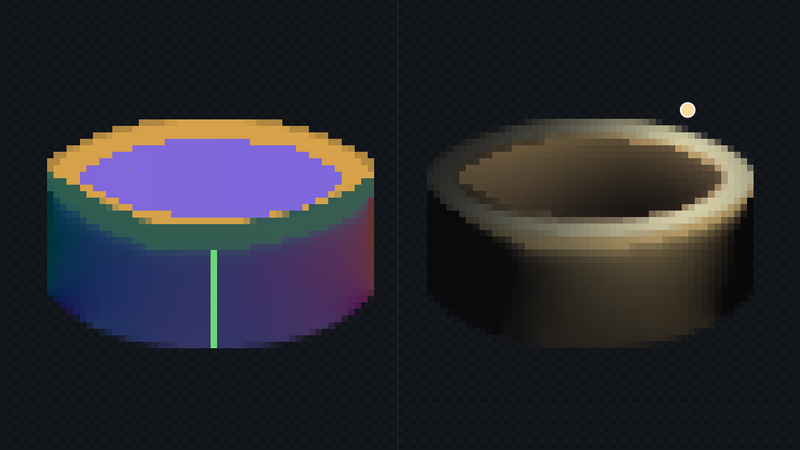
Public release is still December 3. The headline in this build started as one tester's well that no combination of hints could light properly, so thank you to them, and to everyone sending reports.
Wells, barrels and pits
Looking into the mouth of a well, what you see is the far inside wall, facing back across the hole. Lit from the left, the left side of the hole falls into shade and the far right catches the light: the opposite of the outside wall, and most of what makes a hole read as a hole. And because that wall is vertical, it faces the same way all the way down, so the hole carries on out of sight behind the near rim.
Nothing in the editor could say that before. Concave area lit a well like a shallow bowl, its near edge turning back up toward you as if the hole had a floor just below the rim.
The new Opening hint, key W, does. Fill the mouth of a well, a barrel, a bucket, a chimney or a pit. For a whole well, paint the rim as a Flat face, put a Tube axis stroke down the outside wall, and fill the mouth as an Opening. Camera pitch, the setting Flat face already uses, sets how far the inside tips toward you. The line drawn around the mouth is no longer read as a fold, and lines drawn further inside, like the bricks of a well, still are.
A normal map says which way each pixel faces, not what stands between it and a light, so a light placed low in front of a well still reaches the inside. Turn on Ambient occlusion and Apply extra maps in Lit to see the inside darken the way a deep hole does.
totallynormalmapper.com/docs/hints
Projects open on a double-click
Double-click a .tnmap project in your file manager and it opens in the editor, with the editor's icon on the file. If the editor is already open, the project opens there, asking first if there is something unsaved, and the window comes to the front. The editor sets this up for your account the first time Steam starts it; there is nothing to install. On Linux it adds a file type and a hidden desktop entry under ~/.local/share.
The title bar now names the project you are working in, with an asterisk when there is something unsaved.
Split's smaller pane scales to fit
Drag the line between Split's panes and the narrower one now shows the same view, scaled down, rather than cutting the picture off. Zoom and scroll stay linked, and Fit fits the wider pane.
Extra maps take your normal map's name
Height, AO, specular and Unity mask files are now named after the normal map you save, rather than the artwork you imported: hero_normal_unity.png comes with hero_mask.png, including when you rename it in the save dialog. The name the export dialog suggests is the project's once it has been saved.
Fixes
- Height and AO stop recalculating on their own. With the Height, AO or Spec view showing, or Apply extra maps in Lit on, the editor recalculated them many times a second even when nothing had changed. The status bar's "maps…" flickered, and the graphics card never got to rest. They now recalculate once per change.
- Small fix for animation frame navigation.
For testers
If the app is already in your library, Steam will offer this build. Start it from your Steam library. A copy started some other way asks Steam to relaunch it. The About dialog should read 1.8.0.