Status
SteamPeaks
ChartsSalesUpcomingPatchesNewsCalculator
New on SteamEvery app, DLC and depot the minute Steam creates itAppsEvery app on Steam, newest change firstPackagesSubs and bundles, and what each containsDepotsDepots, manifests and install sizesTagsSteam's user tags and the games under themDevelopers & publishersCompanies and their cataloguesTechnologiesEngines, SDKs and anti-cheat found in the filesChange historyEvery PICS changelist as it lands
SignalsNineteen readings of the whole catalogueCompareAny games side by sideRecordsAll-time peaks and the days they were setReportsWeekly and monthly write-upsAlerts & newsroomWatch a game, get told when it movesSteam statusIs Steam up, right nowWeb API explorerTry the endpoints in the browser
NewsSteam's own announcements and the sales calendarCalculatorWhat a Steam account is worth, and its pile of shame
/
Sign in
/
SteamPeaks
The ultimate resource for Steam data.
ExploreChartsSalesSales and festsUpcomingPatchesNewsRecordsTrendingSignals
DatabaseAppsPackagesDepotsTagsDevelopersTechnologiesChange history
ToolsCalculatorCompareSearchAlertsSteam statusAPI
SiteMethodologyFAQDiscordSupportSign in via Steam
Not affiliated with Valve or Steam. Game names and artwork belong to their owners. All times UTC.
PrivacyCookiesFair useStatus
SRPG Studio EXNewsNew Feature 6: Two Shaders with Different Roles
Community

New Feature 6: Two Shaders with Different Roles

SRPG Studio EX · published 27 Jul 2026, 09:00 UTC

All newsPlayers around this dateRead on Steam

In the previous version of SRPG Studio, there were plugins—such as those that implemented weather effects—designed to enhance the appearance of maps. In SRPG Studio EX, these map-enhancement features are included by default as pixel shaders.

The shaders that can be applied to a map can be broadly categorized into two types. One is the backdrop shader, and the other is the overlay shader. The backdrop shader is rendered before the map is drawn. It serves as a replacement for space or sky backgrounds. The overlay shader is rendered after the map is drawn. This is similar to weather effects such as snow or rain.

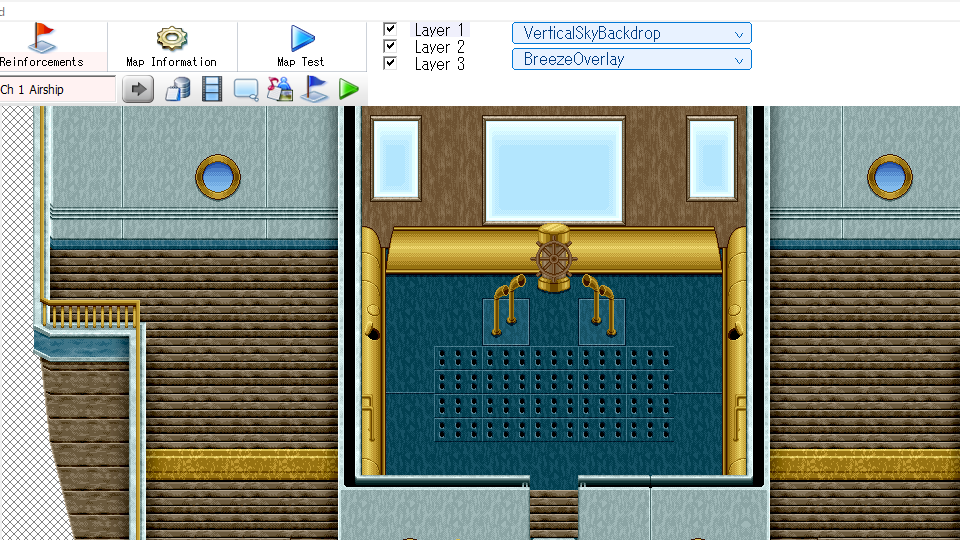
Configuring shaders is extremely simple. When you open a map in the engine, you’ll find options in the top-right corner to set the backdrop shader and overlay shader. Simply select a shader here, and it will be displayed when the game runs. Of course, you can also select custom shaders you’ve created yourself.
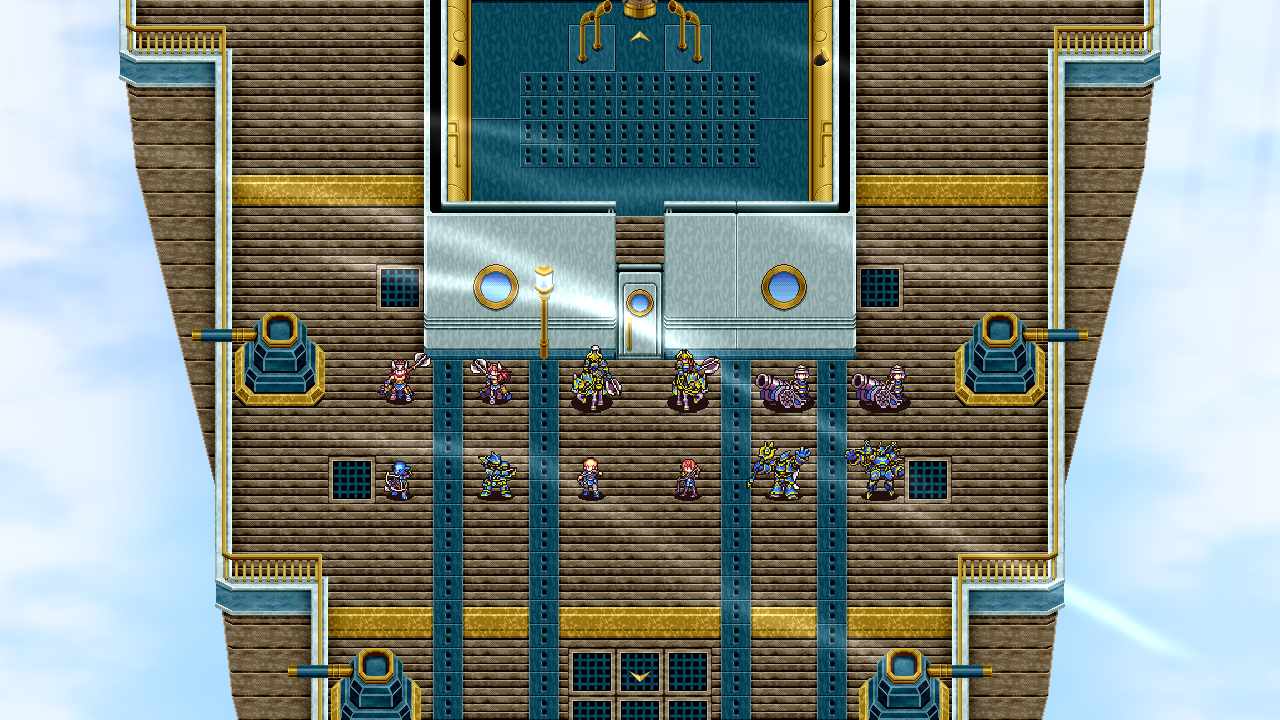
Below is a screenshot of the game with the shaders applied. The backdrop shader (sky) does not overlay the main map. Additionally, the overlay shader (breeze) is displayed on top of the main map. Incidentally, this sample airship map is vertically elongated, so depending on the screen resolution, dead space may appear. However, thanks to the backdrop shader, the black color typical of dead space is not visible.
More from SRPG Studio EX

Other announcements

All news
Community15 May 2026New Feature 5: Multi-LayerPreviously, maps only had two layers. Opaque tiles were placed on the first layer, while transparent tiles were placed on the second layer. In EX, a third layer has been added. This allows for more sophisticated map visuals. In the map editor, you can easily toggle the visibility of each layer using checkboxes. New versions of root.getCurrentSession().getTerrainFromPos and root.getCurrentSessio…Community4 Apr 2026New Feature 4: Fullscreen via the Maximize Button"How do I make the game fullscreen?" We've been asked this question countless times. And many game developers have likely received the same question from their players. When you think about it, it's obvious. Who would ever realize that you can go fullscreen by pressing the F4 key? Even if you say they can find out by opening game.ini, when playing games on Steam, it's hard to even notice that a…Community17 Mar 2026New Feature 3: Moving away from hardware and software rendering.Previously, there were two image rendering mechanisms: hardware rendering and software rendering. Hardware was fast, but you couldn't capture the screen. Software could capture the screen, but you couldn't use the mouse. SRPG Studio EX resolves both of these issues. In other words, EX is fast, allows mouse usage, and lets you save screenshots. The mouse can be used at any resolution and, of cou…