Update v3.3F: fairer hit timing, Attempts, a redesigned menu, and Sync sound
GuitarSesh · published
GuitarSesh is now on v3.3F: everything since the last public build, 3.2P, sixteen versions in all. Four things I previewed last time are here: Past Results, the Pitch tab in the Song Report, the rebuilt Guitar & Tuning screen and Session Tuning. Attempts, the other preview, is here too, and the menus and the way you move between screens are redesigned. The biggest change is fairer hit timing, so run Calibrate input once after you update. The highlights are below; the full list is in the in-game Changelog (Start Menu > Community).
Fairer hit timing
- 3.2P started timing hits from your pick. This update does it for many more notes, including low strings and slow-settling notes, so more of your Perfect, Good, Early and Late calls come from the moment you pick, not from when the game recognizes the note.
- A pick inside the hit window counts even if its note settles just after. This helps most with palm mutes, string changes and low strings at fast tempos.
- Muted, palm-muted and briefly damped picks that were too quiet to count are now heard.
- A string left ringing used to get a free hit on the next repeated note. Now each repeat needs its own pick, so your score reflects what you played.
- On ringing notes, the timing word waits a moment so it shows the right result instead of a guess.
- Changing Input Calibration (ms) in Settings, or pressing Apply on the Song Report's timing nudge, now takes effect on the very next note instead of after a restart.
About calibration: if you calibrated before, these fixes are already on. The full and quick calibration runs now end with a "Let it ring, pick it again" step that measures your own picking, so running one once fits the fixes to your guitar and interface. Calibration also counts a pluck whose pitch settles a moment late, and a pick resting on the string no longer splits one pluck into two.
A new way around the game
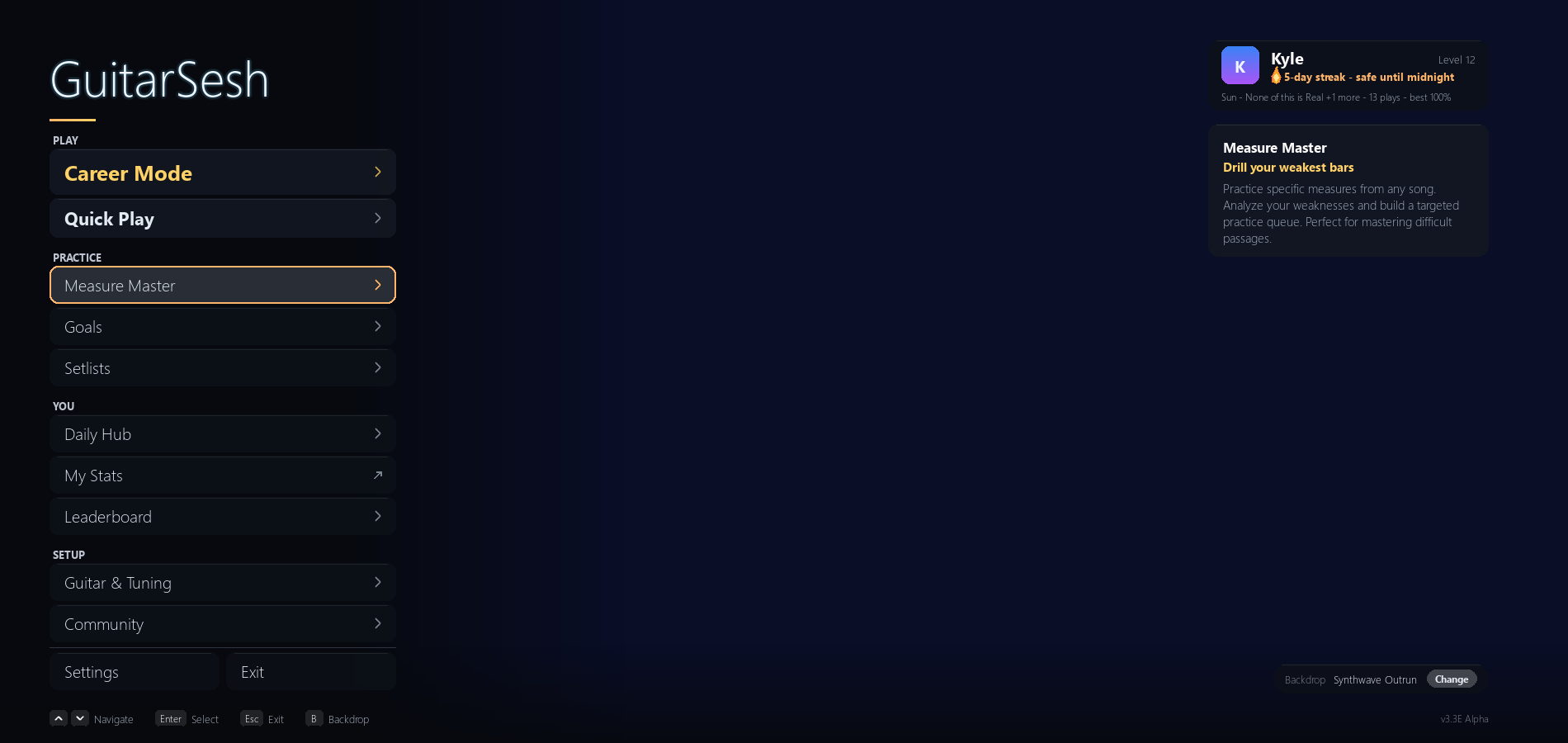
- The Start Menu is regrouped into PLAY, PRACTICE, YOU and SETUP, with a panel that describes the row you point at. The Community links (News, Changelog, Discord and the rest) live in one Community list, and the old Database door is now Update Library in Settings > Files & Data.
- Every screen keeps one name on every button that opens it: Song Report (was Stats), My Stats, Guitar & Tuning (was Guitar Input), Tuning Drift, Chord Library, Data Explorer and Handbook.
- Every screen has one Back, named for where it goes ("< Back to Library", "< Back to Venue", "< Back to Settings"), and a song's Back returns to the screen that started it: Library, Daily Hub, Leaderboard, Setlists, Goals or Venue. Results screens and drills find their way back the same way.
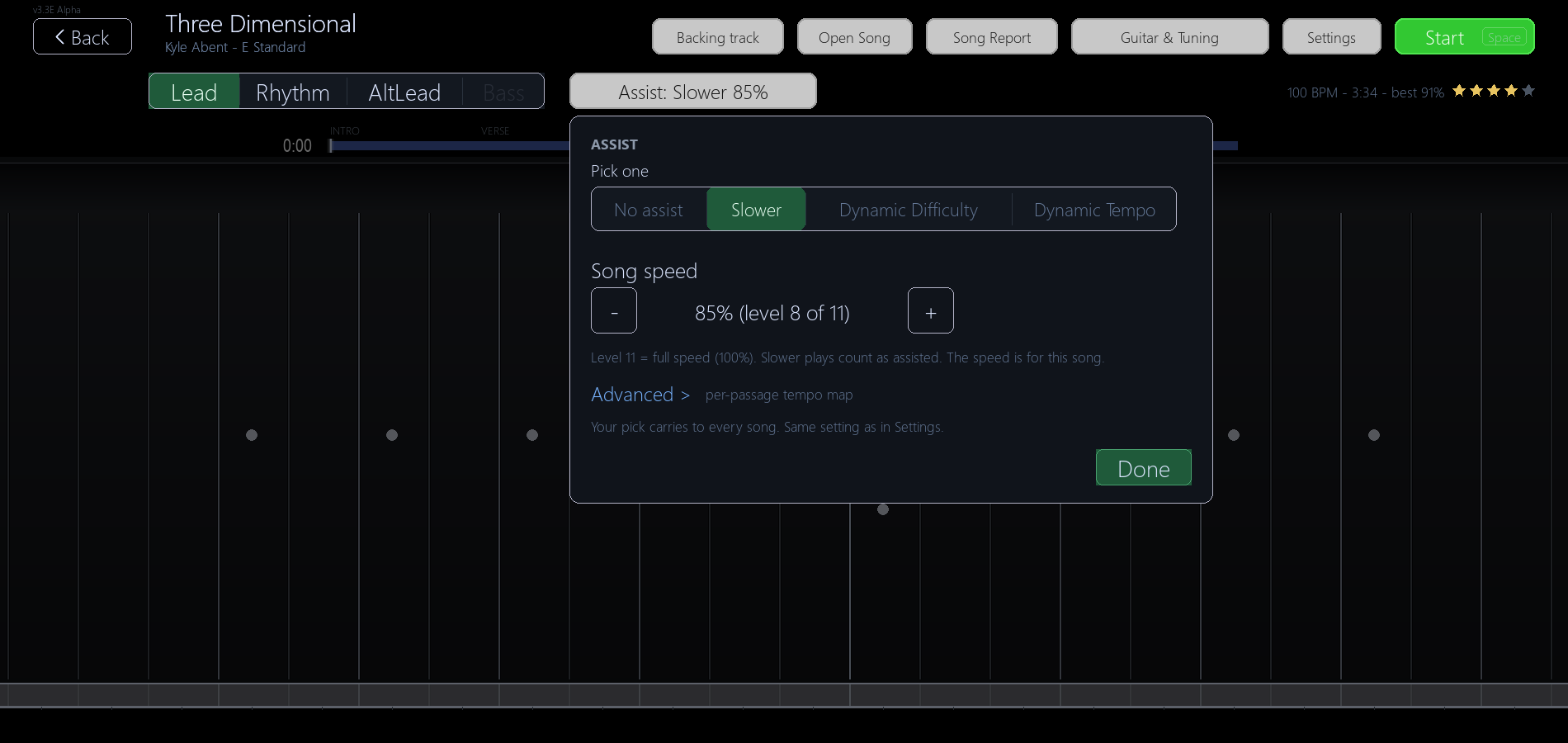
- The song screen has one Assist button for No assist, Slower, Dynamic Difficulty and Dynamic Tempo, with the speed shown as a percent ("Assist: Slower 85%"). Space stops a song; while paused, P resumes and Esc stops.
- Career Mode opens on the venue you last played and says so ("Resuming: <venue>"). Venue, city and map screens got named Backs, Song Report links for each played song and a clearer show rating.
- Results, Daily Hub, My Stats, Leaderboard and Drill Summary each have one clear primary button and links that say where they go (Past Results, Setlist Calendar, Open again, Drift history). Drill buttons show the speed they will run at.
Attempts: see where your runs stop
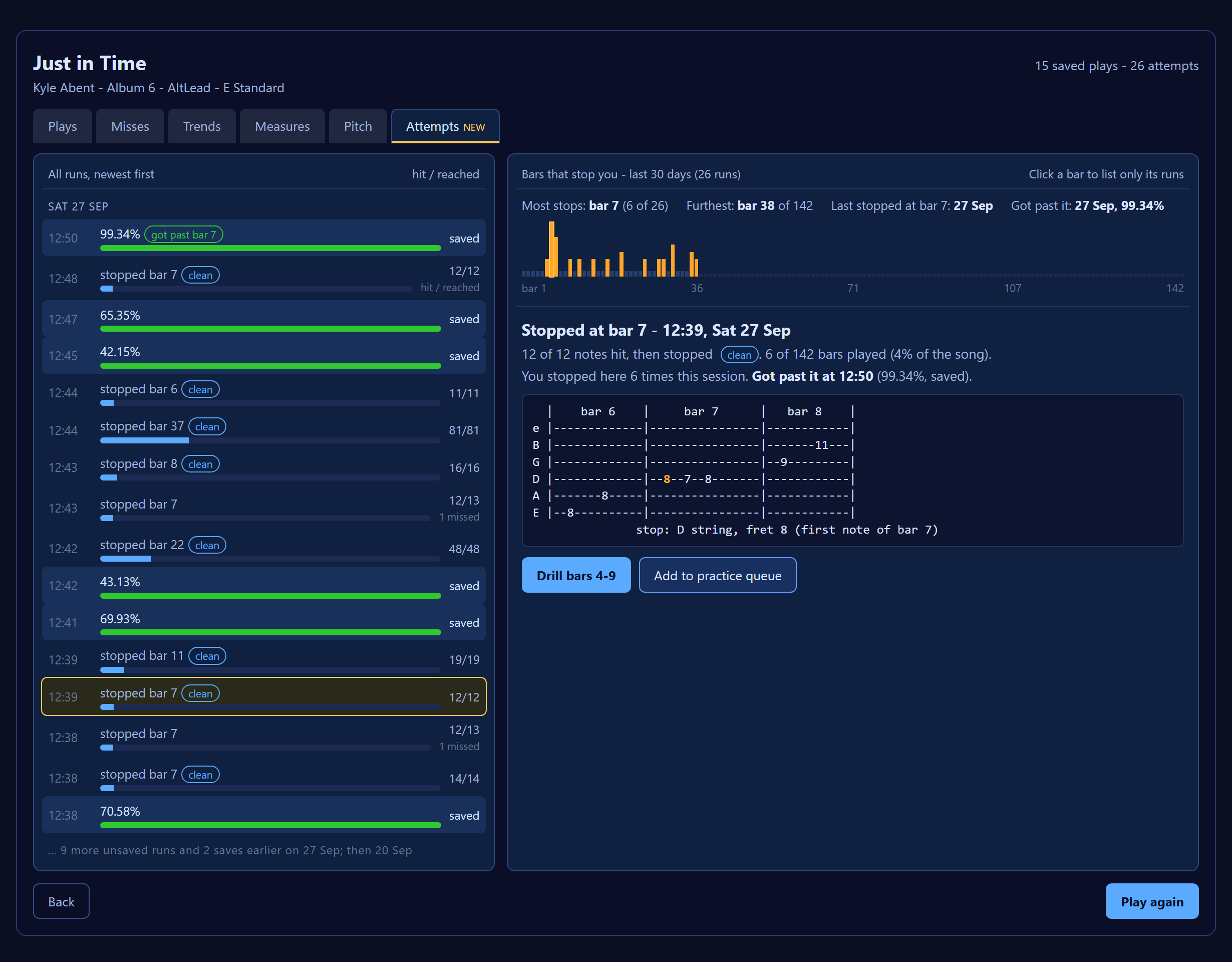
- Runs that ended below the save bar used to leave no trace. The Song Report now has an Attempts tab (the last tab, marked NEW) that lists them newest first: the bar where you stopped, how many notes you hit before it, and a label such as clean, missed earlier, finished under the bar or short run.
- "Bars that stop you" shows the last 30 days: the bar that stops you most, your furthest bar, when you last stopped there, and the saved play that got past it. Click a bar to list only its runs.
- Drill opens practice on the bars around your stop, and "Add to practice queue" saves them for later.
- Measure Master shows an amber "Stopped here 3x" badge on the section where your runs stop. It never changes your mastery.
- On the results screen after a play that did not save, the Weak Spot band now says "Where you stopped", with the bar and how many times you stopped there. PRACTICE THIS drills that spot.
- Plays that end below the save bar are now recorded for everyone, on by default. They are never added to your stats, grades or XP. To turn it off: Settings > Audio & Calibration > SAVING PLAYS > "Record plays below the save bar".
Past Results
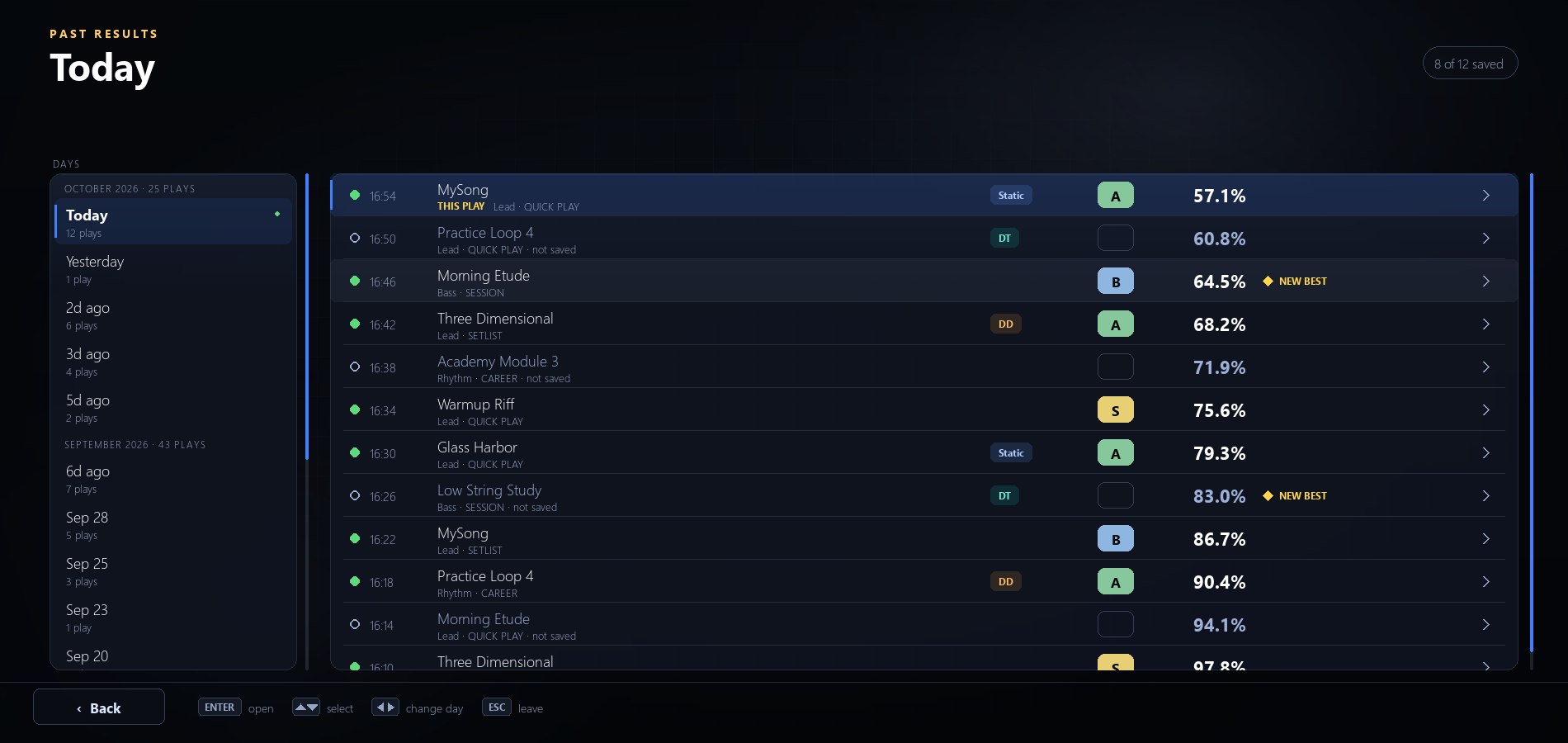
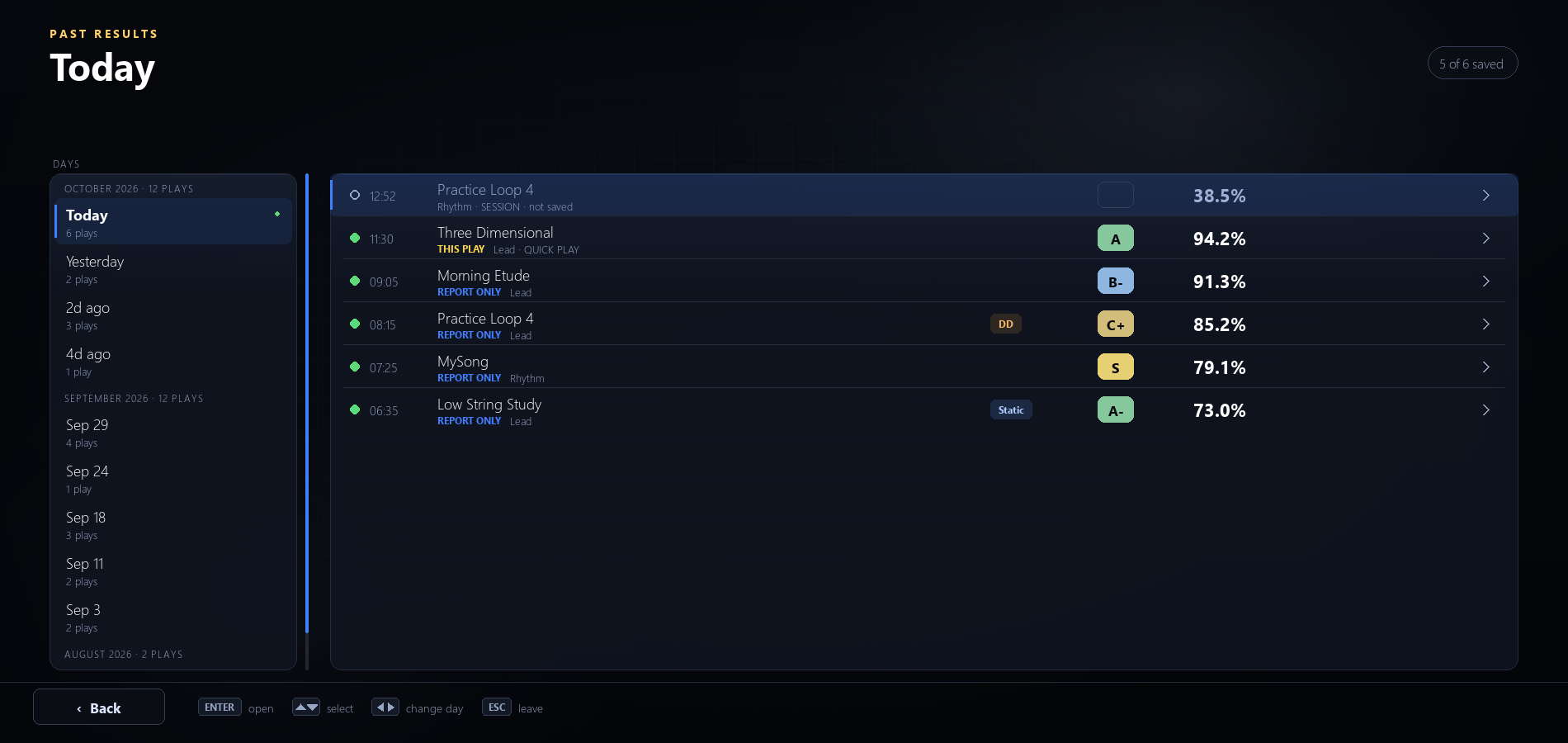
- Every results screen after a song is now kept, even when the play didn't save. Open the list from PAST RESULTS on the results screen, or from the Leaderboard without playing a song first.
- Days on the left, that day's plays on the right, newest first. Open any entry to see that results screen again. A play that was a new best at the time is marked NEW BEST AT THE TIME.
- Your older plays are listed too, marked REPORT ONLY. They open that play's Song Report, since no results screen was recorded for them.
Rewind that keeps your hits
- Rewinding while paused now keeps the notes you already played. Only the part you play again is judged again, and notes you rewind past can be hit again instead of counting as misses.
- Repeated notes no longer miss after you pause and rewind, and rewinding no longer double-counts notes toward the next Dynamic Difficulty or Dynamic Tempo level change.
One best play, everywhere
- Your best play of a song now means the same thing on every screen: the play that earned the most points. A full-speed run can beat a slowed-down one even with lower accuracy, and your personal best, stars and grade all come from that one play. Some songs may now show a different personal best.
- The results screen shows the score you beat next to NEW BEST. Each song keeps its own best, and Lead and Rhythm keep theirs separately.
- A Dynamic Tempo or Dynamic Difficulty play that stays at full speed the whole song counts as unassisted in Career Statistics, goals and your Personal Best. Run Update Library (Settings > Files & Data) once to apply this to older plays. (Career venues that slow a song work differently; see Career below.)
Tuner: a new Check view
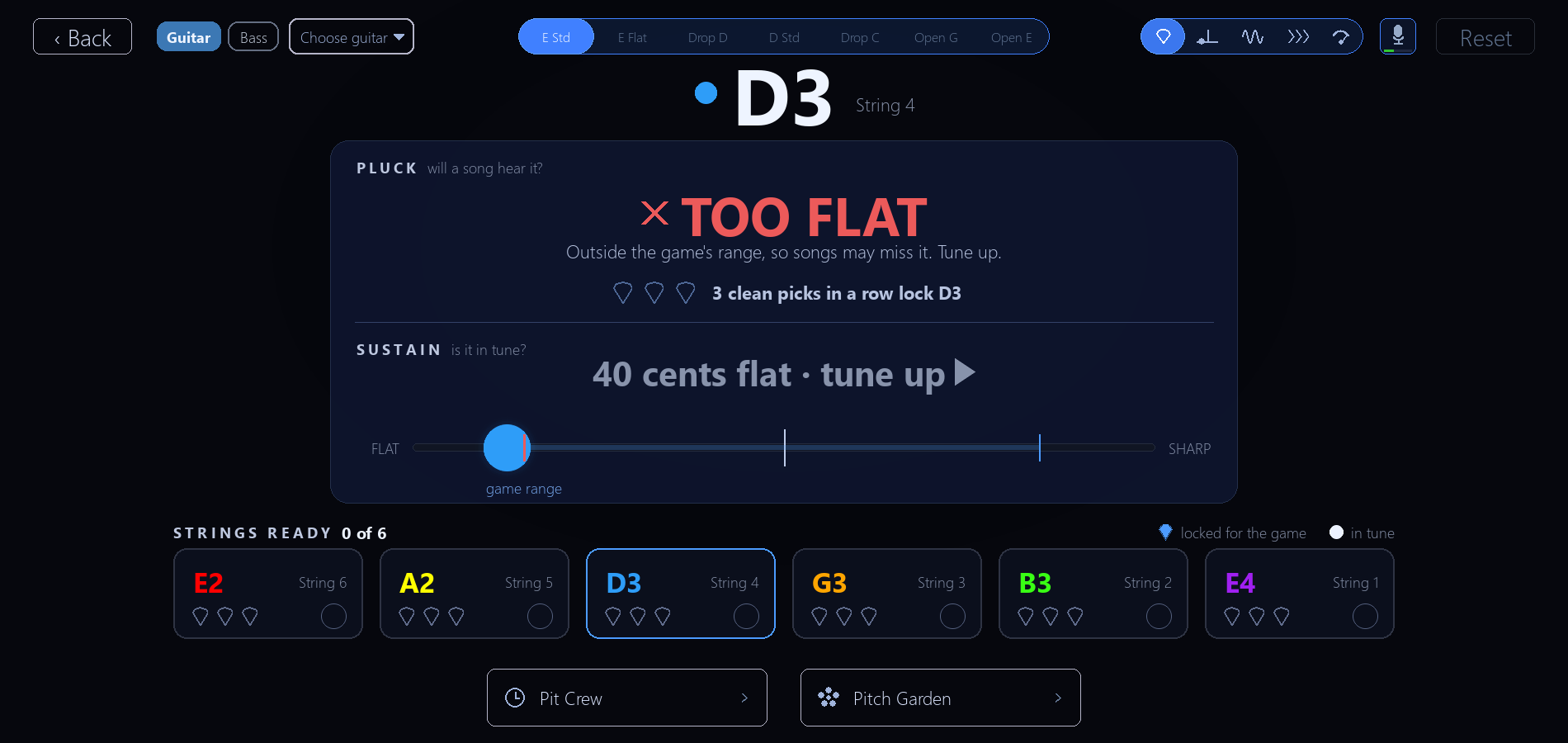
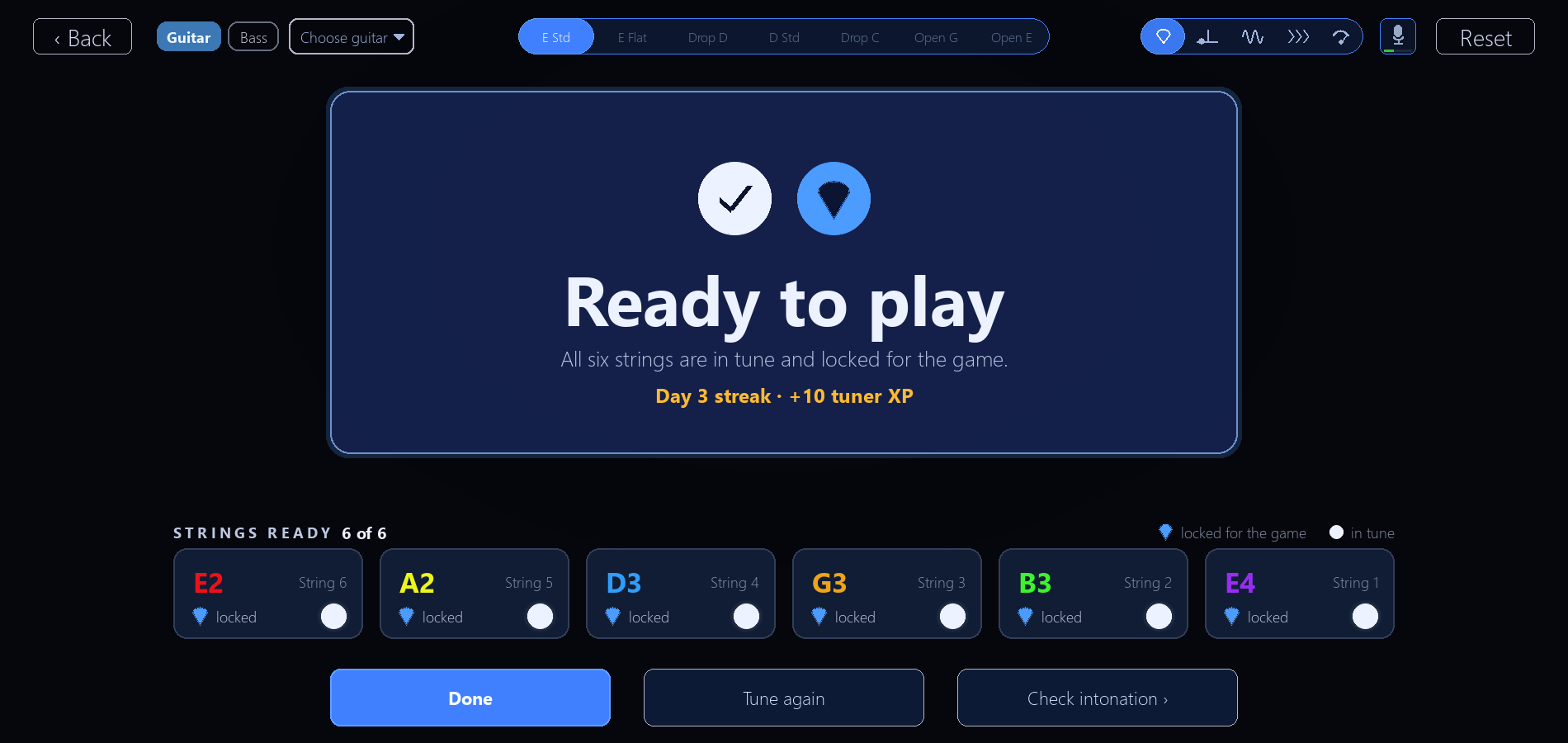
- The new Check view rates each pick the way a song does: Heard, Too quiet, Too flat, Too sharp or Wrong string. It's the default view unless you already picked Strings, Strobe or Dial.
- Three clean picks in a row lock a string. Lock every string in tune to see Ready to play.
- If the game is slow to hear a pick, Check says "Heard too slowly", so you know your pick was fine.
- The Tuner is stricter: a string shows green within 2 cents of the target, down from 5.
Guitar & Tuning, rebuilt
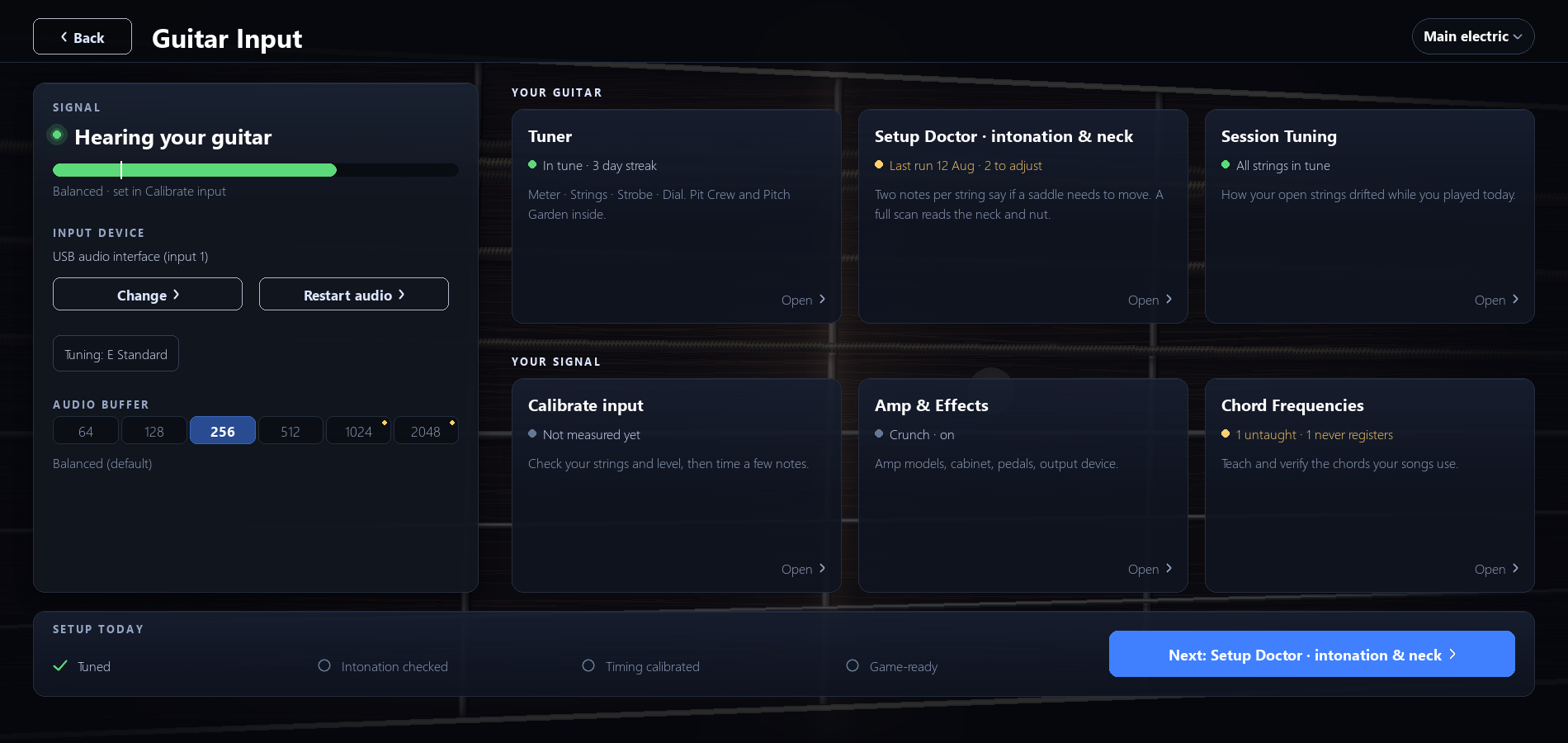
- One Signal card holds everything about your input: state, live meter, device and tuning. Below it, six buttons in two rows (Your guitar, Your signal), a My Guitars selector, and a checklist that shows your next setup step. A new Game-ready step is done once the Tuner's Check view says you are ready to play.
- The game no longer picks your input just because it is the loudest. After a few plucks, if your guitar comes through more clearly on another input of your interface, calibration and the Tuner switch to it and say why, for example "heard you on input 2". This fixes calibration not hearing the low E string on some interfaces.
- It never switches mid-song. If your guitar shows up on a different input during a song, it switches you afterwards and Results tells you, or asks first if you chose that input yourself.
- If the amp picks up the game's own sound (feedback), it mutes right away and looks for the input that really hears your guitar. If it had to mute during a song, a small "amp muted" note shows while you play.
- A new warning tells you when your input is clipping, with a tip to turn down your interface gain or your guitar's volume.
- With the amp on, the Tuner and calibration could stop hearing your guitar on some interfaces. The amp now pauses while they listen. Plugging in a USB guitar cable no longer makes the amp lose your speakers, and after you change cable or speakers the amp stops crackling without a restart.
Setup Doctor and Session Tuning
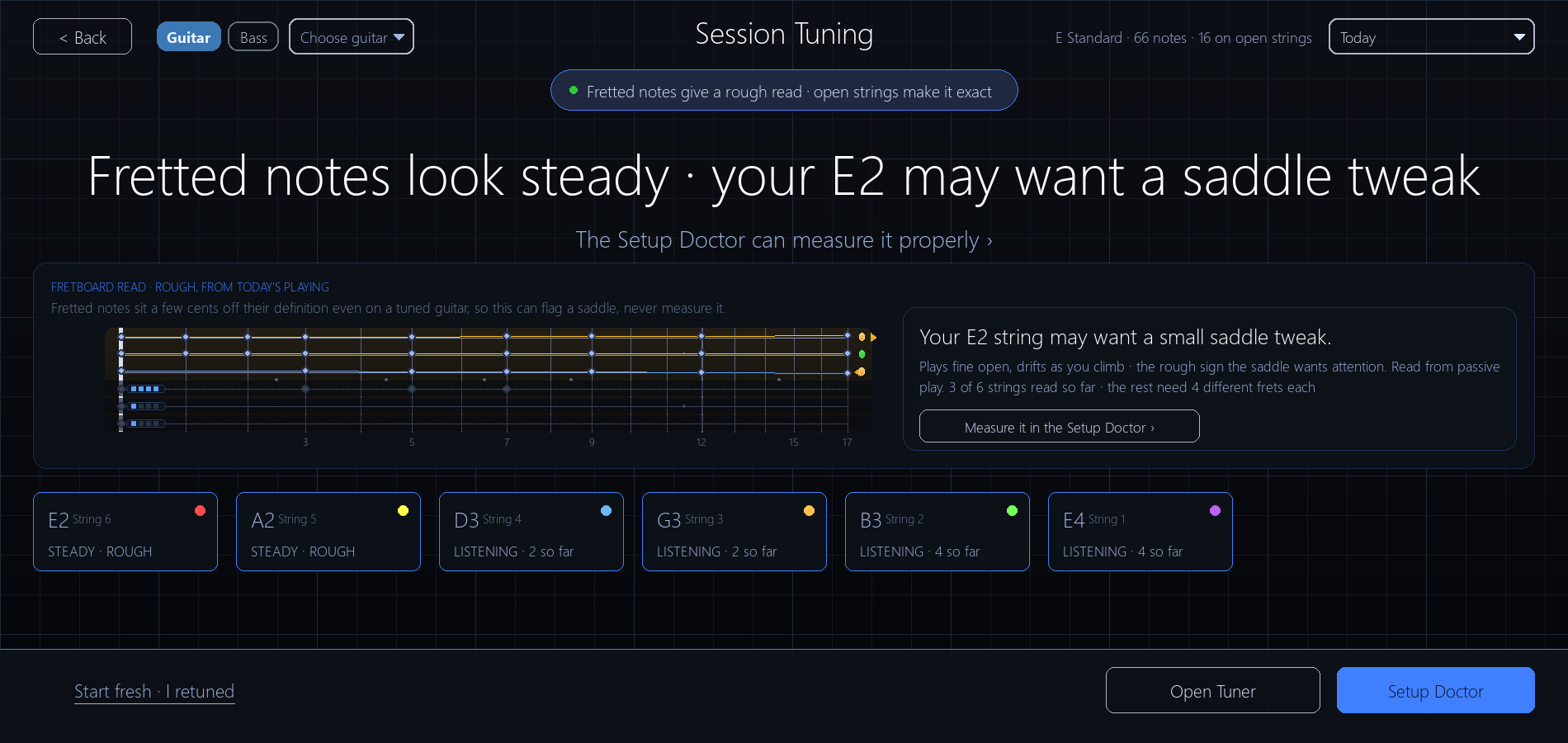
- When a string needs tuning, the Setup Doctor no longer sends you to the Tuner. Tune it in place and the scan carries on. Its button on Guitar & Tuning shows when it last ran and how many strings are left to adjust.
- It now shows which way to move the saddle even when the 12th fret is only 2 to 5 cents off.
- Session Tuning reads your intonation from the notes you play. Fretted notes give a rough read and open strings make it exact. A string that looks off is marked MAY BE SHARP or MAY BE FLAT and points you to the Setup Doctor.
- Every day you played is saved, so you can look back at any of them.
Sync sound
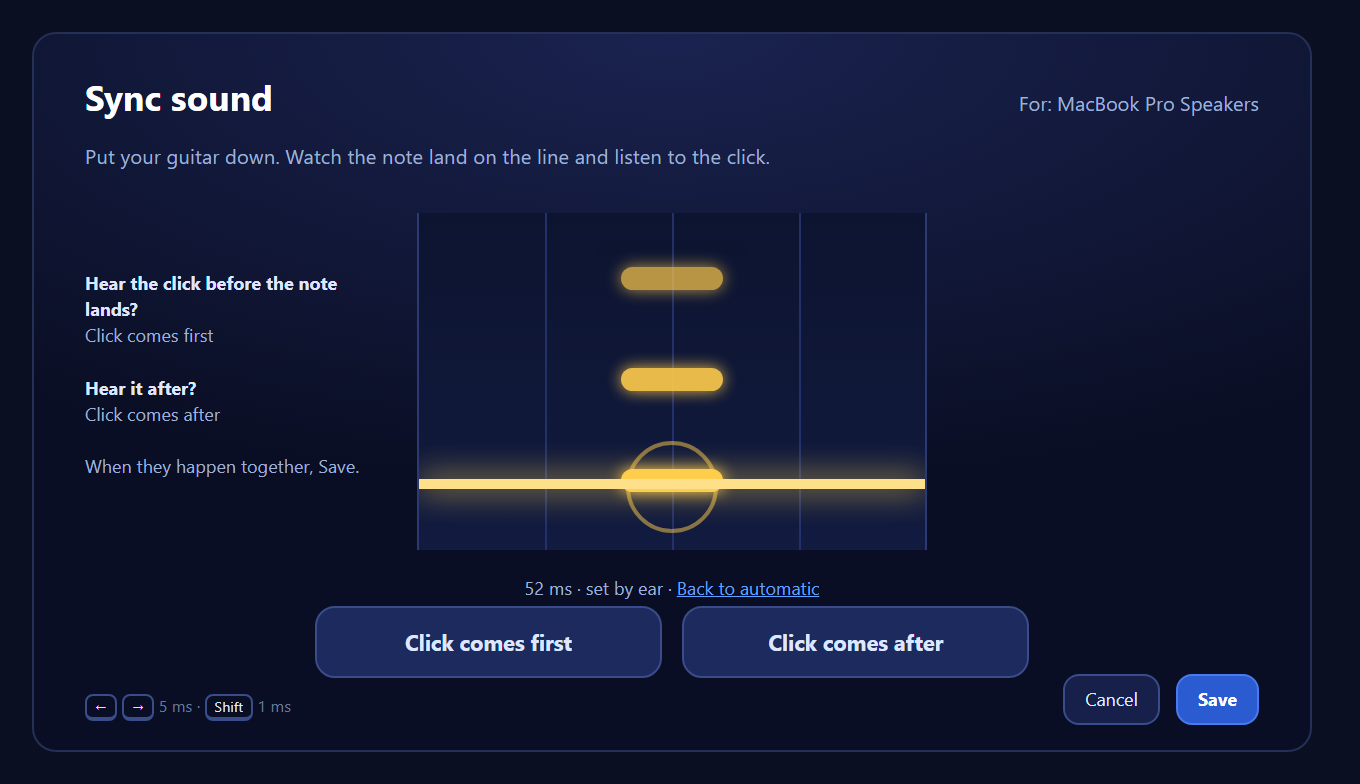
- New Sync sound screen (Settings > Audio & Calibration > Sound) lines the song's backing track up with the notes on screen, for your speakers or headphones. Put your guitar down, watch the note land on the line while a click plays, press "Click comes first" or "Click comes after" until they happen together, then Save.
- Each output device keeps its own setting, so your speakers and your headphones can differ. "Back to automatic" returns a device to the built-in value. Nothing changes until you save one, so songs sound the same as before.
- Notes and backing track out of step? After a song where you were playing but nearly every note missed, the Song Report offers a link to Sync sound (once per session for each device).
- Pausing and rewinding no longer leaves the backing track trailing the notes for the rest of the song, and the count-in clicks follow the same setting.
Song Report: a Pitch tab
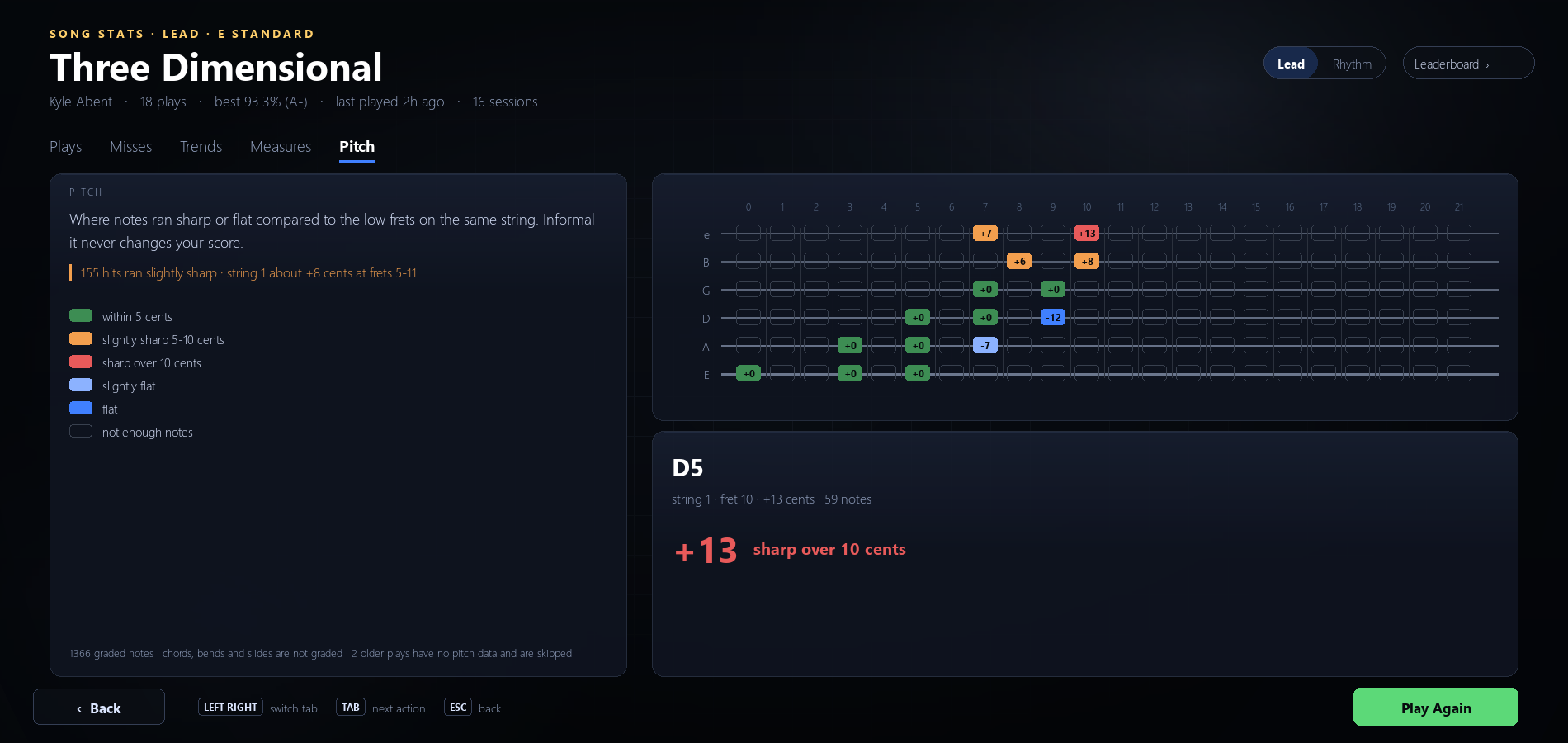
- A fifth tab, Pitch, shows where your notes ran sharp or flat, string by string and fret by fret. It is informal and never changes your score. Chords, bends and slides are not graded, and it fills in from this update on.
- After a song, if one string ran noticeably sharp or flat up the neck, the results screen adds a HEADS UP line and an OPEN SETUP DOCTOR button.
- Both fretboards in the Song Report now run to fret 21 instead of stopping at fret 12. Bass arrangements draw four strings.
Setlist calendar
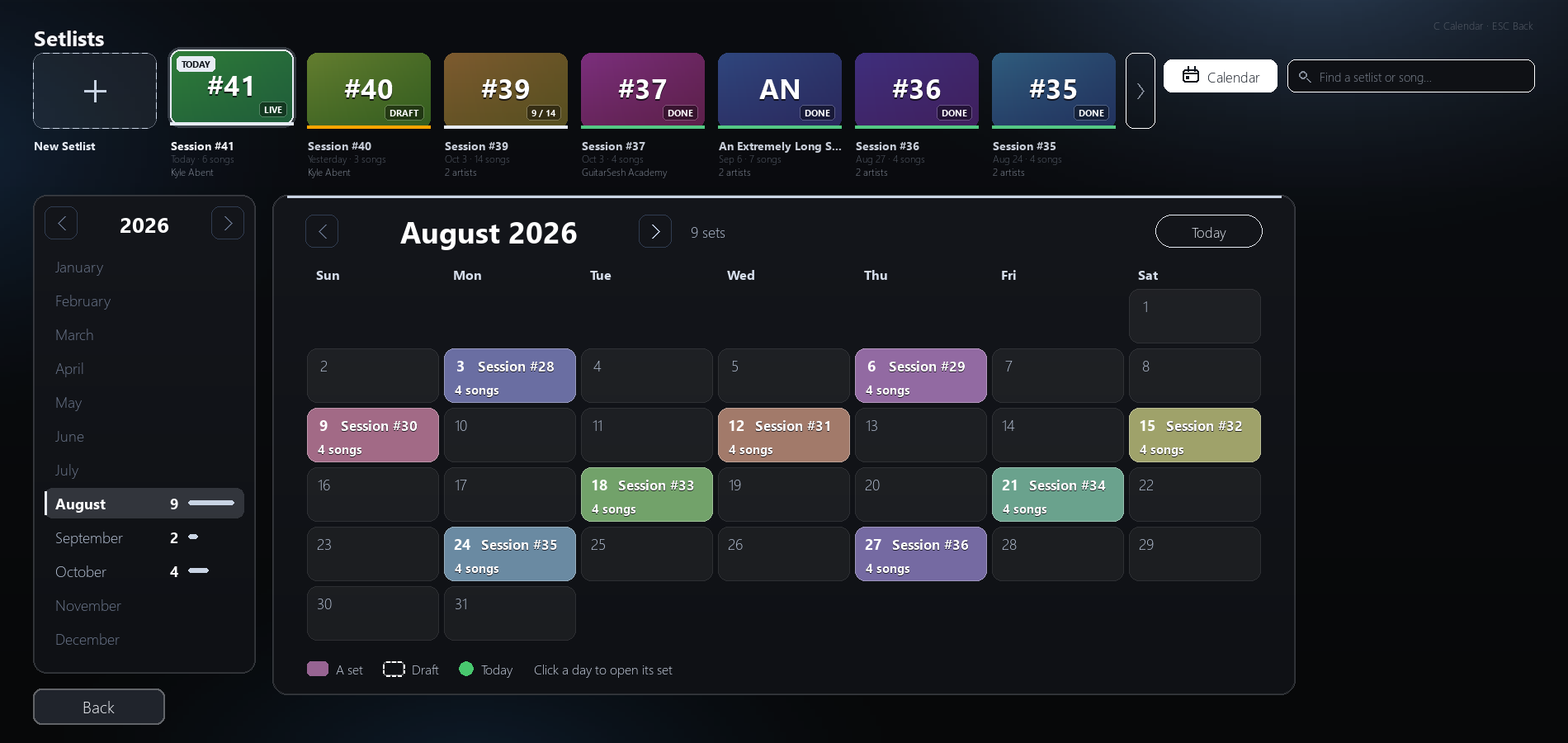
- A new Calendar button (or press C) in Setlists shows your play history as a month grid. Each day shows the setlist you played, how many songs and how many minutes. Click a day to open it.
- Setlist search finds dates too, like "sep 30" or "9/30".
Goals
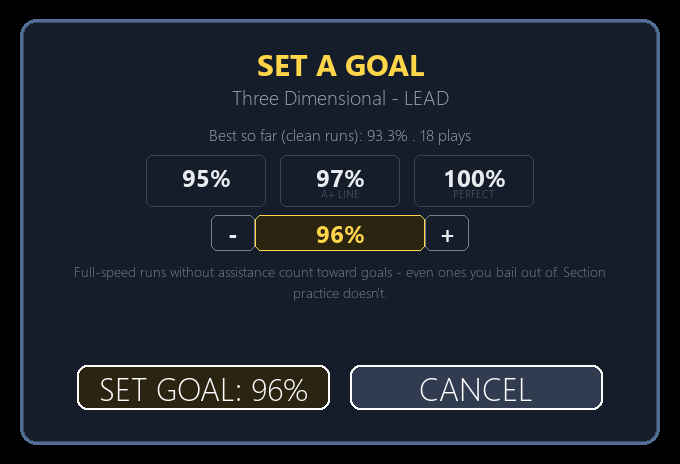
- SET A GOAL has a fine-tune control: Left and Right move the target by 1%, Up and Down by 5%, up to 100%.
- You can set a target at or below your best. It becomes a replay goal, and your next clean run at that target clears it.
- After you clear a goal, the next target offered comes from your best clean run, and a one-click raise never creates a goal you have already beaten.
Career
- Career venues are played in the venue's tuning. During a venue song, the tuning controls in the Tuner, Guitar & Tuning and Chord Frequencies are locked and tell you why.
- When a venue slows a song below full speed, a Dynamic Difficulty or Dynamic Tempo play there counts as assisted. Only a play at full venue speed earns the full-speed badge or sets an unassisted best. Plays you already saved are unchanged.
- The venue page now names the venue that actually opens next. Before, it sometimes named the wrong one.
- A venue counts as finished once five of its songs have been played, and the celebration, its progress ring and the next unlock all agree.
- Career Statistics shows your finished venues' plays, best score and stars again, and marks tries that fell under a venue's accuracy bar.
Song library and tracks
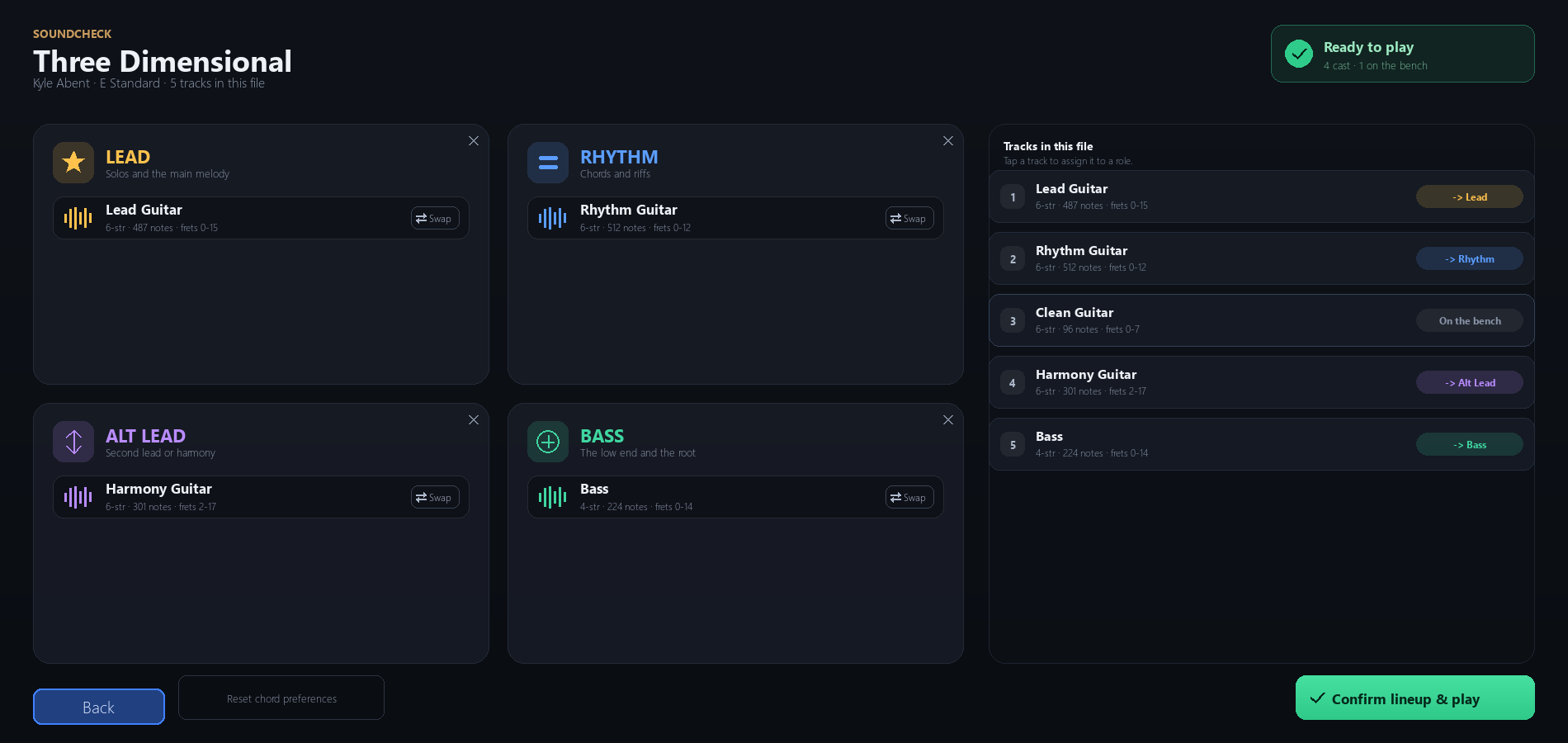
- Every song has a Set up tracks button, so you can choose which part is Lead, Rhythm, Alt Lead or Bass before you play it. A saved track assignment now wins over a track's own name.
- Song search works the same way in Quick Play, Setlists, Measure Master and the Leaderboard, and you can search with several words in any order: "dimensional kyle" finds Three Dimensional by Kyle Abent.
- Songs with Lead, Rhythm or Bass in the title no longer show up twice, songs that share a name but come from different artists are kept apart, and a song kept in two tunings saves under the one you opened.
- Songs played in a different tuning from their folder, or whose title differs from the file name, keep their own Dynamic Difficulty and Dynamic Tempo progress.
- Dynamic Tempo keeps a long chorus near its written speed, and Dynamic Difficulty reads long choruses and compound or odd meters (6/8, 12/8, 5/4 and the like) correctly. Your songs' difficulty maps are rebuilt once, so the first open of each song after this update takes a little longer.
Misc fixes and improvements
- Escape and right-click work the same on every list screen: each press closes the innermost open thing first, then leaves the screen.
- Chords the game hasn't taught you yet no longer count as misses when you stop a song before reaching them.
- Chord Library: a chord counts as heard in Strum Check when any one of its first three taught tones is in tune, so it no longer says "not registering" for strums the game scores.
- Note Check redefinitions didn't take effect before. Now they do, so re-check any notes you redefined.
- Switching profiles applies the new player's string colours, Reduce Motion and menu backdrop straight away.
- Saving Settings no longer switches Data Sharing off for you, and if your settings file can't be read when you change a preference, that one change is skipped instead of resetting your settings.
- Minus grades (A-, B-, C-, D-) and D+ show in their proper colours.
- Frame timing calibration and the stutter report judge frames against your display's actual refresh rate instead of assuming 60 Hz.
- With Streamer Mode on, exporting a setlist shows only the file name, never your folders.
- Settings no longer has the Output latency, Timing offset, Frame timer and Auto frame timing controls. Your input timing comes from Calibrate input and the Song Report's timing nudge, and your saved values are still used.
- Copy and paste work in text fields, Setlists and the amp preset name box, including Cmd+C and Cmd+V on Mac.
- Every new screen and label is translated into all 29 languages.
About stricter pitch
Last time I talked about a stricter pitch option. The way I'm doing that is by helping you play in tune, not by making songs harder to score: the Tuner now wants you within 2 cents, its Check view tells you whether a song will hear each pick, and the Pitch tab and the results screen's HEADS UP show where your notes run sharp or flat, so you can fix it with the Setup Doctor. Attempts, the other preview, is described above.
Keep an eye out for my playtest sessions on YouTube: youtube.com/@KyleAbent :)
Thanks for playing! If something breaks, the Known Issues screen, Discord and Steam forums are the fastest way to reach me.