The beta branch moves from v3.1E to v3.2J today - 31 versions between August 23rd and September 12th. The default version follows after some testing on beta; there will be a short note here when it does. To try it now: right-click GuitarSesh in your Steam library, Properties, then Game Versions & Betas, and pick beta from the dropdown - Steam swaps the build over, and picking Default Public Version again returns you to the current release. Most of it is visible the moment you launch: nearly every screen in the game was rebuilt this summer, and then every tutorial was re-aimed at the new screens. The big changes are first; the full notes are grouped by area below.
In five lines:
- The finish line is a slot the note drops into. Fully inside = Perfect, within 24 ms, on every note.
- Accuracy, streak and a Perfect / Good / Early / Late word update live while you play.
- Calibration measures every string, and a new setting accounts for the backing track's own delay.
- A backdrop gallery with 29 scenes, 14 of which move with your guitar.
- Measure Master drills a section, records every pass, and steps the tempo up as you improve.
The finish line is now a slot
The strike line used to be a hairline. It is now a slot the note drops into: a dark box with a bright edge top and bottom, three times the note's height. The note enters through the top edge, sits fully inside for exactly the Perfect window, then sinks out through the bottom. Fully inside is the moment the song expects the note. Play then for a Perfect.
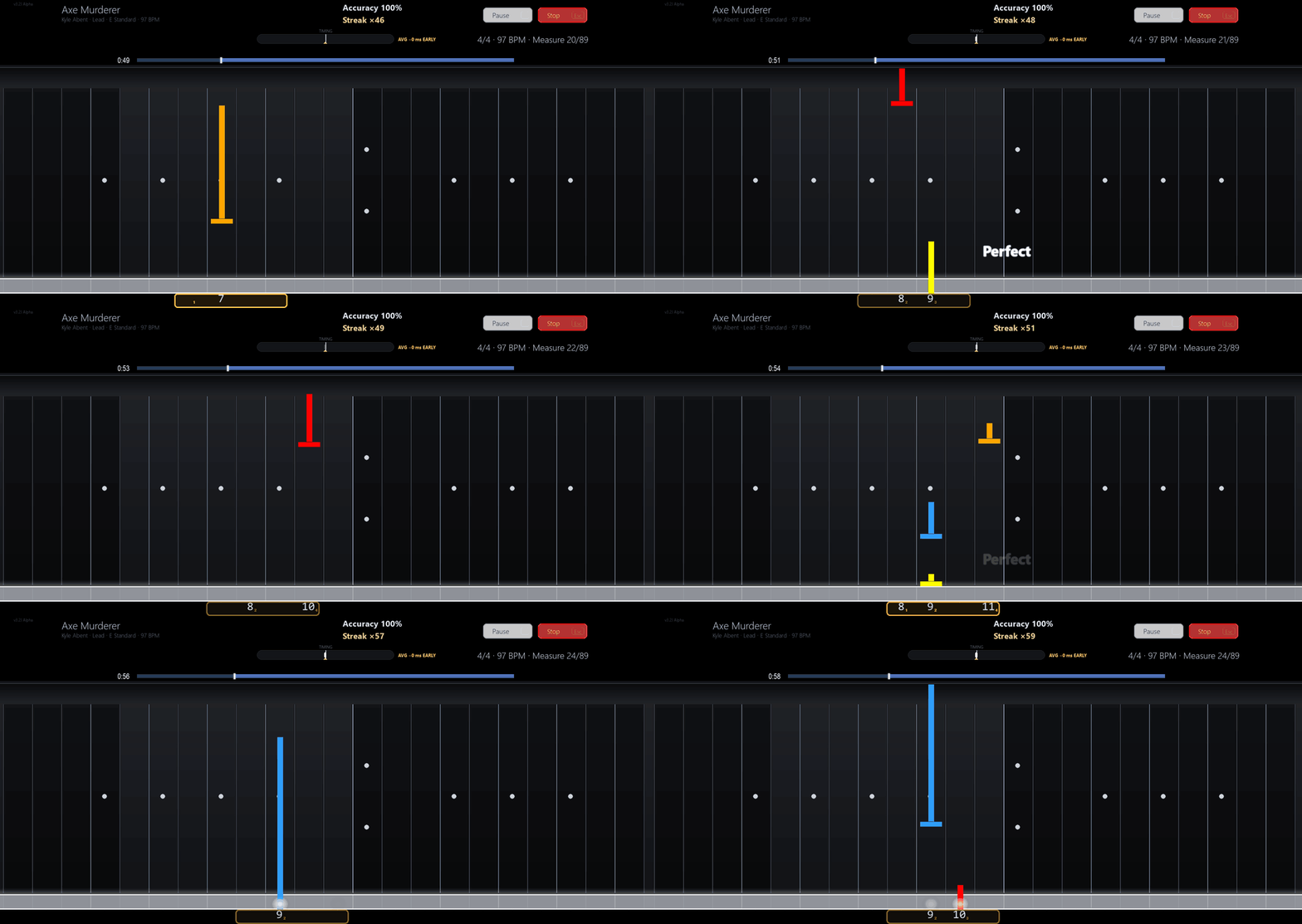
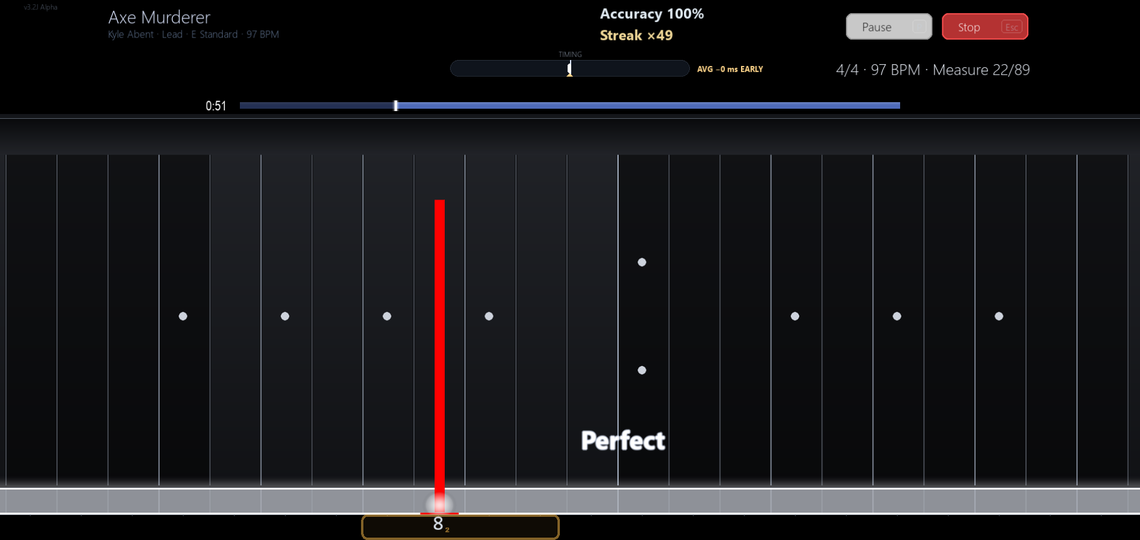
- Perfect means within 24 ms of the note's true time, on every note, on every screen. Good runs to 72 ms late; beyond that is Late. These no longer move when you adjust the Early Hit Window.
- A word appears on each hit - Perfect flashes white; Good, Early and Late show their own colour and how far off you were, for example Good +41 ms. It picks the widest clear gap between the playing lanes instead of sitting on top of the notes.
- A Timing meter under the Accuracy and Streak readout marks every hit early or late of centre and shows your running average, such as AVG +12 ms LATE.
- Accuracy and streak update live on the highway. Until this update nothing on screen could tell you how you were doing until the song ended.
- The early window was too tight: a slightly early strike counted as a complete miss at just 48 ms. New profiles get 80 ms, and if you never changed the setting yours moves to 80 as well. On fast passages it tightens automatically so a strum cannot land on the previous note.
- Input calibration now plays 16 notes across low, middle and high strings and reports the offset per string. A new Output Latency Compensation setting accounts for the backing track being heard slightly after the beat, so playing in time with what you hear is scored as on time. You will be asked once to recalibrate; you can skip it.
- Your Song Reports and past plays use the same Perfect, Good, Early and Late labels. (The first version of this mislabelled almost every missed note as Early - fixed, and past plays are repaired on first launch.)
The gameplay screen tells you how you are doing
One bar across the top: the song's title over its artist, tuning, BPM and time signature; accuracy, streak and the difficulty badge in one cluster; Pause, Stop and Volume at the right edge, Pause and Stop with their keys shown. The two rows of grey rectangles and the black text boxes are gone.
- The arrangement row is one control with four segments, always four: an arrangement the song does not have is greyed, not missing. Tempo and Levels became one Assist control that states its setting in words - Dynamic difficulty - L7, Static tempo - full speed.
- The progress bar runs the width of the neck with the song's own section names above it. Section names shrink to the word that matters: a section called SUPER FAST INTRO reads INTRO, not SUPER F and an ellipsis.
- The keys no longer die when a song starts: Space or Esc stops the song, P pauses it, Space resumes.
- Chords are drawn as one thing - a beam joins the notes and the name sits above them. A chord the game was never taught is drawn hollow and skipped rather than counted as a miss, and a line under the start prompt says how many chords need teaching. A chord you taught with the wrong shape turns amber and tells you so. Songs with untaught chords score higher on new plays; old plays keep their scores.
- Lane Highlighting under Settings, Highway: Frets Used In The Song, Frets Playing Right Now, or the new default for new profiles, Frets Still To Come - a fret the song only touches early goes dark once its last note has passed, so the neck follows the clock.
- Miss Flicker is now Miss cues (still off by default): a dropped note gets an X, its lane tints red, and a broken streak of eight or more says so. It works in every Assist mode now, including no assistance.
- The fretboard has visible inlays now.
- New: the Anchor Highlight Box, an amber frame around the four frets your hand is in, with small finger digits beside the fret numbers, so you read a shape instead of six numbers. On for new profiles; an existing profile switches it on under Settings, Highway, Fret Text. Its digits and dashed reach lanes appear only for notes about to arrive.
- The classic note style is retired; the premium highway is the only look.
- Beat and half-beat lines can scroll with the notes if you want a pulse through rests (Settings, Highway, Beat-level subdivisions). Off by default. Optional pick-tick sound, also off by default.
A start menu you can drive from the keyboard, and a gallery of backdrops
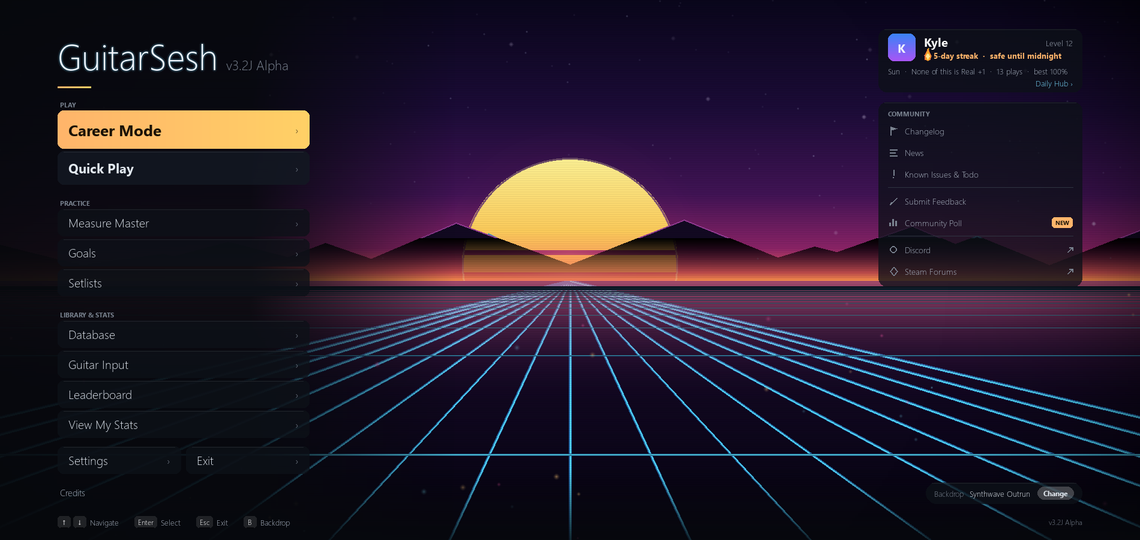
The start menu is one column of grouped rows - Play, Practice, and Library & Stats - with a panel beside it describing whichever row you are on, and the scattered utility pills gathered into one Community panel. Up and Down move, Enter opens, and a hint bar shows the keys. Escape and Exit now ask before quitting; they used to close the game on the spot.
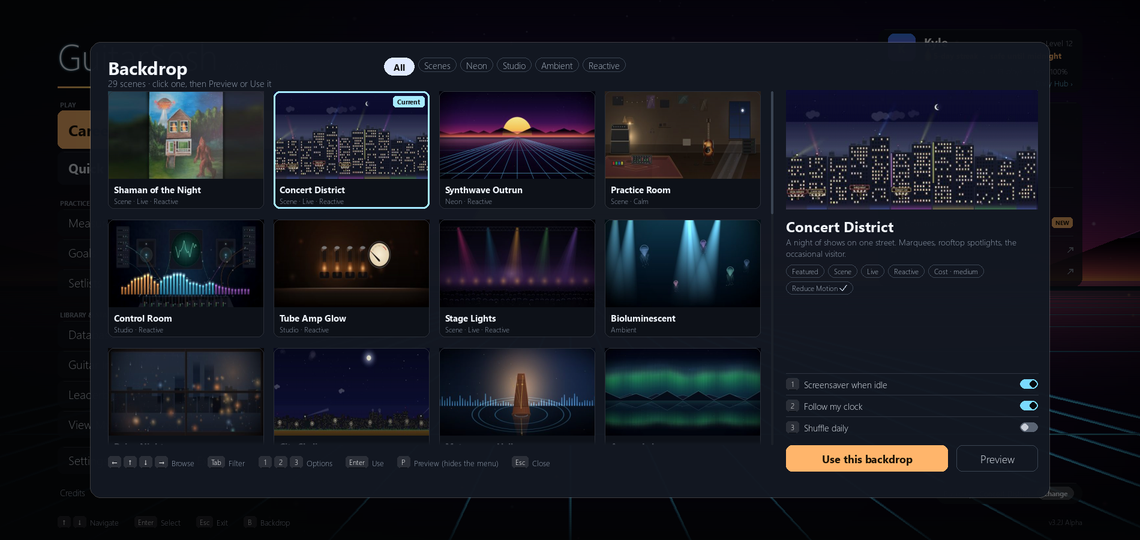
The backdrop chooser was two arrows cycling 27 names. Press B and a gallery opens over the live menu: tabs for Scenes, Neon, Studio, Ambient and Reactive, cards with real thumbnails, and P previews a scene behind the gallery before you commit to it.
- 29 backdrops, six of them new: Festival Field, Green Room, Fretboard Macro, Pedalboard, Lissajous and Sleeve Wall, which builds its record shelf out of the songs you have been playing.
- Fourteen of them react to your guitar while you sit in the menu with a cable in. The Control Room behind Guitar Input shows your real signal on its scope, meters and LEDs.
- New backdrop: Shaman of the Night, a painting of mine. The visitor breathes and blinks, the UFO drifts with its beam, the windows flicker and the stars twinkle.
- Three toggles live in the gallery: Screensaver when idle, Follow my clock (City Skyline, Golden Meadow and Concert District take their light from your local hour) and Shuffle daily.
- Concert District, the default, used to run a full day every minute and fade into a grey daytime city. It stays night now. Switching backdrops cross-fades instead of cutting, and with Reduce Motion on every backdrop becomes a still after two seconds.
- Five old backdrops were retired; if yours was one of them you will land on Concert District.
- Every backdrop has a translated name, and the version number now sits beside the GuitarSesh logo instead of on the gameplay screen.
One song library instead of a folder drill-down
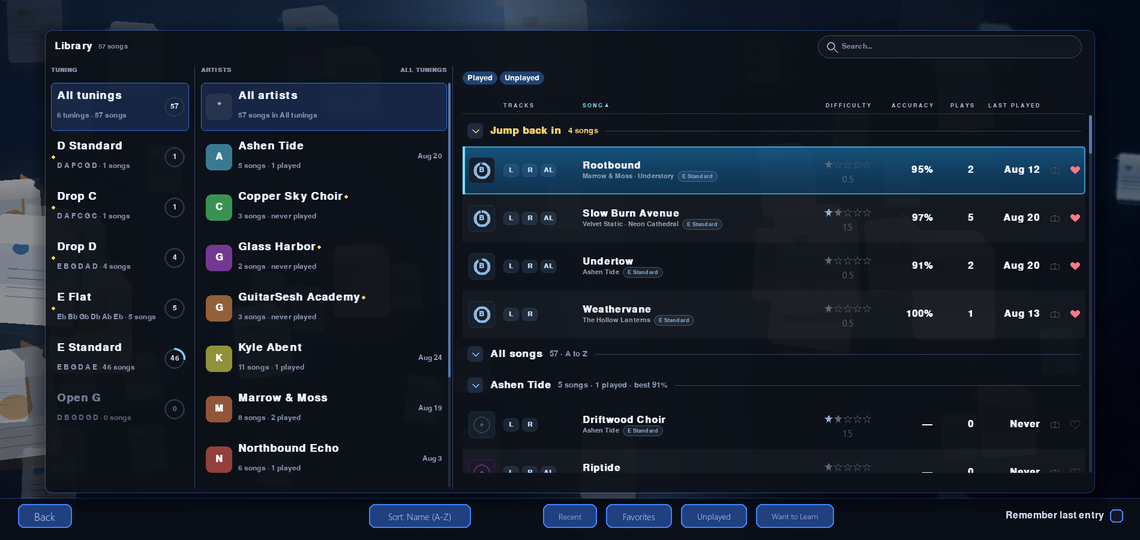
Quick Play, the Career venue picker and Measure Master's song chooser are now the same screen: a tuning rail, an artist column and one song list. Picking a tuning or an artist filters the list instead of walking you into a folder. Search covers the whole library at once and folds the rails away while you type; Jump back in is pinned at the top. It opens faster too - it used to rebuild its entire background every time, and that build is now three times faster, so the first open of a session is quicker.
Settings, rebuilt around what each row does
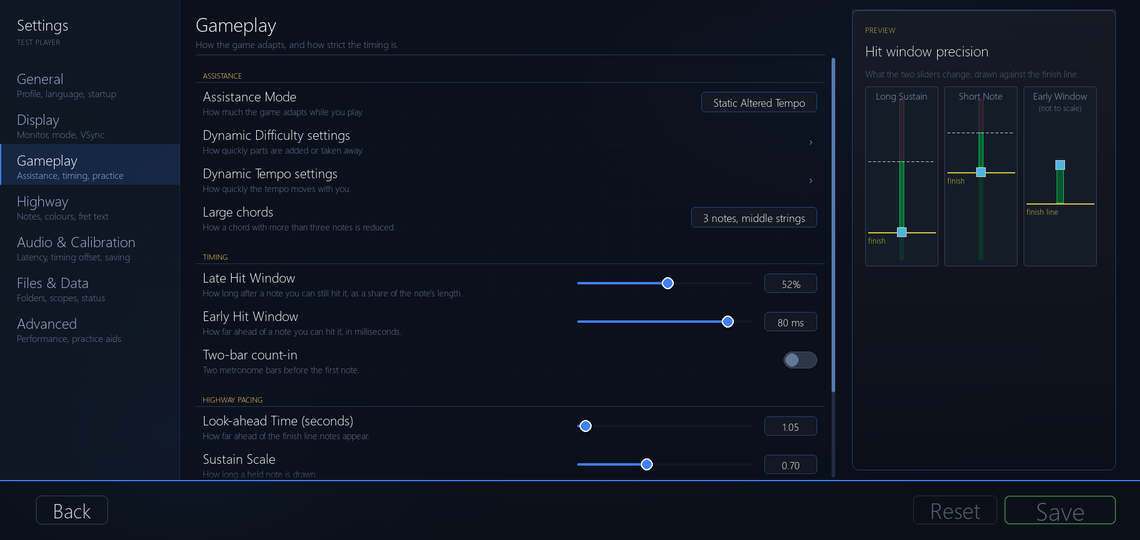
Three columns: categories down the left, one scrollable list of rows in the middle, and a panel on the right that explains whatever you are pointing at. Every row reads the same way - what it is on the left, its control on the right - and on/off rows are switches in plain language that visibly move when you flip them. The string colour editor works on one string at a time instead of a wall of eighteen sliders, a mouse wheel over a toggle no longer flips it, and Esc goes back.
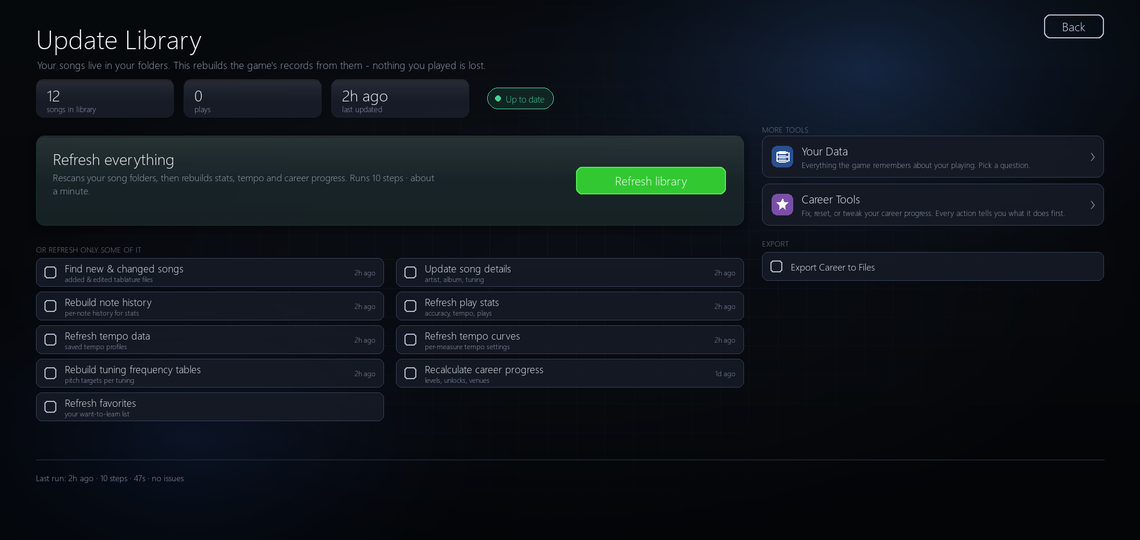
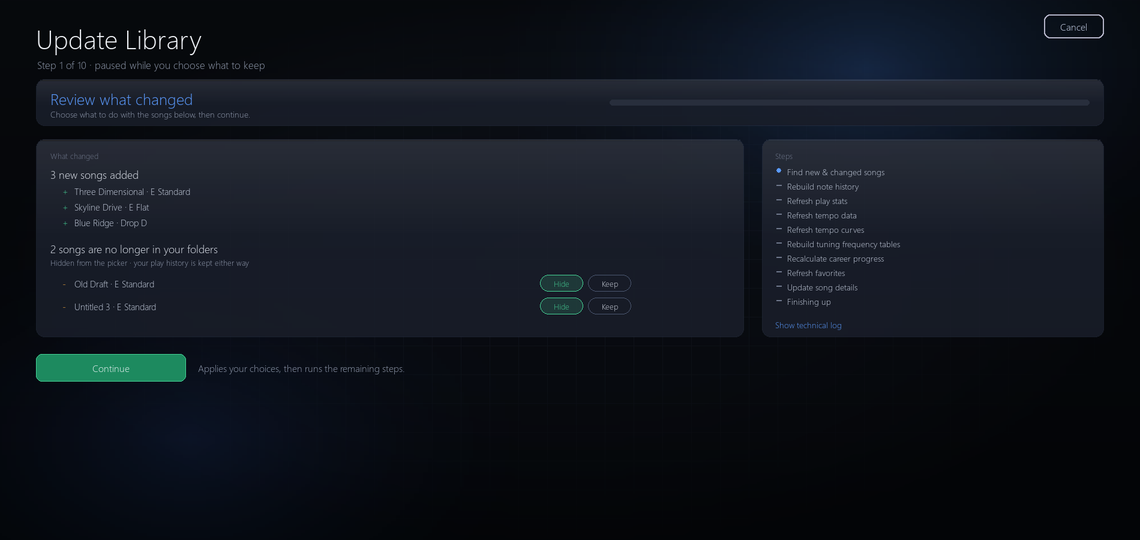
Update Library is one page now, and the game no longer freezes while it runs. The running step shows real progress, Cancel stops the run, and finding songs pauses on Review what changed - new songs listed, missing ones offered Hide or Keep - before it rebuilds stats. A failed step ends on a plain-words reason with Retry this step, which re-runs only that step instead of the whole library.
Song stats is one report
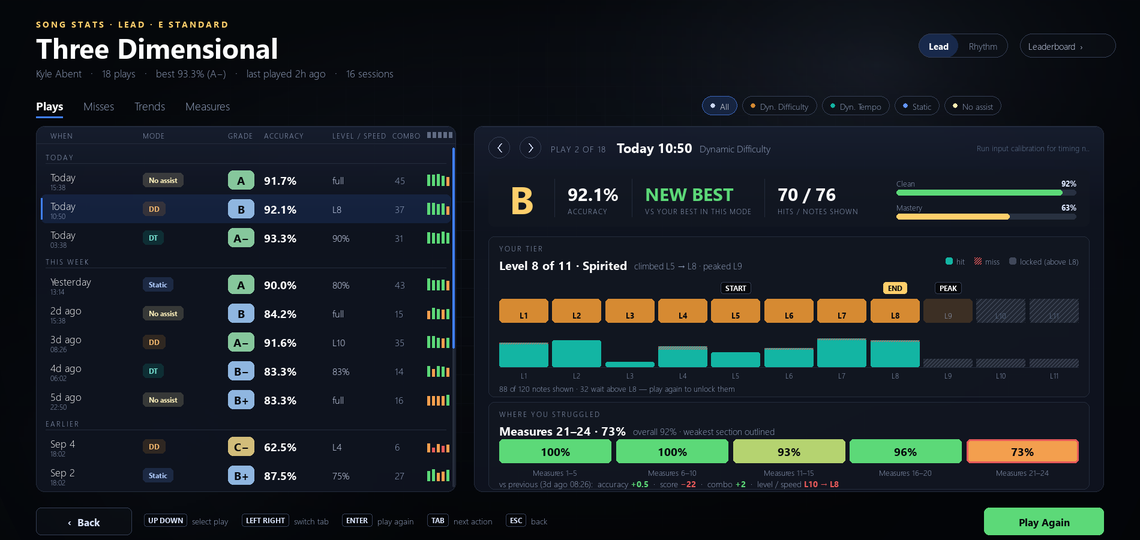
The Stats hub and its seven sub-screens are gone. Opening stats for a song lands on one report: a history column of your plays and a detail pane that draws every kind of play the same way, whether it was Dynamic Difficulty, Dynamic Tempo, static tempo or no assistance. Four tabs: Plays, Misses, Trends and Measures.
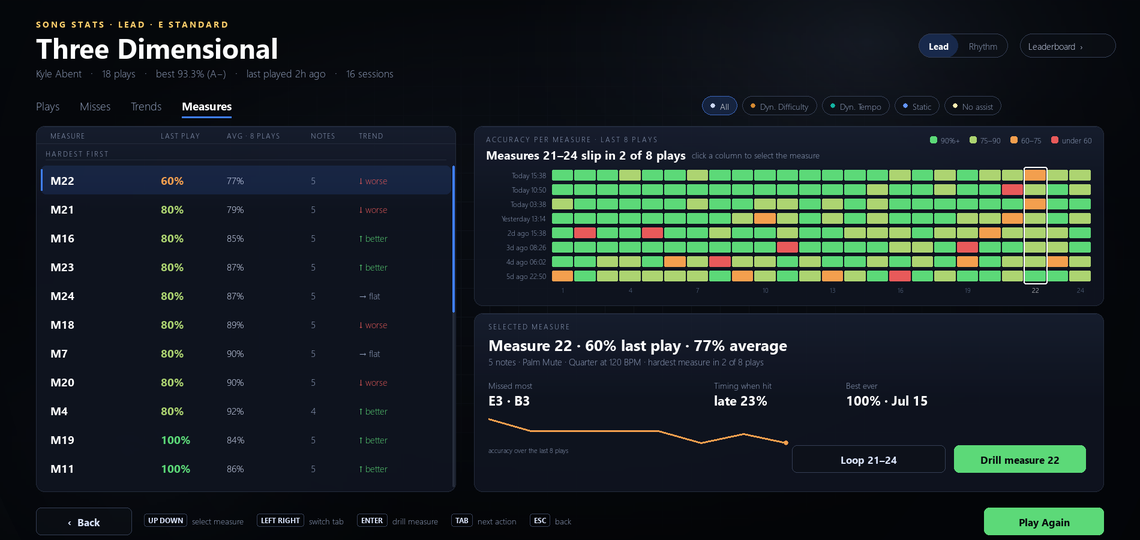
- Misses lists every missed position on a fretboard with its rate, count and trend, and offers Drill measure 12 and Add to practice queue. Measures ranks every bar hardest first with an eight-play heat grid. Trends charts accuracy, timing and hit rate by note length once you have three plays.
- Once a song has more than 30 plays the history groups them by month and gains a search box and quick filters.
- Every attempt is kept now, even one that stopped early or was too short to count. It sits beside the song's stats in your play data folder and never counts against your scores. The game does not show them anywhere yet.
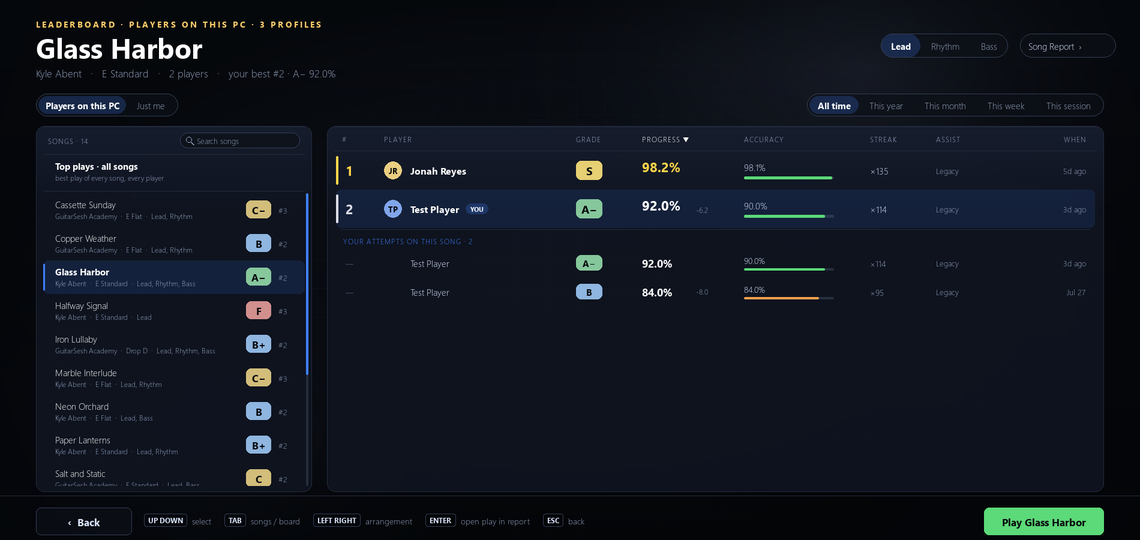
- The Leaderboard is its own screen with a board per song (Top plays across all songs is still the default view): a song rail with search on the left, and a board of one row per player on the right with your own attempts underneath. The scope is honest - players on this PC, and how many profiles. The old board called itself global over a table that has only ever held this computer, mixed every song into one ranking, and handed gold to whatever landed on the top row.
Measure Master: drill a section, keep the result
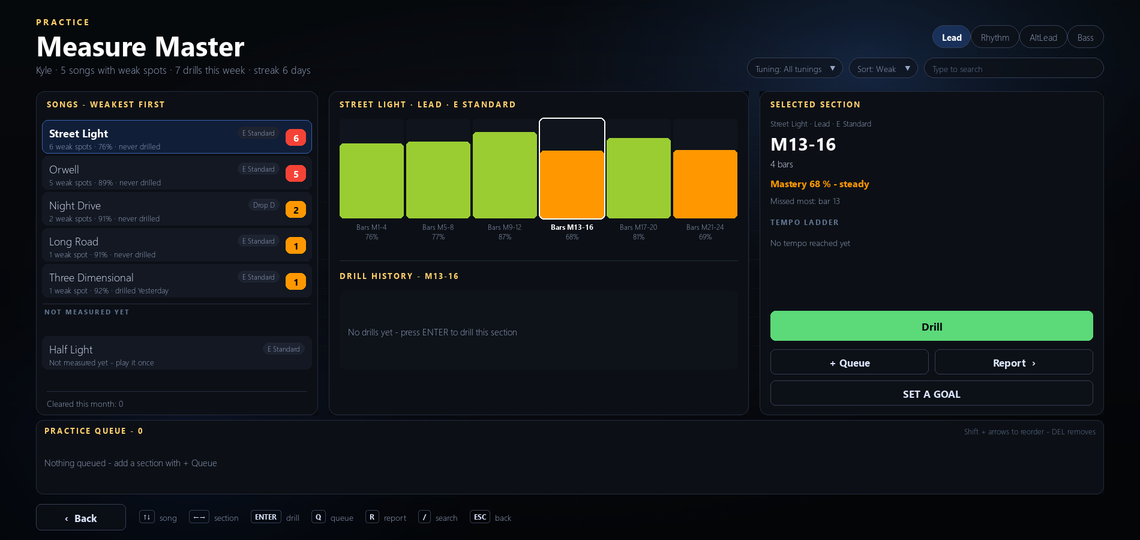
Every way into practice - Measure Master, Drill and Loop on the Song Report, Practice This on the results screen - opens the same Practice Setup sheet. Choose the bars, Default or Gradual tempo, 3, 5 or 10 passes or Until target, the accuracy you are aiming for, and a one-bar count-in.
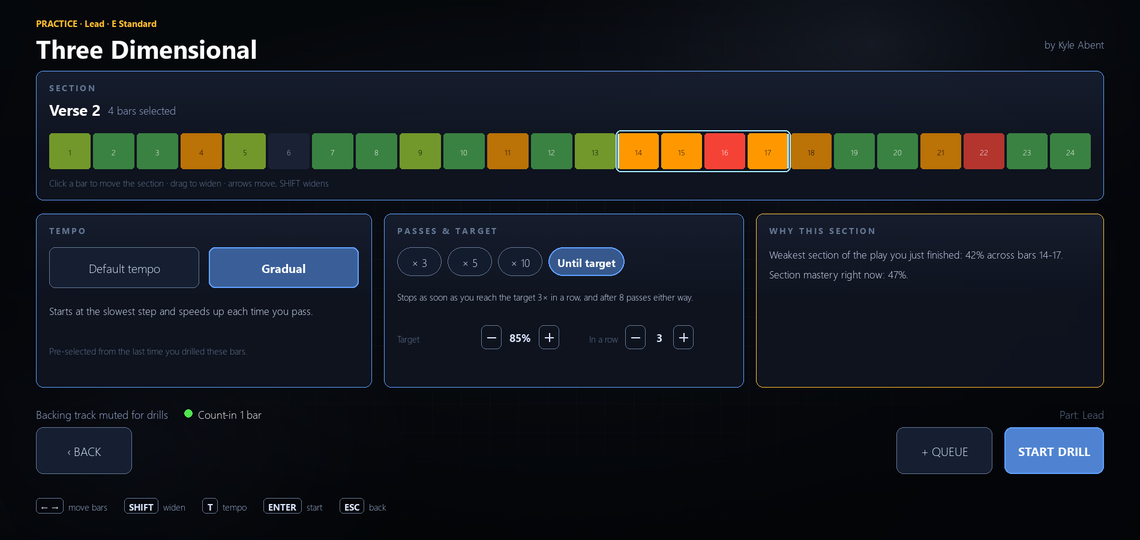
- Gradual starts you slow and steps the tempo up a rung each pass you play well, and back down when you do not. Until target ends the drill the moment you hit your number the required number of times in a row.
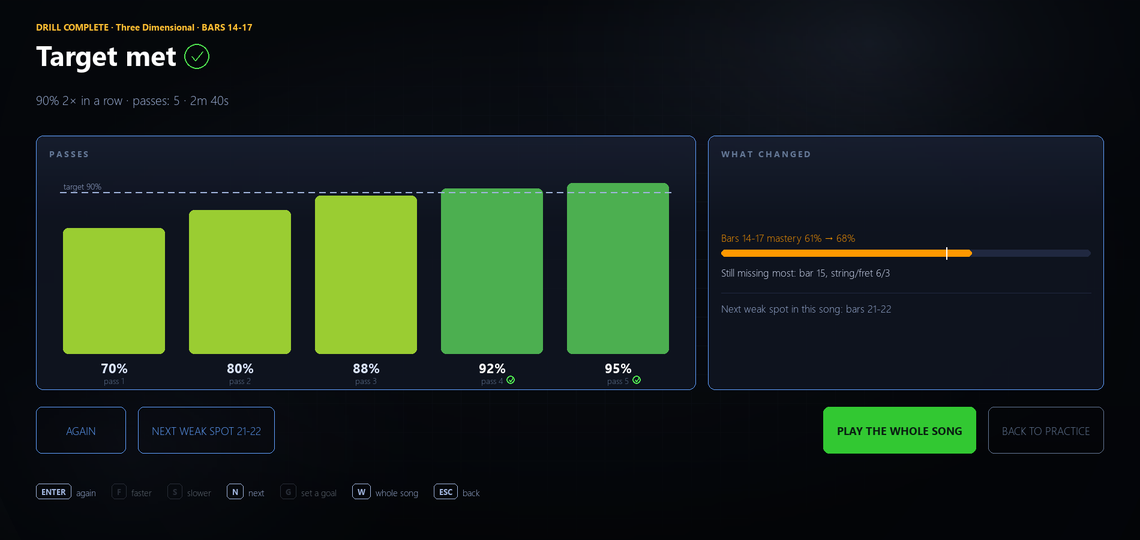
- Every pass is recorded. A focused repeat used to write nothing down and end on no screen at all. Each pass is saved with its accuracy and the real tempo it was played at, and every drill ends on a Drill Summary with a bar per pass against your target line and buttons for Again, Faster, Slower and Next Weak Spot.
- The backing track stays muted while you drill. Drilling bars 15 to 18 used to start the track from the top of the song.
- Drills feed the heatmap, earn XP through your normal career total (once per tempo rung per section per day, so looping one easy bar all afternoon cannot farm it), and a goal can now target a section: bars 14 to 17 at full tempo at 90 per cent or better.
- The screen ranks songs weakest first, names sections from the chart's own markers (Verse 2, not Bars 9 to 12), and the practice queue belongs to your profile and is grouped by tuning.
- Fixes: Practice This started one bar late and bar 1 could not be reached; bar numbers count from 1 everywhere; tablature files in the newer .gp and .gpx formats are analysed properly.
Career: maps, city, venue and statistics redesigned
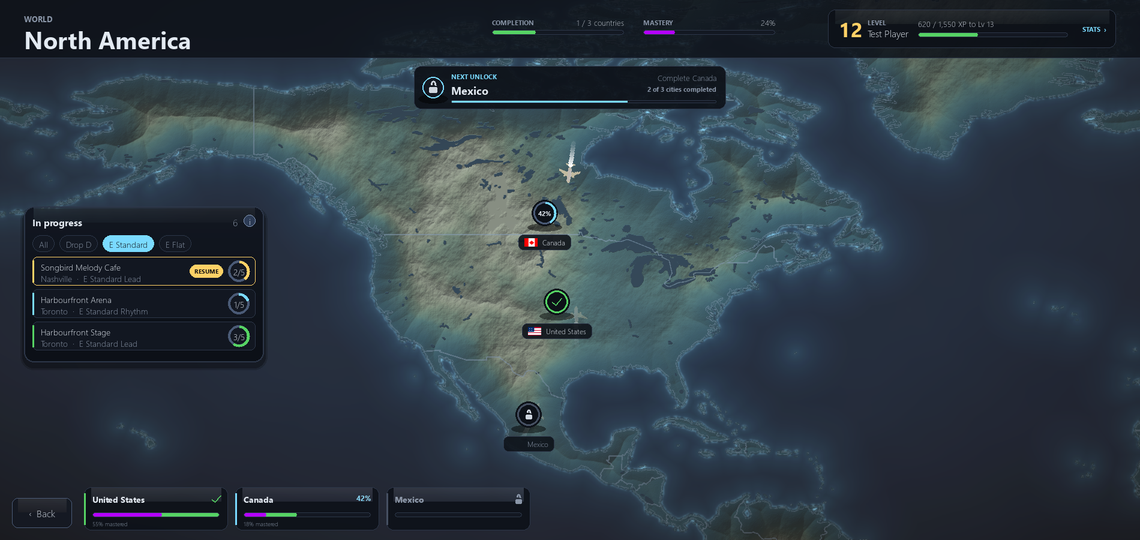
The world, region and country maps look like one screen instead of three, with a shared header and one marker style. The progress panel used to be painted over the map, hiding one city completely. The completion figure in a map header is now that view's own progress, not the world average.
- The city screen is three columns: your rig, TAKE THE STAGE with a card for each venue, and a tuning-by-arrangement grid where every cell of an unlocked venue sets both selections at once.
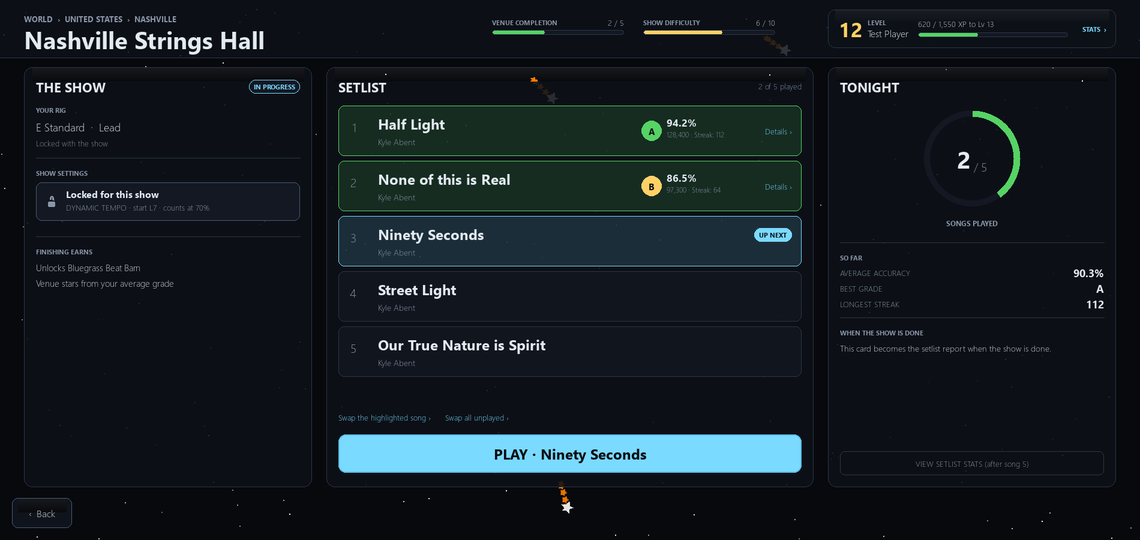
- The venue screen matches the rest of Career: THE SHOW on the left holds your tuning, arrangement and show settings; SETLIST in the middle marks the song you will play next as UP NEXT; TONIGHT on the right tracks the show as it happens. Assistance mode, start level and the accuracy a play needs to count are chosen in one place, and the screen says up front that they lock when the first song starts.
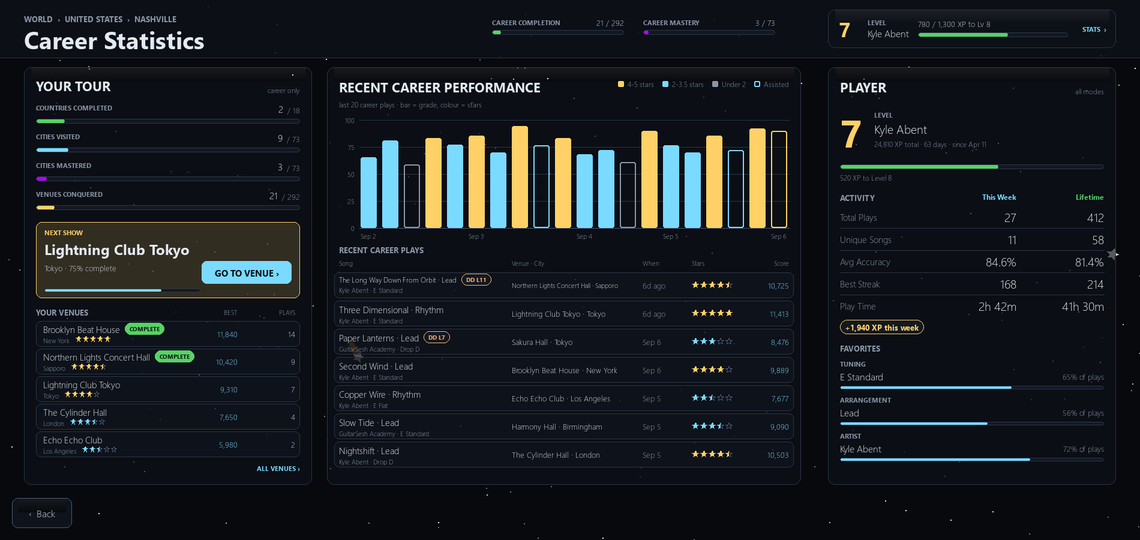
- Career Statistics is one screen under the same star field as the map, with a Next Show card and a Go To Venue button that drops you into that city.
- Fixes: an invisible dead spot on the world map that threw you out to the Start Menu; three tuning columns on the city grid named after the wrong tuning and one with no name; past level 99 the level number painting through its own label; the lower half of a venue's Play button opening the progress screen instead of the song; Swap all unplayed disappearing after your first play.
The tuner remembers your tuning, and you can lock it to one string
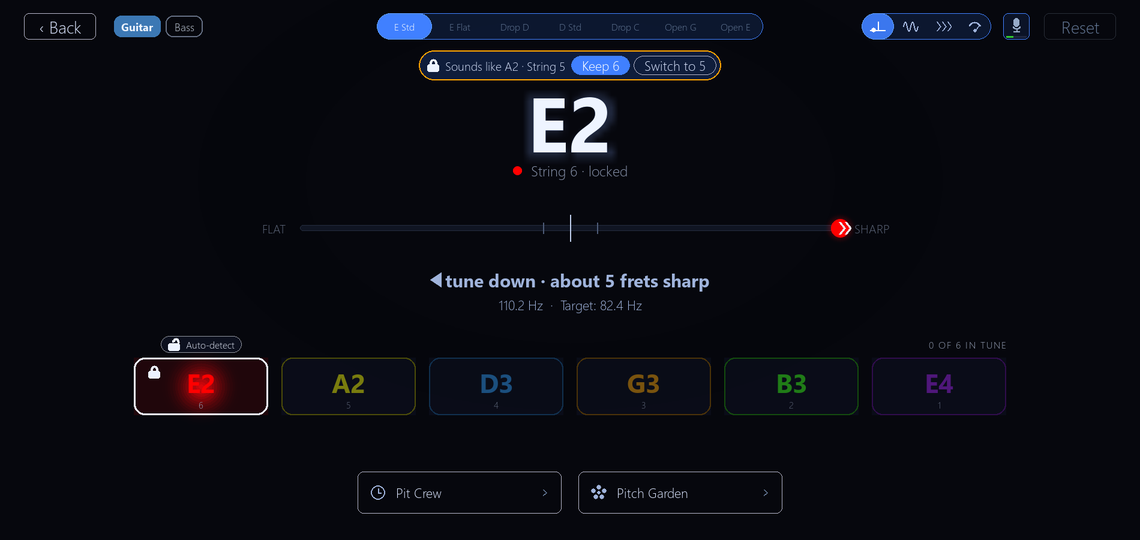
The tuner now remembers the tuning you picked. A guitar kept in E Flat used to read a full semitone flat on every string at every launch until you clicked the E Flat tab again. Play a few strings that fit a different tuning and a small notice says Sounds like E Flat, with Switch and Keep. It never switches on its own.
- Lock to one string: click a string or press its number, and the tuner holds it. A fresh string a whole octave flat reads correctly, which is exactly what a new string sounds like on the way up. If what it hears is clearly a different string it asks once - Keep 6 or Switch to 5 - and waits.
- Every view - Meter, Strings, Strobe, Dial - says the same sentence the same way: 12 cents flat, tune up, with the arrow pointing the way the needle will move. The Meter's arrow used to point the opposite way from the Strobe's.
- The mic button has a live level bar, and Input Calibration offers Low, Medium and High instead of a raw 0.050.
- Pit Crew and Pitch Garden are tiles with your personal best on them and live inside the tuner's own frame. Pitch Garden has new flower artwork.
Setup Doctor: a Quick check per string, and a fix view that shows which way to turn
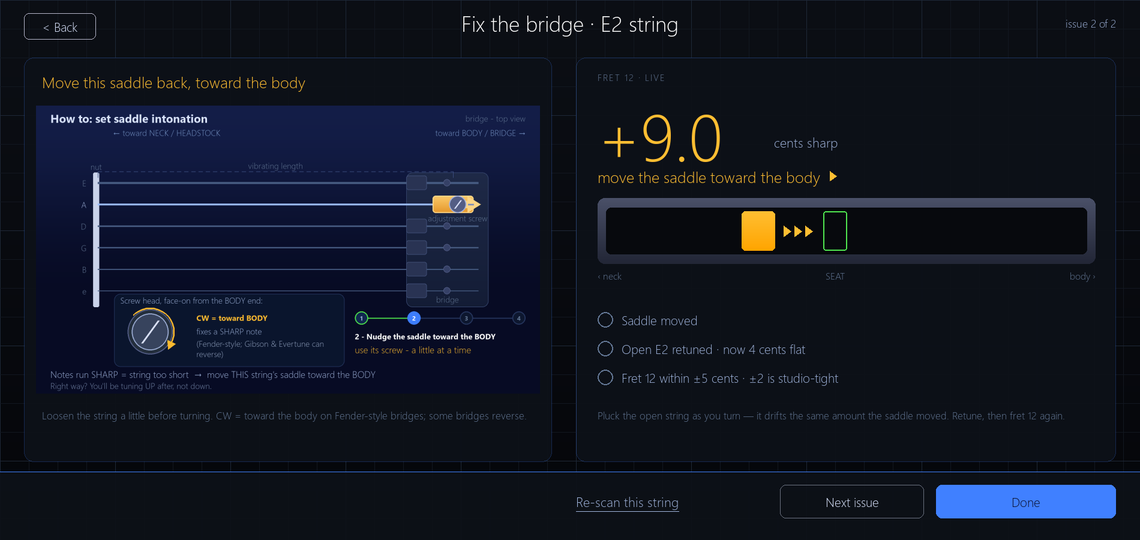
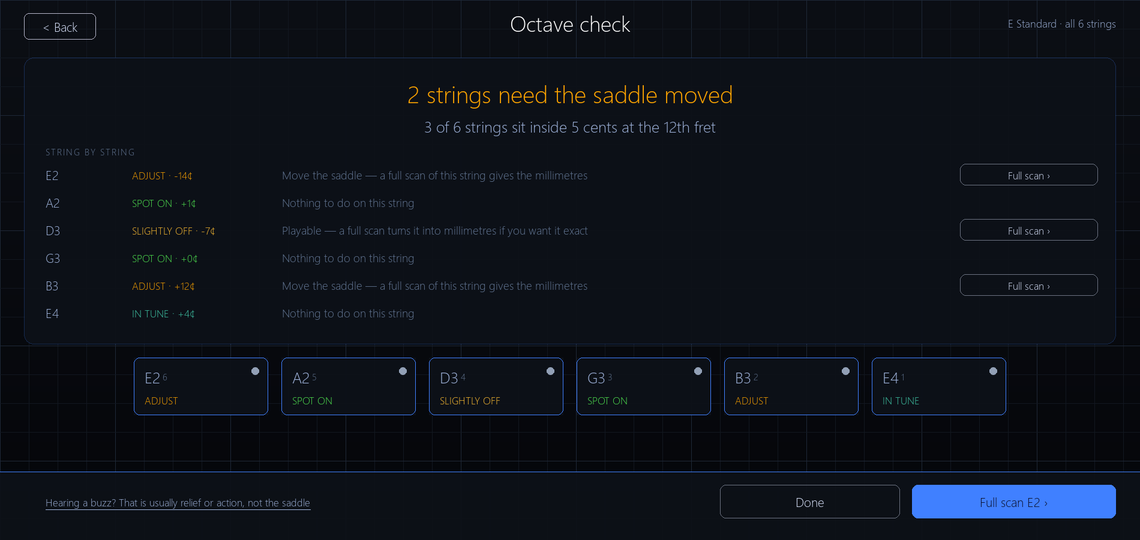
The Setup Doctor measures intonation, neck relief and nut height. It now asks your instrument first - Electric 25.5, Electric 24.75, Acoustic, Classical or Bass 34 - so its saddle-move estimates match your guitar.
- Quick check: two captures per string, open and fret 12, and a verdict on a ladder in cents - SPOT ON, IN TUNE, SLIGHTLY OFF, ADJUST. It replaces the separate Intonation screen, which used to disagree with the Setup Doctor about the same string.
- The fix view is one live readout: how many cents out, which way to move the saddle, a track showing it move toward the right spot, and a screw-head diagram big enough to read while you hold a screwdriver. When the string stops ringing it keeps your last reading so you can turn the screw in silence. If it hears the harmonic instead of the fretted note it says so in amber and nothing turns green.
- The report reads as one work order - tuning, then nut, then saddle, then neck relief. The truss rod direction stays hidden until you confirm the fret-gap check it asks for first.
- Several translations had called the guitar's nut a bolt, a hazelnut or a capo. Fixed, in all 29 languages.
Amp & Effects opens on your tones, and Change Input Device finds your guitar for you
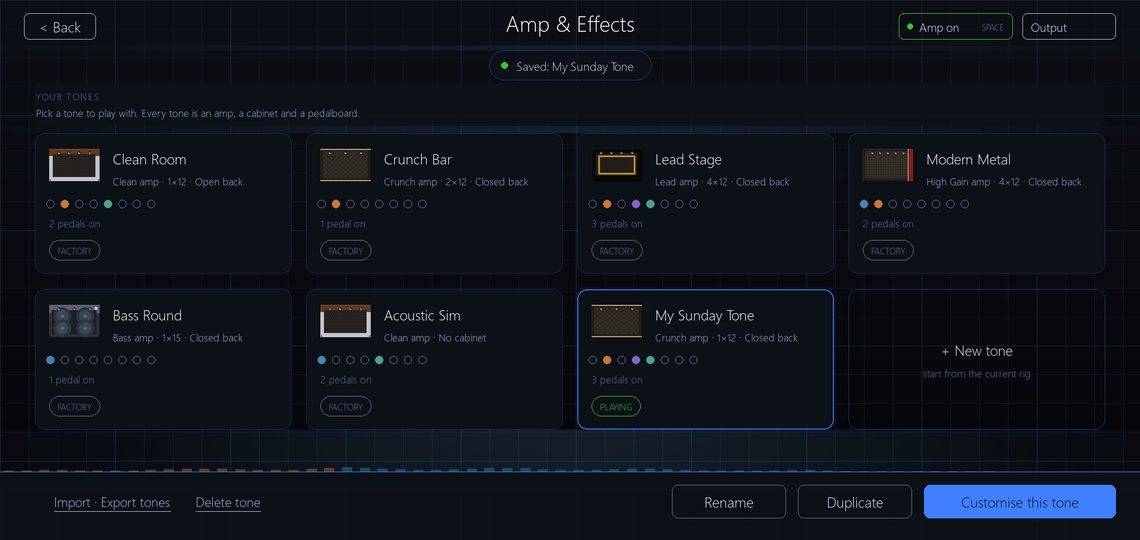
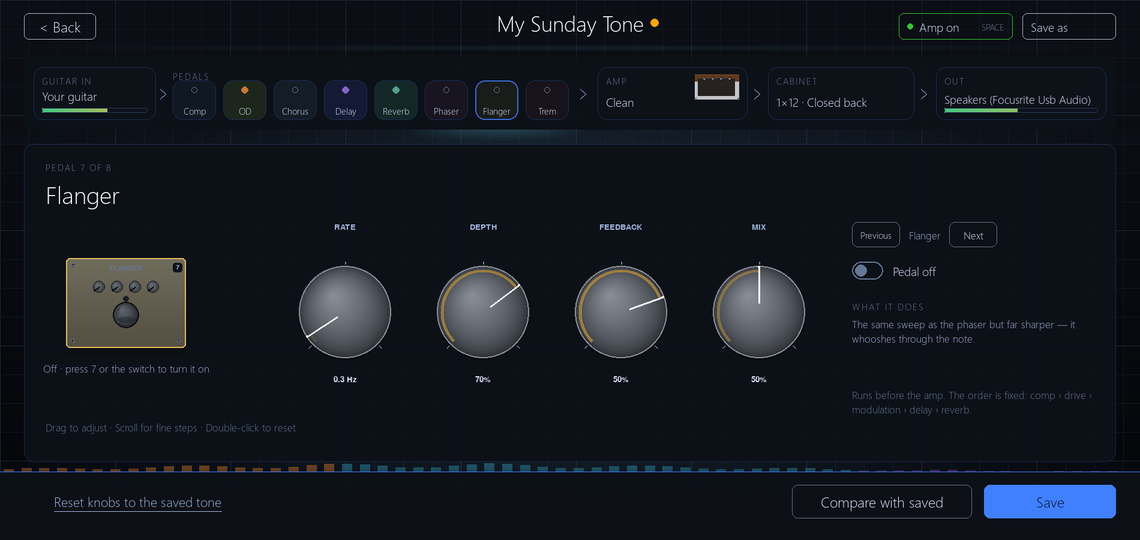
Amp & Effects used to open on the editing workbench with your presets hidden in a file browser. It opens on a gallery of tone cards now - amp model, cabinet, eight pedal lights, the playing one marked. Editing is the signal chain: Guitar in, eight pedals, Amp, Cabinet, Out; click a stage and it fills the workbench with its knobs 50% larger.
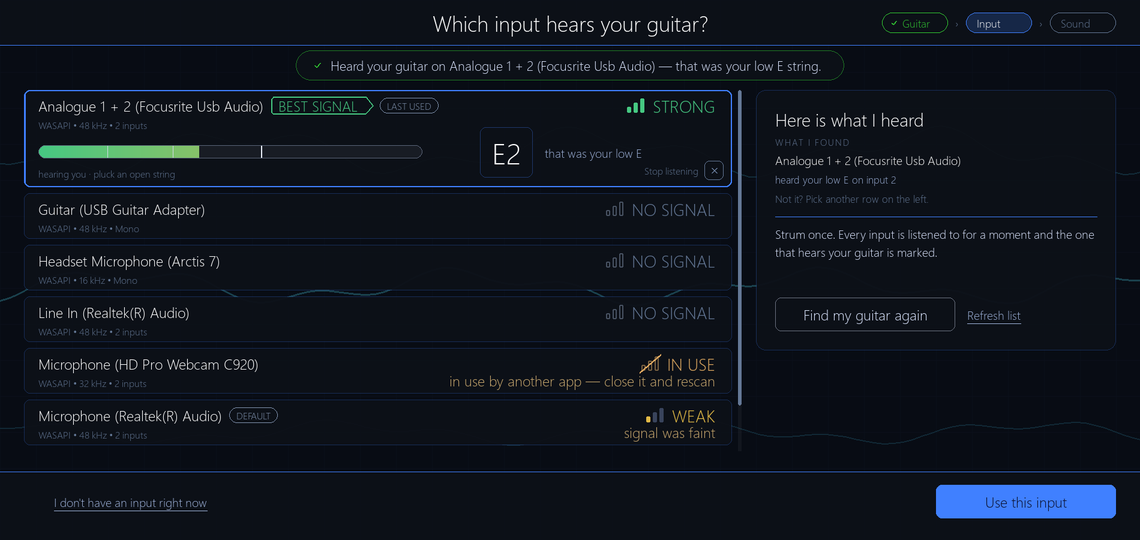
Change Input Device sits on one frame with a Guitar, Input, Sound step strip. On first setup it counts down - Plug in and strum, starting in 3 - with a live level meter, so the scan cannot start before your strum lands. It pre-selects the best signal but never saves the choice without you.
When Windows is blocking microphone access the game recognises the pattern and says so, instead of showing a cable checklist for a problem no cable will fix. Opening this screen could close the game outright in the installed build; that is fixed.
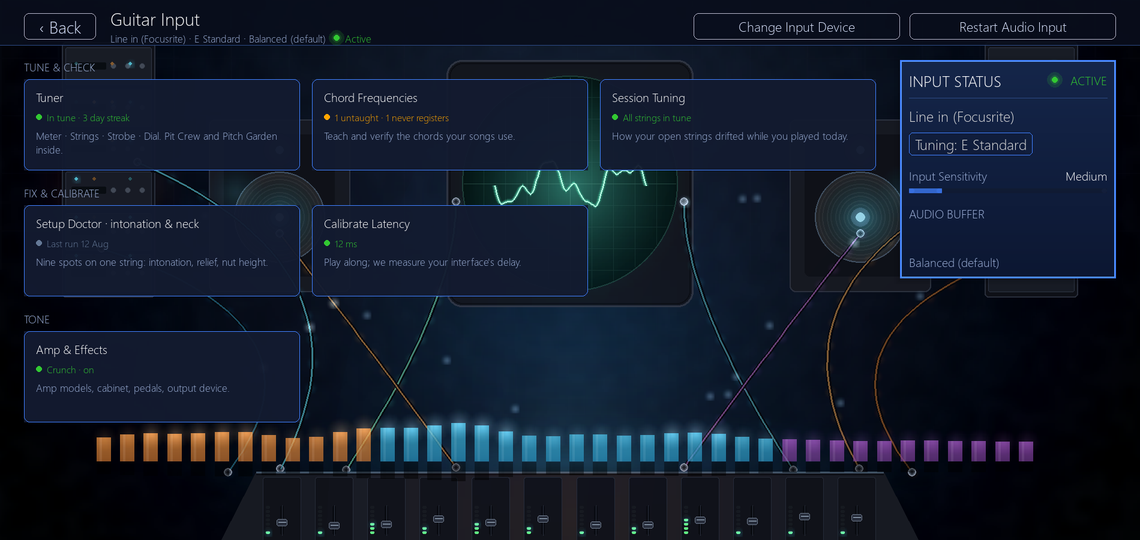
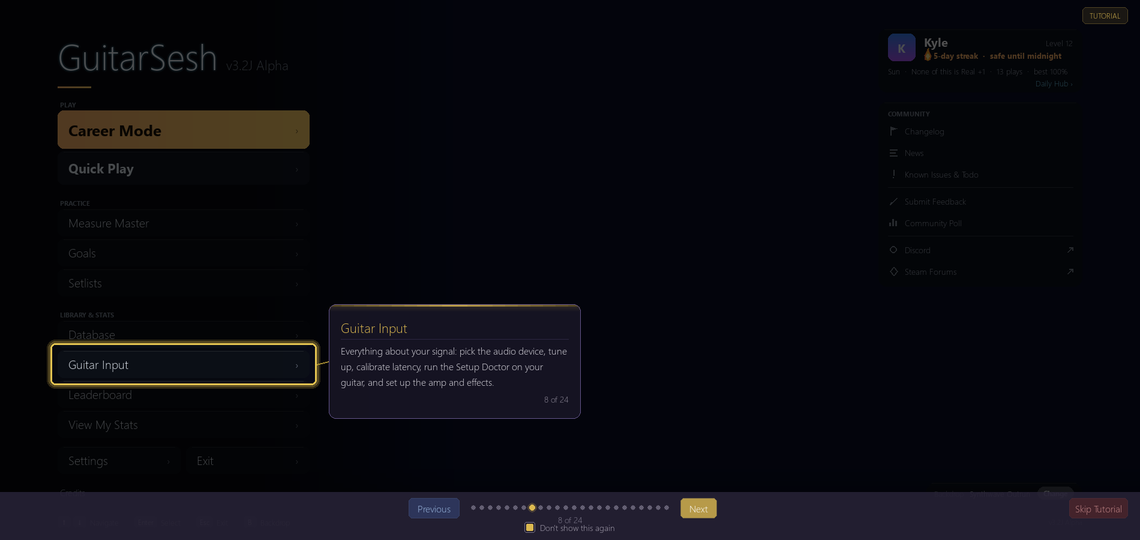
The Guitar Input screen's ten identical buttons are six tiles in three groups, each with a live status line: your last tune-up, the chords the loaded song needs, your measured latency.
First run is one guided rail, and every tutorial was retaught
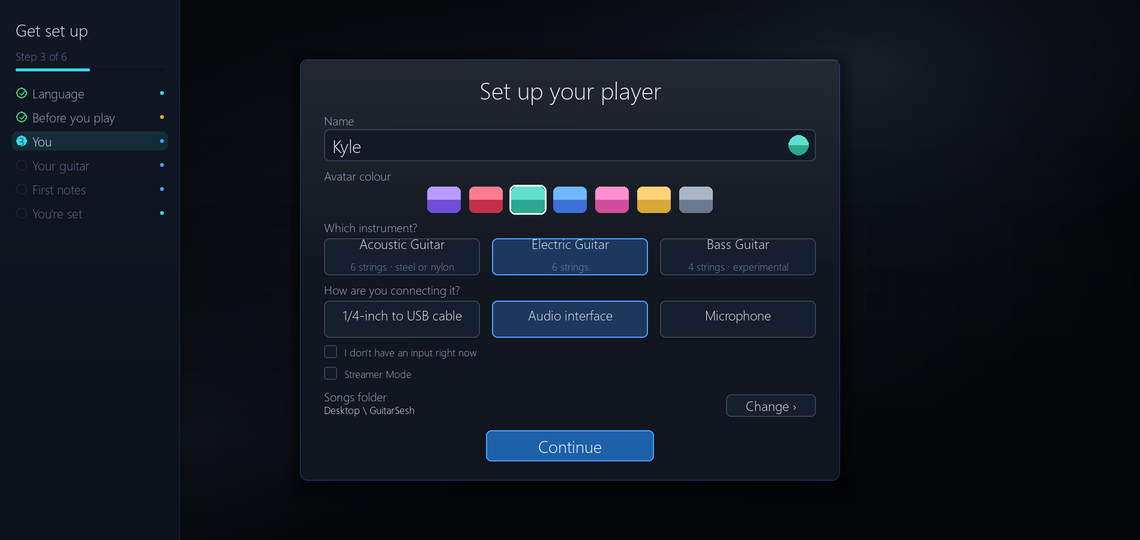
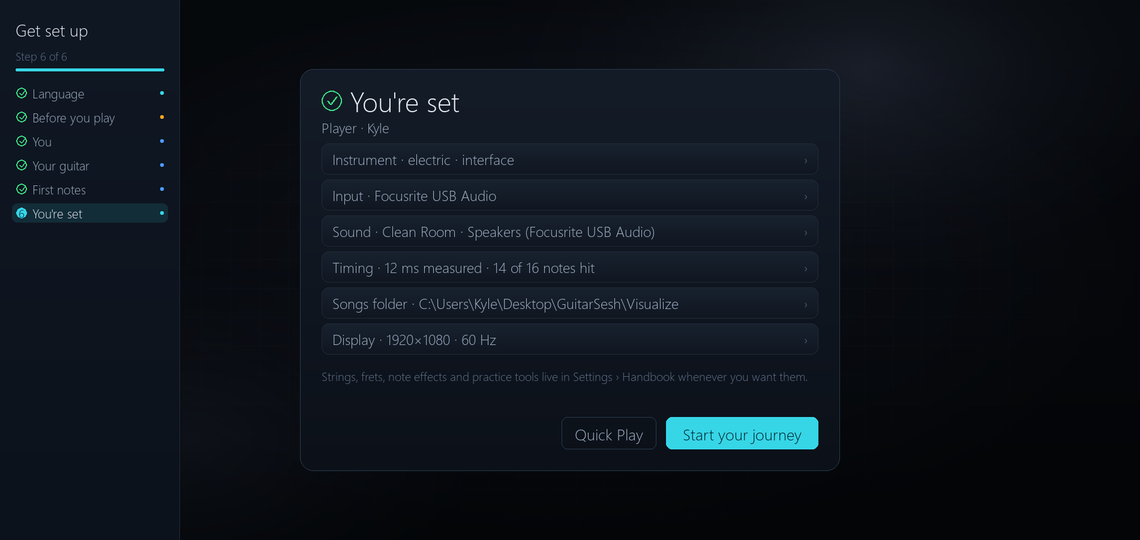
A new player walks six named steps with a progress rail they can see the whole way: Language, Before you play, You, Your guitar, First notes, and You're set. First notes puts you on the real highway with the real note engine and measures your actual guitar, so setup ends knowing your timing. The eight-page tutorial has left the first-run queue and lives at Settings, Handbook, and Start your journey now lands on the menu instead of jumping straight into Career.
Nearly every screen was redesigned this summer and the tutorials still pointed at the old layouts. Every one has been re-aimed so each spotlight lands on the control it describes.
Because of that, every tutorial shows once more after this update; dismiss any you know, or reset them under Settings, General, Reset Tutorials. Song stats, Measure Master and Setup Doctor tours run on demo data so they show something on a fresh install, and the Daily Hub, Leaderboard and Career Statistics have their first tutorials.
Everything else
Goals
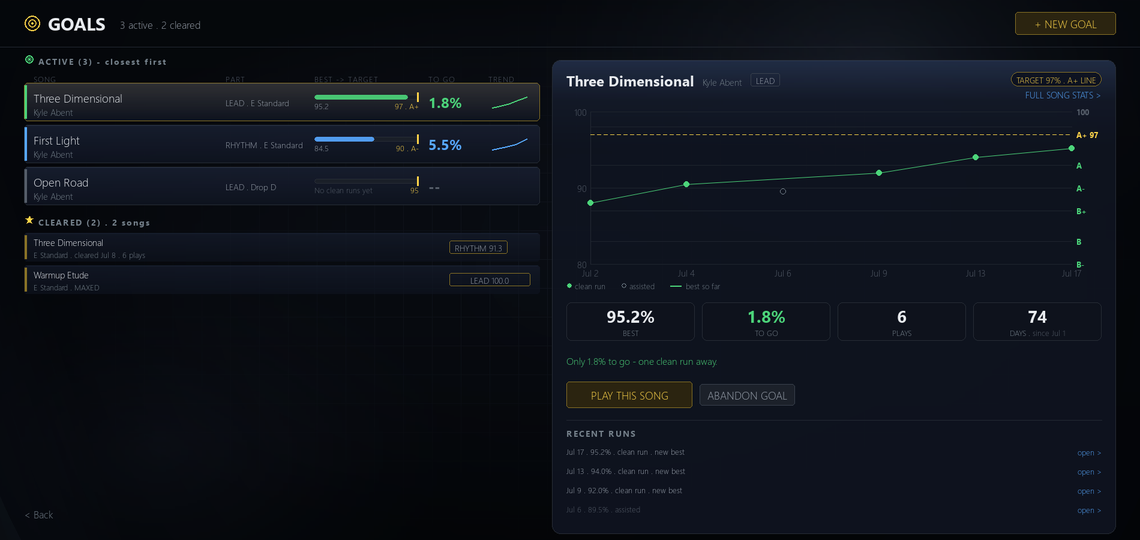
- A run played at full speed now counts toward your goals. With static tempo armed but never applied, goals could read no clean runs next to plays in the high nineties.
- After you clear a goal the next rung offered sits above what you cleared it at, and the progress chart no longer starts at 80 percent for players whose rungs sit below it.
- Clear every goal and the list offers a Raise strip - the cleared goals closest to their next grade, one click each to push them up. The cleared shelf groups by song, rows carry a progress bar from the accuracy a play needs to save up to your target, and every dot on the journey opens that exact play in the Song Report.
- A goal on a song no longer in your library says so, with a link to update the library.
Daily Hub
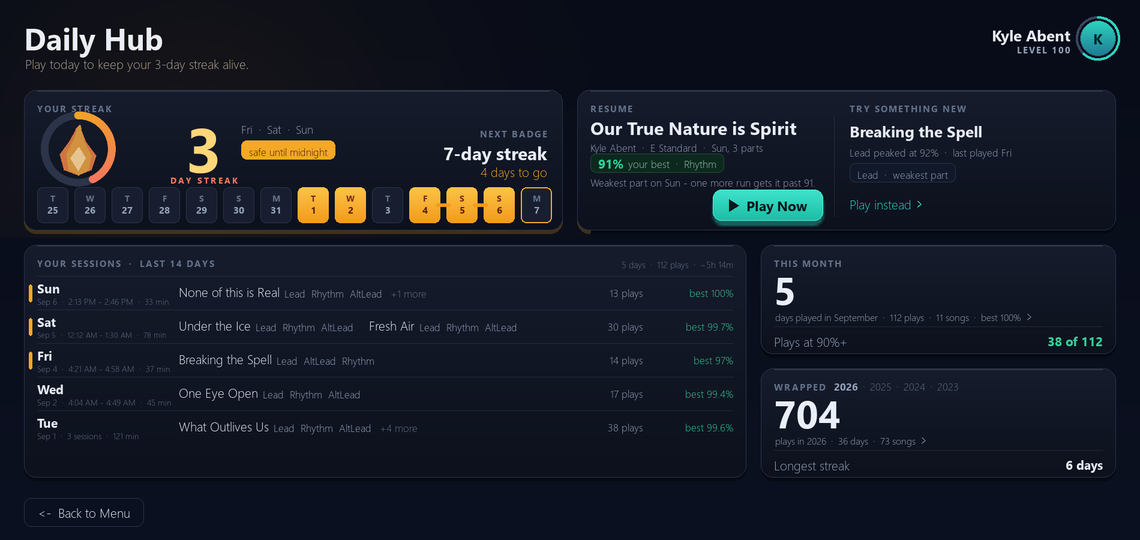
- A rolling two-week strip draws your streak and names the days, so a three-day streak on a Monday shows the Friday, Saturday and Sunday it came from. A chip says where you stand: safe until midnight, or kept today.
- A session log replaces the three stat cards: your recent days, split into sessions, with the songs in each and your best accuracy. Click a song to open its report.
- The week summary answered zero every Monday morning because the week reset on Monday. It is a rolling window now. THIS MONTH separates Times played from Distinct songs - four songs played 28 times used to read as 28 songs.
- New setting under General, Startup: open the Daily Hub on the first launch of each day. Off by default.
Setlists
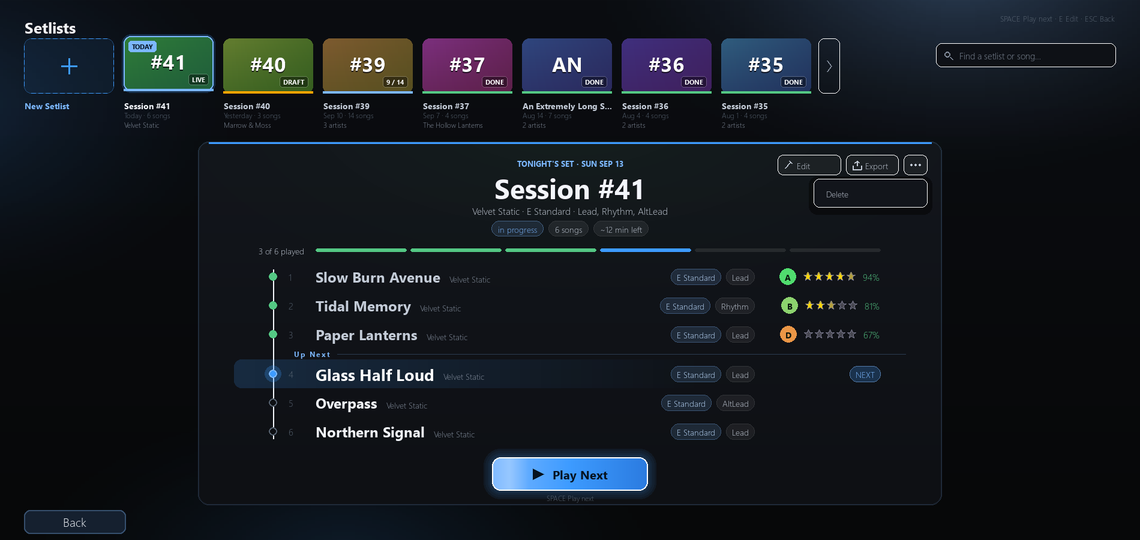
- One set owns the screen like a printed set sheet, with your other setlists as a strip of tiles above it. Export is a proper dialog: copy the track list to your clipboard or open the folder it saved to.
- Backing out of Edit no longer demands you save changes you never made - there was no way to satisfy it, so you were stuck. The strip no longer snaps back to the selected tile every frame, and unplayed songs show NEW rather than a bare zero.
Results and notices
- A run played at full speed is no longer marked as tempo-assisted on the results screen.
- You can switch off just the Almost - this play didn't save notice, the one for runs that only missed the save bar, under Settings, Audio and Calibration. The notices that matter still fire: no input, wrong tuning, missing files, untaught chords.
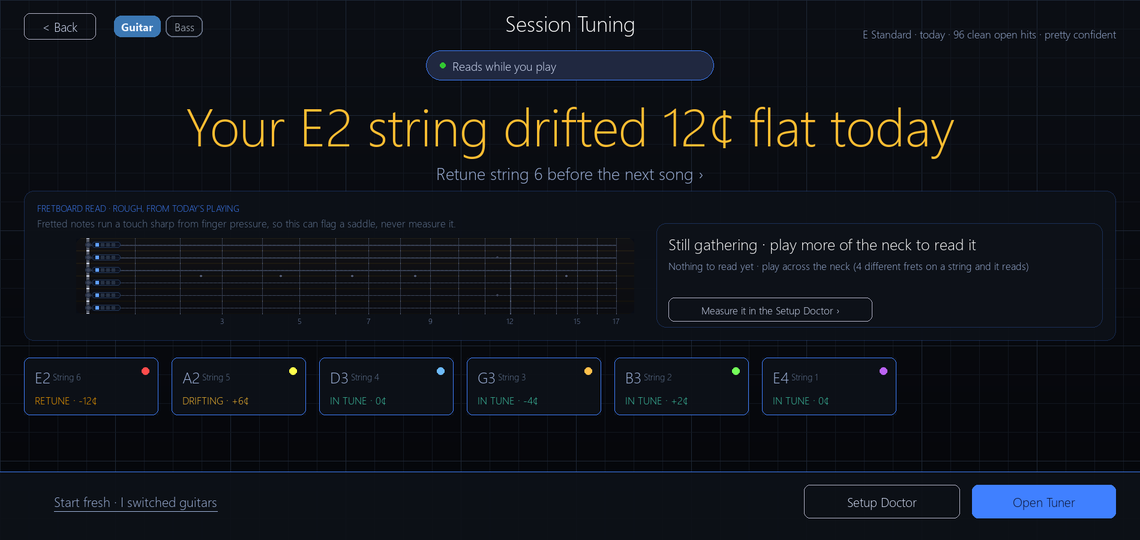
- The post-song intonation screen no longer interrupts you on a guess from a handful of frets, and the Session Tuning screen finally shows its verdict - Your E2 string drifted 12 cents flat today - which never actually appeared before.
Fixes worth knowing about
- If the setting pointing at your play data folder goes missing, the game finds the folder again instead of quietly writing nothing.
- Several E Flat chords were defined against the wrong frets and could not register when strummed. Corrected tuning definitions reach existing installs: if you never edited yours they update silently with a backup; if you did, a one-time card offers Load new definitions or Keep mine.
- Mac: every arrow in the game drew as a box. They draw as arrows now.
- Japanese, Chinese and Korean text on Amp & Effects and several other screens drew as rows of empty boxes. Fixed.
- Career XP could be left half-restored every time Update Library ran, if a play's song had been re-scanned. That row is now skipped with a note in the log and the rebuild finishes.
- Wording fixes across the translated languages from a native-speaker review, and every new label in this update is translated.
That is v3.1E to v3.2J. If something in here does not behave the way it says, the game writes a log file next to the exe - send it my way, in the Steam forums or through Submit Feedback on the start menu.
guitarsesh.com has the game's own page, and guitarsesh.com/album5 has the new music - the songs on the Daily Hub screenshot above are from it.