Thank you for always using Textvas.
New Features
・Added Node Graph Editor
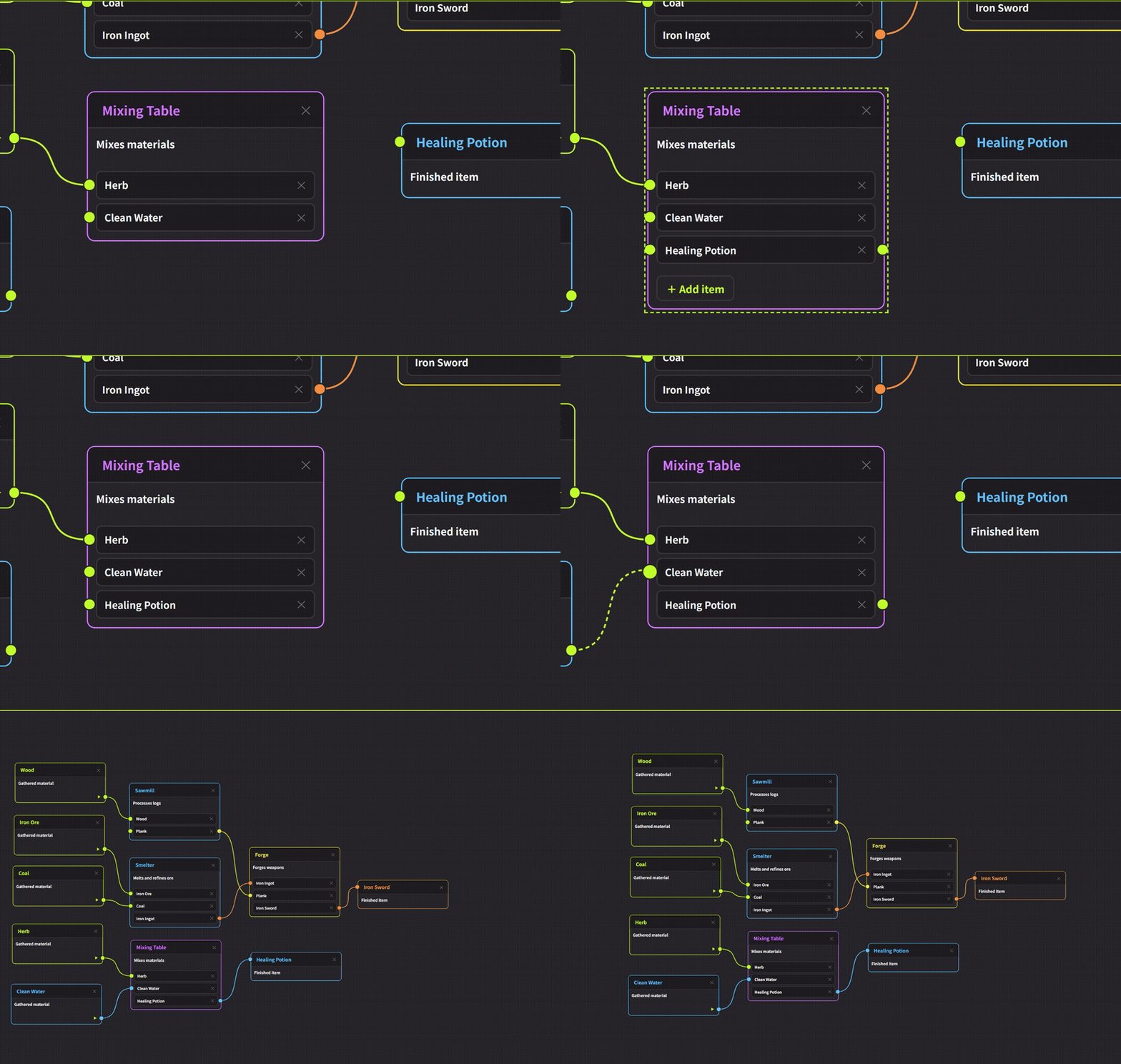
We've added Node Graph as a new node editor.
This is the third node editor, following Dialogue and Flowchart.
You can add it by right-clicking a tab → Add Node Editor → Node Graph.
It's a relationship-diagram editor that lets you freely connect nodes with lines, useful for organizing character relationship charts, skill trees, and reference materials — for many-to-many connections that are neither conversation branches (Dialogue) nor step-by-step diagrams (Flowchart).
By right-clicking each item inside a node, you can choose Input & Output, Input only, or Output only.
Within a single node, you can freely set each item to input-only, output-only, or both.
・Node Color Customization
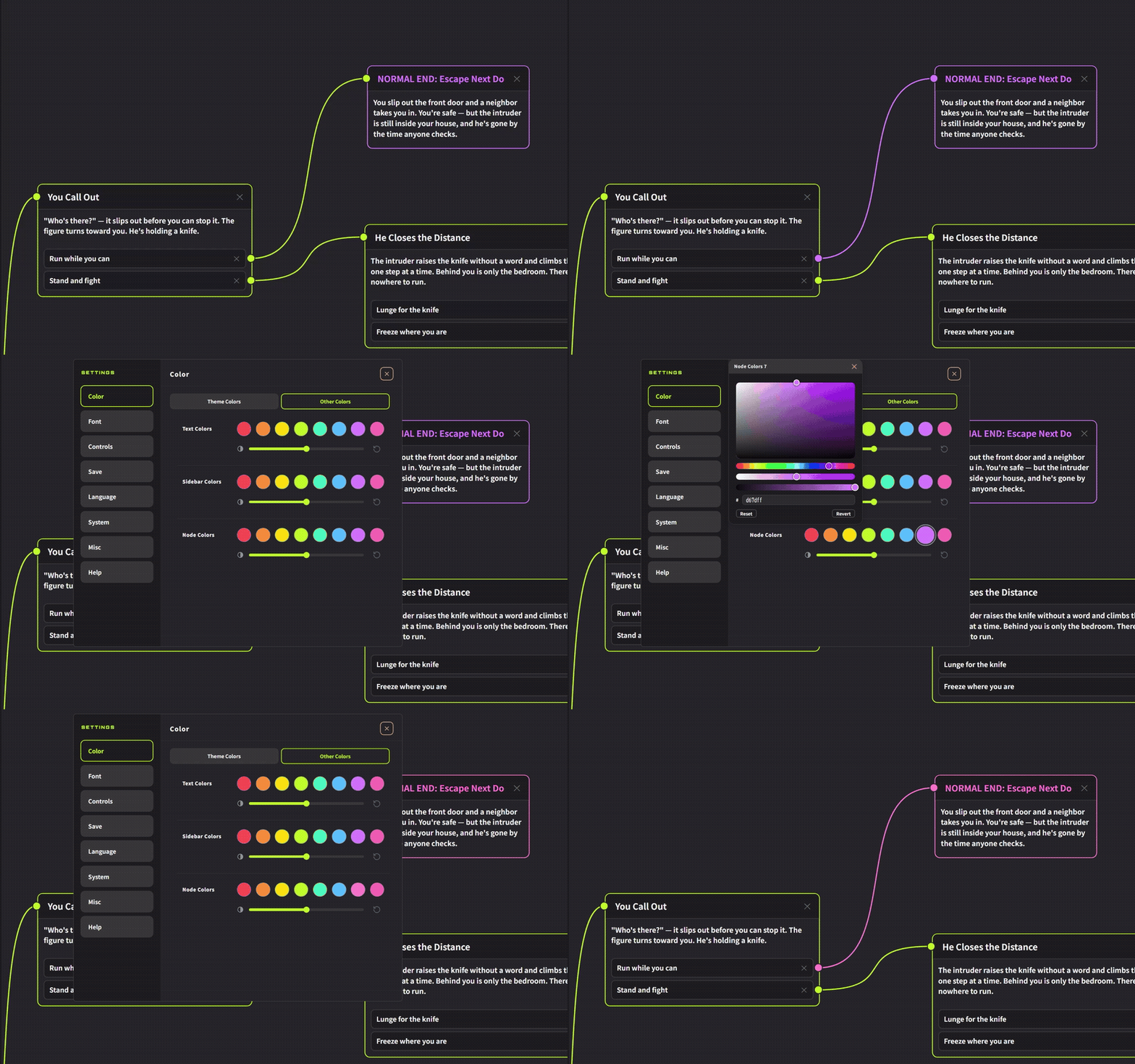
You can now freely change the node colors of Dialogue, Flowchart, and Node Graph from "Other Colors" in Preferences, the same way you change text color or sidebar color. We've also added a gear icon next to the color swatches in the node's right-click (long-press) menu, so you can open the node color settings directly from there.
・Color Changes for Connection Lines and Sockets (Node Graph / Dialogue Nodes)
Clicking a connection line now opens a color menu where you can choose a color from the node colors. The chosen color is applied not only to the line but also to the sockets at both ends, so the line and socket colors match. You can also delete the connection right from this menu.
・Official Support for Animated WebP and APNG Playback
Animated WebP and APNG, like GIF, are now excluded from the lightweight processing (downscaling/thumbnailing). Regardless of size, they will now always play as animations using the original data. In previous versions, large animated WebP or APNG files could be displayed as static images and fail to animate.
Improvements
・Shortcut Support for Select All Nodes
The Ctrl+A shortcut (Select All Nodes) has been adjusted to also work in Dialogue and Node Graph.
・Exclusive Display of Start and End Points
Improved so that Start and End are displayed exclusively in the node menus of Dialogue and Node Graph.
・Editor Type Display When Adding a Node Editor
The empty screen shown right after adding a node editor (Dialogue, Node Graph, Flowchart) now displays the name of the editor type you opened.
・Improved Visibility of Flowchart Connection Arrows
The arrows on Flowchart connection lines have been adjusted to be larger and easier to see.
Bug Fixes
・Fixed an issue where the path display shown when hovering over a folder link would disappear after switching tabs.
・Fixed an issue where copying and pasting link cards such as folder links would turn them into plain text. All three types — folders, URLs, and boards — can now be pasted while keeping their link format.
・Fixed an issue in Flowchart image export where shape colors and text were not reproduced correctly.
・Fixed an issue where the bounding box would remain on screen after deleting a shape in Flowchart.
・Fixed an issue in Dialogue mode where adding a choice to a connected node that had no choices would cause the existing connection line to disappear.
・Fixed an issue where the round connection marker was not displayed in Dialogue image export.
・Fixed an issue where, after switching themes in Preferences colors, the previous theme's grid lines (horizontal lines) remained on the board even though the pattern setting was set to none.
・Fixed an issue where text wrapped to the screen width would temporarily stretch into a single line during touch swipe-zoom. Text wrapping is now maintained even while zooming.
・Fixed an issue during touch operation where guides would move with just a light touch. As with text cards, guides now require a small amount of movement before being treated as a drag rather than a tap. This applies to all guide types.
We will continue to work on improving Textvas.