Status
SteamPeaks
ChartsSalesUpcomingPatchesNewsCalculator
New on SteamEvery app, DLC and depot the minute Steam creates itAppsEvery app on Steam, newest change firstPackagesSubs and bundles, and what each containsDepotsDepots, manifests and install sizesTagsSteam's user tags and the games under themDevelopers & publishersCompanies and their cataloguesTechnologiesEngines, SDKs and anti-cheat found in the filesChange historyEvery PICS changelist as it lands
SignalsNineteen readings of the whole catalogueCompareAny games side by sideRecordsAll-time peaks and the days they were setReportsWeekly and monthly write-upsAlerts & newsroomWatch a game, get told when it movesSteam statusIs Steam up, right nowWeb API explorerTry the endpoints in the browser
NewsSteam's own announcements and the sales calendarCalculatorWhat a Steam account is worth, and its pile of shame
/
Sign in
/
SteamPeaks
The ultimate resource for Steam data.
ExploreChartsSalesSales and festsUpcomingPatchesNewsRecordsTrendingSignals
DatabaseAppsPackagesDepotsTagsDevelopersTechnologiesChange history
ToolsCalculatorCompareSearchAlertsSteam statusAPI
SiteMethodologyFAQDiscordSupportSign in via Steam
Not affiliated with Valve or Steam. Game names and artwork belong to their owners. All times UTC.
PrivacyCookiesFair useStatus
言之叶 - KotonohaNewsUpdated explanation on March 22, 2024
In-game event

Updated explanation on March 22, 2024

言之叶 - Kotonoha · published 22 Mar 2024, 03:17 UTC

All newsPlayers around this dateRead on Steam

Module

The original grid obstacle layer only had two states, 0 and 1, namely painted and unpainted (such as obstacles), but now two new modes have been added.

● The first type is numerical mode

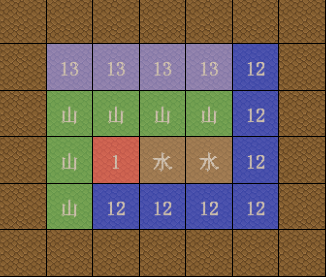
Allowing 0-255 numerical values to be displayed in the same grid data layer (0 indicates unpainted)

In this way, different effects can be created in the same grid data layer based on different types of values.

At the same time, each grid can also be named separately, but only one name will be displayed in the

preview (for example, if the grid is called terrain, it can have grass, water, mountains, etc.)
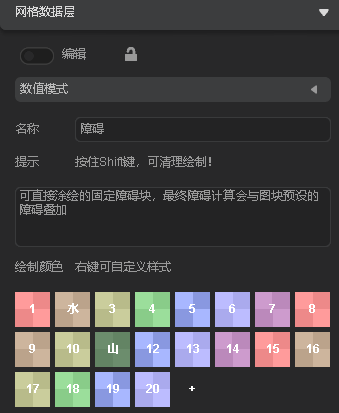
● The second type is passage (four directions)

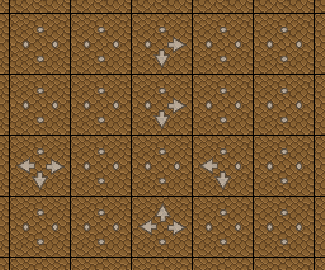
Set different traffic states in four directions within a grid (mainly used for RPG templates)

It can be directly drawn on the map, or the four-way traffic status of the block can be set by setting the

status of the block/automatic component.
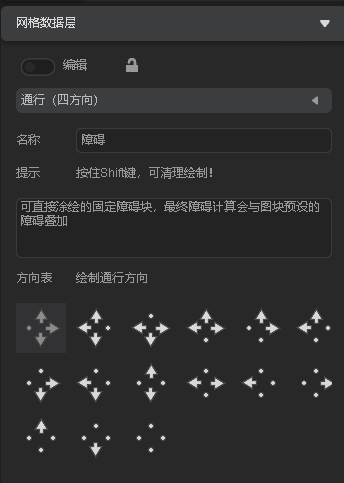
Features and optimization

● The dialogue command is currently displayed as "skip mark" in "text effects waiting for player operation"

More from 言之叶 - Kotonoha

Other announcements

All news
In-game event26 Jun 2026Update Announcement V0.9941, June 26, 2026Functions ● Scene layer switching: Press Shift+~ to switch to the object layer (originally, Shift+1~9 could switch between layers 1–9). ● In the Scene Editor, a new option has been added to the object layer's right-click menu, listing all layers under the current mouse cursor position for quick selection. (Right-click menu → Select Layer) ● Historical version engine A new option has been added…In-game event28 Apr 2026Update Announcement V0.994 (Plugin System Upgrade) on April 28, 2026Engine - Plugin System Upgrade ● The plugin system now includes version management. When a plugin is published, a new version will be created along with snapshots of the engine version and template versions at the time of release. This resolves compatibility issues caused by template updates (e.g., architectural changes). Users can later install the corresponding version (provided the plugin au…Game update1 Apr 2026April 1, 2026 Minor Update Patch V0.9931Engine Update · Fixed an issue where searching commands in the editor could cause errors or freezes. · Fixed a bug where clicking would display all text when multiple "Wait for Player Input" commands existed in "Show Dialog". · Fixed a bug where blank spaces appeared in "Show Dialog" when text had material effects, non-zero character spacing, and text effects (e.g., 10-frame pause). · Optimized…