The May update upgrades to the latest version of Unreal Engine 4, future-proofing the game and fixing a few issues with the previous Unreal version. In addition, you now have more options for player slots, a color palette, improved object rotation, and more:
• Updated Unreal Engine to 4.27
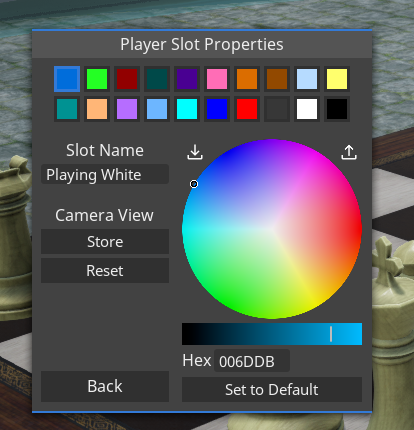
• Slot names now have names and default camera setups: the "Player Colors" button in the session options has been renamed to "Player Slots". The window accessed through the button now allows to set a name and store the current camera setup in addition to adjusting the color for each player slot.
The slot name can be used to whisper in the chat to the player currently occupying that slot, in the same way as player names are used. By default, all player slots are named with their index (1 to 20).
When a player slot has a stored perspective, a player who joins the game in that slot or switches to the slot through the player options will move to the stored perspective. This can be used to emphasize where on the table a player in a given slot is seated.
• Holding down rotation keys (Q/E/Arrows by default) now continues to rotate objects
• Color pickers now have a color palette where you can store and load your own selection of 36 colors
• Increase speed of turn-in-place animation (when presseing Q/E or arrows while highlighting, not holding, an object) and keep the rotated object in place in relation to other objects - it used to land on top of objects above.
• Store hold height between sessions
• When editing snap points in preview mode for an object with global snap points enabled, allow adding points snapped to other objects that aren't on top of the edited object
Scripting
• Add `GameObject.removeDrawingLineObject` and `GameWorld.removeDrawingLineObject´
• Add `Player.setDrawingColor` and `Player.setDrawingThickness`
• Add `DrawingLine.tag` property
• Extend the occasions when `Card.onRemoved` is called to all actions where players remove cards (dragging a card off the stack or the container explorer, drawing or dealing cards, or when a player cuts/splits/divides the stack)
• `Text.setAutowrap` did not work for clients (only affected host player)
• `Player.getSlot` and `Player.getName` did not return correct results for players who rejoined games in progress
• Don't allow setting primary color on card holders (the color is determined by the owning player)
• Increase time that `Player.showMessage` messages stay on screen
Fixed
• Autosaves were not available to load on Linux
• Using keyboard shortcuts for editing card decks in the editor made previously edited cards re-appear
• UI elements for properties of snap points in a new grid were not enabled when the object had no snap points
• After closing the chat using the Enter key, it couldn't be opened again using enter until clicking with the mouse
---
These new updates we've added are just some of the many features on our early access development roadmap for Tabletop Playground, which you can check out on our Trello HERE.
Don't forget to join our community Discord to chat with the dev team and give us your suggestions for new features for the game!