Major Update: Introducing the Hunter Workspace — Playtest v0.20260824.5
Beast Market Playtest · published · build 24896616
Hunt, build, and watch the market at once: introducing the Hunter Workspace
This update fundamentally changes how Beast Market is organized.
Instead of switching between one full screen at a time, you can now keep hunting while opening Quest Select, Builds, the Workshop, the Market, and other tools together in the new desktop-style multi-window Hunter Workspace.
It is designed around Beast Market's core loop: hunt in the background while you read the market and refine your gear.
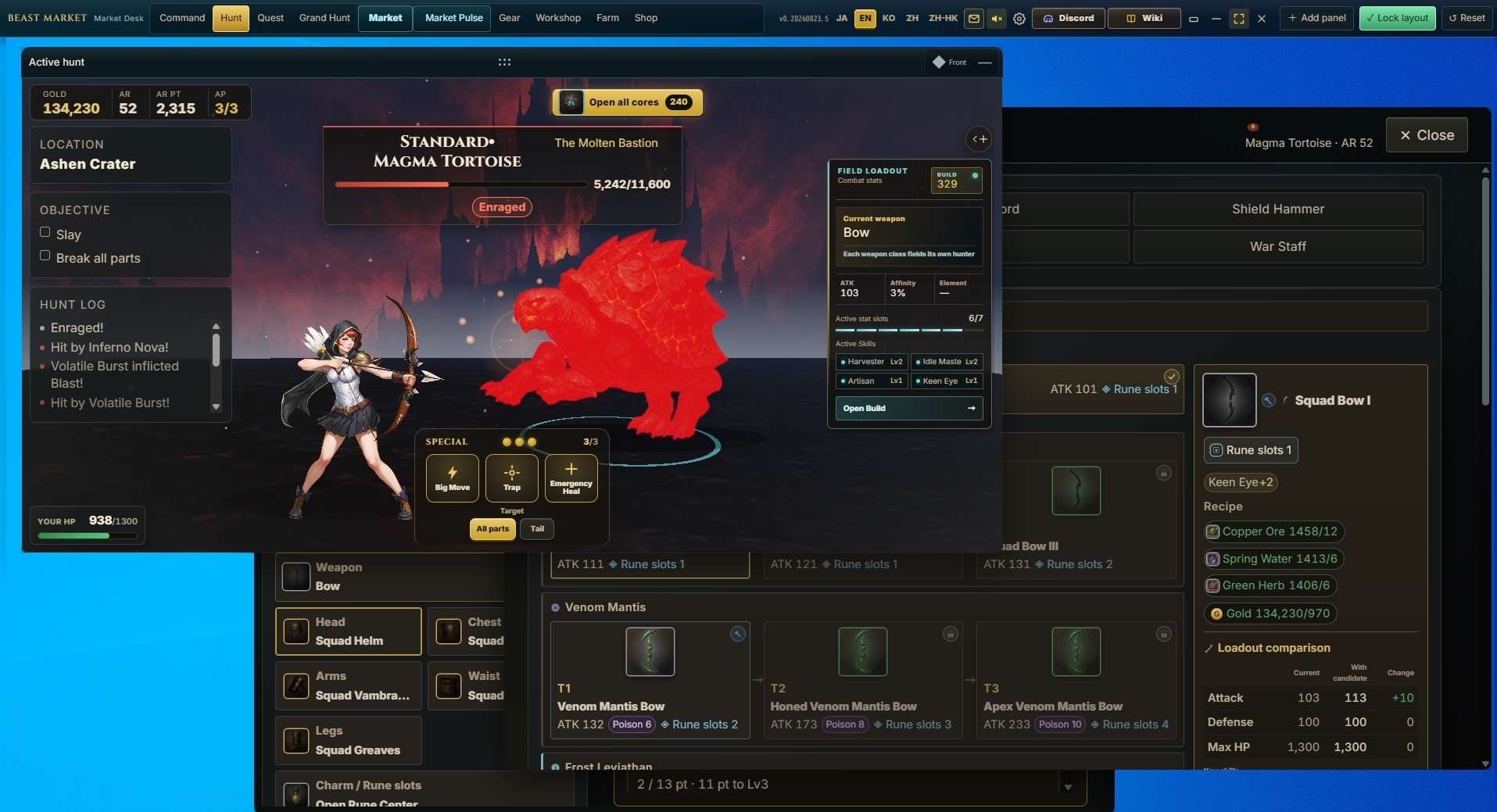
A freely arranged multi-window workspace
- Hunt, Quest Select, Builds, Workshop, Market, Farm, and other features can be opened as separate panels at the same time.
- Panels can be moved, resized, minimized, maximized, and kept in front.
- Reopened panels restore their previous position and size.
- Layouts are saved automatically, with a Reset Layout option for returning to the default arrangement.
- Transparent space outside game panels allows you to interact with browsers and other desktop apps behind the game.
- Switching between Compact Mode and the normal workspace now preserves panel placement and the hunt presentation.
- A first-launch language selector has been added. Japanese, English, Korean, Simplified Chinese, and Traditional Chinese (Hong Kong) are supported.
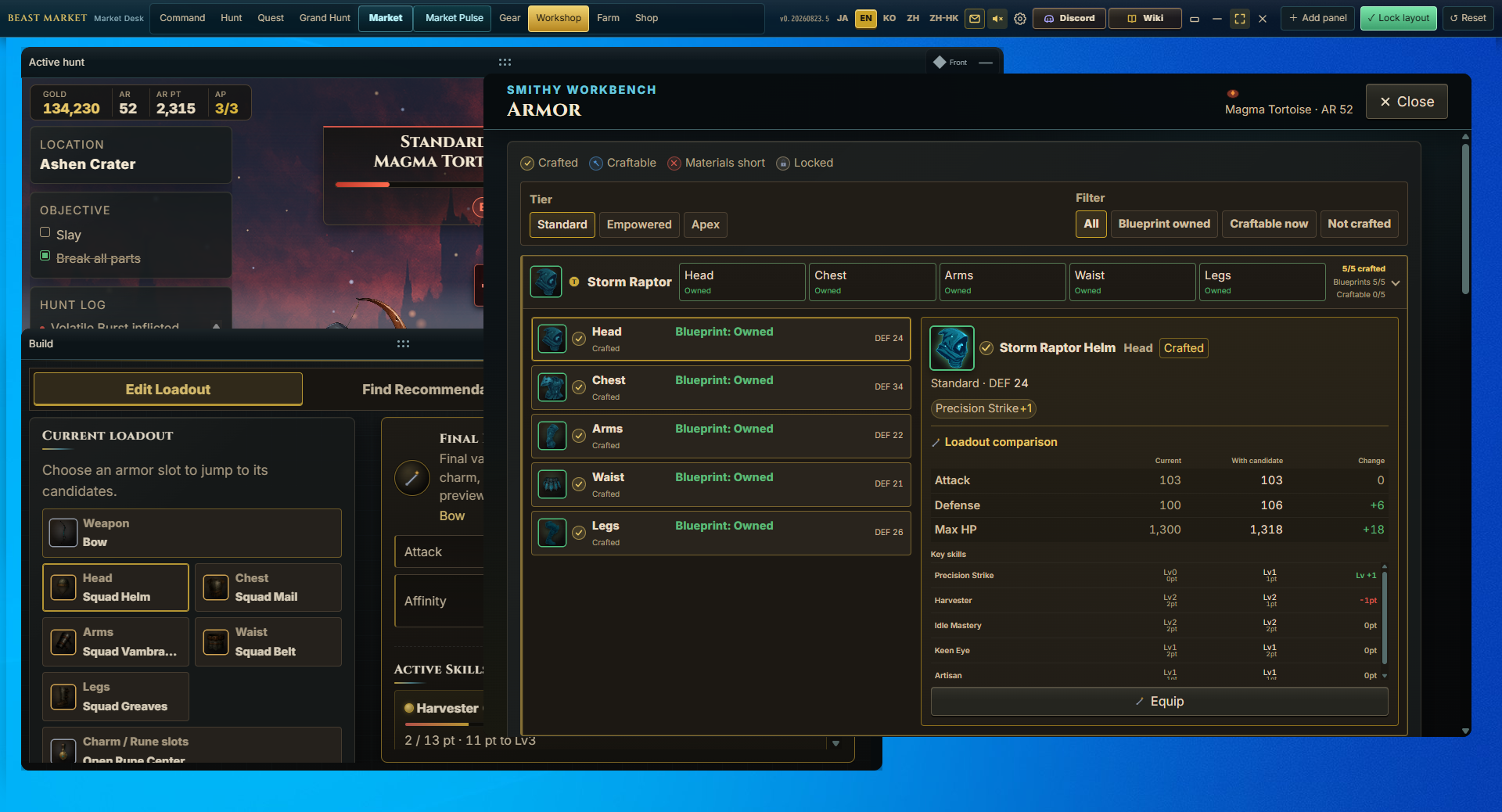
Builds, Workshop, and Rune Management
- Build is now organized into Build Loadout, Find Recommendations, and My Sets.
- Active skills, Orb-granted skills, equipment candidates, and final stats are easier to compare within one workspace.
- The Workshop has been rebuilt as a larger work panel, making owned blueprints, craftable parts, and required materials easier to distinguish.
- Navigation to weapons, armor, research, Charms, and squad equipment has been streamlined.
- Rune Management now includes search, category/rarity/equipment-state filters, stable sorting, and bulk selection.
- Skill changes can be previewed before equipping a Rune.
- You can generate a 1200×630 share card containing your equipment, Runes, Charm, active skills, and hunt-efficiency score. Short share links, X posting, image saving, and detailed text copying are supported.
Quest Select and progression guidance
- Quest Select now recommends targets for your current equipment and explains each recommendation.
- Filter by monster name, variant, first-clear status, and Research Lv; sort by recommendation, AR, Research Lv, or name.
- Quest cards now show estimated hunt time, element, weaknesses, resistances, and inflicted ailments.
- First-clear status is easier to read separately for Standard, Elite, and Apex variants.
- Quest and equipment changes now appear immediately while the server confirms them in the background. Only failed operations are rolled back.
- Season 0 goals and the next suggested action are now shown in Command Center, and the beginner guide can be replayed from Settings.
Hunt screen and combat presentation
- The hunt scene now uses a stronger sense of depth, with the hunter in the foreground and the monster deeper inside the arena.
- Hunting grounds have been refreshed with 30 backgrounds and six families of ground treatment.
- Attack, hit, damage dealt, damage taken, and ailment feedback have been resynchronized for every weapon type.
- Fixed the delay between reaching the capture threshold and completing a capture.
- AP interventions, defeats, camp returns, kills, and captures now follow a more consistent timeline between server results and animation.
- Hunt results appear inside the Hunt panel, can be closed manually, and automatically close after 30 seconds.
- Fixed offline-progress and hunt-result dialogs being clipped by certain window sizes.
- Clicking the Hunt panel now brings it forward, and panel dragging has been optimized.
Grand Hunts and Gear Enhancement Orbs
- Grand Hunt has been redesigned into a clear sequence: craft a Hunt Map, run the chain, review rewards, select an Orb, select gear, roll effects, and compare the result.
- Hunt Maps can now be crafted in batches.
- Added an auto-run option that continues through owned Hunt Maps.
- Cards for all six Orb types now explain their target skill groups and effects.
- Current effects and the newly rolled candidate are displayed side by side before you choose whether to replace or keep the existing enhancement.
Market and Market Pulse
- The top-menu “Prices” entry has been renamed “Market” to make the economy hub easier to find.
- Market is now organized around Listings & Retrieval, Market Analysis, and Steam Holdings.
- Added Market Pulse, a compact panel for monitoring market activity while you play.
- During Playtest, you can inspect the Market interface and preparation data. Steam Inventory transfer and listing are reserved for the full release and are not available in Playtest.
DLC features during Playtest
- For Playtest evaluation, Workshop Assistant, Homestead Charter, Tactics Computer, Grand Warehouse, and Hunter's Bedroll are available to existing and new Playtest participants.
- This access is for Playtest feature evaluation and does not grant ownership of the full-release DLC.
Synchronization, rewards, and stability
- Equipment changes, Quest switching, crafting, shop purchases, and Core opening now use immediate interface feedback while confirmation continues in the background.
- Duplicate requests are blocked while pending actions remain visible and understandable.
- Fixed delayed Core and first-clear reward settlement after AP interventions.
- Auto Progress now settles hunt results and first-clear rewards in order while advancing through targets.
- Fixed missing hunters, blank panel contents, and changed window sizes after returning from Compact Mode.
- Fixed repeated exit confirmations and improved clean game shutdown.
Wiki
- Updated monster elements, weaknesses, resistances, ailments, part hitzones, and Research Lv-based drop rates.
- Grand Hunts, Gear Enhancement Orbs, Rune categories, and shared Builds now match the current game rules.
- The Wiki and shared Build pages support Japanese, English, Korean, Simplified Chinese, and Traditional Chinese (Hong Kong).
This is more than a visual refresh. It lays the foundation for Beast Market as a game where hunting never has to stop while you manage equipment and read the economy.
Thank you for the extensive reports and testing throughout Playtest. We will continue improving usability, presentation, synchronization, and economic features.
---