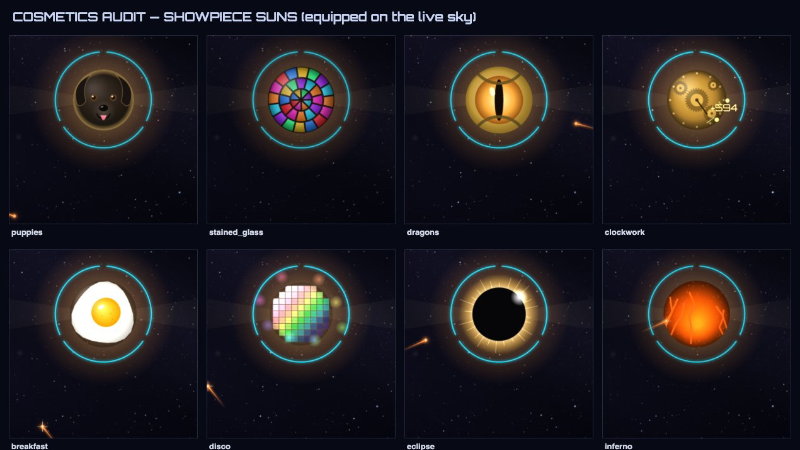
Idle games have a reputation, and we understood it going in. Numbers go up, you close the tab. We built one anyway, because the part we actually wanted to make was the part nobody expects to find. Here is a full accounting of one of those layers: the 122 ways you can change how Stellar Nursery looks.
Planet themes 58
A theme here is not a skin on one planet. It is a recipe, and one purchase dresses every body you own: the planets, their moons, and the sun itself. Equip Stained Glass and the whole system becomes a cathedral window. Equip Bakery and your star is a proofing loaf.
Art Styles (12)
Noir, Pixel, Stained Glass, Watercolor, Origami, Ukiyo-e, Blueprint, Chalkboard, Art Deco, Mosaic, Crayon, Comic Book
Materials (10)
Lava, Neon, Ice, Chrome, Marble, Clockwork, Crystal, Velvet & Gold, Knitted, Porcelain
Cosmic & Whimsy (10)
Coins, Constellation, Beach Balls, Eclipse, Ghost, Disco, Christmas, Jack-o'-Lantern, Poker Chips, Tires
Food (9)
Candy, Bakery, Fruit, Sushi, Breakfast, Pizza, Coffee & Cream, Ice Cream, Cookies
Creatures (8)
Cats, Puppies, Dragons, Bees, Koi, Owls, Jellyfish, Axolotls
Nature & Mood (8)
Aurora, Deep Ocean, Flowers, Thunderstorm, Cherry Blossom, Forest, Autumn, Midnight Garden
Secret (1)
You have to find this one.
They are not all the same weight. Thirty-seven are standard, eleven are premium, and six are showpieces, which are the ones I spent the longest on: Stained Glass, Clockwork, Breakfast, Disco, Puppies and Dragons. Two are seasonal. One is tied to finishing the work. One is secret.
Every theme is earned by an achievement first and bought with stardust second. You cannot buy your way past the playing.
One rule we would not bend: the Nurture console always shows you the real planet, even with a cosmetic equipped. Themes dress the world view. The console is where you read a world's actual condition, its life, its stage, its damage. I did not want a decorated Earth hiding a dying one.
The beam and the vacuum 30
Two things you touch constantly: the beam that charges your star, and the vacuum you sweep loose stars with. Both have their own catalogues, and neither is for sale at any price.
15 beam styles. Solar Standard, Crimson Lance, Emerald Ray, Violet Storm, Gold Ray, Ion White, Rose Quartz, Abyss, Toxic, Ember, Glacier, then Void Edge, Magenta Pulse, Dragonfire, and Prismatic, which animates.
15 vacuum styles. Gravity Gold, Nebula Rose, Abyssal Teal, Verdant, Ion Blue, Ember Draft, Ghostlight, Amethyst, Honey, Mint Frost, Deep Current, then Twilight, Bloodmoon, Solar Flare, and Starlight.
Every one of these is unlocked by an achievement. There is no stardust price on any of them. The only way to get a new beam colour is to do something in the game worth remembering.
UI tone 34
This is my favourite layer and the hardest one to show in a screenshot. The entire interface is keyed to a single hue. Change it and every panel, readout, border and glow in the game moves with it. Not a theme setting with three options. A colour wheel, and the console follows.
Thirty-four tones, starting at Console Cyan and travelling the whole way around: Amethyst, Orchid, Fuchsia, Pink Nova, Crimson, Hematite Red, Ember, Solar Gold, Citrine, Chartreuse, Leaf, Verdant, Jade, Mint, Emerald, Sea Glass, Turquoise, Lagoon, and back to where you began.
Three are yours from the start. Most of the rest cost stardust, escalating the further you travel around the wheel from where you began. Three are priced in minerals instead, which felt right to me: the red one costs hematite, the gold one costs silicate, and the magenta one costs neutronium. There is also a white called Starlight, which is not a hue at all and so works differently under the hood. You can have it free, once, if you pick it at First Light.