Long notes are three pieces now — a head, a body and a tail — and they are drawn like it. The skin editor grew a search box, three switches for the sparks, and a proper override for what a hold looks like under your finger. And the playfield can be emptied of everything that is not the chart.
LONG NOTES, DRAWN PROPERLY
On the field
A head, a body that tiles up from the tail, and a tail. No stretched ribbon, no white slab.

- THE HEAD STAYS ON THE LINE while you hold it:
an early press dragged the ribbon down to the line and left it there⇒ it sits on the judgement line until the tail arrives, then the whole note leaves at once. - AT 75%:
the ribbon swapped texture where the hold pays its credit, and read as cut in half⇒ the credit still pays there, and nothing on screen moves. - NO MORE SHAKE: the bar was drawn after the frame it measured, so a held head sat 16–36 px under the receptor and moved every frame. It now draws against the frame being drawn — measured at 0.0 px across thirty frames.
- A SKIN THAT SHIPS BOTH END CAPS is drawn this way on its own, with nobody touching a row. Without caps it is the additive light it always was, so no existing skin changes.

In the skin editor
Six pieces for a long note, and a real switch for the pressed state.
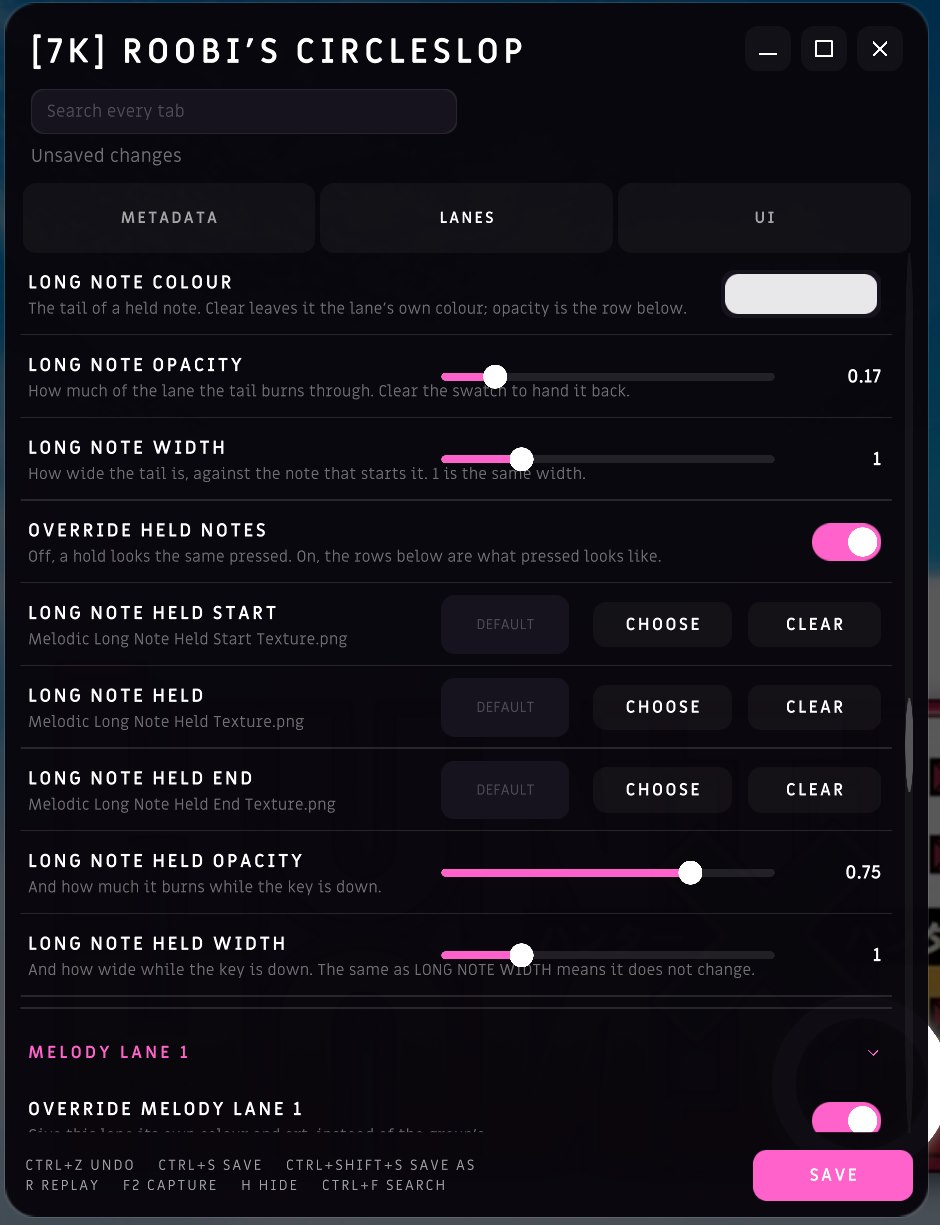
- OVERRIDE HELD NOTES sits in each of the three families — central, rhythm and melodic. Off, a hold looks the same pressed. On, the rows under it are what pressed looks like, and nothing else.
- THE HELD WIDTH:
applied whatever you did, so every tail in every skin widened under your finger without anybody asking for it⇒ only when the override is on. - TWO OPACITY ROWS:
the tail's opacity only existed as the alpha strip hidden in the colour picker⇒ LONG NOTE OPACITY for the tail at rest, LONG NOTE HELD OPACITY for the moment your key is down. - SIX TEXTURES in all — start, body and end, plus the three held ones — and the tail's colour now reaches all three pieces while the chart is running.
- EVERY SKIN ALREADY INSTALLED was read for what it was already doing and seeded to match. None of them look any different.
FIND A SKIN SETTING BY TYPING
138 controls across three tabs, and finding one meant guessing the tab and then scrolling.
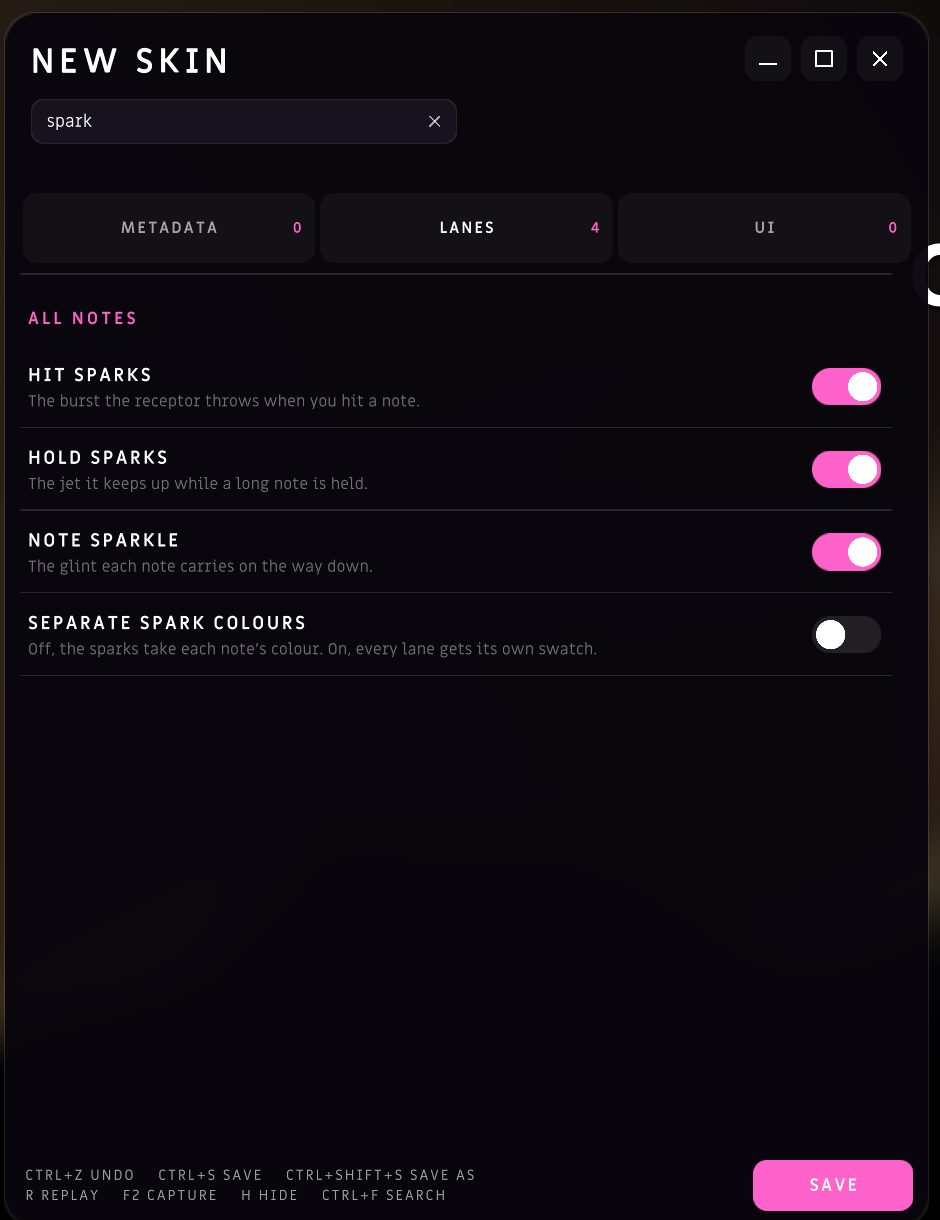
- A BOX UNDER THE SKIN'S NAME filters all three tabs at once, and the tab rail says how many matches each one is holding. If the tab you are on has none, the panel moves to one that does.
- A ROW ANSWERS TO ITS HEADING as well as its own name, so "melody 4 colour" finds a row that is just called COLOUR.
- CTRL+F puts the cursor in the box, ESC clears it, and a click on the playfield clears it and scrolls to the block you clicked.
- EVERY HEADING FOLDS ITS BLOCK — the whole heading is the button. A search opens everything while it is up, and your folds come back the moment you clear it.
- THE STATUS LINE:
"Up to date" sitting there whenever nothing was happening, which was most of the time⇒ it is simply not there until it has something to say.

THREE SWITCHES FOR THE SPARKS
"The particles when you press a note" turned out to be three different effects.

- HIT SPARKS: the burst the receptor throws at the moment you hit a note.
- HOLD SPARKS: the jet it keeps up for as long as a long note lasts.
- NOTE SPARKLE: the glint each note carries the whole way down — not a press effect at all.
- All three start on, and a skin written before they existed reads them on, so nobody who touches nothing sees a change. Turn all three off and the field goes quiet: the receptors are flat bars of colour again and the note head arrives plain.
A PLAYFIELD WITH NOTHING IN THE WAY

- THE MOUSE POINTER HIDES while a song is playing, and the corner buttons go with it — they come back the moment you are not playing.
- THE GAME HAS ITS OWN POINTER:
the Windows arrow⇒ the logo's triangle, from the splash screen onward. - THE BEATMAP BACKDROP has one switch that turns it off, on a row of its own.
- H HIDES THE HUD in a replay and while spectating.
- DRAG THE PLAYFIELD where you want it instead of moving sliders, and every marker piece can be dragged — not only the health bar. The timing bar and the pp a run is worth are pieces a skin can place too.
SONG SELECT
- FILTER BY TAGS, the same way the download browser does — the chart tags, on the list you actually pick from.
- THE OTHER FOUR BOARDS are in the dropdown that used to hide them.
- THE PREVIEW FOLLOWS THE RATE, so a chart you are about to play at 1.4x sounds like it.
THE CHAT WINDOW MOVES
- DRAG IT AND RESIZE IT, and it comes back where you left it.
- EACH DM'S FACE on its channel tab, so a row of tabs is a row of people.
- SEND A BEATMAP IN A MESSAGE, and open one that arrives.
THE BEATMAP EDITOR
- DRAG A LONG NOTE'S ENDS instead of retyping its duration.
- UPLOAD A WHOLE MAPSET from the editor in one go.
- THE CAMERA PERSPECTIVE is remembered between sessions.
- THE BEAT DIVISIONS are drawn on the lanes they divide, and only as far as the view can reach.
THE SITE
- A WIKI AND A SKINS PAGE, on the row you look things up from.
- THE TERMS, THE PRIVACY NOTICE, THE COMMUNITY GUIDELINES AND A BEATMAP RIGHTS POLICY are published — the ones the service actually runs on.
- YOUR PEAK RANK sits under the rank you hold now: how high you have ever been, not only where you are today.
- MUTUALS: a follow that goes both ways says so, in pink.
- A CHART'S BOARD can be narrowed to a country, to your friends, to one speed or to one mod.
- PICK WHICH BOARD YOUR PROFILE OPENS ON, and World Rankings comes back on the keymode you picked last.
- THE PROFILE SAYS WHAT YOU ARE DOING, not just that you are online, and the badge opens the map it names.
- ETTERNA joins the profile links, and the rhythm-game links carry their real logos now.
- TOP PLAYS reaches the second hundred, the latest plays feed refreshes itself, and the country table says which keymode it is counting instead of always 4K.
- THE STREAK says when the day turns over, and what to do about a day that has not counted yet.
- THE PP RECALCULATION PANEL:
a panel you had to read to know where you stood⇒ retired, and the page simply says how full your pp window is. - THE WORLD RANKING can show the players it hides, when you ask it to.
BUGFIXES
- Typing in the skin editor no longer plays the chart underneath — searching for "spark" used to press whichever lanes S, P, A, R and K were bound to.
- Escape from a text field clears the field instead of closing the editor.
- A hold's spent and failed ribbons keep their texture when you change skin without leaving the song.
- The two ends of a long note survive the skin under them being rebuilt.
- Last song's answer no longer puts its event cursor back on this one.
- The game opens on its menu until the four notes are worth playing.
- Spectate says why the picture stopped, not just that it did — and says what the player you are watching is doing, not only their name.
- A long note is called one thing everywhere in the game.
SEE YOU ON THE PLAYFIELD
If you make skins, this is the patch to open the editor on. Tell us what is missing.
More from Lynium: Play the Rhythm
Other announcements
Lynium 2.2.2 — Patch NotesYou can now be judged on the timing you already know. Twelve presets, the games they came from printed on them, and your score, your pp and your health measured the same way whichever one you pick. And the editor charts a song by itself the moment you import it. PLAY ON THE TIMING YOU KNOW Pick the game you came from Settings → Gameplay → JUDGEMENT TIMING, or the first screen you see on a new i…Lynium 2.2.1 — Patch NotesYou can watch somebody else play now — live, from the chat, three seconds behind their hands. And every run you finish records itself, so you can rewatch it, hand it to somebody, and leave notes on the exact moment you want to talk about. WATCH SOMEBODY PLAY Spectating Right-click a name in the chat, hit Spectate, and you are in their run. · THE FEED : their playfield, their score, their combo,…Lynium 2.2.0 — Patch NotesThe game has a chat, and it is the same room as the Lynium Discord — type in one window, it appears in the other. And a run now draws about twice the frames it did, because the chat, the missed notes and the timing tick had all been quietly charging you for things nobody was looking at. THE CHAT Seven rooms, the people in them, and whatever you feel like sending. The window · A CARD, NOT A CURT…