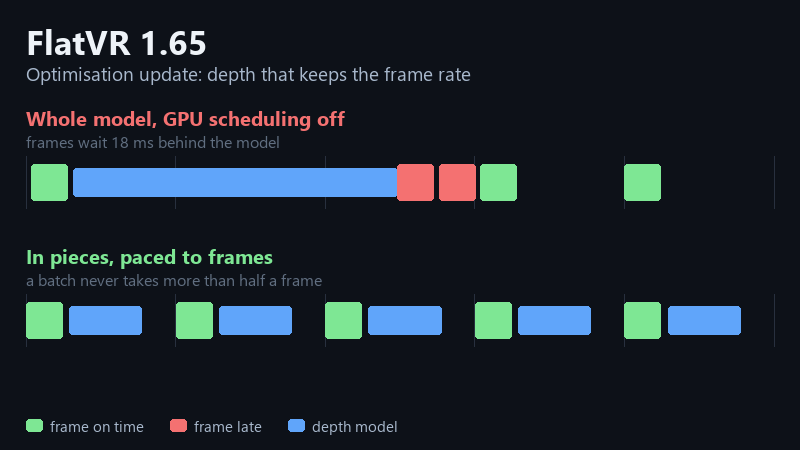
A regular update, about frame rate with AI depth on: hardware GPU scheduling on the Status tab, the depth model in pieces paced to your frames, presets that watch the frames themselves, and a set of fixes.
How to get it: right-click FlatVR in your Steam library → Properties → Betas → develop. To go back, pick last_stable. Settings survive either way.
Cinema Mode no longer freezes and jumps
"Sync Depth to Picture" holds the picture back by the time the depth model takes, so the 3D matches the frame it was built from. On a 120 Hz desktop the capture delivers a 60 fps video as A,A,B,B, and the frame ring behind that delay was counting those repeats as pictures. Whenever the desktop sped up, the ring could not reach back far enough, the delay collapsed and the road jumped ahead; when it slowed down again the picture stood still until real time caught up. The ring now keeps only real pictures, and holds ten of them instead of eight. Measured: every content frame on screen for exactly its interval, no holds, no skips.
Performance Mode watches the frames, not just the clock
The presets used to judge a depth model by its own inference time against a budget. A model can keep that budget and still ruin the frame: its GPU work lands between the frame's own, and on a card that is also busy - a game, an editor - each map makes a frame or two late while the model's median sits comfortably inside the budget. Now the frame loop reports late and dropped frames to the tuner every second, and a rung that keeps dropping them for five seconds is stepped down. Only downwards, never on Custom.
New: the depth model in pieces, paced to your frames
A depth model is one long chain of GPU work, and while it runs your frame waits behind it - on a card without hardware GPU scheduling, all of it. The model can now be cut into pieces at its transformer-block boundaries and submitted in batches, with a wait for your next frame between them; a batch never takes more than half a frame's period, so the frame always gets in. Same map, same total work, a steadier frame rate; the price is that the map arrives a few frames later. The switch is the new Run the depth model in pieces, paced to frames checkbox on the FlatVR tab. All the Distill presets ship pre-cut. Presets set it on entry and leave it live: Cinema Lite starts in pieces (it is the mode for the weaker card), the other three start whole, Custom keeps your choice.
HAGS on the Status tab
Hardware-accelerated GPU scheduling is a Windows switch buried four menus deep, and it decides whether the graphics card can put a frame in between the depth model's work. Off, depth stutters; on, it does not - the 3 September numbers were Distill Quality at 90 fps with it on and 45 with it off, same machine. The Status tab now says whether it is on, explains what it does, and offers to switch it on (one admin prompt, then a Windows restart). It also offers the way back, behind a warning.
Fixes
- Stop → Start in one session no longer loses the graphics device on the first frame. A GPU query from the first session was being reused on the second one's new device; the D3D11 debug layer caught it and named it.
- SBS / XREAL output: dark gradients no longer turn into blocky steps. The SBS path stored linear values in 8-bit textures; they are sRGB now, like the headset's.
- The D3D12 device used for FSR 3 lives until the process ends; destroying it on Stop was crash #62.
- Frame generation's NvOF session is built on the frame thread again; building it in the background crashed the driver.
- Default screen on a fresh install: 3 m wide at 5 m, scale 1x.
For the silent crashes
Debug tab → Enable Silent-Crash Dumps now also switches on Windows Page Heap for FlatVR, so a heap-corruption crash that used to close the app without a word is caught at the instruction that did it, and Check & Send Silent Crash reports it. Turn it off after the hunt - it makes the app slower while on. There is also a D3D11 debug layer checkbox (DEBUG MODE) for chasing device losses that leave nothing in the Windows logs.
What this does not change
The models are the same as 1.62. Nothing here alters what the depth looks like - only when the map arrives and what the frame pays for it.