Bug Fixes
- Fixed an issue where NPC Eva's status would not update with quest progression.
- Fixed an issue where heavily damaged ships would sink and be destroyed too quickly.
- Fixed incorrect map colors for neutral islands.
New Features
Character Save History Restore
We've added a Character Save History Restore feature, allowing you to restore previous character saves. You can choose from up to 9 historical save files to replace your latest save.
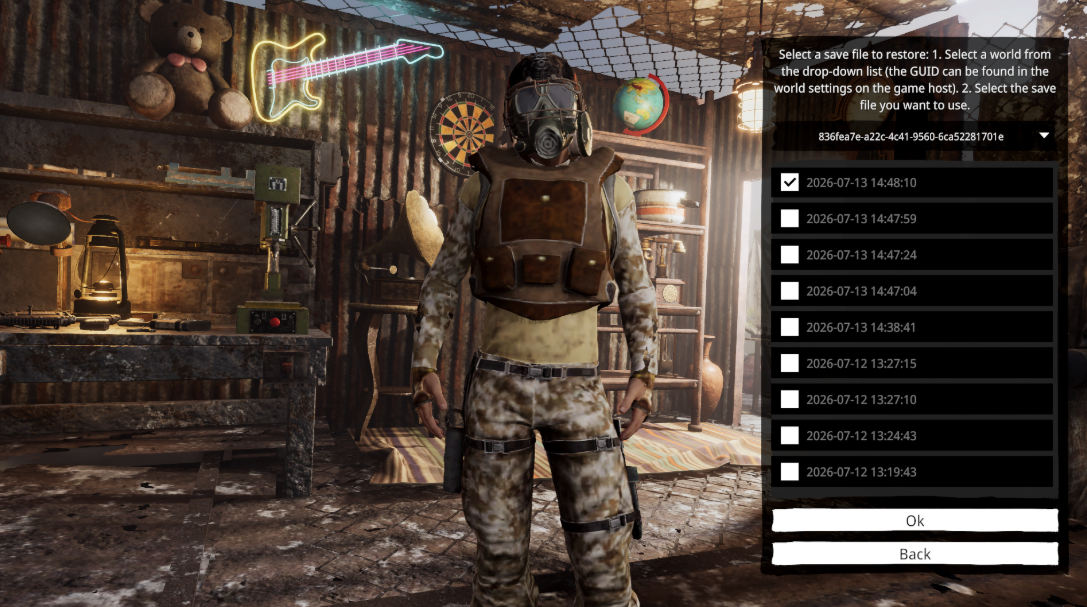
Please use this feature with caution. The restore option can be accessed from the Character Selection screen.
How to use:
- Select the desired world from the drop-down list. (The World GUID can be found in the host world settings.)
- Choose the save file you want to restore.
- Click Confirm.
Note: Due to current save system limitations, world names cannot be displayed at this time. Support for displaying world names and restoring world save history will be added in a future update.
Dedicated Server
Added support for custom save paths.
When launching the dedicated server with the launch parameter:
-steamID <Your_64bit_SteamID>
save files will be loaded from:
C:\Users\<Your_User_Name>\AppData\LocalLow\Vector3 Studio\Sunkenland\Worlds
If the parameter is not specified, the server will continue loading saves from the default location:
C:\Users\<Your_User_Name>\AppData\LocalLow\Vector3 Studio\Sunkenland\SteamCloudData\<Your_64bit_SteamID>\Worlds
Please read the updated Dedicated Server Manual before configuring your server scripts.