Warrior Architects Updated to Version 1.0.8.2,Added a part-time job mode
Warrior Architects · published · build 21208622
Warrior Architects has been updated to version 1.0.8.2 on December 16, 2025.
Below are the update details:
Update Notes
Added new building [Stage]
Fixed an issue with enemy AI incorrectly allocating population between villagers and combat units
Added new building [Tavern]
Added new building [Blacksmith]
New Part-Time Job Buildings
Three new buildings have been added to Warrior Architects:
[Stage], [Tavern], and [Blacksmith].
These buildings are unlocked when the player reaches Level 3.
Each building provides a different type of part-time job gameplay.
Stage – Rhythm Game
Entering the Stage opens a rhythm game interface.
Controls
↑ Up Arrow: Hit upper notes
↓ Down Arrow: Hit lower notes
← Left Arrow: Hit left notes
→ Right Arrow: Hit right notes
Basic Gameplay
Notes move from the edges of the screen toward the judgment zone in sync with the music
Press the corresponding arrow key when a note enters the judgment zone
More accurate timing results in higher ratings and scores
Consecutive successful hits increase your Combo
Every 100 successful hits grants 1 EXP
Each successful hit also has a chance to generate income
Judgment Ratings
Perfect: Extremely accurate timing
Good: Slight timing deviation
Bad: Barely hit
Miss: Failed to press the key within the timing window
Score & Combo
Hitting notes earns points
Continuous hits increase Combo
A Miss will break the Combo
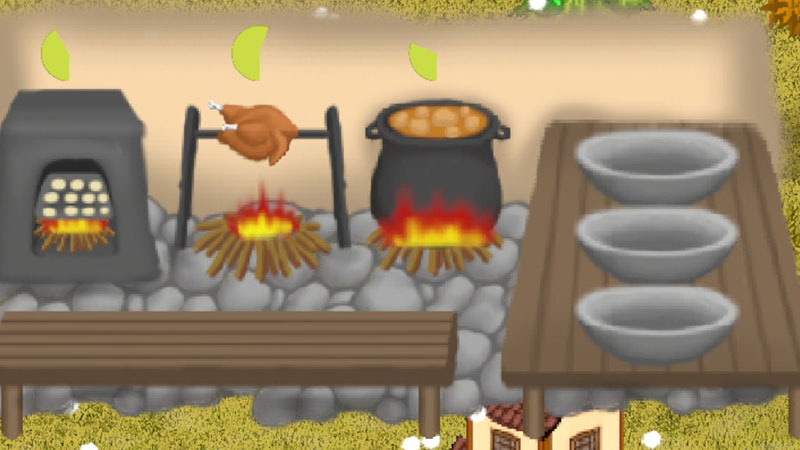
Tavern – Cooking Game
Entering the Tavern opens the kitchen interface.
Basic Gameplay
Three ingredients appear on the table in the lower-left corner:
Flour
Raw Chicken
Potato
Click an ingredient to begin cooking:
Flour → Sent to the left oven → Baked Bread
Raw Chicken → Placed on the middle grill → Roast Chicken
Potato → Cooked in the right pot → Potato Soup
Each dish requires a certain cooking time.
Once completed, the dish is placed on the white plate on the right side.
Click the finished dish to earn income
New ingredients will then appear on the table, allowing continuous cooking
Blacksmith – Forging Game
Entering the Blacksmith opens the blacksmith interface.
Basic Gameplay
Iron ore appears in the barrel at the top-left corner.
Click the iron ore to send it to the furnace on the right for heating.Once the iron turns red-hot, click the anvil in the center to begin forging.
After forging, click the furnace again to reheat the half-finished product.
Click the anvil once more to continue forging.
When the forging reaches a certain stage, click the liquid container in the bottom-right corner to quench the item.
After some time, the completed sword will be placed on the table in the bottom-left corner.
Right-click the sword to deliver it and earn income.
After delivering the finished product, a new batch of iron ore will appear in the barrel.