The main focus of this update is to improve the Air Systems and overall polishing. Along with numerous smaller bug fixes, several UI elements have undergone significant improvements. We are also pleased to welcome Mark, a new employee responsible for Pictures and Marketing. Additionally, we have overhauled the Steam Page and created a new fancy logo!
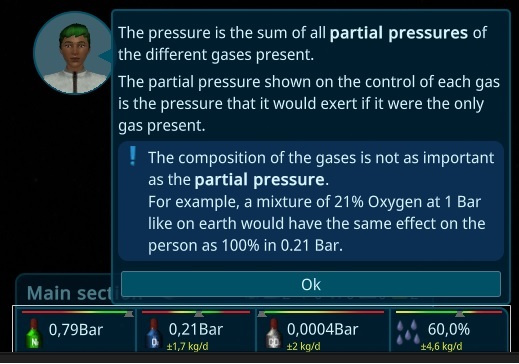
Partial Pressure
The primary change in this iteration pertains to the ship values. Through experimentation, I discovered that the atmosphere within the ship behaves differently from reality. As a result, I have made adjustments in the game to account for this. The focus now lies on partial pressure, meaning that it doesn't matter if the atmosphere is 100% filled with oxygen as long as it's at 0.21 bar. Consequently, nitrogen is not as crucial as previously thought and will serve a different purpose in future iterations.
Gravity Details
Gravity has undergone a significant rework and now features the same attributes as other resources. This includes displaying the interior items that influence gravity, a comprehensive history, and more. The calculations have also been adjusted to reflect a more realistic approach with rotational energy. This means that the thrusters need to be adjusted when mass is attached to or detached from the ship.

Advanced Doors
The doors now have an additional state. They can be open, closed, and sealed. The closed state allows individuals to walk through, but it stops the airflow. Essentially, closed doors act as airlocks.

Section List
You can now get an overview of all sections by hovering over the section name and reading the tooltip. Additionally, it is now possible to select the section. Currently, only basic features are available, but more will be added in future updates.

Keep Tooltips Open
To address a problem where new players were unable to see the reasons for disabled tasks, tooltips can now be kept open by clicking with the middle mouse button. This provides an opportunity to solve the issue. Special thanks to grantedthree for reporting this problem.

Markers
The Resource Tooltip Bars have received a complete makeover. They now have a unified style and are easier to use. Critical fill states, such as air values, are now indicated by markers. The markers also display the time to the next critical point.

Other Mass Balancer
To make balancing the ship in the late game easier, I have added a new Mass Balancer that functions similarly to the previous one. This new feature allows for the redistribution of mass away from the ship.

Game Time-based Autosaves
In addition to the existing "Every n Minutes" autosave option, a new Game Time-based autosave has been introduced. This can be configured in the options menu and will create a savegame by default every 7 days of in-game time. Special thanks to Bluesky-wr for reporting this. Furthermore, more metadata and a small screenshot have been included in the savegame to facilitate easier identification.

Mass History
The Mass now also includes a history feature, making it easier to track the magnitude of ship leaks.

New Soil Machine
As part of the ongoing updates to old models, I have created a brand new Soil Machine. Like before, it uses Bio Garbage, CO2, H2, and energy to produce Prepared Earth, which can be used for growing plants later on.

Other changes:
- Fixed an issue where restarting the game with Dynamic Brightness would result in a workaround for a Unity Bug.
- Resolved a problem where the Tutorial Tooltip was overlapping the white highlight box (thanks to hackerintraining).
- Fixed the display of the correct amount of interior items in Blueprints.
- Addressed missing values in Blueprints and various other UI elements.
- Corrected the calculation of updating Moon Places with more than one crew member (thanks to Mark).
- Fixed the Help feature when Gravity was not yet activated (thanks to Mark).
- Resolved broken Person Animation Data (thanks to Mark).
- Fixed an endless loop in the loadTransportSlot function when the transport slot is full (thanks to Mark).
- Fixed the pimenu, preventing a person from filling up something when they are already carrying something else (thanks to Mark).
- Fixed a sound issue with effects.
- Fixed effects not starting after loading a game.
- Fixed a problem where a box turned in the Stacked storage before moving in.
- Fixed the placement of the Highlighter, ensuring it is sometimes not behind the UI.
- Fixed doors not being multiselectable.
- Fixed the Energy overlay not being displayed.
- Fixed the Unconscious Animation not being used in certain cases.
- Fixed a missing Delta label in a special case.
- Fixed the pause not being stopped in a special case with some popups.
- Fixed the Seal button not changing when unsealing in a specific situation.
- Adjusted the SaveGame Progress to be in front.
- Fixed special cases for PopupPanels.
- Improved the error resistance of WorldElements.
- Prevented a person from receiving a walking command when unconscious.
- Fixed a flickering issue with food on the table while placing it.
- Fixed a problem where a person would not stop being unconscious in special situations.
- Fixed the canceling of Walking, which would move the person to the next position.
- Fixed a selection problem where the MassBalancer was unintentionally selected.
- Corrected the mass calculation while constructing a room.
- Fixed some dismantle storages not sending resources.
- Fixed the positioning of Resource-Overview elements for constructions (thanks to BurritoBotV3000).
- Disabled tasks for interior items when the storage becomes empty.
- Fixed WorldElements being shown at the wrong location when behind the camera.
- Fixed the 3D icon for the mass balancer floating in the air.
- Resolved a broken Camera Overflow feature (thanks to BurritoBotV3000).
- Fixed the zoom on the HistoryGraph to prevent scrolling.
- Adjusted the Person timewarp for Crafting to use the processing time as the target.
- Implemented autocorrection for model problems to prevent spamming warnings.
- Balanced the SupplyShip so that 12x 1t steel can fit into the 12t cargo (thanks to grantedthree).
- Stopped the HelpElement when clicking on it again.
- Showed the created Report ID when creating errors or feedback.
- Included the resource type in the StorageProblem if it has only one resource type.
- Changed the MassBalancer to show the TargetValue as Mass instead of Percent for easier setup.
- Allowed the Optimal Resource to be cheat-able.
- Adjusted the rotation of persons' idles to not always be the same.
- Saved the CameraPosition, Zoom, and Current Selection in the savegame.
- Hid Storage Hints for the Person Need overlay.
- Remembered the last overlay when it is changed to improve usability.
- Moved the ability to drop multiple rooms to the Shift key for easier dropping of single rooms.
- Notified the player when humidity is low and explained the implications.
- Included the Target Container Value as part of the container and added a special marker for it
- Improved the readability of rounding for all values, preferring non-comma values.
- Showed the Leaking Buildings instead of a general AirLeak amount.
- Prevented connected doors from being removable (thanks to grantedtree).
- Showed the reason for interior items and rooms being not dismantlable.
- Prioritized workplace tasks for Transport, Construct, Maintain, and Working.
- Increased the person's carry capacity from 20kg to 50kg (0.3g max) for improved efficiency.
- Ensured that persons lay in their own beds and not in beds assigned to other persons.
- Included the ConstructionState of construction sites in the priority list to prioritize their completion.
- Increased the update of mass on SupplyShip and Shuttle arrival.
- Made Maintenance dynamic, depending on the construction effort.
- Restored the tooltip for Construction Effort.
- Improved the sound of engines for the SupplyShip and Shuttle.
- Removed the history of a resource when the container is removed.
- Aligned the item size of storage buttons.
- Reduced the occurrence of bad person models at medium zoom levels.
- Displayed the Room Target of Construction in the Activity panel.
- Enhanced the tooltip for activities on workbenches.
- Improved the view with many ResourceFilters on a storage.
- Made the location of ResourceContainers clickable to select the storing entity.
- Enabled hiding overlays (like resource paths or container elements) in First Person View.
- Hid non-buildable or deprecated interior items from the SupplyShip and Workbench (thanks to BurritoBotV3000).
- Added a tooltip for Repeat Mission (thanks to BurritoBotV3000).
- Increased the impact of high humidity on rooms and interior items.
- Implemented autocorrection for problems with wrong AirVolume (thanks to Mark).
- Implemented autocorrection for Storage Problems.
Want to see more?
I also post the progress and more pictures to our Discord:
And don't forget to wishlist and follow us to keep up to date.
https://store.steampowered.com/app/1638030/Generation_Ship/