Update 0.30: Steam Workshop Available, New Map and Improvements!!
major updateAncient Wars: Medieval Crusades · published

Greeting Strategists!
First of all, thank you all for supporting the project and continuing to build such a fantastic community.
It is a pleasure to announce this great update, which stands out for adding a feature that many of you wanted, such as Steam Workshop support. You already know that the community is the most important thing for me and I hope that this addition helps you to enjoy the game a little more.
Below is the list with all the content of this update:
- Steam Workshop support (how to use it is described below)
- New Map: (4) Friends of Our Enemies
- Added time cost indicator for all objects that require time for their production or construction (Buildings, units, researches, etc...).
- New sorting system in the selection of units, now grouped in a more intuitive and easy to control by the player.
- Added penalty effect on ranged units when attacked by a melee unit.
- Fixed critical bug that forced to restart the game after each multiplayer game to avoid the desync.
- Fixed bug that caused the overlapping of the penalty suffered by ranged units when attacked by a melee unit that caused their damage to be zero when attacked by numerous melee units.
- Fixed bug in which the flags of settlements healed neutral units.
I hope you like this update and feel free to give your feedback or any suggestions as always.
Official Discord of the game:
Link
Steam Workshop User Guide:
To create a Workshop item and upload it:
1 - Open the game's Map Editor
2 - Create the map with all the features or modifications you want (You can create maps for new game modes, mission maps, great battles, simple skirmish maps, etc...)
3 - Save the map you have created
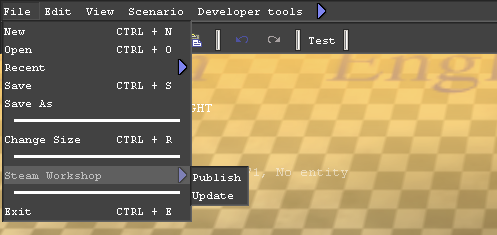
4 - In the editor toolbar, look for the File option, click and select the Steam Workshop option, where you can publish the Map in the Workshop or Update a Map that you have previously uploaded.
You can look at the screenshot to see where the Steam Workshop option is located in the Editor.
5 - Finally, change the Item information in the Steam Workshop to your liking
To subscribe and download a Workshop map:
1 - Enter the game Workshop, from the game meeting point
2 - Browse the available maps
3 - Subscribe to the map you want to download
It will download automatically and appear in the game along with the other available maps
4 - If you want to delete a downloaded map, simply unsubscribe from it in the Workshop