Build 26384878
buildTask Force · public · first seen
Task Force 0.7.7.2220
Quality of Life Update
This update is all about the little things that make a match feel better: knowing who you're playing with, dealing with the players who ruin it, and fewer moments of "wait, why did it do that?" Here's what's new.
A Brand New PLAYERS Screen
Open the in-game menu and PLAYERS now shows everyone on the server: both teams side by side, the score, the round and the clock between them, and anyone spectating underneath.
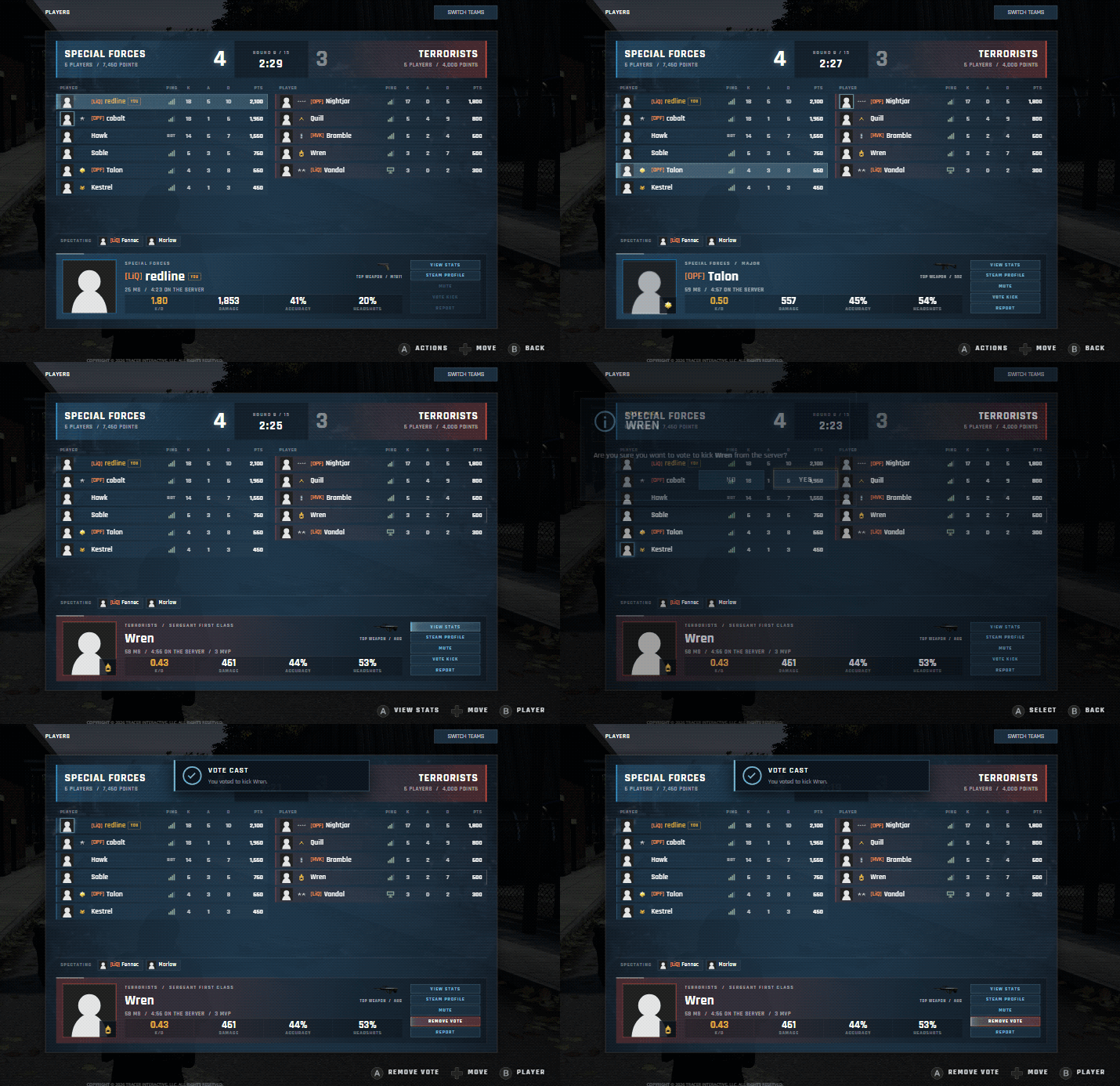
- Every row shows the player's rank, clan tag, ping, kills, assists, deaths and points. Players who are dead this round are dimmed, and the host is marked.
- Select a player to see more about them at the bottom: their rank, how long they've been on the server, their K/D, damage, accuracy, headshots and their top weapon.
- From there you can VIEW STATS (their full stats page), open their STEAM PROFILE, MUTE them, VOTE KICK them or REPORT them.
- Bots are listed with their team, but they can't be selected.
- SWITCH TEAMS is right at the top, and the list shows you on your new team instantly.
It all works on a controller too: the d-pad moves through both teams, A opens a player's options and B takes you back.
Your Server at a Glance
Across the top of the in-game menu is the server you're playing on: its name and region, the map and mode, your ping, and how many players and bots are on. If it's a controller only server, it says so right there.

You'll also spot an ADMIN button up there. Server admin tools are on the way, and that's where they'll live.
Vote Kick, Done Right
VOTE KICK asks you to confirm first, so a stray click never starts a vote. Once you've voted, a notice lets you know it went through.
Changed your mind? The same button now reads REMOVE VOTE, and your vote is taken back straight away. Casting votes has a cooldown so nobody can spam them, but removing your vote is always instant.
Ready Up for Ladder Matches
In a competitive ladder match, the PLAYERS screen doubles as the lobby. Every player has a ready light, and SWITCH TEAMS becomes TOGGLE READY. Once the match is under way, the ready lights and the button go away, since nobody is switching sides mid-match.

Report a Player
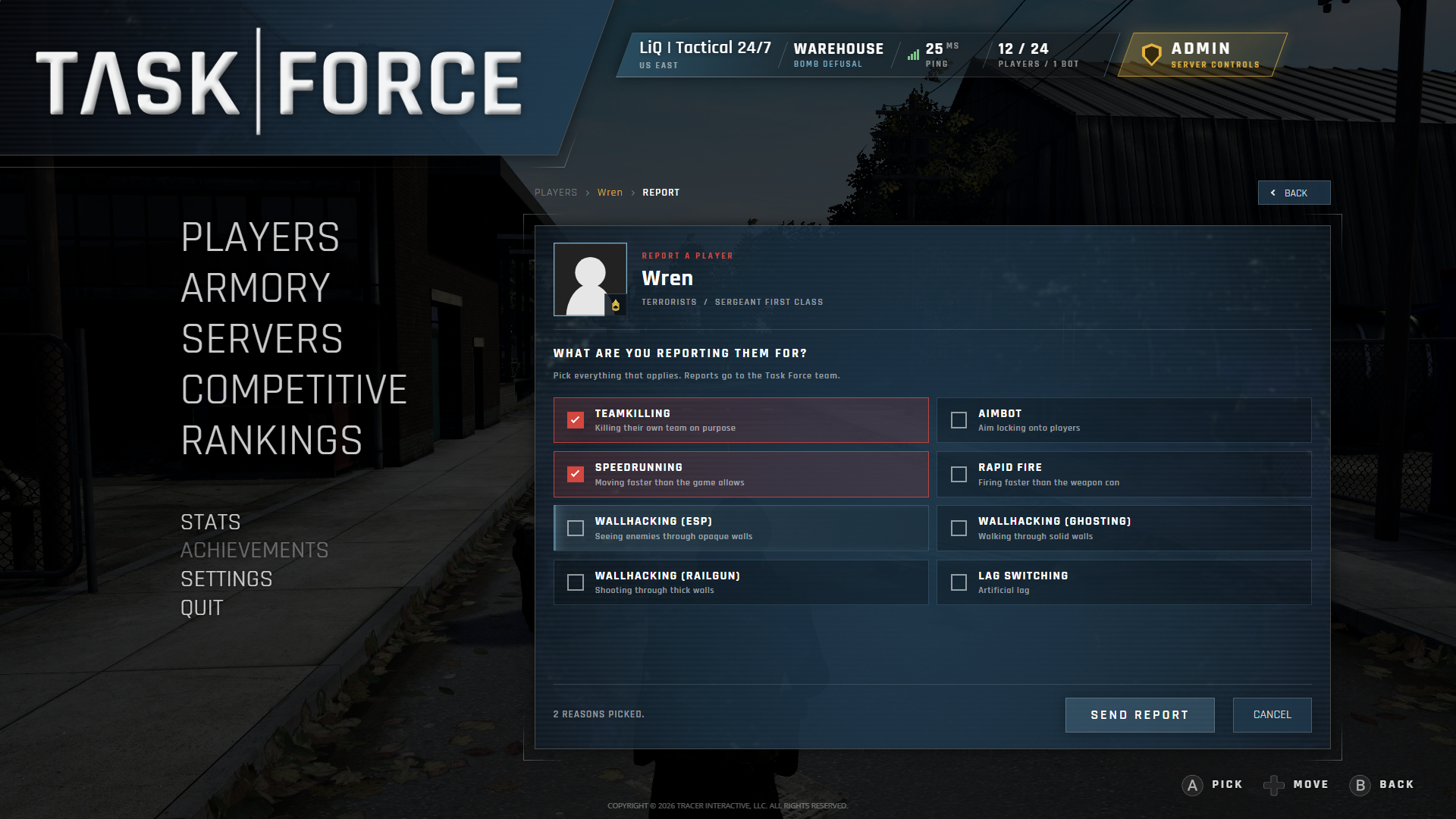
REPORT now opens a proper form. Pick everything that applies (teamkilling, aimbot, speedrunning, rapid fire, three kinds of wallhacking and lag switching) and send it straight to the Task Force team. You'll be back on the PLAYERS screen with a notice that your report was sent.
Controller Only Servers
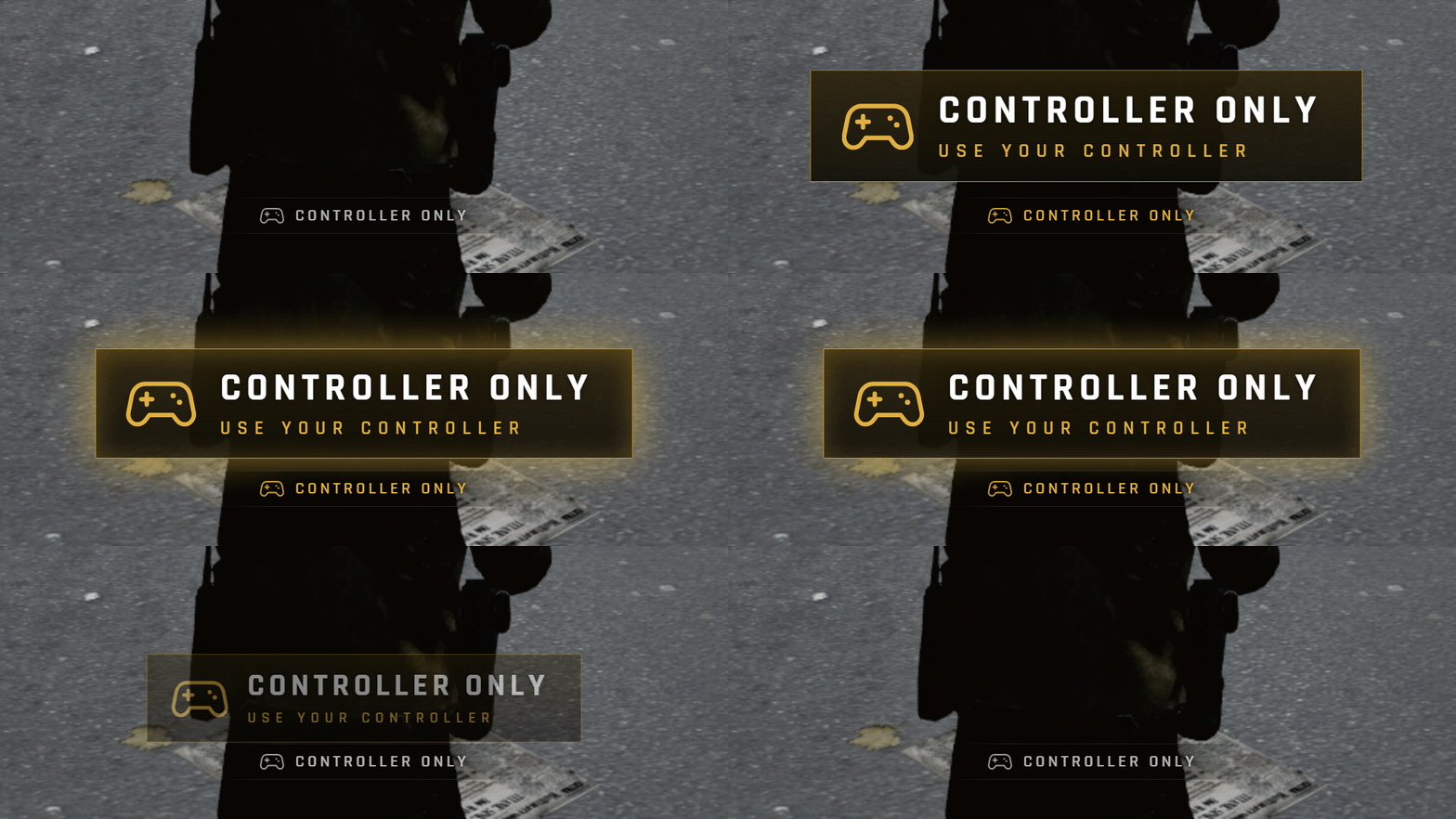
On a controller only server, a small CONTROLLER ONLY badge now sits at the bottom of your HUD for the whole game. If you're playing with a mouse and keyboard, a big alert rises out of it and asks you to pick up your controller. As soon as you do, it slides back down.
Type With Your Controller
Text boxes work on a controller now too. Press A on one (a server's password, your lobby's name, a search) and Steam's on-screen keyboard comes up right over the game, and whatever you type goes straight into the box. Chat works the same way: open chat with a controller and type your message on the keyboard.
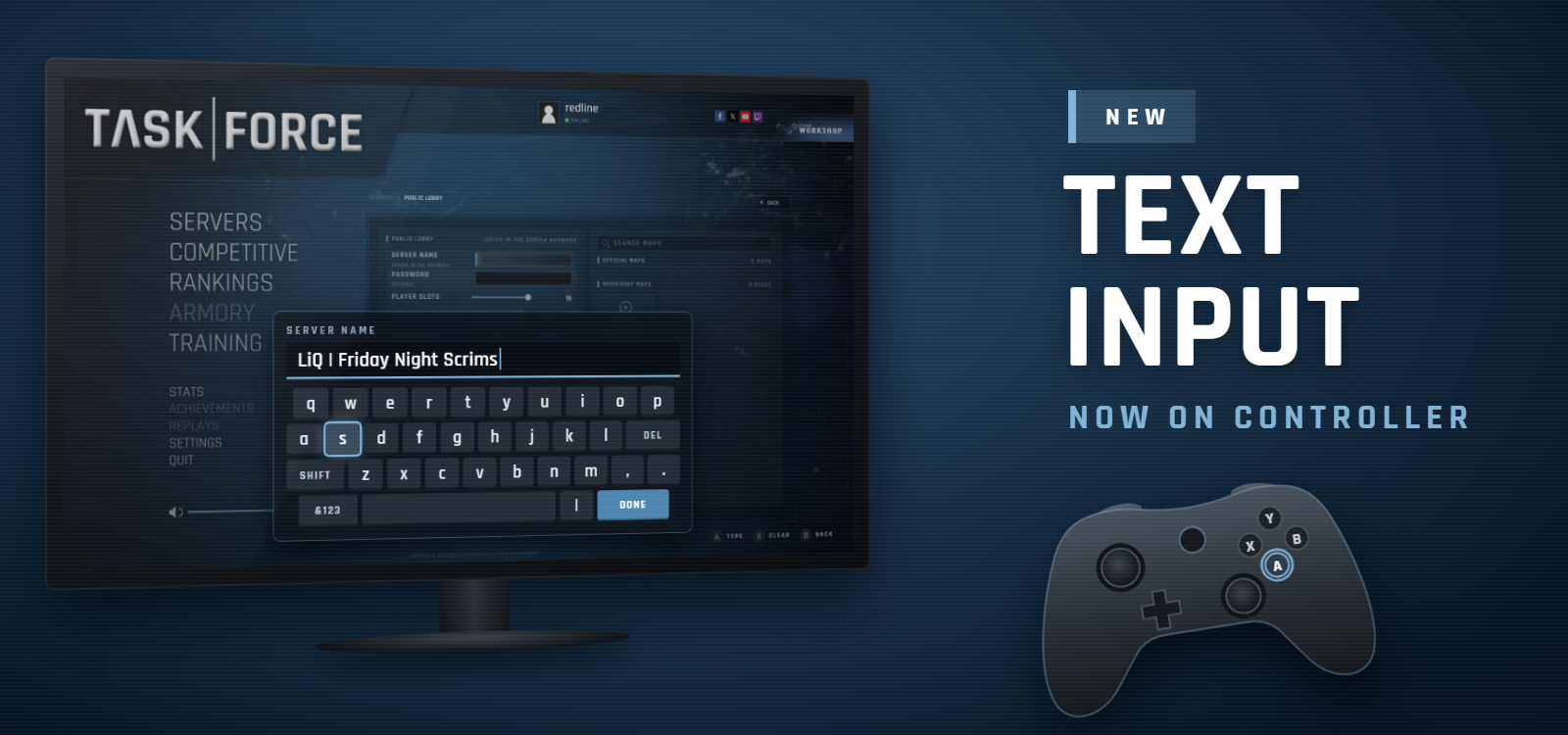
The keyboard is Steam's own, so it shows up when you're playing in Big Picture mode or on a Steam Deck.
More Controller Improvements
- Reaching the first or last row of a list now scrolls it all the way to the end, so nothing is left hiding just out of view.
- The main menu's volume can be changed with a controller.
- On a server's page, Y connects from anywhere on the page, and X slides RECENT ACTIVITY up and down.
- On the Bindings tab, actions are grouped and ordered the way you'd look for them, instead of in the game's internal order.
A Better Scoreboard
- The scoreboard is wider on widescreen displays, so long names have more room.
- Ping bars are crisp and even at every resolution, on the scoreboard, the side panels and the PLAYERS screen.

Small Fixes
- The logo button no longer stays stuck looking pressed after it takes you back to the main menu.
- Connecting to a server from the list, by double click or from the password box now plays a click sound.
- Workshop maps you already have installed no longer wrongly show up as OUTDATED.
- On 4:3 screens, the ADD TO ROTATION button in the lobby no longer has its last word cut off.
- Adding a map to a long rotation now scrolls the list so you can see the map you just added.
- A server's version on its page no longer gets cut off or crowds the UPDATING SOON tag.
- Player names on a server's overview page no longer get squeezed.
- A server's page no longer always says UPDATED NOW. It now only warns you when the server's info may be out of date.
- SERVER IS DOWNLOADING MAPS now counts every map in the rotation, instead of showing done too early.
- Workshop map pictures on a server's page no longer flicker while the server downloads maps.
- A server page that fails to load now shows a clear error message, and REFRESH loads it again properly.
- Match times, countdowns and team names on the competitive ladder no longer get cut off, even on 4:3 screens.
- BACK on a competitive team's page now returns you to where you opened it from, not always the ladder.
- The left stick deadzone sliders in the controller settings now actually change your deadzone.
- Hint messages with more than one button in them now show a picture for every button, not just the first.
- Hints that ask you to click a stick now show a stick-click picture instead of the plain stick.
- The SHARE and OPTIONS button pictures in hints now show properly.
- The countdown before the second map no longer freezes in its last few seconds.
- Hit markers no longer stop working for the rest of the match if you join before spawning.
- Hit markers from the last round no longer stay lit after you respawn.
- Switching who you spectate now shows the new player's HUD right away, with no leftover effects from the last player.
- While spectating, the weapon picture no longer briefly shows the previous player's weapon.
- Chat messages no longer jump around when you open the chat, and the typing box lines up with them again.
- Emojis in player names, clan tags, server names and chat messages now show up properly.
Tell Us What You Think
A lot of this came straight from your feedback, so keep it coming. Jump into a match, open PLAYERS, and let us know what you think on our Discord.
Depot changes
| Depot | New manifest | Previous manifest |
|---|---|---|
| 611301 | 4277084786003817667 | 4888388644299366444 |