Build 25118985
buildEZY Virtual TableTop Builder · public · first seen
1
Branches
2
Depots changed
—
Download delta
07:52 UTC
Time · UTC
Major update · published by the developer
EZY VTT: 3D miniatures, scene weather, and rock-solid saves
This update gives EZY VTT new tools for building systems and scenes, plus a large batch of fixes across the constructor, the game table, and networking. Below are only the changes that matter to you.
New
- 3D miniatures on the game table — Assign a 3D model to a token, then adjust its size, tilt, and position right at the table. Upload ready-made GLB/glTF models, or, on desktop, a .unity3d file (the export format used by popular online miniature makers — EZY VTT converts it into a model automatically). Store them in the module's assets or upload them for a single session.
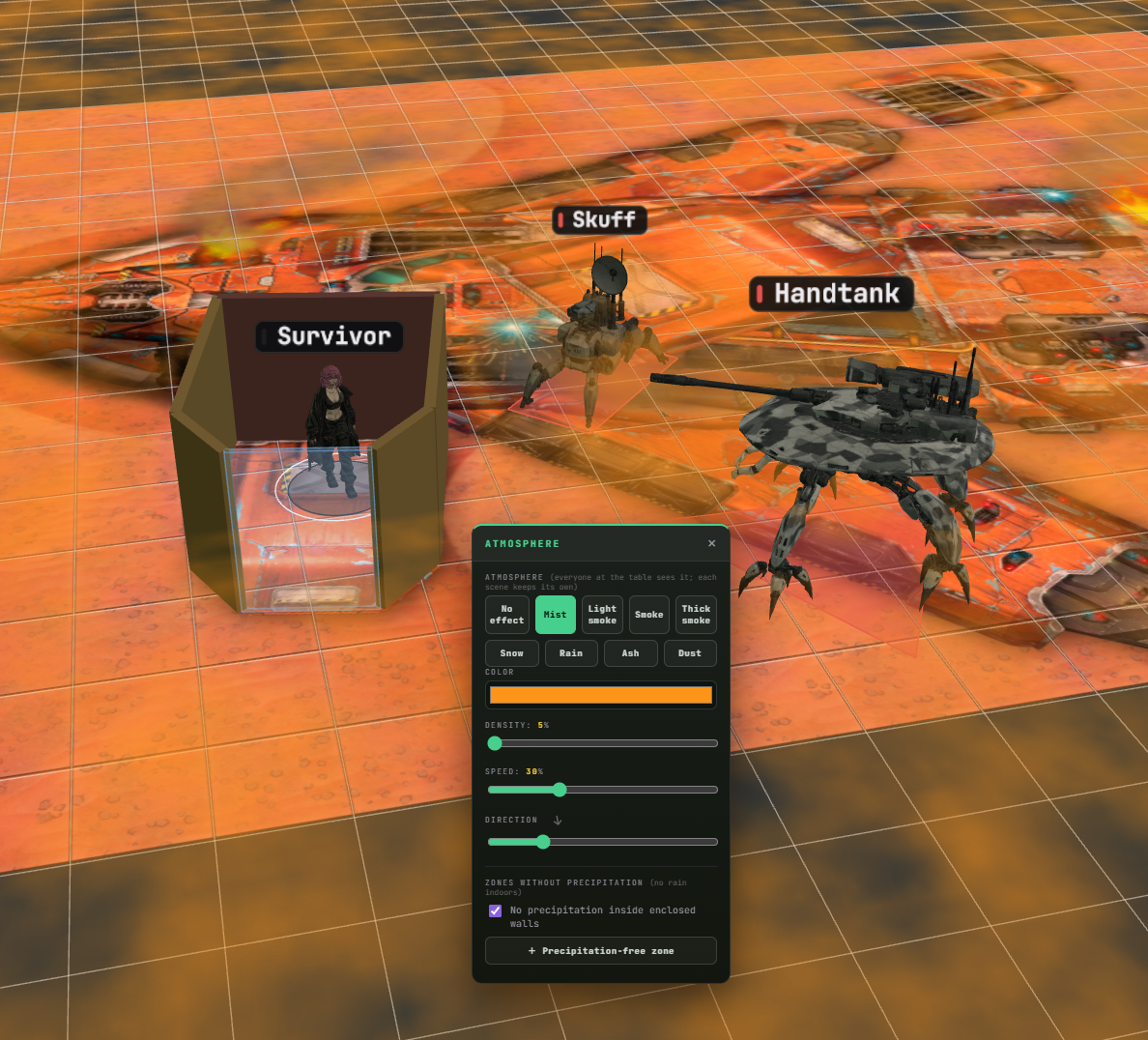
- Scene atmosphere — Turn on mist, smoke, snow, rain, ash, or a dust storm for a scene, and tune its color, density, speed, and direction. Precipitation can auto-stop inside enclosed rooms, or you can exclude it from hand-picked zones.
- Sky and skybox — In 3D mode you can now set a flat-color sky, pick one of 24 built-in presets, or upload your own panorama. The sky is saved with the scene and can double as the ambient light source.
- Die-step values — An attribute or skill rank can now be stored as a die face, from d4 to d20. Skills gained a matching roll mode: the attribute and skill each roll their own die, with success thresholds set by the system's author.
- Reaction and Morale at the table — Reaction and Morale settings now play out live during the game. The NPC card gets the right commands, and result tables, opposed checks, manual modifiers, and hidden rolls all work as configured.
- New "Checklist" block — Authors can define an arbitrary list of items — possessions, languages, traits, or skills, for example. At the table, each item is checked off and saved separately per character or NPC.
- Player-picked skills — The Skills block gained a mode where players add the skills they want from the system straight to their sheet, or write in their own. The standard GM mode can now hide untrained skills and add one-off extra skills for a specific NPC.
- Custom death threshold — Death no longer has to happen exactly at 0 on a resource. Authors can build their own threshold from attributes, numbers, and operators in a visual builder — no formulas to write by hand.
- Sheet block reference — The character sheet's block palette now has a "?" button. It opens a description of the selected block: what it shows, which settings the author controls, and how players interact with it at the table. All 59 block types are covered, in nine languages.
- Floors in 3D — The GM can now set the distance between floors. Any participant can personally pin an available floor above or below the current one to see it alongside the active one — walls, contents, and its own fog of war are all shown.
Improvements
- "Tables" renamed to "Scenes" — Wherever the interface refers to a module's pre-built game scenes, it now uses the clearer name "Scenes" instead of "Tables" (which was easy to confuse with the actual game table). Updated across navigation and the editor, and translated into every supported language.
- Grid visibility — The grid toggle has moved into the "Table & Grid" panel, so its current state is visible at a glance. It's still personal: the GM and each player can turn the grid on or off independently.
- Throwing dice by hand — A die you grab with the cursor and actually throw now counts as a real game roll: the result lands in the log and syncs to everyone else at the table.
- Handling multiple dice — Ctrl-select several dice and grabbing them gathers them into a compact handful. Right-click a single die or the whole selection to throw it or clear it off the table.
- Duplicating Library items — Right-click an item to duplicate it instantly. The copy gets its own ID, appears right next to the original, and is ready to edit immediately.
- Contextual settings help — Complex settings now have a compact multi-line "?" popover. The initiative-type picker is the first to get the full treatment — read right in the editor how each available option differs.
- Save feedback — A manual save is now clearly confirmed by the interface. Autosave still works exactly as before, without any extra animation to distract you.
- "My Modules" — A failed load no longer looks like an empty account. On a network or authorization problem, EZY VTT now says it couldn't fetch the list and offers to try again.
- "My Sessions" — A temporary network hiccup no longer removes a session from the local list. If an entry was already lost, the GM can restore their session to the list using its code.
- Module summary — The "What's Inside" section now counts NPCs from the Bestiary, not just standalone entities. The character count shown before publishing a module is now correct.
- Token labels — A flat token's name, health, and badges now stack neatly above it instead of overlapping the artwork. Scaling the labels no longer makes them overlap each other, either.
Fixes
- Module save reliability — Closed a whole class of bugs where different editors could overwrite each other with an older copy of the module. Saves now run sequentially, switching tabs waits for the write to finish, and background editors no longer roll back changes made in other sections.
- Edits after autosave — Fixed a bug where, after the first autosave, some interface elements kept writing changes to a stale copy of the data. Everything looked saved on screen, but the next edit could quietly vanish.
- Protection when signing in on a new device — Old data from a previous storage location can no longer overwrite the current version of a module when it's carried over to another device again.
- Character sheet after duplicating a block — After duplicating, pasting, and similar actions on the character sheet, later edits no longer get lost to competing instant saves.
- NPC attributes — The Bestiary now correctly handles not just numbers but text, lists, checkboxes, colors, dates, and die-face values too. An NPC's field type now matches its attribute's type in the system.
- Draft attributes — If an NPC's or sheet's attribute value was filled in before the author gave that attribute its final name, the data no longer gets lost once a permanent ID is assigned.
- Supply die — Fixed the existing "supply die" mechanic: its face no longer collapses to 0 at the table. The "use" button now correctly steps the die down and syncs the new value.
- Logic editor — Fixed nodes that visually showed the first option in a list while actually storing an empty value. Now, until a choice is made, the editor honestly shows "— choose —".
- Fog of war on hex grids — Fog of war now uses the actual hex-grid geometry. The brush, the rectangle selection, and the open-area check all work by hex cell, not by squares laid over them.
- Floors and maps — Fixed a serious bug where deleting an inactive floor could, after a restart, end up writing one floor's map over another's. Also fixed a sticky preview overlay and a token's floor being lost after a restart.
- Physical dice results — The result strip no longer counts every die already sitting on the table: only the current roll's batch is totaled. Dice also no longer block clicks on the control panel underneath them.
- Game table interface — Panels and dropdown menus now sit on an opaque backing, so grid lines no longer show through the text. The "Table Pools" tray now automatically lifts above the bottom buttons and player cards.
- Localization — Fixed leftover Russian strings that were showing up in a few elements of other languages, including roll comparisons and the "Scenes" step in the "Getting Started" guide.
- Linux — Fixed the cause of the Steam build instantly quitting on clean Linux systems: the required WebKitGTK components and helper processes now ship together with the app. Also fixed dropdown text color under a light system theme.
- Logic editor: graph tabs — The missing graph-tabs strip and the "new graph" button are back. The bug was caused by a clash in the editor's shared styles.
Changes to available features
- Collaborative module editing removed — After modules moved to the new storage backend, co-authoring effectively stopped working, even though it still appeared in the interface and pricing tiers. The non-functional mode has been removed; handing a project to another author is still possible via exporting and importing the .ezy file.
Per-depot manifest changes
Depot changes
| Depot | New manifest | Previous manifest |
|---|---|---|
| 5013431 | 1516566757878259736 | — |
| 5013432 | 6960202259953024063 | — |