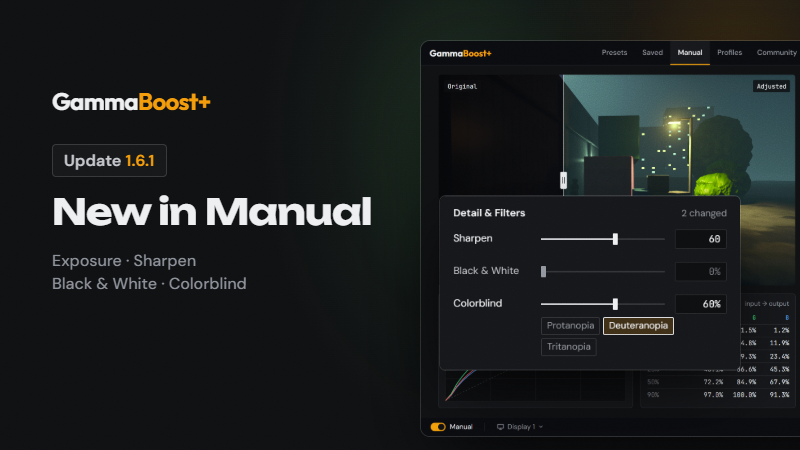
New in Manual
- Exposure: more or less light, like a camera. Unlike Brightness, white stays white.
- Shadows and Highlights: the dark and bright ends on their own, on NVIDIA's −100 to 100 scale, so values from an NVIDIA filter copy straight over.
- Tint Color and Tint Strength: a tint of any color.
- Sharpen: uses your monitor's own sharpness setting (most monitors allow it). It never touches the game, and your monitor's setting comes back when you turn GammaBoost+ off.
- Black & White: with a filter color, as in black-and-white photography.
- Colorblind: pushes apart colors that look the same with Protanopia, Deuteranopia or Tritanopia.
- Black & White's filter colors and Colorblind need an NVIDIA card with HDR off. In HDR, Black & White is plain gray.
- Everything works outside the game, with nothing injected, so it's anti-cheat safe.
Changes
- Vibrance now changes color only: grays and contrast stay as they are. The built-in presets keep their look. Your own and community presets that use Vibrance lose a little of their contrast and get a little more color.
- The old Highlights slider is now called White Level, and the old Tint is Green–Magenta.
- Manual is quicker: slider changes go on screen straight away, on all monitors at once.
- A tidier Manual: Black Level, White Level, Green–Magenta and the tint color are under "More". A "More" opens by itself while one of its sliders is changed. Channels is collapsed until you need it.
Fixes
- Presets per monitor: after a restart or a driver update, Windows can renumber monitors, which sent presets to monitors that no longer existed. GammaBoost+ now follows each monitor itself.
- "Windows refused the change" no longer shows while your screen is changing, and when it does show, it says which display and why.
More from GammaBoost+
Other announcements
GammaBoost+ × Liquid Glass · Update 2.0A new GammaBoost+ · Rebuilt around presets: a new design from the ground up, with a sidebar for Presets, Manual, Eye Care, Community, My Presets, Profiles, OBS Studio and Stream Deck. · Everything you set up carries over: your presets, profiles, keys and settings are all still here. · In 17 languages: English, German, French, Spanish, Italian, Portuguese, Polish, Russian, Ukrainian, Japanese, K…Creators wanted: partner with GammaBoost+We're looking for streamers and YouTubers to partner with. Make a preset for your game and we'll feature it in the app's new Creators tab, with a link to your channel. Any channel size. As you grow with us, you can earn from every sale through your own link. Interested? Open Community → Creators in GammaBoost+, join our Discord , or email [email protected] .GammaBoost+ 1.6 - a preset for each monitorA preset for each monitor · Pick a monitor, then a preset: only that monitor changes. All displays still sets every monitor. · The picker shows each monitor's preset. · The on/off switch and key act on the picked monitor. With All displays picked, they act on all of them. · "Apply last preset on launch" restores each monitor's preset. · OBS sync follows your primary monitor. Profiles · Monitors…