AquaDesk Update 2.0 — New Shop, wallpaper rotation, live stages, Heavy Bass
AquaDesk - Desktop Aquarium · published
The Shop, rebuilt
The Shop is now a large window in the middle of the screen, with tabs along the top (Fish / Plants / Objects / Sand / Effects). Everything you used to unlock in the SP Shop and then buy in the Shop now lives in one Shop: unlock it with SP and buy it with coins right there.
Plants, wallpaper, sand, object placement, photo mode and the BGM player have also been taken out of the skill tree and are available from the start. The SP you spent on those skills and on unlocking the SP Shop is refunded.
Anything you had already unlocked stays yours.
Live stages — the fish become the crowd
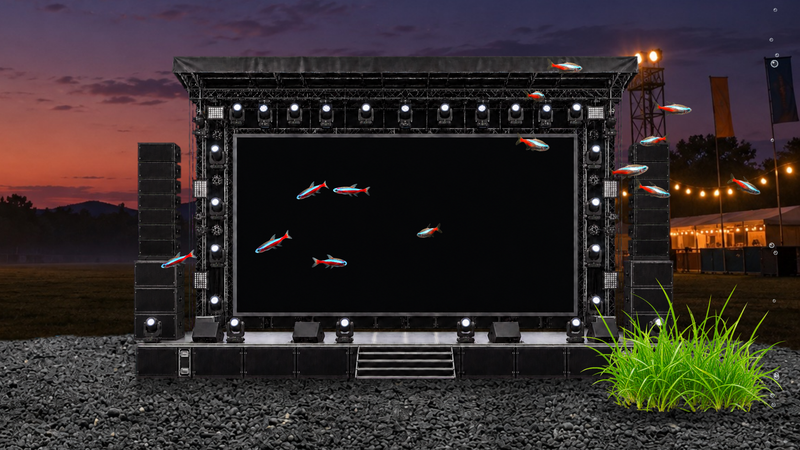
Two new objects join the tank: the Arena Stage, a big screen framed by lighting rigs, and the Live House Stage, a brick-walled club in warm light. Press "Choose video" in Arrange mode and point it at one of your own video files, and it starts playing on the big screen up front while the fish swim past in front of it. You can enlarge a stage almost up to the water's surface and fill the whole tank with it.
Note: playing a video can slow things down on some computers. If it feels heavy, press "Remove video".
Note: unlock them from the Shop.
Heavy Bass effect — your wallpaper shakes to the bass
Play some BGM and your wallpaper thumps along to the bass. Even while the music is stopped, it keeps shaking to a rhythm of its own. You can choose how strong the shaking is. Try it with the live stages, or with the new wallpapers "Live Stage" and "Open-Air Concert".
Note: unlock it on the Shop's "Effects" tab, then switch it on under "Effects" in Arrange mode. It only shakes while a wallpaper is selected.
The Wallpaper window and 9 new wallpapers
A new "Wallpaper" button on the palette opens a window where you can compare thumbnails as you choose, and the tank behind it changes the moment you click.
9 new wallpapers — Living Room / Cyberpunk Room / Live Stage / Block World / Eiffel Tower / Festival Night / Open-Air Concert / Night Sky / Dragon
Rotation — switches between the wallpapers you pick at an interval you set, in order or at random. Each change blurs softly into the next wallpaper.
My wallpapers — add as many of your own images as you like, several at once.
Raise wallpaper above the sand — now set per wallpaper.
Better swimming
Fish now choose their heading with each stroke, so the rhythm of their swimming and the way they face line up. When they head deeper or come to the front, they hold a diagonal pose as they go. Fish coming head-on pass each other before they collide, with the smaller fish giving way. Within a shoal the order shifts from time to time, and when tetras swim in a line, each one follows the path of the fish ahead. Fish also wobble less in their heading after a turn.
And more
"Launch automatically at login" in Settings now lets you choose which mode to start in (Aquarium mode / Fish-watching mode / Wallpaper mode / Mini tank mode). It starts in Wallpaper mode by default.
The Breeder’s Stand now opens from the "Buy from breeder" button on each fish tile in the Shop.
The tutorial has been updated: it now walks you from unlocking neon tetras through placing plants and sand.
Fixed fish swapping in front of and behind a plant around its swaying outer leaves.