Status
SteamPeaks
ChartsSalesUpcomingPatchesNewsCalculator
New on SteamEvery app, DLC and depot the minute Steam creates itAppsEvery app on Steam, newest change firstPackagesSubs and bundles, and what each containsDepotsDepots, manifests and install sizesTagsSteam's user tags and the games under themDevelopers & publishersCompanies and their cataloguesTechnologiesEngines, SDKs and anti-cheat found in the filesChange historyEvery PICS changelist as it lands
SignalsNineteen readings of the whole catalogueCompareAny games side by sideRecordsAll-time peaks and the days they were setReportsWeekly and monthly write-upsAlerts & newsroomWatch a game, get told when it movesSteam statusIs Steam up, right nowWeb API explorerTry the endpoints in the browser
NewsSteam's own announcements and the sales calendarCalculatorWhat a Steam account is worth, and its pile of shame
/
Sign in
/
SteamPeaks
The ultimate resource for Steam data.
ExploreChartsSalesSales and festsUpcomingPatchesNewsRecordsTrendingSignals
DatabaseAppsPackagesDepotsTagsDevelopersTechnologiesChange history
ToolsCalculatorCompareSearchAlertsSteam statusAPI
SiteMethodologyFAQDiscordSupportSign in via Steam
Not affiliated with Valve or Steam. Game names and artwork belong to their owners. All times UTC.
PrivacyCookiesFair useStatus
Void Cargo: EquilibriumNewsExplore and Calibrate Your Ship
In-game event

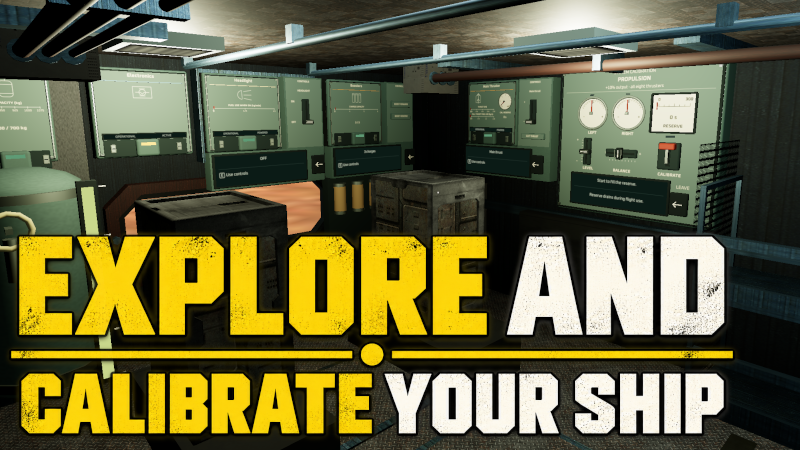
Explore and Calibrate Your Ship

Void Cargo: Equilibrium · published 19 Sep 2026, 14:43 UTC · build 25409369

All newsPlayers around this dateRead on Steam

This update is the first step to keeping longer flights engaging.

While the ship interior isn't yet fully fleshed out, it already gives you a few things to do: You can tune systems at the calibration station, carry new emergency supplies or just watch the terrain pass through the windows.

The ship keeps flying while you work.

As always I look forward to the feedback you have about this and how we can make the interior even more interesting!

I must admit I'm not sure yet how to best support walking inside the ship with HOTAS/Joystick - currently there are no settings to map walking/looking but if you think this makes sense, I will add them.

Safe flying.

Full changelog:

Inside the Ship

  • Press U (Keyboard) or the left stick (gamepad) to leave the pilot seat at any time to explore the ship interior.

  • Explore a rebuilt cockpit and lower deck with machinery, storage racks, windows, and working consoles.

  • Use cabin controls to adjust main thrust, fire forward or reverse boosters, switch the headlight, and deploy the emergency chute.

System Calibration

  • Solve a different task at each station: align the propulsion needles, damp the stabilizer oscillation, and suppress repeating interference channels on the scanner.

  • Calibration gives temporary flight bonuses: 10% more thruster output, 25% more scanner range, and 15% less wind force remaining after stabilizer upgrades.

  • Each station fills a five-minute reserve that drains during flight use. Scanner and stabilizer calibration require the corresponding upgrades.

Emergency Supplies

  • Buy field repair kits and reserve fuel canisters at Arrays and carriers. The ship has room for two of each without using cargo space.

  • Carry a repair kit from the aft rack to a damaged system to repair it fully. Each kit repairs one system and is consumed on use.

  • Connect a reserve canister to the fuel tank to transfer up to 100 kg of fuel. Unused fuel stays aboard.

Controls, Balance, and Visuals

  • Gamepad Y-axis inversion now has separate settings for flight and walking.

  • Fuel compound now sells for less, while stabilizing material sells for more.

  • Active vents push the ship upward more strongly.

  • Rebalanced ambient lighting and revised materials on carriers, discovery sites, Arrays, and resource crystals.

More from Void Cargo: Equilibrium

Other announcements

All news
In-game event3 Oct 2026Update 36: Redesigned Regions, Crash SequenceAll Regions except Titan and Hyperion got a redesign! All regions had good ideas and a unique twist for the overall terrain (and those are still present) but none of those regions were as nicely detailed as Titan. I have added unique detail like spines, ridges, rock formations, smaller gullies, etc. to all maps and also improved the possible positions for the resource deposits, discoveries and…Community2 Oct 2026Dev Log #3 - Improved maps!A while ago - when I was working on the discoveries and resource deposits - I realized two things: · With the exception of Titan and Hyperion the maps have interesting ideas but... don't look very interesting "up close" when actually flying them. They miss the nice terrain detail which makes Titan so interesting - on Titan the details are mostly craters and that fits. How can I improve and add…Game update26 Sep 2026Update 35: PerformanceThe recent updates took a toll on performance which should be restored to solid FPS with this update