This update brings the public branch up to the same versions as the current Terrain Expansion beta and includes the following...
MAJOR ADDITIONS
Expanded the Central Libya map to approximately 50km x 100km. This is now the full "production" size. The expanded terrain includes some new sectors to fill out the space as well as 2 major airbases (one in the North and one in the South) complete with usable runway.
Reworked most of the textures on Central Libya so that the terrain appears more detailed. I also fixed a number of inverted normal and height maps on the Libya terrain which has done wonders for it
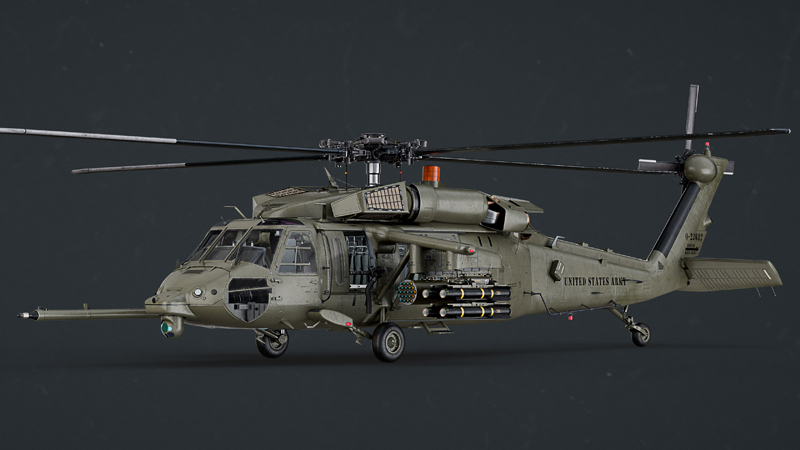
Blackhawk helicopter is now flyable in both its cargo and DAP configurations. ːsteamhappyː
OPTIMISATIONS
Optimised the infantry system's memory usage as much as I can. The only way to improve it further is switch to a skeleton system which I will do in the future.
Memory usage in Central Libya is now much better. It could top out at around 10-12Gb depending on how much you flew around. It should now be around 6.5Gb and pretty stable.
Moved all the particle effects for vehicle explosions, smoke and burning fires to a centralised database. This means units don't have to have a unique copy stored of each effect stored in RAM. They simple spawn the required effects when needed. This is much more RAM efficient when dealing with 1,000s of vehicles. This also allows me to tweak effects from a single location.
Refactored a lot of the code so that it is not dependant on rigidbody components.
Stripped the rigidbody components from ground units as they don't need them.
V2 of the terrain streaming system which is faster and requires less processing power than before. Terrain tiles should now be streamed in correctly without slowing down the main CPU thread. I've also updated the logging system to now log how long a tile took to load. This might be helpful debugging slow HDD etc.
Added in terrain collider optimisations. This system swaps high and low terrain colliders around without having to load the corresponding high/low detail terrain meshes. This means I can use high poly colliders close to the player and lower poly / less accurate colliders on terrain that is further away (12km+) and after 24km terrain colliders are turned off. Terrain that is 12km+ away is basically only used for RADAR masking from long range RADARs which are not yet in the game, but they're coming (BUK). For those that are CPU bound this might extract a few more FPS but the most important thing is the scalability options for truly huge terrains.
Fixed a memory leak caused by the Vector graphics used on the HUD and various other MFD & Map screens.
Optimised the terrain flattening system so that it only ever has to update once instead of every time a terrain tile is streamed in.
Updated my custom bullet physics and ray casting system to V2.0. It now utilises multiple CPU cores more efficiently and gives the CPU cores more time to finish their calculations without stopping the main thread.
Added in an Object Pooling system for all bullets. This is reduces CPU overhead when firing guns.
Weapons are now pre-loaded in the background when you select your helicopter. This removes any delay when adding or removing weapons on the load out screen which was always a little annoying.
It will use a bit of extra RAM but the game is still well below the 8Gb threshold.
Helicopters are now streamed in when selecting them on the Mission Planning screen. Depending on the speed of the drive HG:DEX is installed on this can happen very quickly or may take a few seconds. You'll see a message telling you the helicopter is loading in and you'll be prevented from selecting another helicopter until the chosen helicopter has loaded.
While it is loading you are free to do other things as the loading system now no longer blocks the main thread.
If loading takes a long time it is possible for you to go to the arming screen and still see the old helicopter. It will be switch once the new helicopter is loaded automatically.
Updated the texture swapping system to use a faster and better async loading system when selecting different colour schemes on the weapon load out page.
GENERAL UPDATES & FIXES
Implemented the new terrain mapping system for the current map. This system uses a new shader system to colourise the terrain based on its height instead of static textures which makes it more memory efficient and will also stay up to date automatically if the terrain ever changes.
Removed the VRAM slider as it is no longer needed. Unity will automatically use as much VRAM as is available.
A new, customisable, night vision mode which more closely replicates a monocle system. You can change the size, brightness, edge softness and tint in the Game Settings menu allowing you to replicate a wide range of different night vision modes.
Added height based blending to the fog. This allows higher terrain to "poke" above low lying fog giving the terrain a bit more visible depth.
Added a radial fog effect. The old fog was basically a line across the screen which, in most cases, is fine. However, at wide resolutions (e.g. 32:9) or wide field of views the fog at the edges of the screen would actually be further away than the fog in the centre of the screen making it look a little weird when moving the camera view
Updated the IHADSS system so that the IHADSS display is sized correctly based on your field of view settings. In most cases this should make the IHADSS display bigger. When you change you field of view you might have to cycle view positions for the update to take place - I'm looking into why it isn't instant.
Added new views with appropriate bindable controls...
Satellite view. This looks down on your helicopter from about 25m
Turret view. This moves the camera to the side of you gun turret and follows its movements. The Apache's turret has a particularly good view
Left/Right Stores view. This places you just behind either the left or the right weapons pylon.
Padlock Target. This makes the camera look at your currently locked target and will have a 360 degree movement.
If no target is locked then the view will slave to your targeting pod and will have a limited gimbal angle the same as the targeting pod.
All views except Satellite View can be padlocked so, for example, you can select Right Stores and then Padlock Target and it will track from that view.
Deleted some visible cubes which were left over from some alignment transforms on the Cheyenne
20mm gun pod on the Kiowa has been updated so it is correctly attached by the main stores hard point and not mounted to the Pilot's door
Some minor adjusts to LOD levels for the Comanche cockpit and the 20mm cannon pod used on the Gazelle, Lynx and Kiowa
Added a "no fly zone" marker around the Central Libya map.
Added some new "cinematic" music tracks.
Updated the A.I. pilot code so that they can read the terrain in front of them allowing them to react faster to changes in terrain level when moving quickly. They still struggle to handle tall mountains but I am working on fixing that too.
Renamed the Hellfire missiles to their correct real-world designation. "L" is now Radar and "R" is now Laser
Reworked the rotor disc lift/efficiency system so that maximum lift is now achieved at a lower forward speed. This is roughly 60kts and will allow you to perform a rolling take off more easily.
Apache, Chinook, Comanche and Cheyenne helicopters now have steerable tail wheels to help them taxi better.
Updated the flight model with some better code. Overall this shouldn't make too much difference as I've tuned all the helicopters to be fairly close to where they were before. However, they should now feel more responsive to cyclic input.
Added in a "Multi Target Tracking System" for the HUD. Basically this system shows where all known targets are marked by placing small cross hair markers on them on the HUD.
This system works in tandem with the TSD display so that you can filter it using the usual TSD priority layers and also the TSD distance. It also only marks enemy units that are alive and should give you much better situational awareness.
It can handle a maximum of 256 unfiltered enemy targets which should be enough for most encounters.
You can toggle this feature on/off in the Game Settings menu under the difficulty section.
Tweaked the sky colour and clouds on Central Libya. Sunny clear days should now look bright and clear with deep blue skies and some wispy high altitude clouds.
Added Ambient Occlusion post processing. You can also configure the effect to your own preference in the video settings menu if you want a more obvious shadowing effect or turn it off completely.
Updated the burning fire effects so that they are no longer shrunk down in size when viewed through the targeting pod.
Artillery positions were incorrectly tagged as medical centres and this could cause a mission to not generate correctly.
Updated the music player so it will once again fade correctly between tracks rather than getting cut off suddenly. I've also updated it to stream music tracks rather than load them into RAM which will save a few MB.
Fixed a missing LOD on the M261 rocket pod launcher
Fixed the fog/haze system. Now it will smoothly shade fog/haze into the distance starting from around 4 or 5km for a clear day instead of it being extremely compressed and going from nothing to full fog in a short distance.
Two new options added to the Scenario Generator...
Air Defence Density alters the overall number of SAM & AAA units. 0% will produce a mission with no SAM or AAA units unless they are required by the mission itself. 200% density will have roughly twice the number.
MANPAD Density alters the amount of MANPADs. At 100% density infantry have a 25% chance to carry a MANPAD. 0% will will remove all MANPADS unless the mission needs them (which I don't think any do currently). 200% density will mean infantry have 50% chance to carry a MANPAD.
Added in a Spatial Partitioning System which allows for faster target searching by all units without having to utilise the physics engine.
Added in some new particle effects when firing rockets
Added a warning message to the top of the HUD when you are getting near the edges of the mission area. This message is displayed when you are within 1km of the edge of the mission area.
Added a critical warning message when you are about to go out side the edge of the mission area. This displays at around 100m but for you exit the mission area. There's currently no penalty for going outside the mission area (other than the lack of terrain in some areas) but in the future it will cause a mission failure.
Reduced the fire rate of the UB-32 rocket pod slightly.
Selecting "Random" music for the title screen, briefing etc will no longer occasionally play nothing.
Added a compressor to all audio channels except music which should prevent any audio clipping occurring at high volume levels.
Fixed the IR size of the Kraz 5233VE truck which was slightly bigger than it should have been.
Added in a "Rotor Droop" effect which is most visible on the load out screen. When the mission starts and the blades begin to spin up the amount of droop is reduced as the blades begin to fly.
Fixed a bug which would cause the Command Menu to remain active but not shown on screen when starting a new mission.
Fixed a bug that could cause mission to be incorrectly reported as INCOMPLETE on the right MFD.