It's funny, while working through the Alchemists Journal feature and finding all the ways I want to teach lessons inside the game, many of the nice-to-have features have bubbled to the surface as features worth chasing.
Many of these requests have been sitting around for over a year. The Journal gave some of them a way into the game, and once I started pulling on that thread, apparently I had two weeks of UI work to do.
Well, they're here now. Let's talk about them!

Blueprint Previews
I had initially thought this feature wouldn't make it into MoteMancer because I couldn't imagine how to achieve it effectively. And then I wrote a tool a week ago to help me make Alchemist Journal pages that would take a blueprint and populate the complex content setup with those structures, just to save me time.
Then the obvious mental bridge happened... if the Journal can build a scene from a blueprint, why can't the Blueprints menu do the same thing?
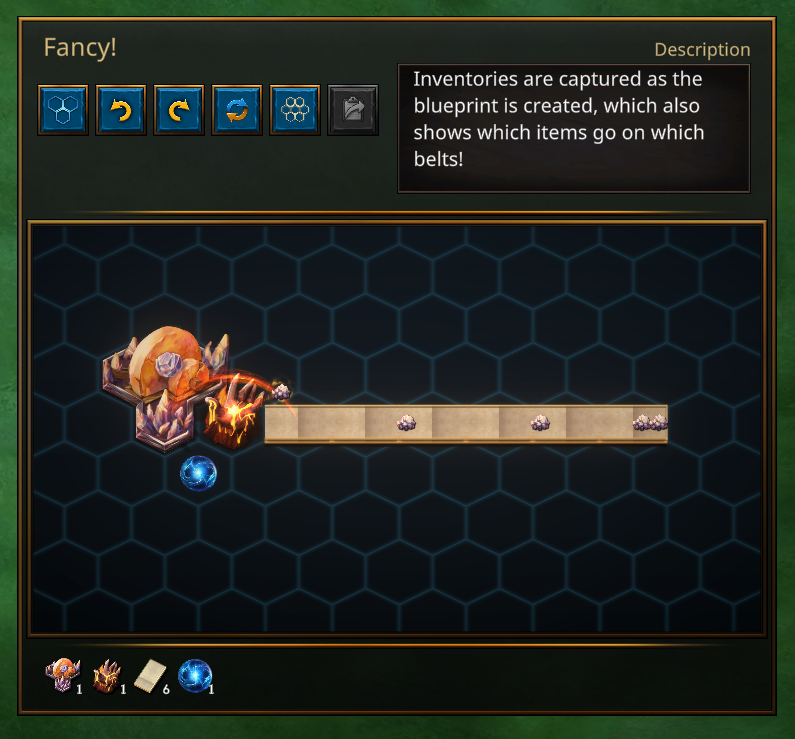
The Journal already has tools for keeping demonstration inventories supplied and putting items into motion. Those work here too. So you can actually watch items moving through your blueprint while you preview it.
Super awesome.
This presentation also allows me to show rotating and flipping blueprints in-window, and lets you create variants on the fly. I'm also eyeing simple upgrade tools, like swapping Saltways for Streamways, but I haven't settled on those yet.
It's definitely an experimental feature and I don't know how far it can go, but I'm super excited for players to check it out and see how it can be improved. I haven't seen other games quite do blueprints this way, so I'd love feedback!
Pinnable Plans
One of my first ever play testers asked for a Pinning feature because there were so many recipes to keep track of, and that task has been sitting in my nice-to-have pile for over a year now. Well, that feature is in too!
Part of the Alchemists Journal has a section to write notes to yourself, and it only makes sense to also be able to show those notes on the HUD somewhere. So I started there as sort of a short quest-log style presentation, but that immediately led to other QoL upgrades.
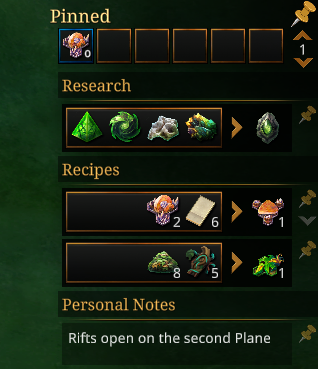
Any recipe can now also be pinned, as well as any research that is far in the distance. If you are trying to make plans for the future and want a quick in-game cheat sheet, this feature is for you. Everything is reorganizable and collapsible so you can opt into whatever part of the Pinables that makes sense to you.
Also of note - I've added 36 new expandable bind slots to the Pinnable area as well, each with their own hotkey reference should you choose to use it, which also work even while the buttons are hidden. So if you ever just wanted to bind Levitate or Streamways to a permanent specific button, now you can!
Spells and Wheels
That leads us neatly to another one of MoteMancer's consistent bits of feedback - Spell equipping can feel a little clunky, especially if you swap spells often. All of this recent UI focus has unlocked another highly requested feature - a heads up gestural spell wheel.
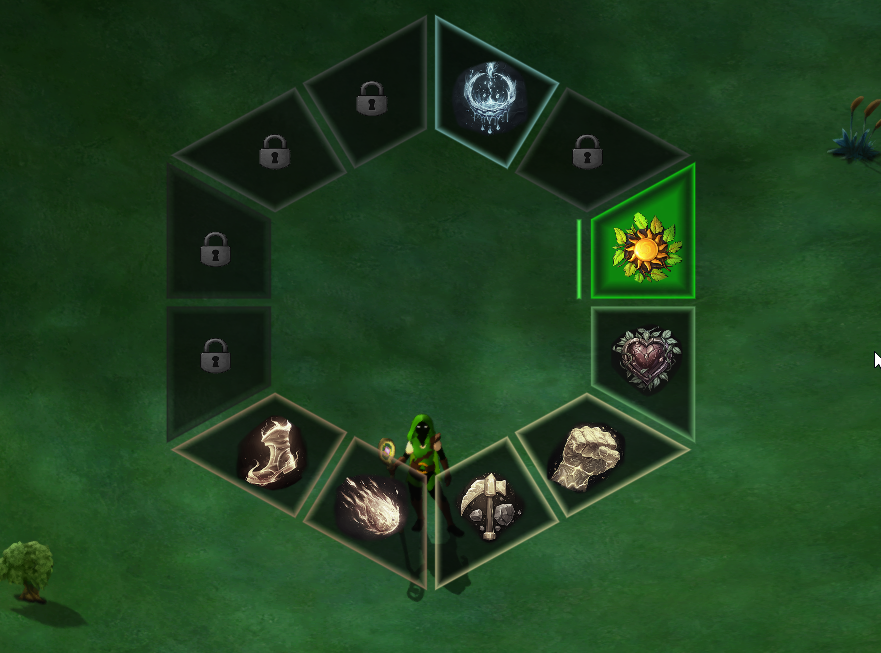
Default bound to Tab, the spell wheel lets you quickly select any elemental spell with a flick of your mouse. Just another feature to keep you in the puzzle solving flow state.
Victory!
And finally for today's musing - I've also implemented a proper victory screen with run-wide stats for you to revel in your accomplishments.
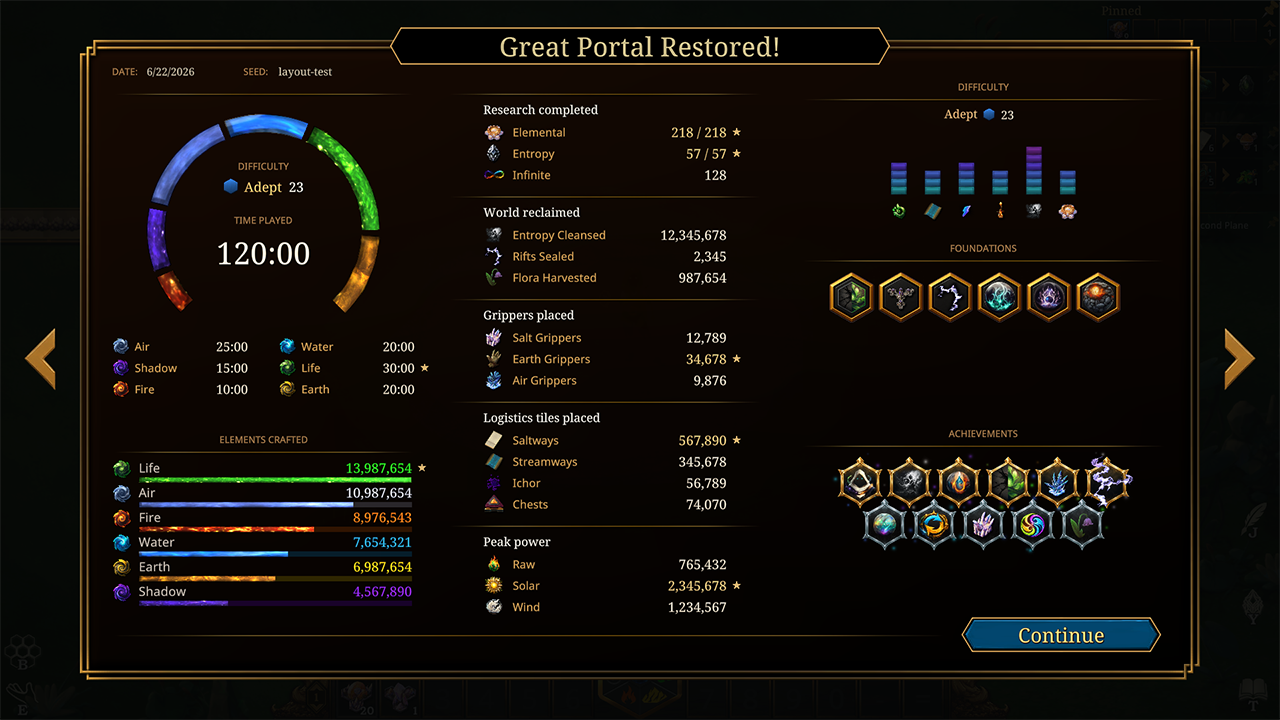
After spending that long tending a world, it deserves a proper send-off.
This also provides a use for the Library's book that we all know and love. The book will keep track of all of your past victories as a historical ledger so you can revisit your runs, compare them, or share the results with friends.
Work Work
There's still more to do as always, but the UI got a significant upgrade these last two weeks. The Alchemists Journal is still actively being added to, but all of these features are now live on the Experimental branch if you'd like to check them out. Feedback as always is super appreciated.
Back to the Lab!
~CyanAvatar 🌿