When I was at school for computer animation, we had a saying - "Is it enough to fool the bartender?" The thing about graphics in general is you can spend almost an infinite amount of time making something better and at some point you must surrender your art to your audience.
Along the way though, sometimes you find a technique that satisfies your innate need to push just a little further, without consistently creating black-hole time sinks. Today I want to share my favorite one: Multi-Texture Particles.

Particle Prowess
At their simplest, particles are emitting the same image over and over from a position, and doing something with them along the way. You can tint them, scale them, rotate them, tell them how long to stick around, etc. And you can get pretty far just using a single image.
If you ever wanted something more elaborate though, where you could just 'see' that the same image was being used, a common technique is to render out a sequence, like an explosion or fire or smoke, and then play that image sequence as the particle lived out its lifespan. The trouble there too is that you (consciously or unconsciously) can detect the pattern and it breaks the illusion.
These are just games after all so who cares whether you can detect a pattern or not? Well, I care.
Smoke and Mirrors
Ok so on to a practical example. Below are three systems with identical motion, just different texture techniques.
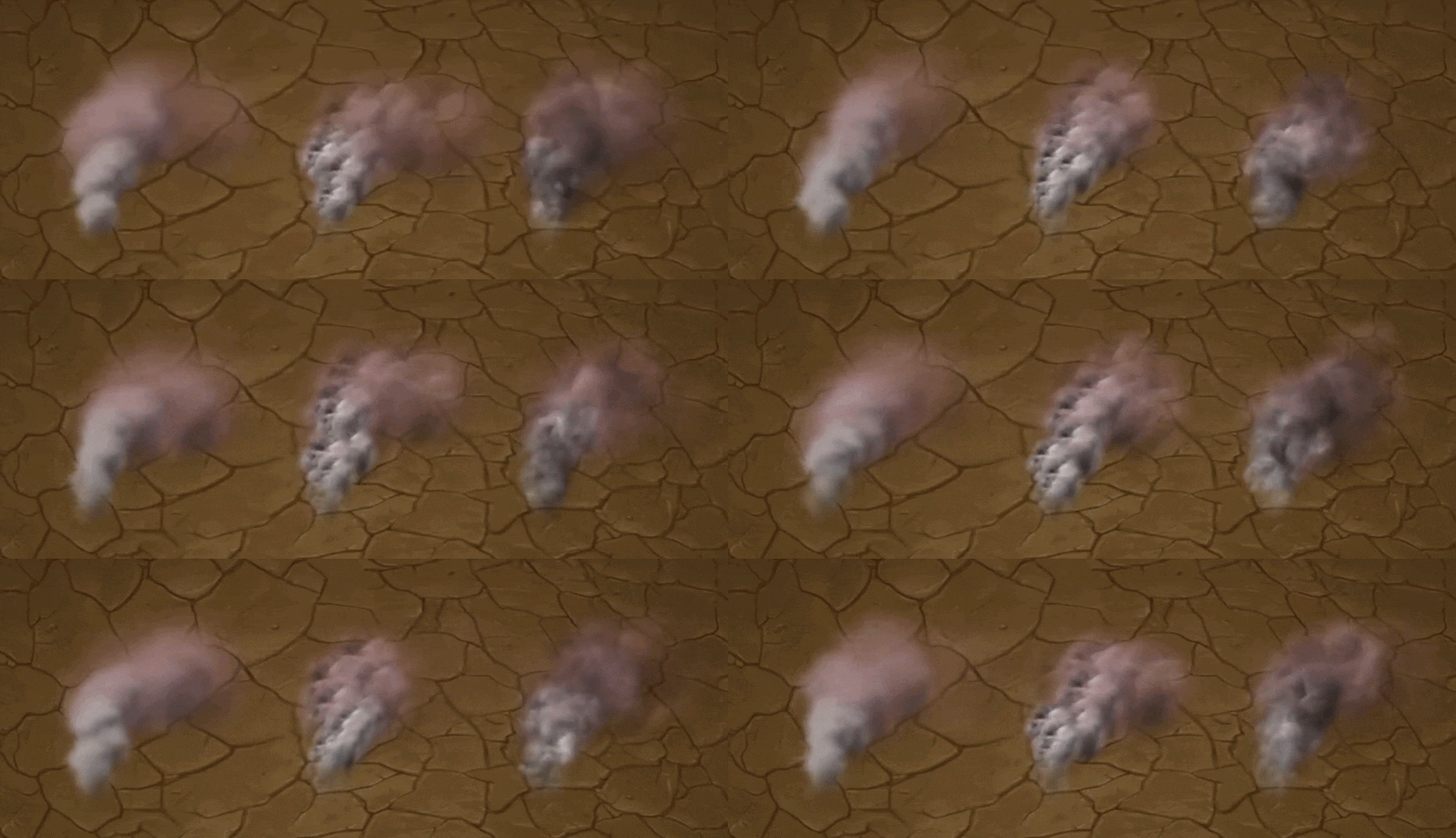
The first is a simple 'puff' image, and you've probably even seen many examples that look like this in games. It reads like smoke, it's perfectly serviceable, but if you look at it you can see the same sprite image over and over, and it doesn't have that much personality. The shading you see is completely fake, just a little highlight painted on the top left side and a little shadow painted on the bottom right, nothing fancy.
The second, we make the texture a little more interesting so it has personality, but now the repetition is almost worse. Because your eye can pick out the detail, you can even track each individual image as it evolves. Again, perfectly serviceable in a pinch, this is just one element on the screen after all, but we can do better.
The third... you can barely even track a single particle. if you watch very closely you can for a moment, but there's so much evolution going on that the cloud tumbles and roils even within itself. it doesn't look like particles anymore, it just looks like smoke. Plus it has way more personality.
So what's the secret?
No secret at all really. When I covered Texture Scrolling for Progress Bars, the technique is functionally identical, it's just that most software packages don't support this for particles out of the box, you have to make it yourself.
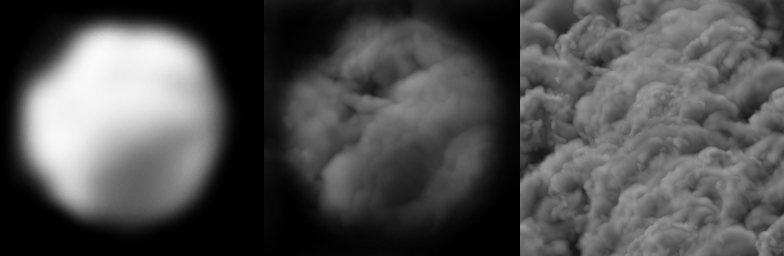
First- A only; Second- B only; Third- A * C1 * C2
Simply take a mask texture like the cloud puff, and then grab a second texture and sample it once or twice and multiply them all together. I'm personally a huge fan of sampling the same texture twice at different scales because it's cheap and effective, but you can definitely sample two different multiplying textures to great effect. Those are more for hero elements though, not supporting character FX.
There's one super significant thing about this approach for MoteMancer specifically though - we care a lot about performance, and we need to make sure this solution is extendable. Thankfully there's an awesome tool for that too - Texture Atlases and Texture Arrays allow us to have literally every mask and scrollable texture on a sheet each.
Now every particle just uses a few integers to pick its textures. This means huge families of FX can share the same material and textures, collapsing what could have been hundreds of draw calls down to a handful, mathemagically.
Awesome.
Speaking of Math
The last musing was about particles conditionally drawing inside and outside portals, but what was the solution? Turns out, just math!
I had been treating it like a rendering problem, when the answer was already sitting in front of me. Each portal's visible slice is defined by the player's position and the two sides of the portal threshold and we already use that math to draw the portal boundaries. So instead of trying to make VFX Graph understand the stencil, the particles can simply ask the same question: am I inside this slice?
Since VFX Graph is already doing its work on the GPU, adding a couple of dot-product checks per particle is negligible compared to heavier alternatives like passing around mask textures or introducing another camera. We just reuse the same equation everywhere.
Super clean, super fast, super reusable.
Keeping Joy
I think my primary musing today is - This multi-texture particle thing isn't going to make or break MoteMancer, but it's something I genuinely geek out about and love. Not only will it give the game my fingerprint, but every time i see it I'll smile. That makes it worth doing in and of itself. Sometimes you only need to fool the bartender, but sometimes you need to allow yourself to do things just for you.
The particles call! Back to the Lab,
~CyanAvatar 🌿