The Local BETA - Custom Materials and Super Rails
Custom Materials
The focus on this update has been custom materials, and the accompanying Material Builder, which allows you to easily create up to 128 materials with the following properties:
- Texture
- Normal map
- Colour
- Smoothness
- Metallic
- Light emission
- Alpha clipping
- Double sided
- UV mapping
- Tiling and offset Note that, unlike custom models and audio, The Local will manage your provided textures and normal maps, and will delete them when you clear or replace them in game. Please keep copies of your textures elsewhere.
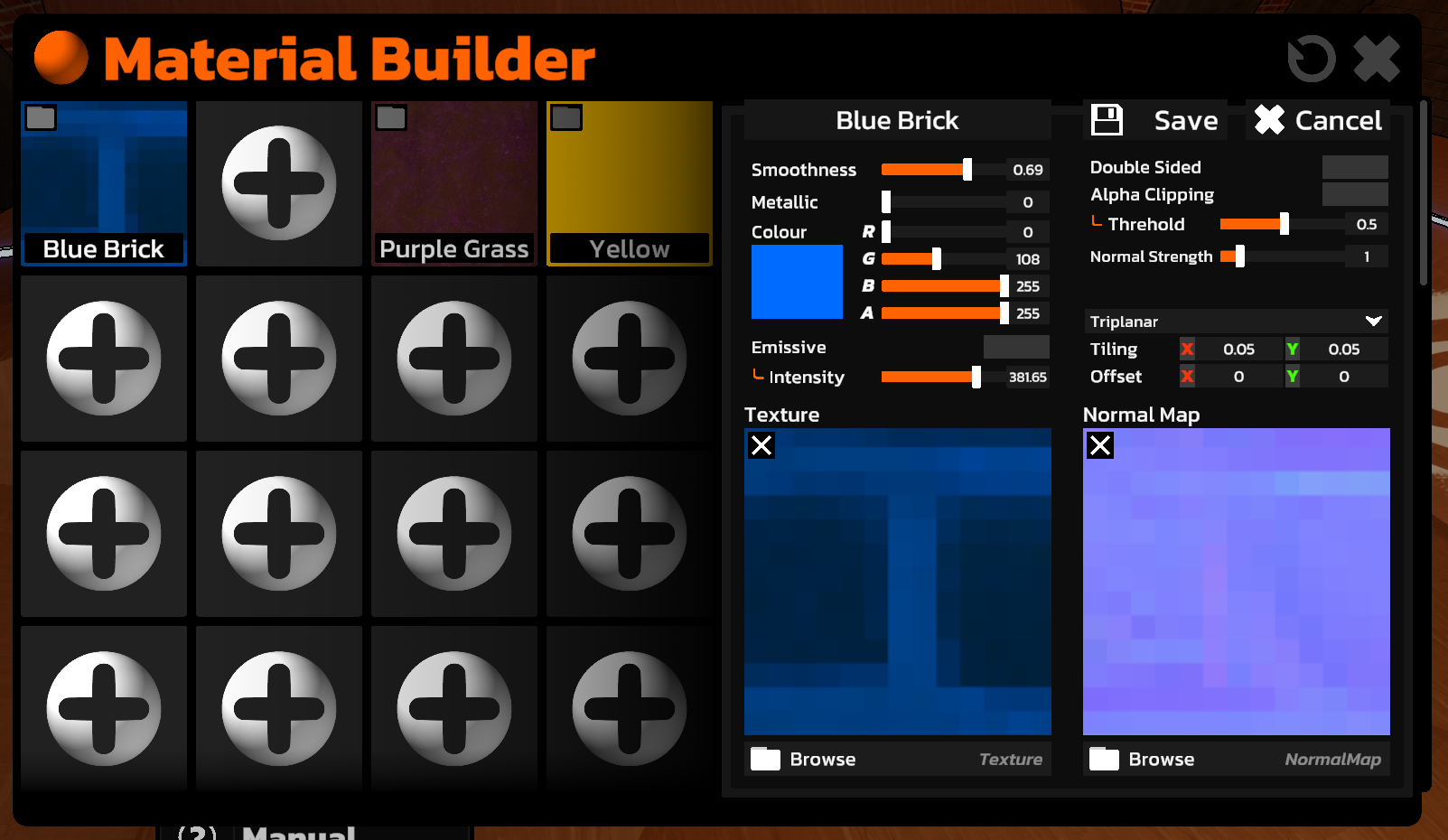
Custom Materials... on Custom Models?
In the same way you can setup LODs on your custom models, you can now use the material picker on your custom models by adding a MAT suffix to the parts of the model you want to be affected by the material picker. And if you want both a LOD and MAT suffix, you can simply separate them with a comma. So it may look like MyModel_LOD0,MAT.
Super Rails
The editor now supports Super Rails. These function exactly like the rails that go up Northern Peak, but are marked differently.
- Enabled from the Inspector
- Toggle to enable markers
- Fields to control the distance between markers, and their scale
Manual
The first draft of the manual is now completed and included with this update. It also includes information about the new Material Builder, and details about each of the material properties you can control.
Fix for a Notable Bug
This update fixes an issue that allowed you to access ALL assets, including ones you're not supposed to for the levels gamemode (ie. accessing balloons outside of an Aim course). This has led to some courses using assets they shouldn't. I won't be deleting these courses, but if you noticed your course was acting a bit... odd... this may have been the issue, and you should replace / remove the assets and republish.
To further prevent this, checks will now be done when playing or publishing a level to ensure disallowed assets don't exist in the scene.
An Additional Build Check
When playing and publishing Timed levels, the spawn point now needs to be absolutely grounded. This is to prevent cases where you timer immediately starts from you falling from the spawn. You can easily ground a spawn by selecting it, opening the inspector, and pressing the "FLOOR" button on the Transform inspector.
Level Browser
- Added option to sort workshop items by subscribed date, last updated, title descending, title descending, and vote score
- The tab you are viewing, and your search filters, are now all saved, so you'll automatically return to them after reopening the game
Other
- Added error handling for loading projects, and playing levels. A popup now will display with an error, and a button to copy the full error to your clipboard. Please send any errors you see
- Selecting and deselecting objects will no longer clear your redo history, only changes that mark the scene as "dirty" will
- Pressing D to deselect will no longer save an undo snapshot if nothing was selected
- Fixed a bug where rail supports wouldn't stick to objects correctly in play mode due to parent-child relationships not being setup in time
- Fixed a bug that prevented projects from opening if the Objects Window was closed
- Fixed an oversight with the "Icy Overpass" asset which caused 2 versions of it to be saved, one larger than the original
- Fixed a bug where you could spam the "EDIT" or "PLAY" buttons in the project browser to repeatedly open the level. This would often lead to a slightly broken level
https://store.steampowered.com/app/2560140/The_Local__Supporter_Package/
