Features
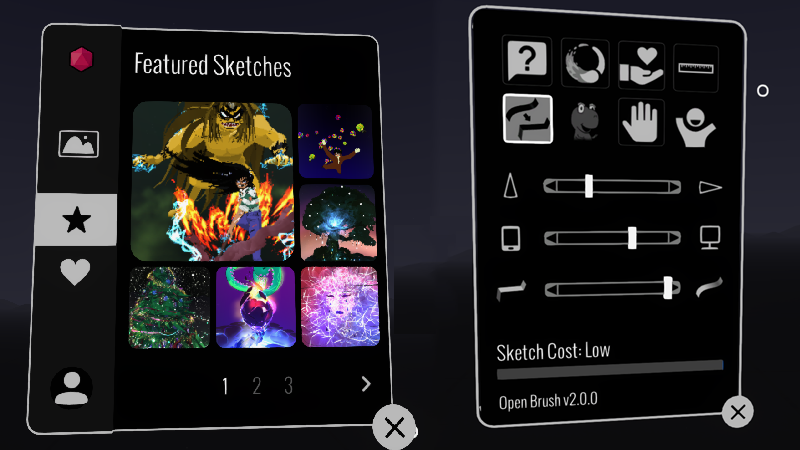
Bundled "Featured Sketches"
Since Google Poly closed down, the immediate access to some examples by talented artists was sorely missed. So we've added some of the classics back in. We have big plans for sharing and viewing artwork so this is just the start.
Add a button in Setting to switch handedness
Previously the only way to do this was to tap the bottom of the controllers together. This wasn't easy to discover and was unreliable when using some controllers. We've kept that in but added a nice clear button the app settings.
Add a button in Setting to reset the "First Time Use" tutorial
This is something that's especially useful when you want to demo Open Brush to a new user. The current tutorial is very brief but we hope to expand it in the future. Note this button affects the app the next time you launch it.
Known Issues
- Meta Quest: Incorrect or missing video thumbnails are shown
- Meta Quest: Gif capture results in just a black image
- Meta Quest (Quest 1 only): Selection and erase tools are not working
- Valve Index Controllers: Grip is too sensitive. It's easy to accidentally trigger a grab when drawing.
- Issues with controllers not appearing when the wrong OpenXR runtime is selected. Vermillion has suggested some workarounds. (Thanks Vermillion!)
More from Open Brush
Other announcements
v2.31 releasedSometimes we get too busy to post everywhere and everything (and sometimes we just forget) so here's the new features in v2.30 and v2.31 Portals Between Sketches Portals are new shape widgets that let you link one sketch to another. Add a portal from the Sketchbook, place and resize it in your scene, and use it to connect separate Open Brush creations. Portals are currently spherical, with more…Just added an item to the "What's New" panel:-)More fixes for Viveverse publishingIf you've got issues with sketches you've previously published to Viverse - try republishing them from this version of Open Brush. Let us know any issues you find and we'll fix them ASAP