Dev Diary 26 - [VLOG] Displaying Information: Introducing the HUD
Gilded Destiny · published
Greetings, Industrialists!
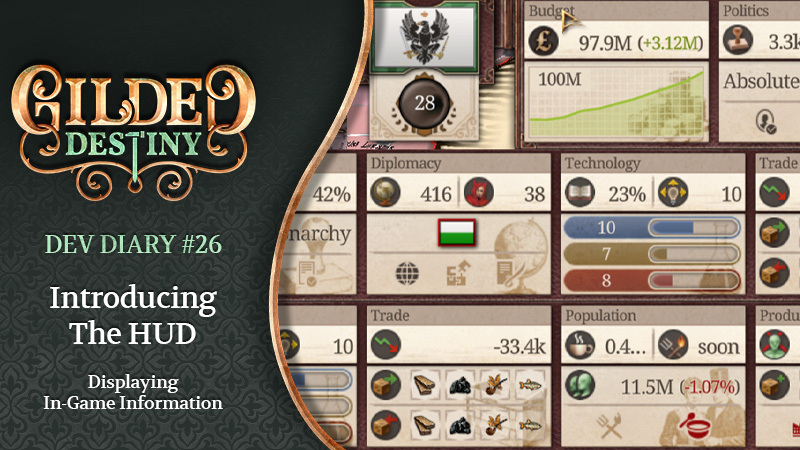
In today's Dev Diary, we're happy to share a first in-depth look of the redesigned HUD. It will share relevant and up to date information about the current status of your country. We'll discuss the general design approach and go into detail about each section. As one of the most visible parts of the UI, it is important that the HUD both looks good and is easy to interact with.
Also, Check out our eleventh Alpha Roadmap Update:
https://store.steampowered.com/news/app/2189430/view/501692943024783533?l=english
You can find the full script for the Dev Diary below.
- - - - - - - - - - - - - - - - - - - - - - - - - - - - - - - - - - - - - - - - - - - - - - - - - - - - - - - - - - - - - - - -
Let us know if you have any questions or feedback over on Discord. And be sure to wishlist us to stay up to date!
Join our Discord community today!
https://discord.gg/3d77T9gxDF
Speaking of Discord, we have started rolling the Discord roles to our Kickstarter backers! If you have not yet completed the Kickstarter survey we sent out, please do so. If you have filled it out, and are not yet in our Discord server, join and say hello in the main channel to let us know you're there to claim your role!
Our Kickstarter officially ended in April, and brought in a total of £31,974 GBP, which is 159% of our goal! We offer the most gilded appreciation to all of our backers and our community. Your support, positive feedback and encouragement, and our growing vibrant community of industrialists motivates more than ever to make Gilded Destiny the most moddable, immersive, fun, and grandest GSG out there.
You can access the survey on the Kickstarter website:
https://www.kickstarter.com/projects/gildeddestiny/gilded-destiny-a-grand-strategy-game?ref=bjurrh
Finally, if you are interested in what we do and want to join us but do not see a relevant job, send us your resume at [email protected]!
- - - - - - - - - - - - - - - - - - - - - - - - - - - - - - - - - - - - - - - - - - - - - - - - - - - - - - - - - - - - - - - -
Script for Dev Diary 26:
Salutations industrialists! I'm Marc, a Producer working on Gilded Destiny.
In today's dev diary we're going to talk a bit about the HUD, or heads up display, in the game. It's the bar at the top of the screen that will give you relevant and up to date information about the game. We will discuss the general design approach and what main each element represents. As one of the most visible parts of the UI, it is important that the HUD both looks good and is easy to interact with.
Without further ado, let's dive in.
In designing the HUD, we wanted it to function more like a dashboard rather than a simple resource bar. Its primary purpose is to give you context about what is happening in your country, informing you on decisions that you, as a player, can make or will need to make. Each section of the HUD displays information about a specific, core aspect of gameplay, corresponding to the tabs in the left hand menu. Each section will update in real time in order to offer some continuity about what has been happening in the game. The main elements of the HUD are indicator icons to provide information at a glance, important stats relating to each section, notifications to highlight important information or events, and buttons to adjust speed of the game, get extra help through our planned wiki, and of course select your favorite music from Gilded Destiny's soundtrack.
One thing to point out as well, is that we are proud to say the new HUD has just been implemented into the game. So, bear with us on any tool tip text and features of the hud that are still very much work in progress.
In the budget section of the HUD, we get information that is relevant for making financial decisions about our country. Front and center, you see the amount of money in your Treasury, with the weekly change in parentheses. The idea is to provide context on how your finances are changing over time and show a historical trend on your budget surpluses and deficits—providing a bit of continuity in gameplay so you have a clear idea of the trajectory of where things are going.
Moving on to politics, you can see actionable information directly relating to your government. At the top, you can see the icons for Authority and Government Support. Both of these are essential for you to monitor as the game progresses, as any unexpected changes in these could be a harbinger of hard times ahead for your rule. The indicator icons here will notify you when there is an action to be taken. The one that looks like a document will indicate whether you currently have a Decision that can be enacted. And the icon showing a silhouette, in the same shape as our policy icons, will light up if you are currently able to change any Policies.
In the diplomacy section, you will see information that relates how the rest of the world sees your country. That is, at the top, you'll see Influence and Infamy which of course will change depending on which decisions you make and those that other countries make in the game (for more information, you can check out our Dev Diary on diplomacy). You can see your current diplomatic status in the center. And below, you can see the three indicator icons. The globe indicates whether you can currently perform any diplomatic actions. The puzzle piece indicates whether you currently have a country that can be released, which can be done in the 'Release Nation' tab in the Politics Panel. The document and sword icon indicates whether you have a casus belli available.
For technology, we're presented with the current state of research across the three branches (Academia, Industry, and Military) and the average literacy rate and technology diffusion on the top, which both have a role in how technological progress is advancing in your country. Literacy rate will affect the research output of your POPs, as well as promotion and demotion of various POP groups. If you're interested in hearing more, be sure to check out our Dev Diary about technology.
When it comes to trade, you will see your current trade balance, along with the top goods that you're buying and selling in terms of value, not quantity. Because otherwise, if we do quantity, it will just be basic foods effectively. Trade balance is also calculated in terms of value, and can be useful for determining whether you should adjust your production, trade policies, or perhaps tariffs... If you want to influence the balance of goods being exported versus imported.
With a quick glance at the Population section of the HUD, you'll get important information on the current state of your POPs. First, you can see the values for Average Happiness and Average Unrest, which is still awaiting implementation and coming soon, as you can see. Moving on to the indicator icons. The Torch and Pitchfork indicates that you have provinces that have high enough Unrest to start receiving Unrest events. The bowl and spoon indicates that there are unwashed dishes in your sink... or rather that there are Pops who are currently not receiving their Essential Needs.
In Production, you'll see up-to-date information about your workforce and status regarding production. On the top, you'll see your current unemployment rate and average province connectivity. Unemployment rate obviously ties directly into your production capacity, whereas average province connectivity indicates how efficiently your goods can travel across your nation. If a factory is losing money, the factory indicator icon will light up. And, if you are subsidizing one or more buildings, the coin will light up.
Military shows you the current numbers for war exhaustion and the percentage of Soldiers and Officers currently employed in the military. Below that, you can see the number of regiments and and the number of fleets currently serving in your country's army and navy.
This popout shows a list of global wars. You can open or close this popout by clicking on the "eye" button. The crossed swords button opens the list of ongoing wars (which will open a more detailed view). As you can see, the edges of the popout have a burnt outline, and when your country is at war, you'll see glowing embers there too.
Here, you'll be able to choose the game speed. From Pause all the way up to light speed - well, speed five, that is. Of course there are keyboard shortcuts for that too.
Here you can open our music player, which we are planning to redesign. In case you're wondering about why we chose a Treble Clef, we simply thought it meshed well with the overall UI, and is perhaps the most recognizable to the general population as well. Also, there's the fact that a certain producer of Gilded Destiny is most comfortable with reading Treble Clef. But, here's a shoutout to all bass clef and tenor clef musicians.
Here you will be able to open the planned Gilded Destiny wiki.
And here, you will be able to return to the main menu. Where you can save the game, close the game, or exit to desktop, or close the dev diary...
So, that's probably a good place to close this dev diary. But, a few final updates.
We're making good progress refining several of the important features of Gilded Destiny, in preparation for the release of the Alpha version of the game to our Kickstarter and Modian backers. Importantly, our dev teams are devoting much of their focus on resolving a few issues with the in-game economy and population. The main problems we are facing are maintaining the integrity of how the pops consume, produce, and trade in-game, which ties into the economy. Once these systems working properly, and once we've thoroughly tested them, we are planning to release the Alpha. For more information on our development schedule, check out our eleventh Alpha Roadmap, linked in the description.
Finally, all of us at Aquila Interactive want to thank our community of backers for their continued patience. We endeavor to release the Alpha as soon as possible, but more importantly than that we want to bring you a game that is enjoyable and playable, where the core systems are largely functioning, even if content and other features are still being developed.
We hope you've enjoyed this Dev Diary, and as always, if you have any questions or comments, let us know below.
Lastly, remember to subscribe to our YouTube channel and, if you have not done so already, add Gilded Destiny to your Steam wishlist.
Until our paths converge once more, we bid thee farewell!
May your destiny be a gilded one.
- - - - - - - - - - - - - - - - - - - - - - - - - - - - - - - - - - - - - - - - - - - - - - - - - - - - - - - - - - - - - - - -
Also:
Be sure to listen closely to the backing tracks in all our videos—they are the pieces you will come to hear in the game, composed by John Skoog. Also, the solo clarinet on this track was performed by yours truly, Marc.
Listen to some of John Skoog's other work on Spotify: https://open.spotify.com/artist/3PGd3lmURa72oFasqK3N7N?si=nDl4DUTRQGKKLaDtGcHBJw
John Skoog Music: https://www.johnskoogmusic.com/