Status
SteamPeaks
ChartsSalesUpcomingPatchesNewsCalculator
New on SteamEvery app, DLC and depot the minute Steam creates itAppsEvery app on Steam, newest change firstPackagesSubs and bundles, and what each containsDepotsDepots, manifests and install sizesTagsSteam's user tags and the games under themDevelopers & publishersCompanies and their cataloguesTechnologiesEngines, SDKs and anti-cheat found in the filesChange historyEvery PICS changelist as it lands
SignalsNineteen readings of the whole catalogueCompareAny games side by sideRecordsAll-time peaks and the days they were setReportsWeekly and monthly write-upsAlerts & newsroomWatch a game, get told when it movesSteam statusIs Steam up, right nowWeb API explorerTry the endpoints in the browser
NewsSteam's own announcements and the sales calendarCalculatorWhat a Steam account is worth, and its pile of shame
/
Sign in
/
SteamPeaks
The ultimate resource for Steam data.
ExploreChartsSalesSales and festsUpcomingPatchesNewsRecordsTrendingSignals
DatabaseAppsPackagesDepotsTagsDevelopersTechnologiesChange history
ToolsCalculatorCompareSearchAlertsSteam statusAPI
SiteMethodologyFAQDiscordSupportSign in via Steam
Not affiliated with Valve or Steam. Game names and artwork belong to their owners. All times UTC.
PrivacyCookiesFair useStatus
Those Who RuleNewsPatch (v1.0.9): Graphics Quality Settings for Laptop Users, Bug Fixes
Game update

Patch (v1.0.9): Graphics Quality Settings for Laptop Users, Bug Fixes

Those Who Rule · published 3 Feb 2025, 22:49 UTC

All newsPlayers around this dateRead on Steam

Hey Everyone!

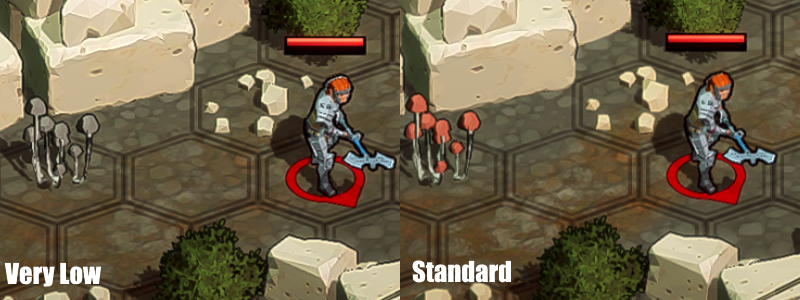
This patch aims to address the issue with chapter 4 crashing on integrated graphics cards (mainly laptops). The graphics settings are now available as "Standard, Low, and Very Low" with the main difference being "Low" and "Very Low" have had their texture sizes reduced to a quarter, and an eighth, respectively. If you have ever tried to load chapter 4 and the game has crashed or stalled on a black screen, please try moving the "Graphics Quality" down to "Low" or "Very Low" and hitting "Save". You shouldn't have to restart the game, but if you're still seeing the issue it could be worth doing a restart to make absolutely sure the settings take effect.
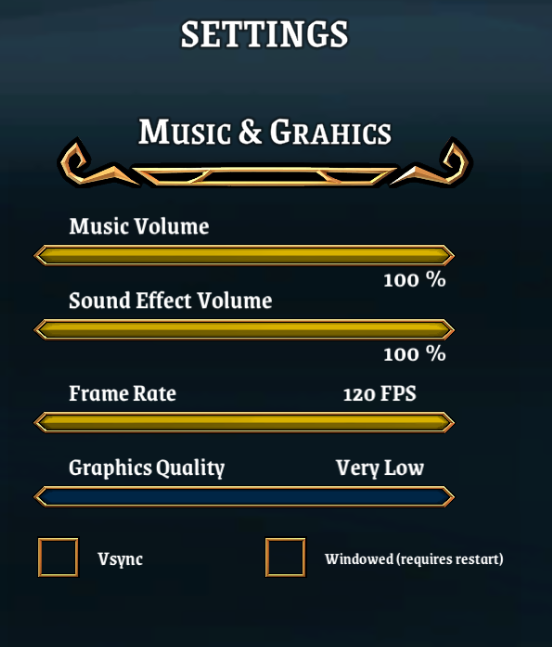
I haven't tested the entire game on these settings, but I wanted to make sure you could play the game first and foremost. I think this will be a large step towards unblocking some of you without dedicated graphics cards. I don't think the effect is too drastic either, here is one example:
Changelog

  • Feature: Introduced a graphics settings (Standard/Low/Very Low) to hopefully alleviate the issues some players with laptops were seeing like certain chapters crashing due to loading textures.
  • Fix: Settings not loading/saving correctly if you've updated the screen edge sensitivity.
  • Fix: Fixed an issue where unblockable reinforcements could be pushed out of the map by units standing on their spawn tile. If you saw a certain reinforcement in chapter 7 not being recruitable, this is why.
  • Fix: If you made edits to your units in their joining chapter in the formation menu and saved, but not in base, the units would go back to default equipment upon restart. It now works correctly where saving in formation menu and restarting will still keep the edits you made showing up in base.
  • Fix: Text fixes "resfresh" -> "refresh", mispelling of "Macrus", Bodyguard ability clarified in its description.
  • Balance: Crusader now has 2 charges for their smite ability.

Also got some fixes for certain unit's being "pushed off the map" and not being able to be recruited. Another fix for an issue where default equipment would keep getting assigned to units on their first chapter in your squad (Mainly happened if you only saved in the formation menu and not base).

Also just a slight balancing change for now so the Crusade can keep up with Enlightened and Saint. Hope this helps make the class feel better.

If you were somebody who was experiencing chapter 4 crashing on your laptop, please confirm to me in email or the Steam forums if the new graphics settings has fixed the issue for you!!

Best,
Eldin T.

More from Those Who Rule

Other announcements

All news
Game update14 Apr 2026Patch (v1.4.3): Small Bug Fixes, and A Big Thank YouHey everyone! Had some bug reports I've been wanting to get to, and just wanted to make sure to get out the fixes to the common ones I could reproduce before going full steam ahead on game 2. Before the changelog, I wanted to say a huge thank you to the community. Those Who Rule 2 is already closing in on 10,000 wishlists . The first game took nearly three years to hit that, and we’re getting t…Community9 Mar 2026Those Who Rule 2 - AnnouncementHey everyone! It's been over a year since the release of Those Who Rule, and some of you may have already had an idea why I've been quiet on announcements. I'm excited to confirm the poorly kept secret - I'm hard at work on the sequel, Those Who Rule 2! The first game was in development for over 4 years, shaped by constant feedback from the community and play-testers. With your help, I made som…In-game event27 Sep 2025Patch (v1.4.2): New SS Rank Weapons, Community Easter EggsHey everyone! I know I said I was likely done with content updates, but I've had some requests through the games release that were too good not to put in. One of the main ones being filling out the roster of SS rank weapons to have a payoff for weapon mastery. Each weapon type now has it's own unique SS rank weapon that are given as rewards throughout the late game. For those of you who have be…