Status
SteamPeaks
ChartsSalesUpcomingPatchesNewsCalculator
New on SteamEvery app, DLC and depot the minute Steam creates itAppsEvery app on Steam, newest change firstPackagesSubs and bundles, and what each containsDepotsDepots, manifests and install sizesTagsSteam's user tags and the games under themDevelopers & publishersCompanies and their cataloguesTechnologiesEngines, SDKs and anti-cheat found in the filesChange historyEvery PICS changelist as it lands
SignalsNineteen readings of the whole catalogueCompareAny games side by sideRecordsAll-time peaks and the days they were setReportsWeekly and monthly write-upsAlerts & newsroomWatch a game, get told when it movesSteam statusIs Steam up, right nowWeb API explorerTry the endpoints in the browser
NewsSteam's own announcements and the sales calendarCalculatorWhat a Steam account is worth, and its pile of shame
/
Sign in
/
SteamPeaks
The ultimate resource for Steam data.
ExploreChartsSalesSales and festsUpcomingPatchesNewsRecordsTrendingSignals
DatabaseAppsPackagesDepotsTagsDevelopersTechnologiesChange history
ToolsCalculatorCompareSearchAlertsSteam statusAPI
SiteMethodologyFAQDiscordSupportSign in via Steam
Not affiliated with Valve or Steam. Game names and artwork belong to their owners. All times UTC.
PrivacyCookiesFair useStatus
Lossless ScalingNewsAdaptive Frame Generation
Major update

Adaptive Frame Generation

Lossless Scaling · published 8 Mar 2025, 12:27 UTC

All newsPlayers around this dateRead on Steam

AFG


Introducing Adaptive Frame Generation (AFG) mode, which dynamically adjusts fractional multipliers to maintain a specified framerate, independent of the base game framerate. This results in smoother frame pacing than fixed multiplier mode, ensuring a consistently fluid gaming experience.

AFG is particularly beneficial for games that are hard or soft capped at framerates that don’t align as integer multiples of the screen's refresh rate (e.g., 60 → 144, 165 Hz) or for uncapped games — the recommended approach when using LS on a secondary GPU.

Since AFG generates most of the displayed frames, the number of real frames will range from minimal to none, depending on the multipliers used. As a result, GPU load may increase, and image quality may be slightly lower compared to fixed multiplier mode.

Capture


To support the new mode, significant changes have been made to the capture engine. New Queue Target option is designed to accommodate different user preferences, whether prioritizing the lowest latency or achieving the smoothest experience:

• 0
Unbuffered capture, always using the last captured frame for the lowest latency. However, performance may suffer under high GPU load or with an uncapped base game framerate.

• 1 (Default)
Buffered capture with a target frame queue of 1. Maintains low latency while better handling variations in capture performance.

• 2
Buffered capture with a target frame queue of 2. Best suited for scenarios with an uncapped or unstable base framerate and high GPU load, though it may introduce higher latency. Also the recommended setting for FG multipliers below 2.

Additionally, WGC capture is no longer available before Windows 11 24H2 and will default to DXGI on earlier versions if selected. GDI is no longer supported.

Other


- LSFG 3 will disable frame generation if the base framerate drops below 10 FPS. This prevents excessive artifacts during loading screens and reduces unnecessary GPU load when using AFG.

- The "Resolution Scale" option has been renamed to "Flow Scale" with an improved tooltip explanation to avoid confusion with image scaling.

Latency


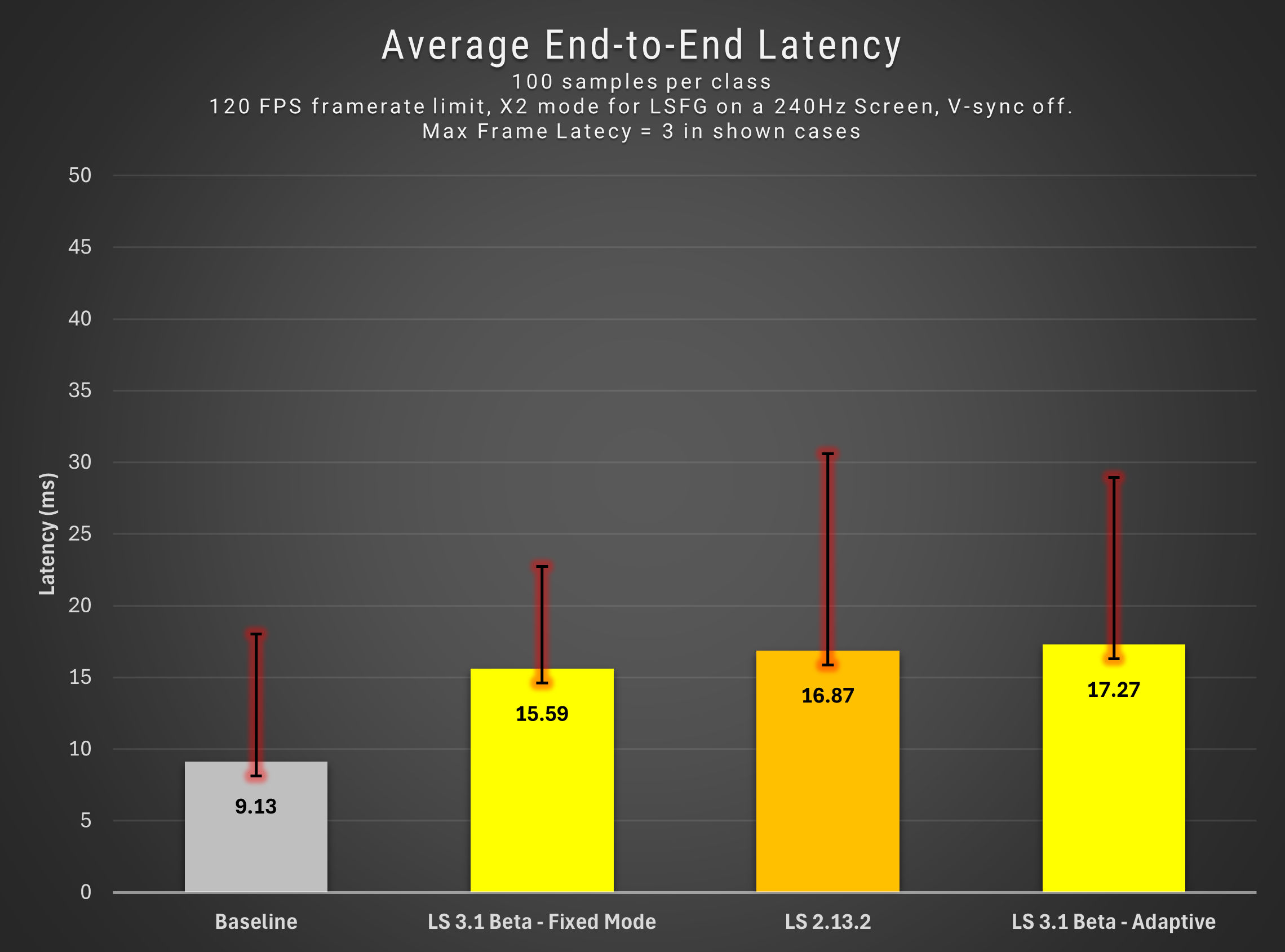
Latency testing by @CptTombstone
Tutorial


Be sure to check out this awesome video by @Jagadhie, where he explains the new feature in detail:
https://www.youtube.com/watch?v=q4i8TPSQi2M

More from Lossless Scaling

Other announcements

All news
Game update14 Jul 2025Performance Mode HotfixResolved a critical bug that impacted quality in LSFG 3.1 Performance mode. · Fixed an issue where holding down a key wouldn’t repeat input if it was part of a scaling hotkey combo. · Added Macedonian localization. Big thanks to everyone helping make LS better. Also, check out the excellent work by PancakeTAS on running LSFG on Linux: Have fun!Major update11 Jun 2025LSFG 3.1This update introduces significant architectural improvements, with a focus on image quality and performance gains. Quality Improvements · Enhanced overall image quality within a specific timestamp range, with the most noticeable impact in Adaptive Mode and high-multiplier Fixed Mode · Improved quality at lower flow scales · Reduced ghosting of moving objects · Reduced object flickering · Impro…Major update10 Jan 2025LSFG 3Happy anniversary, LSFG! LSFG 3 is built on a new, efficient architecture that introduces significant improvements in quality, performance, and latency. Key improvements include: · Better quality: Reduced flickering and border artifacts, with noticeable enhancements in motion clarity and overall smoothness. · Lower GPU load: A 40% reduction for X2 mode compared to LSFG 2 (non-performance mode).…