Status
SteamPeaks
ChartsSalesUpcomingPatchesNewsCalculator
New on SteamEvery app, DLC and depot the minute Steam creates itAppsEvery app on Steam, newest change firstPackagesSubs and bundles, and what each containsDepotsDepots, manifests and install sizesTagsSteam's user tags and the games under themDevelopers & publishersCompanies and their cataloguesTechnologiesEngines, SDKs and anti-cheat found in the filesChange historyEvery PICS changelist as it lands
SignalsNineteen readings of the whole catalogueCompareAny games side by sideRecordsAll-time peaks and the days they were setReportsWeekly and monthly write-upsAlerts & newsroomWatch a game, get told when it movesSteam statusIs Steam up, right nowWeb API explorerTry the endpoints in the browser
NewsSteam's own announcements and the sales calendarCalculatorWhat a Steam account is worth, and its pile of shame
/
Sign in
/
SteamPeaks
The ultimate resource for Steam data.
ExploreChartsSalesSales and festsUpcomingPatchesNewsRecordsTrendingSignals
DatabaseAppsPackagesDepotsTagsDevelopersTechnologiesChange history
ToolsCalculatorCompareSearchAlertsSteam statusAPI
SiteMethodologyFAQDiscordSupportSign in via Steam
Not affiliated with Valve or Steam. Game names and artwork belong to their owners. All times UTC.
PrivacyCookiesFair useStatus
StreamAlertsTVNewsWinter update (6) Improved monitor settings
In-game event

Winter update (6) Improved monitor settings

StreamAlertsTV · published 11 Feb 2025, 18:01 UTC

All newsPlayers around this dateRead on Steam

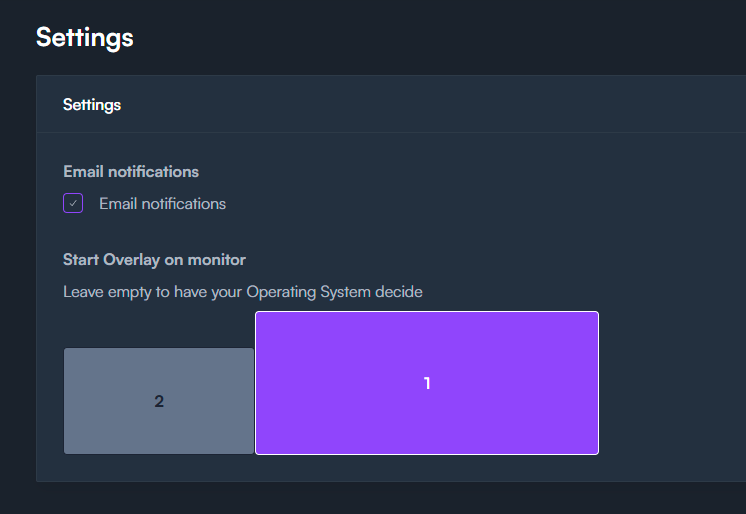
The StreamAlertsTV Overlay sometimes had a mind of its own. It would start up, and jump towards another monitor, not always was this the desired monitor. We fixed this problem! You can go to settings and set up a dedicated monitor to place the overlay.

New features and content

  • Select the monitor you want to use in the settings, the overlay should start on this monitor.
  • We added a Windows Error pop-up to celebrate, check it out under games > cursor effects!

Next week, we're rolling out new animations, visual effects, and various improvements. These updates will be added to the existing bundles in the shop, giving you more content for the same price. If you've already purchased a bundle, the new additions will be unlocked for you automatically.

There are only 2 weeks left before the Twitch Hackathon results are out. Please tell your streaming friends to try Lights Out! and help us win.

If you have ideas for new games, comment here or join our Discord!

More from StreamAlertsTV

Other announcements

All news
Community6 Aug 2026A Super Size update!Chat will go bigger and louder with the Super Size feature for Bits-in-Extension. Get ready to earn more! Why not spin 3 wheels simultaneously? With Super Size, your chat can use 1.5x more Bits to extend games and distractions, drop bigger flashbangs, summon more frogs, and so on. All the chaos, scaled up to eleven! · Viewers: Super Size is self-explanatory — the option is a toggle that switche…Community22 Jul 2026Wheel of Misfortune - 2.0 UpdateA much-needed improvement to StreamAlertsTV's most-used Bits-in-Extension interaction. We've added: · Give items a higher chance with weights · Visual improvements to the customization process · Added tips for clips Spinning the wheel is the most popular interaction by far. By adding weights to the wheel, you, as a Twitch streamer, gain more control over the chaos. You can determine the chances…Community16 Jul 2026Updates on Spin The Wheel and More ImprovementsWe're excited to share the improvements rolling out in July. Read on to discover how your viewers will disrupt your next game. Names Above Alerts! Alerts now show who triggered them right above the alert itself! This way you can immediately curse the culprit who distracts you. Only fair. Wheel of Misfortune 2.0 (work in progress) We're also shaking up the Wheel of Misfortune. As the most popula…