Status
SteamPeaks
ChartsSalesUpcomingPatchesNewsCalculator
New on SteamEvery app, DLC and depot the minute Steam creates itAppsEvery app on Steam, newest change firstPackagesSubs and bundles, and what each containsDepotsDepots, manifests and install sizesTagsSteam's user tags and the games under themDevelopers & publishersCompanies and their cataloguesTechnologiesEngines, SDKs and anti-cheat found in the filesChange historyEvery PICS changelist as it lands
SignalsNineteen readings of the whole catalogueCompareAny games side by sideRecordsAll-time peaks and the days they were setReportsWeekly and monthly write-upsAlerts & newsroomWatch a game, get told when it movesSteam statusIs Steam up, right nowWeb API explorerTry the endpoints in the browser
NewsSteam's own announcements and the sales calendarCalculatorWhat a Steam account is worth, and its pile of shame
/
Sign in
/
SteamPeaks
The ultimate resource for Steam data.
ExploreChartsSalesSales and festsUpcomingPatchesNewsRecordsTrendingSignals
DatabaseAppsPackagesDepotsTagsDevelopersTechnologiesChange history
ToolsCalculatorCompareSearchAlertsSteam statusAPI
SiteMethodologyFAQDiscordSupportSign in via Steam
Not affiliated with Valve or Steam. Game names and artwork belong to their owners. All times UTC.
PrivacyCookiesFair useStatus
Desktop DrillerNewsDesktop Driller: Demo now available on Steam
Community

Desktop Driller: Demo now available on Steam

Desktop Driller · published 2 Apr 2026, 23:33 UTC

All newsPlayers around this dateRead on Steam

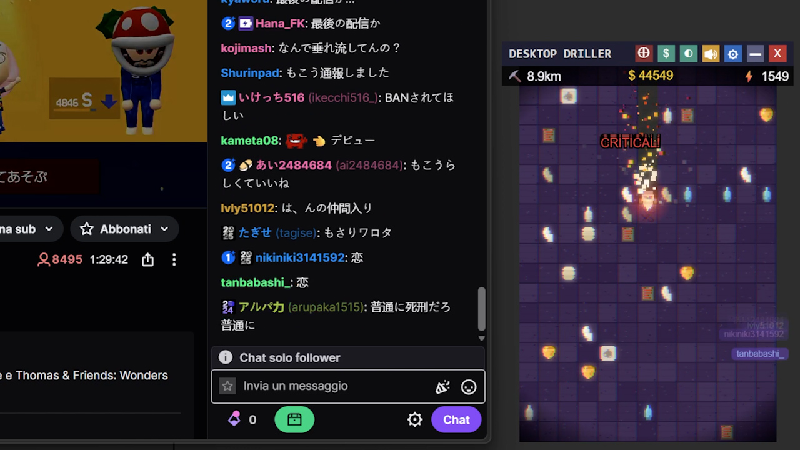
We are pleased to announce that the official demo for Desktop Driller is now available for download. Along with the core gameplay, this version introduces a new feature: Twitch Mode.

Twitch Mode Integration

This mode allows you to connect the game directly to a Twitch channel. Once connected, the drill is driven entirely by chat activity rather than local inputs.

  • Message Impact: Every chat message translates into a hit. The strength of the hit scales with the length of the message.

  • Community Interaction: The drill can now acknowledge viewers by displaying their names on screen.

  • Integrated Alerts: The game includes native notifications for subscriptions, bits, and raids, removing the need for external overlays during gameplay.

Development Focus

Desktop Driller was designed as a background application. By adding Twitch integration, we want to provide a collaborative experience where a streamer's community can actively participate in the progression of the game.

Future Plans

We are currently monitoring how communities interact with these features. Future updates may include chat-based voting for upgrades and community-driven leaderboards.

The demo is available now on our Steam page. If you would like to support the project, please consider adding Desktop Driller to your Wishlist.

The Desktop Driller Team

More from Desktop Driller

Other announcements

All news
Game update16 Jul 2026Comfort Update: Screen Shake ToggleSome of you told us the screen moved a bit too much while drilling - now it's your call. · New "Screen Shake" toggle in Settings. Turn it off to remove all screen shake - while digging, during earthquakes, and on the final breakthrough. · On by default, so nothing changes unless you want it to. · Available in all 12 supported languages. Thanks for the feedback - keep it coming! ⛏️Community8 Jul 2026Fix: the game could reinstall itself after uninstalling — and how to clean it upWe shipped a fix for a serious bug, and we owe some of you an explanation and an apology. What went wrong On first launch, Desktop Driller used to automatically enable the "start with Windows" option, and it registered that startup entry in the following way: instead of pointing to the game's own executable, it pointed to Steam with a command telling Steam to launch the game. Steam's uninstalle…Game update2 Jul 2026Fixes & ImprovementsFixes & Improvements · Fixed: in some cases the game could reappear in your Steam library or re-download itself after being uninstalled. This no longer happens. · New: launching at Windows startup is now optional. New players choose during the tutorial; updating players are asked once. You can change it anytime in Settings. · Improved: confirmation dialogs (such as the quit prompt) are now larg…