Game update
Turnover Updated: In Game Tutorial, Enemy Hearing Improvements, & More
Turnover · published
Turnover has been updated to v1.0.784. This update brings a number of new features and improvements.
In Game Tutorial
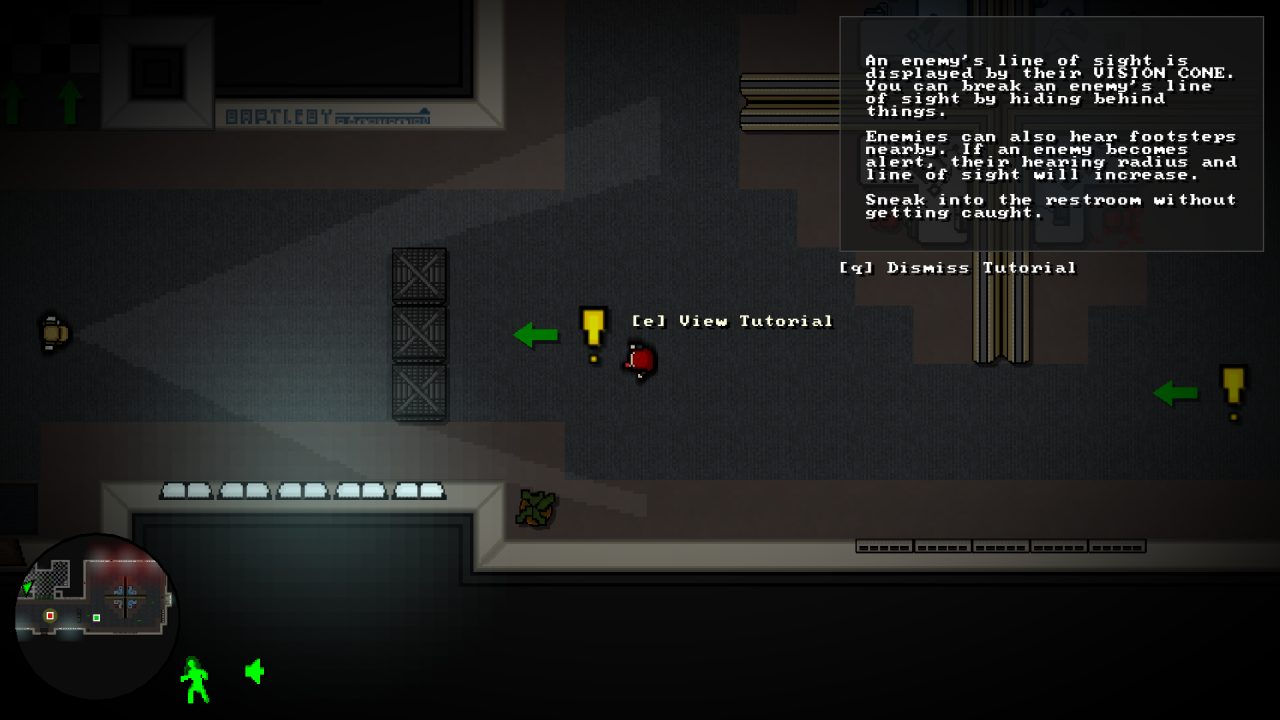
Turnover now has an in game tutorial to help new players learn the basics before jumping in.
New Minimap Hints
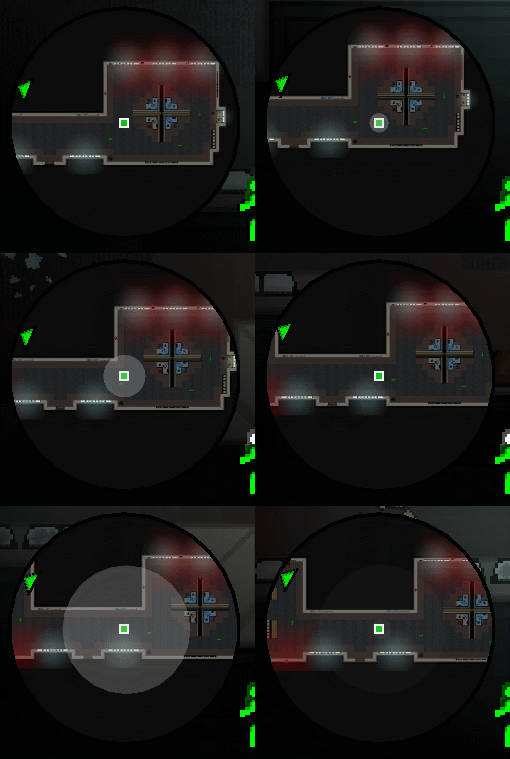
Noise radius and enemy hearing range is now displayed on the minimap for both Easy & Normal mode.
Other Notable Changes
- Game menus can now be navigated using the mouse. Left click selects a menu item. Left/Right click cycles through menu selections that have multiple options, like resolutions, volume, etc...
- In Windows, an info box will now pop up on most game errors, just to give you some more info about what happened. In Mac and Linux, the error message will dump to the terminal.
- The enemy hearing system has been rewritten to fix problems and to accommodate the new radii blips in the minimap. Enemy hearing should be far more consistent.
Full Changelog
- New: Game: Added an in-game tutorial to help new players with the gameplay basics. It can be accessed through the main menu.
- New: Menus: Added ability to make menu selections using the mouse and left click in the main menus.
- New: Minimap: Added enemy hearing radius indicators to minimap for Easy & Normal mode.
- New: Minimap: Added sound generation markers to HUD to display various hearing/noise radii for Easy & Normal mode.
- Changed: Art: Improved shading, perspective, and detail on a number of sprites.
- Changed: Enemies: Rewrote hearing system, improving hearing from enemies.
- Changed: Enemies: Enemies have slightly better reaction times, but the Slow Reactions perk now has a greater benefit.
- Changed: Enemies: Improved enemy spotting priority. Enemies should spot dead bodies in fire better, etc...
- Changed: Rent a Cop: Increased bullet speed.
- Changed: Levels: Tweaked a few levels to accommodate new hearing system.
- Changed: Minimap: Shrunk HUD Player/NPC blips slightly.
- Changed: Engine: Reduced frequency of Steam background checks.
- Changed: Engine: Minor optimizations, mostly involving the rewrite of the enemy hearing system.
- Changed: HUD: Reworded difficulty text.
- Changed: Intro: Shortened the lead-in time on the logo screen when first launching the game.
- Changed: Game: Added more Continue screen hints.
- Changed/Windows: Engine: Added a popup alert box on game error shutdown to relay more info to user.
- Changed/Mac & Linux: Engine: Added console output on game error shutdown to relay more info to user.
- Fixed/All: Levels: Fixed some incorrect positioned deco and other oddities.
- Fixed/All: NPCs: The calculation of vision cones was delayed by 1 frame. Also fixed a tiny rendering bug.
- Fixed/All: Worker: Fixed Victoria's HUD blip disappearing after disabling a server.
- Fixed/All: Minimap: Fixed Turret blips not showing up on minimap.
- Fixed/All: Minimap: Fixed minimap alert sometimes blinking red at the beginning of a level.
- Fixed/All: Controller: Potential fix for incorrect default binds for Xbox 360 controllers.
More from Turnover
Other announcements
Turnover Updated: v1.0.879Turnover has been updated to v1.0.879. v1.0.879 Changelog · New: Added menu identifiers in the lower right of the screen so you know where you are when navigating the menus. · Changed/All: Significant rendering and CPU performance improvements. Should be be most impactful to those with low end systems. · Changed/All: For non-Xinput controllers, DirectInput is now internally preferred over WinMM…Turnover Updated: v1.0.874Notable Changes · Most graphical elements in the game now make greater use of vertex buffer objects for rendering. This will give a performance boost, particularly for lower end systems. · Music and sound volume can now be set separately in the Options screen. · All 21:9 screen scaling issues have been addressed. There were some size/positioning issues in menus and they have been taken care of.…Turnover Updated: Borderless Full Screen ModeTurnover has been updated to v1.0.865. This update adds a Borderless option in the Fullscreen setting in the Options screen. Borderless full screen is a windowed mode where the window is resized to cover the entire desktop and all "window dressing' is removed. It plays nicer with alt-tabbing, multi-monitor setups, or other situations where the normal full screen mode may have issues. To try it…