
Controller Support:
As I have been promising for a long time, I've finally implemented full controller support for Subsistence. The support should cover all Xbox, PlayStation, Steam Deck, and generic controllers.
You will find the in-game controls section now broken down into two sections for mouse and keyboard and controller.

If a recognized controller is connected, you will see a diagram of the button mappings for your controller type.
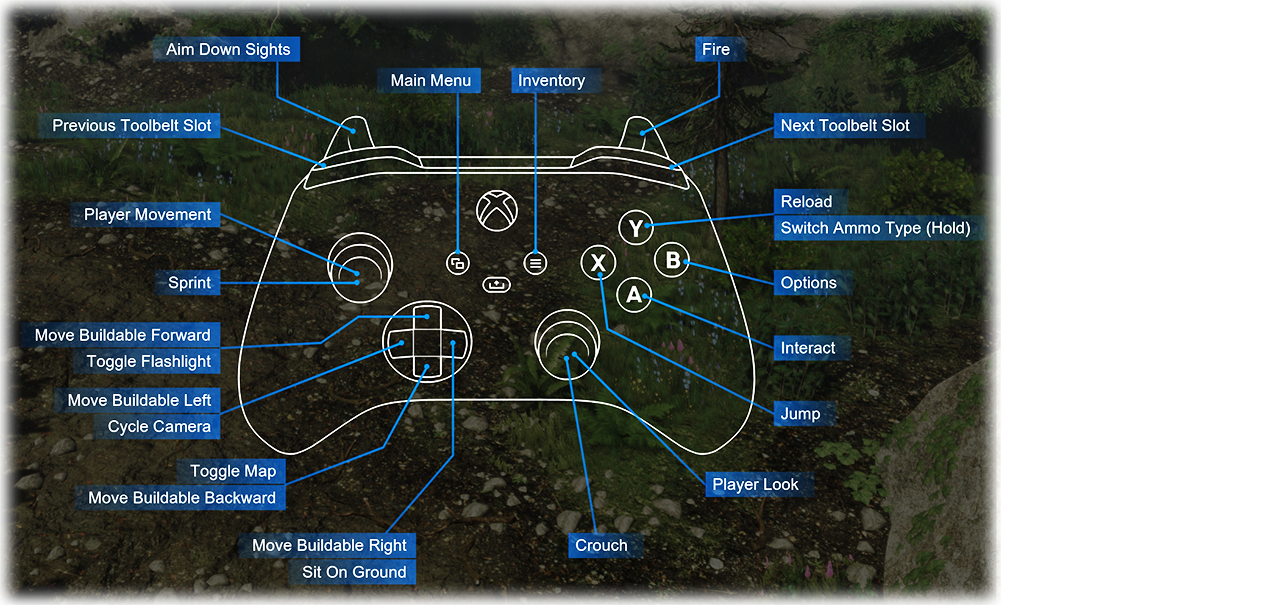
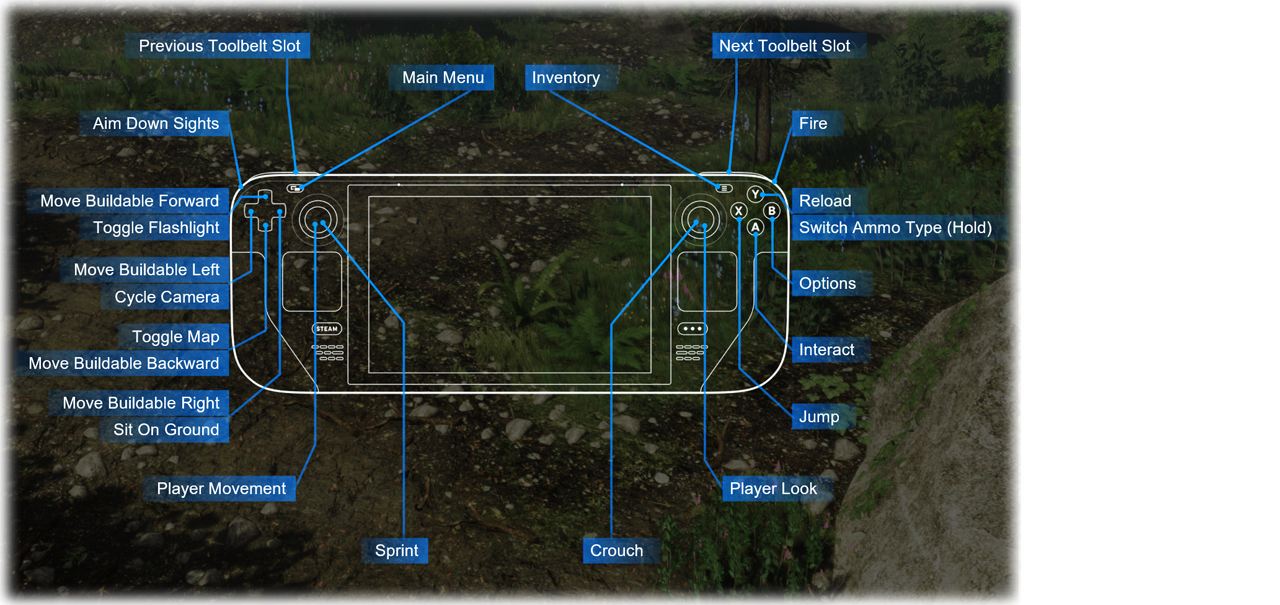
To account for the finite buttons available on controllers, the control scheme is divided into three sets:
- In-Game
- Menu
- Driving
These sets will automatically switch based on what the player is doing in the game. You can view the various sets and their bindings by using the button in the bindings menu.

The button on the left allows you to flick through the various controllers you have connected.
Reconfiguring Bindings:
While I recommend using the default bindings I have configured for each controller type, I understand it's important for players to have the freedom to configure their controllers as they please.

A button at the bottom-left of the controller screen will open up a bindings window, allowing the player to change any aspect of their control scheme.
Steam Input:
I decided to use Steam Input as the basis for the controller support. This was due to Valve's broad support for different controller types, and for ongoing support leading into the future as new controller types enter the market. When rebinding controls in-game, the Steam overlay will popup to show the Steam Input binding menu.
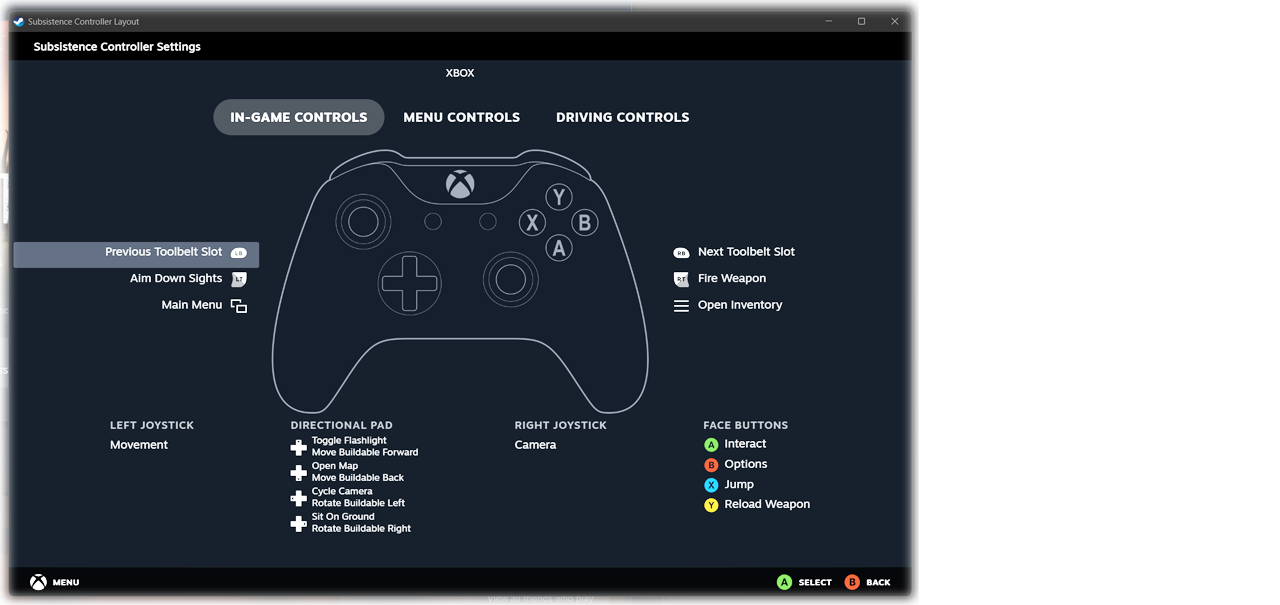
These bindings will only apply to Subsistence, so will not affect your bindings for any other game in your library. This can also be done by clicking on the controller button in the Steam UI while viewing the Subsistence page in your games library.
If you have an existing Steam Input control scheme for Subsistence:
Some players may have already setup a custom control scheme using Steam Input. In this case your custom layout may be selected by default. I strongly suggest switching to the official layout (even if you plan to change it). As the official layout provides many actions supported by the game that were previously not available.

To switch to the official layout (see above), click on the controller box on your Subsistence Steam page. Then click "Browse Community Layouts". Then under "Recommended" select the official layout and apply it.
Note: Most players will not have to do this and the official layout will be selected by default.
Keyboard/Mouse/Controller Glyphs:
Previously many of the in-game prompts provided very small text explaining which key to press. Now I am using images (glyphs) for the specific key or button that is required with less text and at a larger font. This should help with accessibility and provide a cleaner UI.

Also when looking at dropped items, it now shows an image of the item with a count rather than lots of small text.

These glyphs have been implemented all over the UI when text was previously used.
Build Animations:
Something I've been meaning to add for a long time; most buildables will now play out a build animation when they are placed or moved. I think this makes building more satisfying and immersive to see each piece placed individually.

The sound design will play different placement sounds depending on the material type. Each individual piece will shake independently as it fits into place.

I've implemented these animations purely through the vertex shader of the mesh materials. This means they are entirely animated through the GPU and put no extra load on the CPU, so are very efficient in terms of performance.

All wood, roofing and glass structures have had these animations added.
Customizable ADS Sensitivity:
Previously, weapon ADS (aim down sights) sensitivity was exactly the same as normal look sensitivity. This meant as the player zoomed in with a weapon, the sensitivity would become very high and difficult to aim. This was particularly awkward with weapons with a higher zoom (such as the rifle and LAR).

Now weapons have a lowered sensitivity while aiming, making it much easier to target enemies. In addition, players can customize each weapon's ADS sensitivity to their own personal preference. In the controls menu there is an "advanced" section, with ADS sensitivity sliders for each weapon.
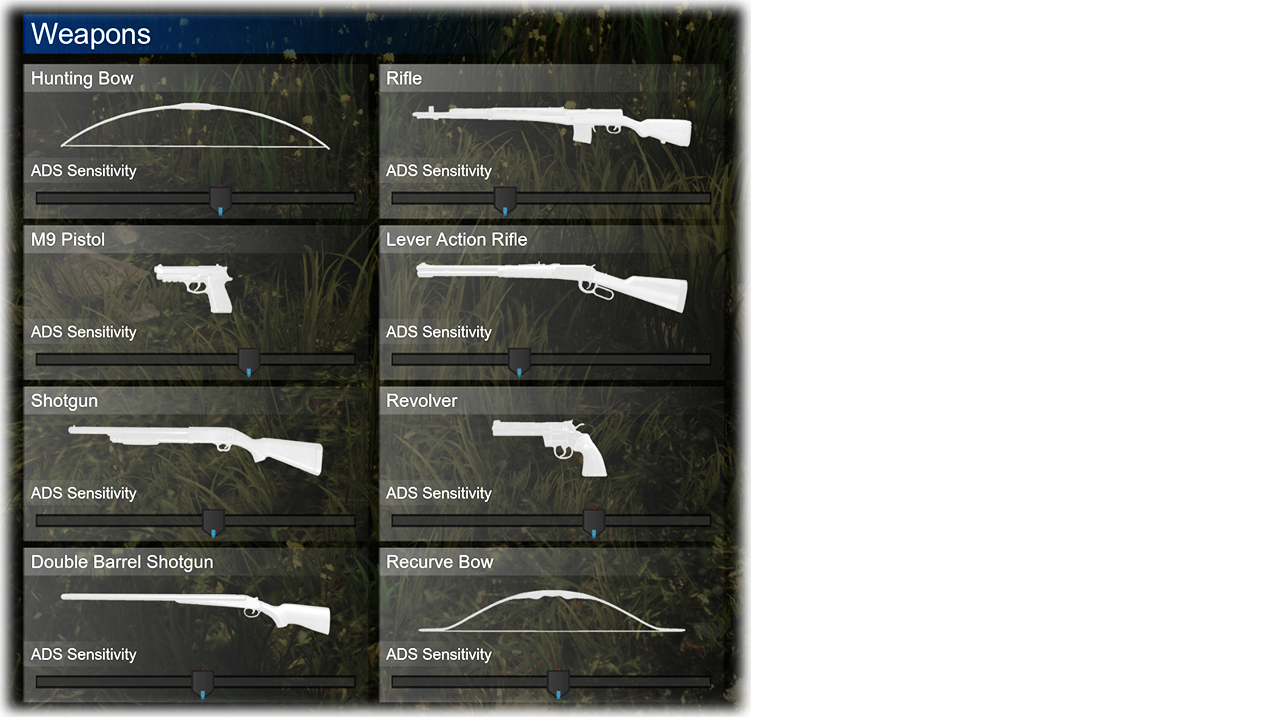
There is a red marker on each slider to indicate the default (recommended) setting.
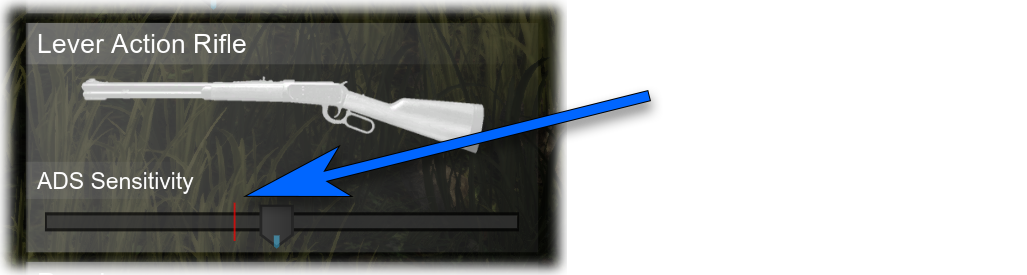
- When the slider is at full, this means the ADS sensitivity will be the same are normal look sensitivity.
- When the slider is at the lowest, the ADS will be 10% of the normal look sensitivity.
These settings can be separately configured for mouse & keyboard and controller (by using the advanced section in each of the respective control menus).

All New Controls Menu:
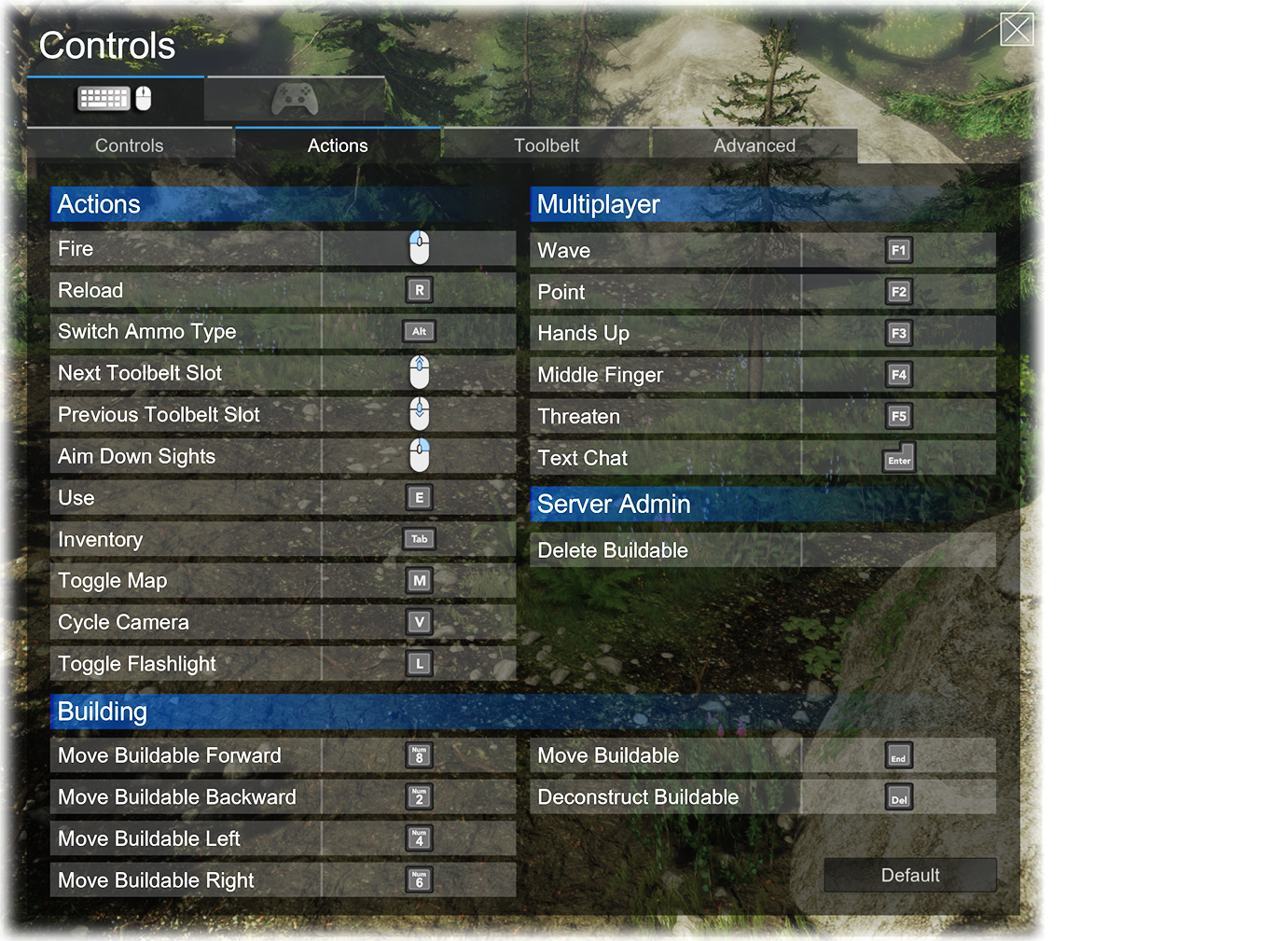
I've completely rewritten the in-game controls menu UI. The code was old and becoming problematic. The new menu is cleaner, features glyphs for keys/button (rather than text), and has some nice smooth animations when navigating between sections.
Inventory Item Animations:
Inventory items will now react as the player interacts with them, or as their state changes.
Clicking on, using or moving an item will play a subtle shake (as well as stacking an item). Also items will tilt as they are mouse-overed. The hope is to make the UI feel a little more responsive to the player.

This also means that as a player "Takes All" from a loot crate, it is a lot more obvious what was taken and where the items have been placed/stacked in their inventory, due to those items briefly animating.
Reset to Default Controls:
There is now a button in the controls menu for resetting all keybinds back to their default values (including sensitivity sliders).
Inventory Input Prompts:
I've added some contextual action prompts (which show top right) while viewing the inventory.

As players mouse-over inventory items the prompts will hint at quick actions available for this item. This includes actions like shift-clicking to move item stacks or singles between inventories (which many players are not aware of).
In-Game Input Prompts:
Same as the with the inventory input prompts, I have also added in-game prompts, which show bottom right during gameplay.

These prompts will hint at things like switching ammo types (if you have more than one ammo type for the held weapon). Or toggling a weapon flashlight if the held weapon has one attached. Hopefully this helps makes playing the game a little more intuitive without referencing the controls menu or googling how something is done.
New Toolbelt Selecting:
Now when scrolling through your toolbelt (using "next/prev toolbelt item" keys), all slots can now be selected. This mean buildables, medical, edible items, etc can be selected without needing to hit a number key. It always felt inconsistent to me that only weapons would select, and the selection would jump around.

When flicking through slots, a small blue marker will show above the slot briefly before selecting the item. This eliminates the glitchy, rapid weapon-equipping animations playing when scrolling through weapons.
Weapons and buildables will equip automatically. For other items (such as med-kits), players can press the "fire" key to use the item (or perform their primary action). An input prompt will show indicating the action that can be performed.
New (Animated) Navigation Menu:
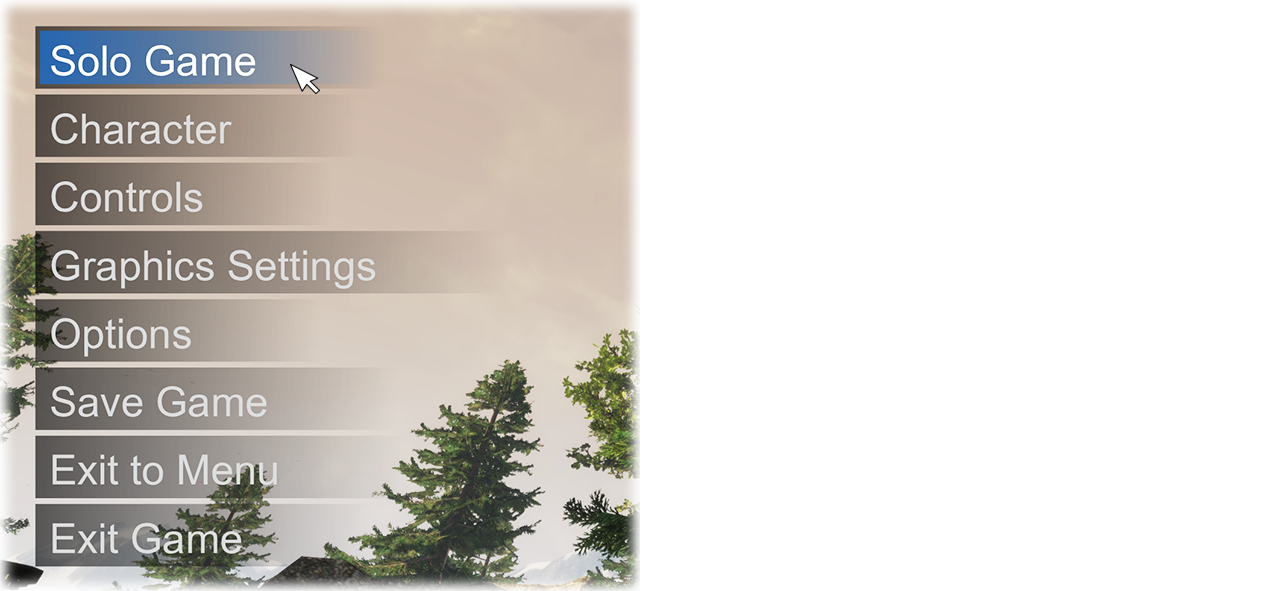
The new menu has a larger font, and is closer in-line with the game's UI design language.
Breath Sounds When Exhausted (+ Fixed Sprinting Animation Bug):
Now when the player depletes their stamina, you will hear a breath sound. I also fixed the bug whereby the arms sprinting animation would continue after stamina depletion.

Quick Craft Hotkey:
Now whenever the craft preview panel is open the player can hit a hotkey to craft the item without needing to mouse over and click on the craft button.
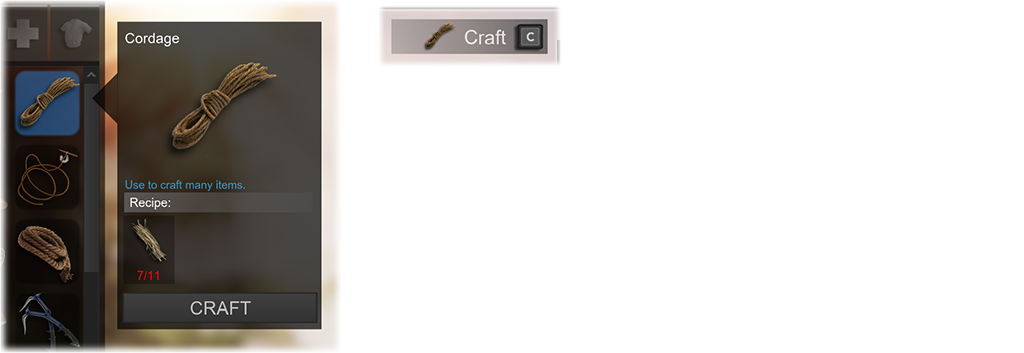
A small convenience, but useful if you can train yourself to use it (much like the "Take All" hotkey).
GeForce Now?
Many players have asked about Subsistence being supported on GeForce Now. GeForce Now is Nvidia's cloud gaming service that allows users to stream PC games on various devices without needing powerful local hardware.
I have always stated that once I have native controller support implemented I would explore this option. So just letting you know that I am actively looking into it, and I will keep you updated as progress continues.
Other Notable Changes:
- Claymores, Breaching Charges and BCU Crackers are now stackable.
- Fixed vehicle falling through the vehicle bay when recalling vehicle.
- Prevented canteens filled with dirty water being drank from when using the quick action hotkey (shift+left-click). This should prevent accidental infection.
- Fixed Garage Door not colliding with vehicle (missed bug in Alpha 63).
- Subtle camera animations will now play during the process of butchering animals.
Thank You 🙏
Thanks so much to everyone that continues to support the game and its continued development. I truly appreciate all the discussions, gameplay, bug-reports and general support. It helps so much to continue to shape the game.
I know much of the community solely use mouse and keyboard, so are probably not interested in the controller support that comprised a bulk of this update. However it's important to broaden the accessibility of the game for players that either prefer or rely on using a controller. Being able to play on a big-screen TV from the comfort of a couch makes the game a more complete package for players.
Have a great weekend!
CG
Discord invite: https://discord.gg/zyy4jQs

X/Twitter: @playSubsistence
Facebook: https://www.facebook.com/playsubsistence/
YouTube: https://www.youtube.com/channel/UCkQZ7vkTiqetTC0_8umY2Pg
Steam Forums: https://steamcommunity.com/app/418030/discussions/
Hosting Your Own Server:
If you would like to host your own dedicated server, I would recommend Nitrado (as I work closely with their team to support the game). You are also free to host on your own hardware, and the server files are freely available on SteamCMD.

You can view a detailed guide to hosting here:
https://steamcommunity.com/sharedfiles/filedetails/?id=2201638184
Continued Translation Support Credits (in no particular order): Thank you so much for the support.
Spanish (David Lascasas, MusicMan)
Hungarian (Erb Ármin)
Portuguese BR (Thiago Schumacke)
Portuguese European (João C. H. Jorge)
German (Philipp J. Rackl (LPCaiser))
Italian (Marcello Brancaccio, Federico D. Ravagli)
French (Anthony Charrault)
Czech (Dílna U mnicha)
Dutch (Damster_NL)
Danish (Jesper Vestergaard Bæk)
Russian (FRAME)
Turkish (Soulkast, Çagla Gurbet)
Swedish (Mattias Gustavsson)
Norwegian (Christer Djuvik, Svein Tore Stegemoen)
Romanian (VaeVictis)
Estonian (Streamerize)
Polish (Robertus Lubin)
Ukrainian (RoW-Team)
Latvian (Martins Plucis)
Finnish (Pewtsku and J4ntteri)