Status
SteamPeaks
ChartsSalesUpcomingPatchesNewsCalculator
New on SteamEvery app, DLC and depot the minute Steam creates itAppsEvery app on Steam, newest change firstPackagesSubs and bundles, and what each containsDepotsDepots, manifests and install sizesTagsSteam's user tags and the games under themDevelopers & publishersCompanies and their cataloguesTechnologiesEngines, SDKs and anti-cheat found in the filesChange historyEvery PICS changelist as it lands
SignalsNineteen readings of the whole catalogueCompareAny games side by sideRecordsAll-time peaks and the days they were setReportsWeekly and monthly write-upsAlerts & newsroomWatch a game, get told when it movesSteam statusIs Steam up, right nowWeb API explorerTry the endpoints in the browser
NewsSteam's own announcements and the sales calendarCalculatorWhat a Steam account is worth, and its pile of shame
/
Sign in
/
SteamPeaks
The ultimate resource for Steam data.
ExploreChartsSalesSales and festsUpcomingPatchesNewsRecordsTrendingSignals
DatabaseAppsPackagesDepotsTagsDevelopersTechnologiesChange history
ToolsCalculatorCompareSearchAlertsSteam statusAPI
SiteMethodologyFAQDiscordSupportSign in via Steam
Not affiliated with Valve or Steam. Game names and artwork belong to their owners. All times UTC.
PrivacyCookiesFair useStatus
AimbeastNewsPatch 4.1.2.2
In-game event

Patch 4.1.2.2

Aimbeast · published 4 Feb 2024, 14:17 UTC

All newsPlayers around this dateRead on Steam

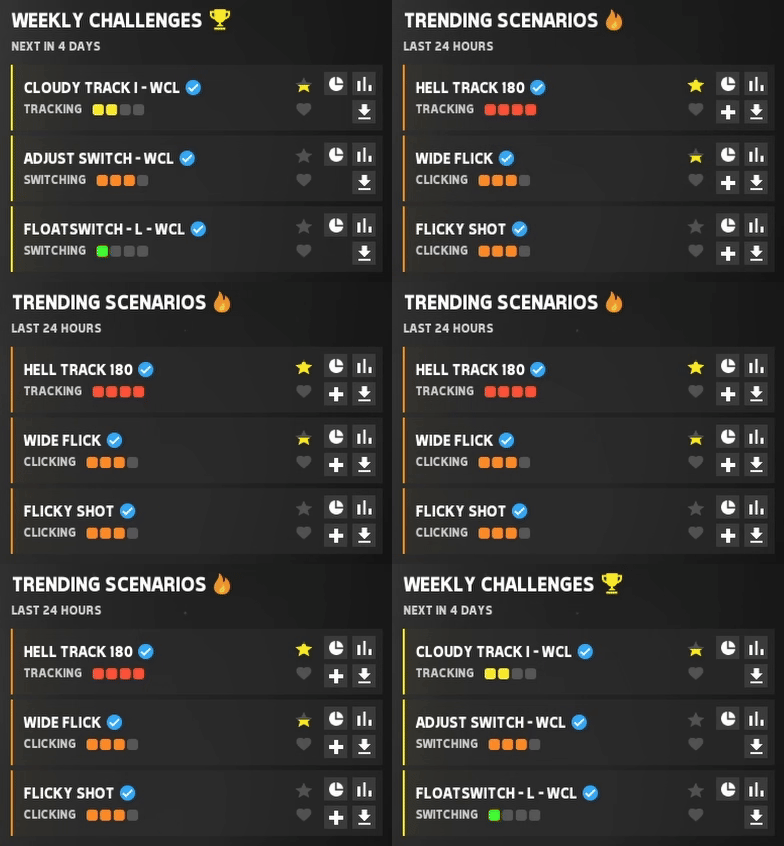
This patch includes several suggestions submitted in the Aimbeast Discord server, like trending scenarios from the last 24 hours, spawn points multi-select, crosshair export to PNG, auto-fire toggle, and new bot settings.

Trending Scenarios:

The top 3 most played scenarios in the last 24 hours will now show in the play tab, cycling with the weekly challenges.

Ranked scenarios and weekly challenges are excluded from this list.
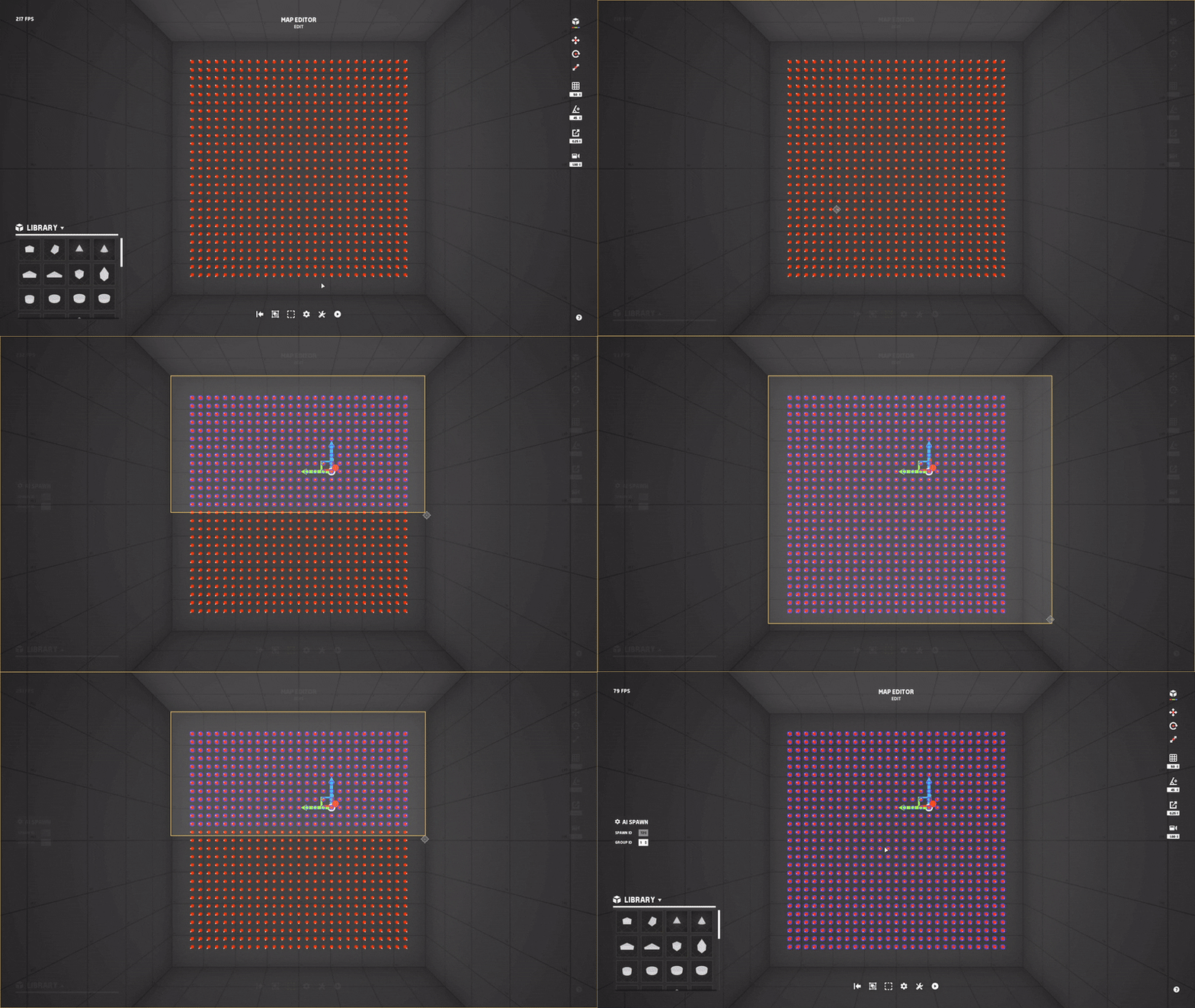
Spawns Selection Tool:

This new tool allows you to select multiple spawn points in a selection box easily.
New Scenario Settings:

  • Moved all spawn overlap protection settings into their category.
  • Spawn Overlap Protection Shape -> This can be either Sphere (which was the default before) or Box.
  • Spawn Overlap Protection Box Extent -> The size of the box (per axis) if the protection shape is set to box, note that this box will be oriented based on the spawn rotation, X is forward/back, Y is left/right and Z is up/down.
  • Spawn Overlap Protection Refresh Before Spawn -> If enabled, the spawn protection will refresh around all active bots, this only works with the spawn protection type set to "Time".

Auto-Fire Toggle:

This new feature allows you to avoid having to hold down the fire button in scenarios where the weapon has infinite ammo and is set to full auto.

The default keybind to toggle it on/off is "Middle Mouse Button" and it can be changed in Settings > Controls.

Crosshair Export To PNG:

Added a new functionality to the crosshair editor that allows you to export your crosshair to a PNG.

This can be useful in case you want to save your crosshair or share it with friends.

New Bot Settings:

Added the movement profiles manager, this allows you to edit the name of a movement profile, delete it, or duplicate it.

  • Movement Time Scale -> Adjusts the overall speed of the bot, including both fly systems.
  • Enable Movement / Fly Dodge Cooldown -> If enabled, after changing any direction, the bot applies a cooldown time to all dodge timers that have remaining time below the cooldown value. This can be useful to prevent the bot from changing two directions in a very short amount of time.
  • Movement / Fly Dodge Cooldown (MIN/MAX)
  • Event Trigger: Direction Changed (U/D) -> Triggers any time the bot changes direction up and down with the fly system.
  • Event Triggered: Speed Up/Down (Fly) -> Updates the speed of the V2 fly system.

Other Changes:

  • Fixed a bug that caused routines to show the incorrect current scenario in the end session routine progress tab.
  • Fixed a rare bug that caused scores to get submitted to the wrong scenario in routines.
  • Fixed a bug that caused some leaderboards to load infinitely.
  • Fixed the arena loading screen appearing after a small delay when joining an online server.

Join our discord to share your feedback and suggestions!


More from Aimbeast

Other announcements

All news
Game update9 Sep 2026Update 4.2.1.3This update adds the "Image Plane" block for verified users to display custom images. It also includes an editor grid overlay , leaderboard submission toggles , new customization settings , and bug fixes . New Editor Block "Image Plane" (Only For Verified Users): This new block allows verified users to add custom images to their maps. The goal of this block is to allow aim communities to includ…Game update25 Jul 2026Update 4.2.1.2This update fixes several bugs for bots and the map editor , and adds new bot settings . We also updated the login system to address some of the recent login errors. The login fixes might not solve the issue entirely; let us know if it helps tho. New Bot Settings: · Added the option to override the Swap Time for each specific movement profile, with a randomized range. · Added various settings t…In-game event7 Jun 2026Update 4.2.1.1This update introduces Smart Restart , a new tool designed to help you lock in and smash your highscores. We’ve also added two brand new Arena events : Speed Boost and High Acceleration . Smart Restart: Automatically triggers a restart countdown if your score falls behind your high score pace by more than the allowed deviation (calculated from your high score). Example: With a 0.05 (5%) deviati…