Steam Early Access Build: V0.236
Update Highlights:
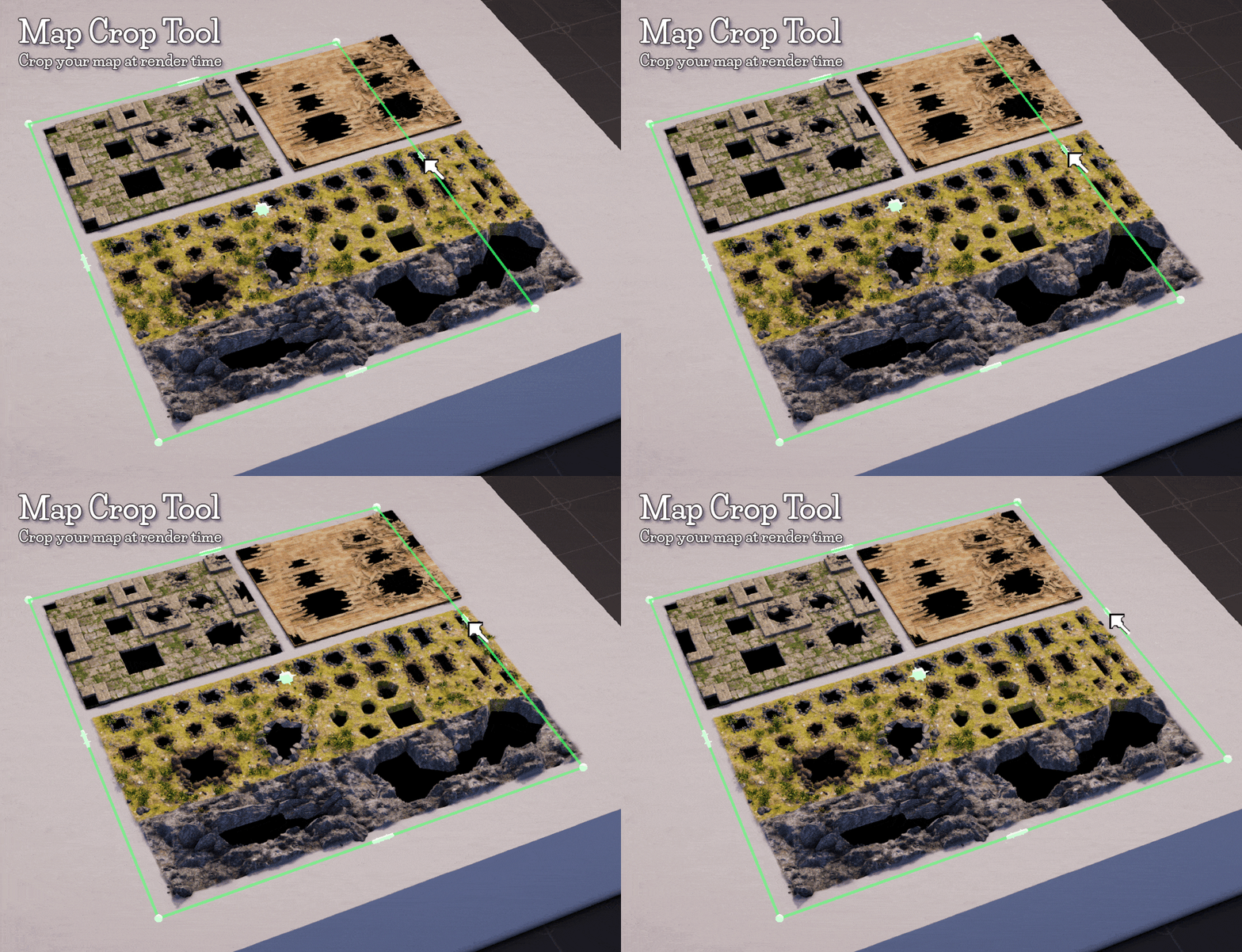
I’ve added a Crop Map Tool, find it in the render panel. It allows you to render out any sized map you want (yay!). It means you don't really need to think about the exact map size until you’ve got a map ready to render. It's much more flexible this way and doesn’t restrict the user. Crops both Rendered map images and .uvtt files.
Change log:
Bug Fix: Light slider values were not affecting light values when the value was typed into the text box below the sliders. Fixed.
Bug Fix: DMM would complain if the Webp option was selected in the .uvtt save options and a larger than 12k render was attempted even if a .uvtt wasn’t being saved. Fixed.
Bug Fix: Resizing the map canvas (which clears the undo stack) would delete duplicated objects if they were still contained in the Undo command stack, causing DMM to break. Fixed.
Added DPI metadata to Jpg/Png (for printing): When a .JPG or .PNG map is rendered the DPI metadata (Dots Per Inch) of the image is now inserted to reflect the chosen DPI in the render panel. Allowing these images to be printed at the correct scale (1 inch per square) without having to set the DPI at print time or having to use another piece of software to set the DPI for printing.
Added UI Color change for Map/.uvtt file save panels: Panels now change color when map image save or .uvtt save is selected making it more easily readable at a glance.
Tweaked Overide UI: Some of the Overide UI text didn’t clip nicely when the UI window was scaled. It should be more readable now.
Increased the accuracy of the basic Cursor: The basic mouse cursor pixel click point was adjusted to make selections more accurate.
Map Canvas Naming: The map you paint and place objects onto is now referred to as the “Map Canvas”.
Added Map Crop Tool: When the tool is active you can drag the Crop Map Tool gizmo to the desired map size. This allows you to select parts of the map canvas to render out, allowing rectangular maps of any aspect ratio. This turned out to be a much more flexible way of creating maps than specifying a map size at the start of map creation.
Added Orthographic Camera (Experimental): In the top bar Camera controls you can now switch the view camera between Perspective and Orthographic modes. While in Orthographic mode there is no perspective so you can more easily see what the final map image may look like from above when you reset the camera. Also useful to line up the Map Crop Tool more easily on hilly maps (the main reason I added this in this update).
**Warning: Due to Unity Orthographic cameras not supporting some rendering options certain effects and shaders will not render correctly (water and tree leaves for example).

Added .uvtt file Multiple Underground/Cave biome walls: If the map has more than one Underground/Cave layer the .uvtt saver will now make walls for all of them not just the first layer it finds.
Added VTT UI buttons: VTT buttons have been added to the .uvtt render tab for the big three VTTs. These have tooltips with more information on how to export to each VTT. Clicking them will take you to external web pages relevant to the VTTs .uvtt implementation (Fantasy Grounds (v4.4+) now has an integrated .uvtt loader so that button just takes you to their main web page).
Added better quality soft shadows: Substantially improved the look and quality of shadows, the soft shadow option now makes them much softer. Helps with soft light sources like torches and fires.
Added Assets Egyptian/KingKik style objects: A new set of objects has been added in the style of a Royal Egyptian house. These objects will go along with the Kickstarter Hero Tier objects. The shader allows the color of the metal to be changed from gold to any color metal using the Color Override.
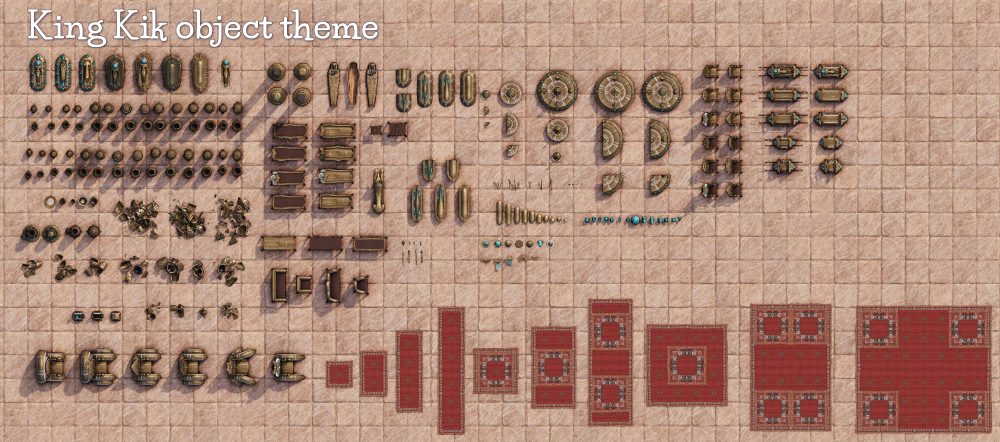
Object Tool
--Pots and Urns--
- KingKik Pots All
- KingKik Pots Smashed Large
- KingKik Pots Smashed Medium
- KingKik Pots Smashed Small
- KingKik Pots Open A
- KingKik Pots Sealed A
- KingKik Urns Ornate A
- KingKik Urns Ornate B
--Sarcophagus/Coffin--
- KingKik Sarcophagus A
- KingKik Sarcophagus B
- KingKik Sarcophagus Gems
- KingKik Sarcophagus Simple A
- KingKik Sarcophagus Simple B
- KingKik Sarcophagus Top Figure
- KingKik Coffin Wooden A
--Furniture--
- KingKik Chair Fancy Metallic A
- KingKik Chair Fancy Wood Metallic A
- KingKik Chair Royal Metallic A
- KingKik Chair Royal Wood Metallic A
- KingKik Tables A
- KingKik Thrones A
- KingKik Sofa A
- KingKik Sofa B
- KingKik Embalming Side Table Wood A
- KingKik Embalming Tables Metal A
- KingKik Embalming Tables Metal Wood A
--General--
- KingKik Ark A
- KingKik Ark B
- KingKik Circle Of Power A
- KingKik Circle Of Power B
- KingKik Circle Of Power C
- KingKik Circle Of Power D
- KingKik Sun Dials A
- KingKik Columns Hex
- KingKik Columns Round
- KingKik Jackal Statue A
- KingKik Decoration Metallic Bits
- KingKik Gems A
- KingKik Metallic Orbs A
- KingKik Tableware
- KingKik Scepter Heads
- KingKik Scepters
- KingKik Carpet Red A
- KingKik Treasure Chest A
- KingKik Embalming Tools A
- KingKik Symbols Ornate
- KingKik Wing Symbols
Added Assets for Kickstarter Hero Tier Backers: Kickstarter hero Tier objects have been added. A Steam key will be added to your Backerkit account that when applied in Steam will allow you to add these objects to your maps.
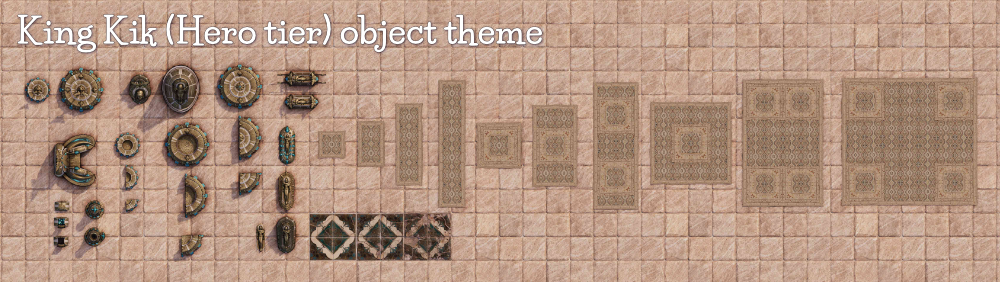
Object Tool
- KingKik Hero Ark A
- KingKik Hero Carpet A
- KingKik Hero Circle Of Power A
- KingKik Hero Effigy A
- KingKik Hero Pool Of Power A
- KingKik Hero Pool Of Power B
- KingKik Hero Sarcophagus A
- KingKik Hero Sarcophagus Top Figure
- KingKik Hero Sun Dials A
- KingKik Hero Throne A
- KingKik Hero Treasure Chest A
- KingKik Hero Urns Ornate B
Room tool (Floor tiles)
- KingKik Floor White Marble With Jade And Gold tiles
Added Assets New Royal/Temple/Ornate patterned tiles: A selection of tiles in the styles of Royal/Temple/Ornate have been added. These will go great in many maps and include Fancy, Grimey and Ruined variations.
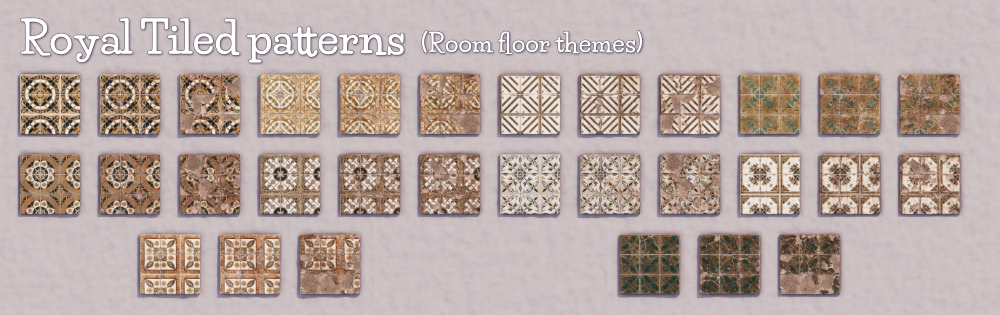
Room tool (Floor tiles)
- Floor Black White Reath
- Floor Egyptian Wings 01 Fancy
- Floor Gold Crisscross 01 Fancy
- Floor Gold Glyphs Dwarven Royal 01 Fancy
- Floor Heiroglyphs Royal Circle 01 Fancy
- Floor Royal Gold White Squares 01 Fancy
- Floor Royal Tiles White Blue Flowers 01 Fancy
- Floor Royal Tiles White Navy Blue Gold Trim 01 Fancy
- Floor Royal Tudor 01 Fancy
- Floor Royal Gold Jade 01 Fancy
Added Plane color assets: Added objects similar to water planes that have simple color shaders.
Object Tool
- Color: a colored plane that receives lighting and shadows.
- Color Flat: a colored plane not receiving any lighting or shadows but will be the color set.
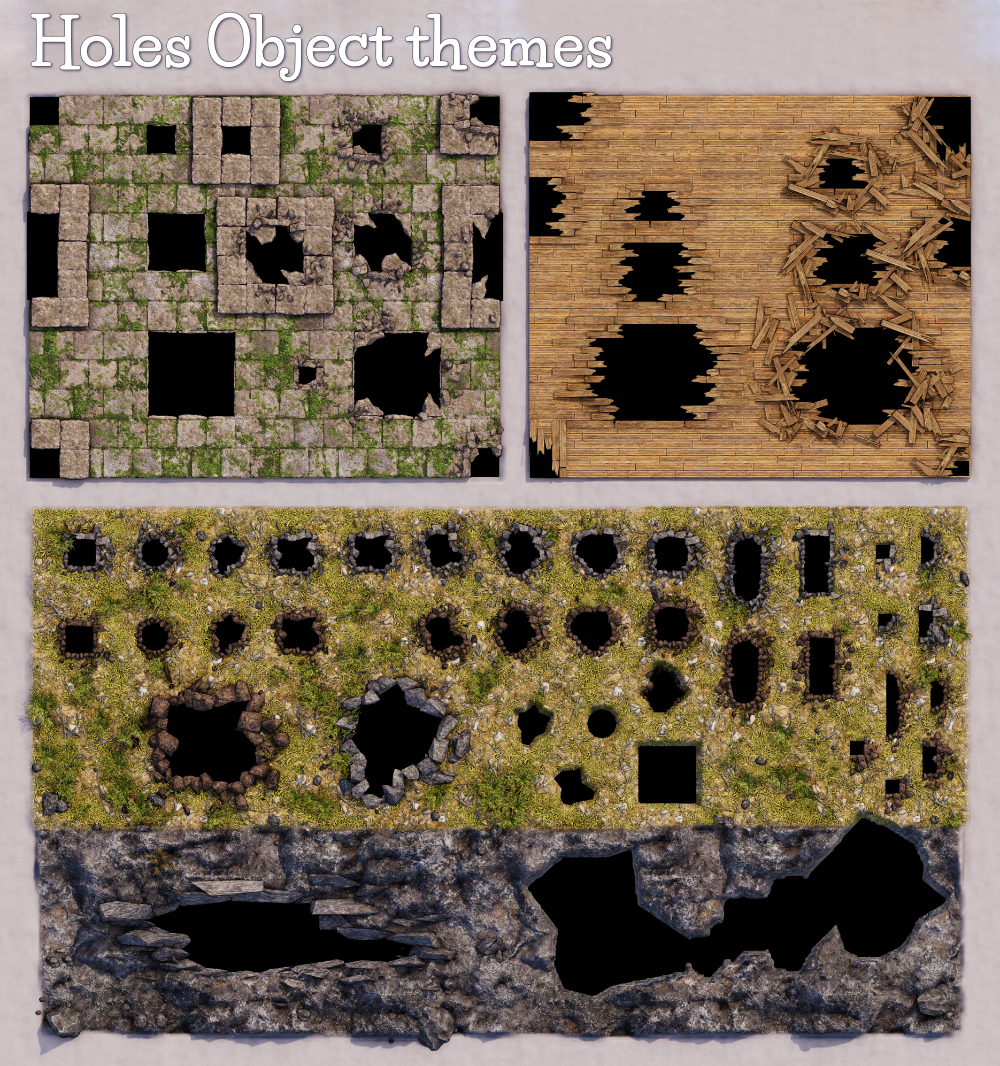
Added Hole assets: Added objects that can be used as holes. These will also act the same way room floors act on the terrain, removing grass and other objects under them and creating a hole below them. You can indent them deeper into the terrain as well to get a slightly sloped side as seen in the image below. The Terrain deformation doesn’t happen in real-time, “Update” the map to see the result.
Object Tool
- Rock: Rocky rubble piled around the hole.
- Mud: Softer muddy clumps around the hole.
- Planks: Can be used on wooden floors to show broken planks. Match the floor color with the Color Override.
- Broken Planks: A variation of the planks hole but with added splintered wood surrounding the hole.
- Holes: Just the holes by themselves with no surrounding assets.
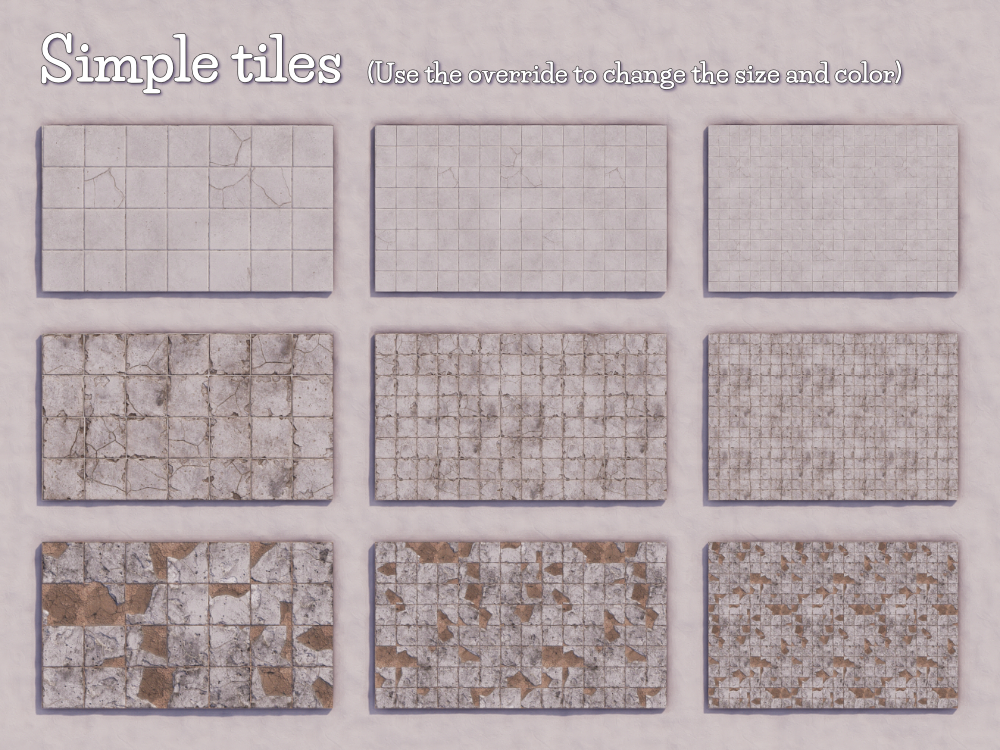
Added Assets New Simple White tiles: A set of White tiles that can be coloured using the Color Overide and their size changed using the Material Overide to be used with the pattern tiles and include Fancy, Grimey and Ruined variations.
Tweaked FireFlame asset: The Fire Flame Light asset in the Object tool has had its point light moved up more above the fire flame to allow the light from the fire to spill out a bit further giving a more ambient look to the light.
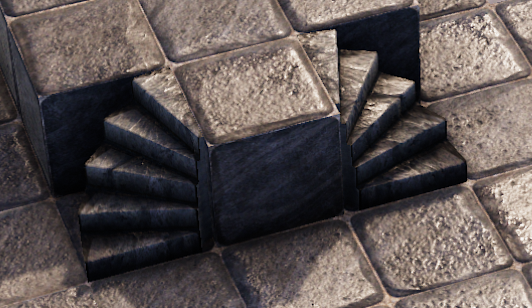
Added Mirrored Spiral Stairs asset: Added a mirrored Spiral stair asset.