Status
SteamPeaks
ChartsSalesUpcomingPatchesNewsCalculator
New on SteamEvery app, DLC and depot the minute Steam creates itAppsEvery app on Steam, newest change firstPackagesSubs and bundles, and what each containsDepotsDepots, manifests and install sizesTagsSteam's user tags and the games under themDevelopers & publishersCompanies and their cataloguesTechnologiesEngines, SDKs and anti-cheat found in the filesChange historyEvery PICS changelist as it lands
SignalsNineteen readings of the whole catalogueCompareAny games side by sideRecordsAll-time peaks and the days they were setReportsWeekly and monthly write-upsAlerts & newsroomWatch a game, get told when it movesSteam statusIs Steam up, right nowWeb API explorerTry the endpoints in the browser
NewsSteam's own announcements and the sales calendarCalculatorWhat a Steam account is worth, and its pile of shame
/
Sign in
/
SteamPeaks
The ultimate resource for Steam data.
ExploreChartsSalesSales and festsUpcomingPatchesNewsRecordsTrendingSignals
DatabaseAppsPackagesDepotsTagsDevelopersTechnologiesChange history
ToolsCalculatorCompareSearchAlertsSteam statusAPI
SiteMethodologyFAQDiscordSupportSign in via Steam
Not affiliated with Valve or Steam. Game names and artwork belong to their owners. All times UTC.
PrivacyCookiesFair useStatus
Portal with RTXNewsOptimize your GeForce RTX Graphics Settings
Community

Optimize your GeForce RTX Graphics Settings

Portal with RTX · published 11 Dec 2022, 16:19 UTC

All newsPlayers around this dateRead on Steam

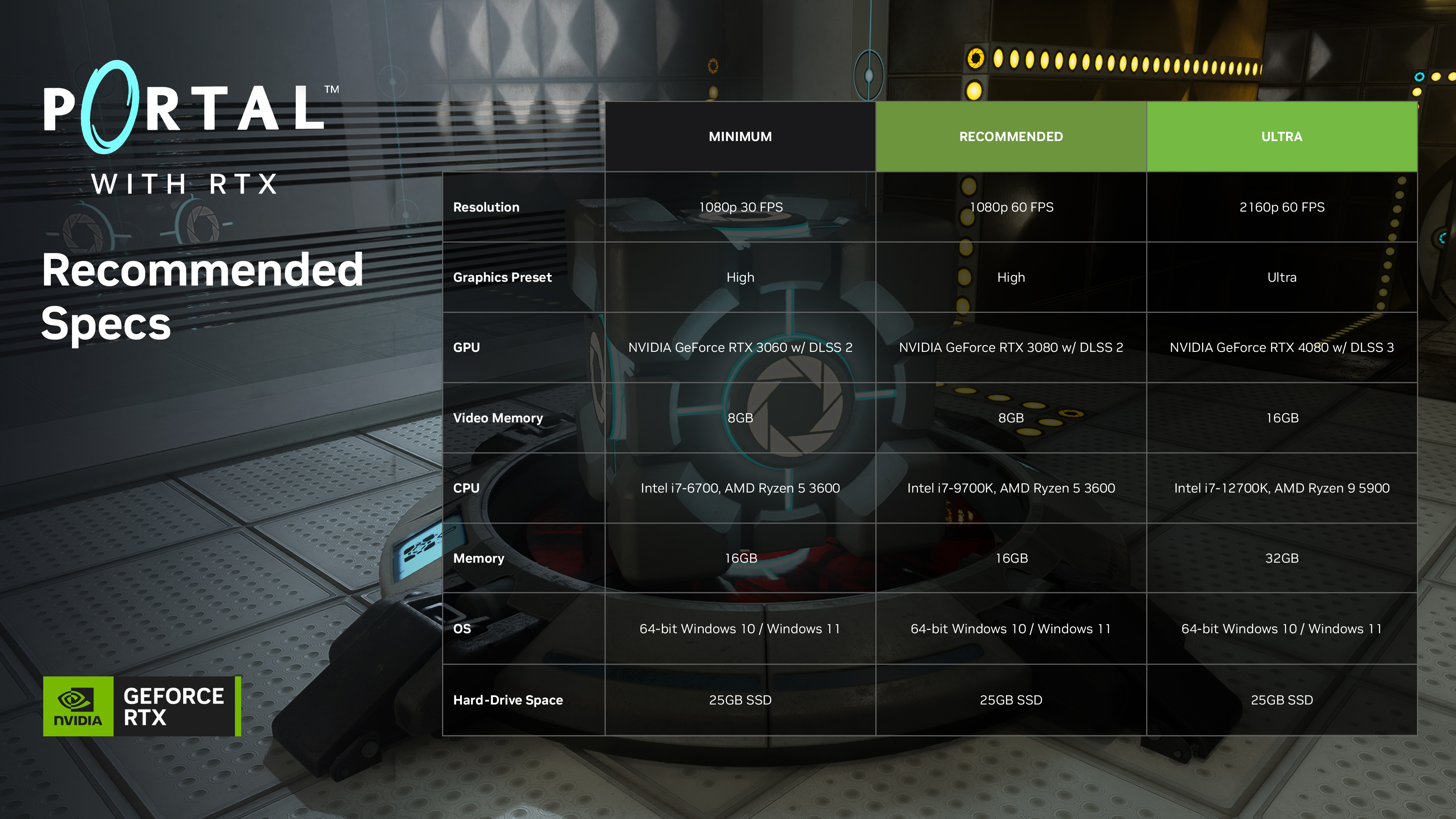
Portal with RTX offers a preview of gaming’s future, where every frame of gameplay is rendered with stunning full ray tracing - an advanced, GPU-intensive (see recommended & minimum specs here), version of ray tracing referred to as “path tracing” - which unifies all lighting effects such as shadows, reflections, global illumination, refractions and more into a single algorithm.

We have seen your feedback regarding performance on GPUs that are outside the minimum recommended specs (i.e. RTX 20 Series) and some that are in-between the minimum and recommended (i.e. some RTX 30 Series GPUs) and have put together some recommended settings for you to use to help improve performance.

The easiest path to better performance is to use GeForce Experience. Simply download the latest game ready driver (527.56), find Portal with RTX, and click Optimize to automatically configure the best combination of image quality and performance settings for your RTX 20 and 30 Series GPU.

Alternatively we have prepared a recommended graphic settings chart to help guide you to higher frames in your play experience.

To adjust your graphics settings in-game press Alt-X to open the Remix graphics window.
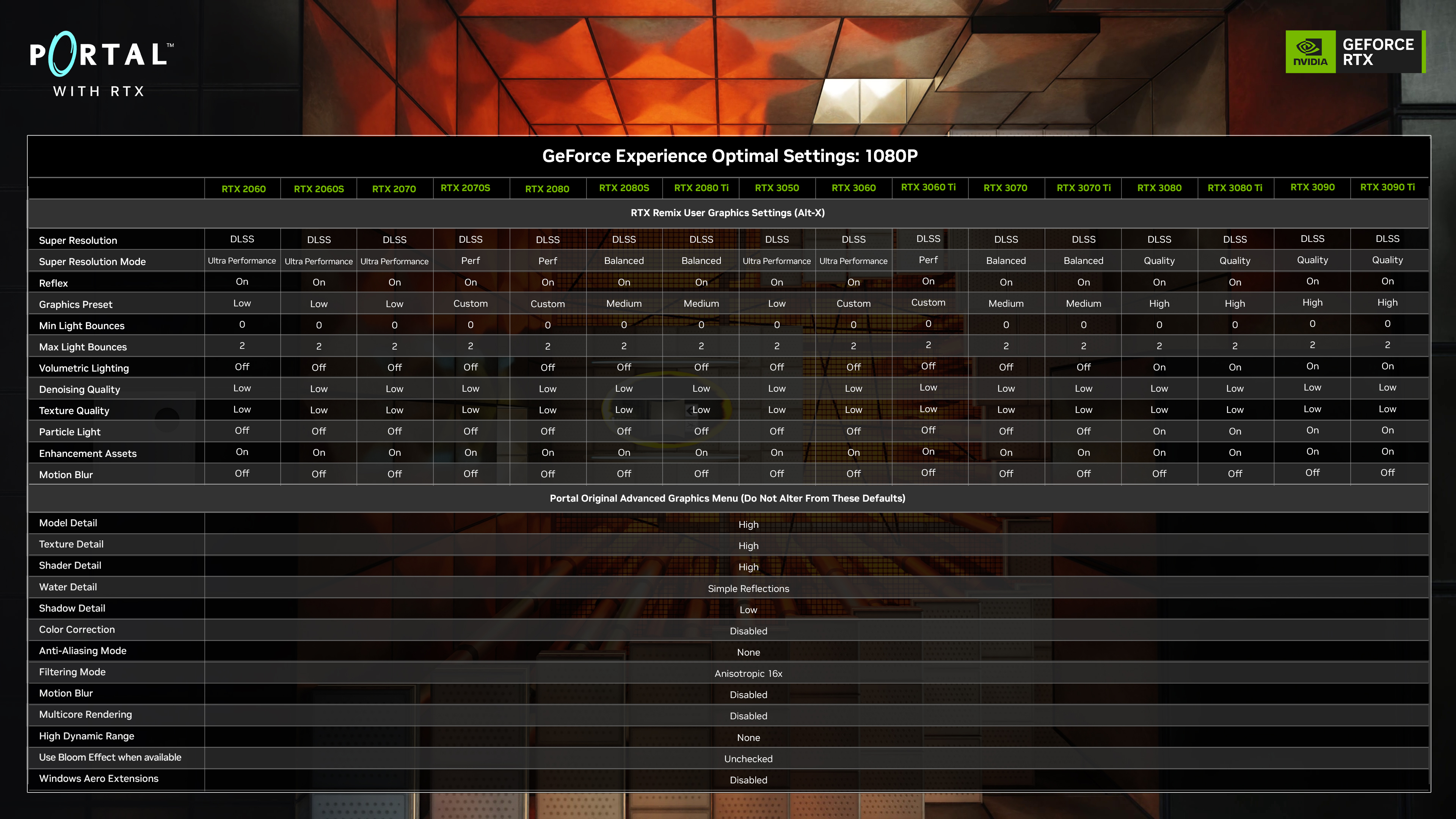
These settings target to improve framerates and your experience will vary depending on your system configuration. These settings may also reduce visual quality.

Please do not alter the Portal “video-advanced” settings, as attempting to adjust these settings may lead to instability; press Alt-X to use the Remix graphics settings window instead!

If you have already altered Portal advanced video settings we recommend you reset them to default and do not alter again.

Recommended System Requirements
We hope you enjoy Portal with RTX!

More from Portal with RTX

Other announcements

All news
Major update19 May 2025Portal with RTX Update: Now With DLSS 4 & RTX Neural Radiance CacheToday, Portal with RTX is being upgraded with DLSS 4 with Multi Frame Generation , multiplying framerates, as well as the transformer model for Ray Reconstruction and DLAA , enabling even better image quality. Portal with RTX is also adding RTX Neural Radiance Cache (NRC), a neural shader that improves indirect lighting, as well as a bevy of performance optimizations. For more details, read the…Community14 Mar 2024Portal with RTX - NVIDIA DLSS 3.5 With Ray Reconstruction and RTX IO AddedToday, Portal with RTX is upgrading to NVIDIA DLSS 3.5 , leveraging its AI-powered Ray Reconstruction technology to improve the fidelity of full ray tracing, and the responsiveness of dynamic lighting effects. And with the introduction of NVIDIA RTX IO, texture loading times are accelerated, and the file size of the game has been reduced. Read on to learn more. NVIDIA DLSS 3.5 With Ray Reconstr…In-game event14 Mar 2024Portal with RTX - Update NotesRelease Notes: · Added NVIDIA DLSS 3.5 with Ray Reconstruction · Added NVIDIA RTX IO support · Update dxvk-remix to 0.4 · Added POM materials · Fixed content issues · Optimized CPU perf · New “secret” cubes · Numerous bug fixes and overall improvements to stability Source Engine: · Updated gameinfo text to allow for main menu logo · Added gamelogo.res to account for main menu logo parameters ·…