Developer Update: Full Gamepad Support Is Now Working
Soccer Fan - Online Multiplayer · published
Hello everyone!
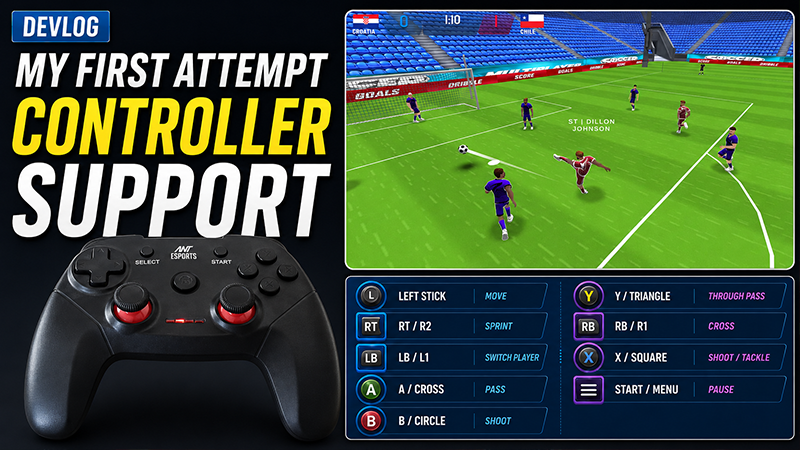
I recently finished implementing full gamepad support for Soccer Fan – Online Multiplayer Football.
When I started, I thought it would be a small task:
Move the player using the left stick
Assign passing, shooting and tackling to controller buttons
Navigate menus using the D-pad
Press the South button to select the highlighted option
It quickly became one of the most difficult systems I have worked on for the game.
Gameplay controls were only the beginning
Analog movement needed dead zones, camera-relative movement, smooth direction changes and support for actions that behave differently depending on whether the player has possession of the ball.
After plenty of testing, gameplay finally felt responsive.
Then the real problems started inside the menus.
The highlighted button was not always activated
At one point, the controller could visibly highlight the Play button, but pressing Select would open Settings or activate Back instead.
The problem was that multiple systems had different ideas about which UI element was selected:
My custom gamepad navigation system
Unity’s EventSystem
An older UI navigation script
Even worse, more than one system was listening for the same Submit button. A single controller press could trigger two different actions.
Finding the cause
I added detailed logs showing:
The visibly highlighted button
My navigation system’s current target
Unity’s selected object
The object that actually received the Submit action
The currently active UI panel or popup
The logs finally revealed that the highlighted button and Unity’s selected button were sometimes completely different.
The solution
I gave my custom navigation system full ownership of gamepad Submit while a menu is active.
It now:
Captures the currently highlighted UI element
Verifies that it is still valid and belongs to the active menu
Sends the action directly to that same element
Prevents competing systems from processing the same controller press
Gameplay input and menu input remain separate, and mouse support continues working normally.
What is working now
The game currently supports:
Smooth analog player movement
Controller-based passing, shooting and tackling
D-pad and analog-stick menu navigation
Buttons, sliders, dropdowns and scrollable menus
Navigation inside layered panels and popups
Mouse and controller input working together
One controller press producing exactly one UI action
The visibly highlighted element always receiving the action
What looked like a simple button-mapping task became a major lesson in debugging, architecture and input ownership. It was exhausting, but it is also one of the most valuable systems I have added to the game.
Question for players
Which controller do you normally use for PC games?
Also, when navigating menus, do you prefer:
A. D-pad
B. Left analog stick
C. Both
Your feedback will help me improve the controller experience before release.