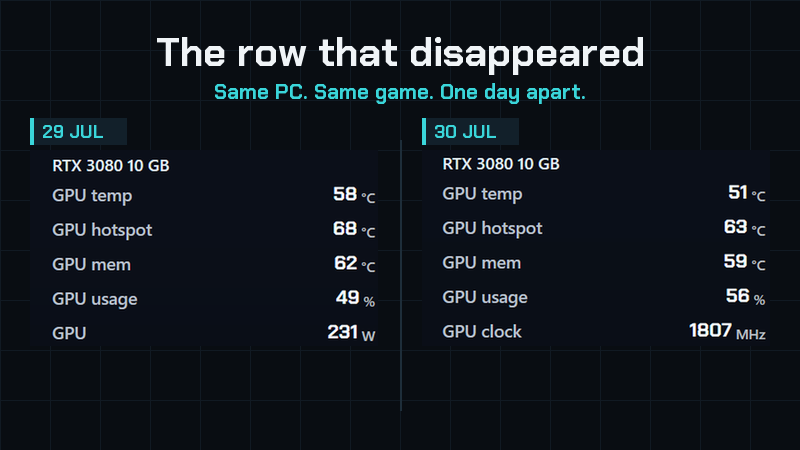
Two sessions, one day apart
Same PC. Same game. Same graphics card.
On the first one, Interactive Hud recorded the card pulling 231 W, peaking at 297 W.
On the second, that row isn't in the report at all.
It didn't show zero
This is the part we care most about. A missing reading and a reading of zero are not the same thing, and almost every tool treats them as if they were — because a gap in a table looks like a bug, and a zero looks like data.
Interactive Hud removed the row. It also dropped FPS per watt, because that number depends on a power figure it no longer had. And it wrote, in the report itself, that the energy and cost shown counted the processor only and were therefore below the real value.
Then it explained why
The graphics card answered everything — temperature, clocks, fan — except power: the driver refused it from start to finish. The energy and cost here count the processor only, so they're below the real figure. This Windows boot resumed from hibernation, which is what causes it — shutting the PC down with Fast Startup enabled doesn't bring the sensor back. Restart Windows and the measurement is complete again.
Fact, consequence, cause, fix. Written by the app, on a real session, with nobody prompting it.
Why this matters
Interactive Hud writes a report after every game — frames, frame times, temperatures, clocks, power, memory, drives, fan and pump speeds — and keeps a history so it learns what normal looks like on your machine.
All of that is worth nothing if the numbers can't be trusted. So the rule is simple: if it can't measure something, it won't pretend it did.
If Fast Startup is enabled on your PC, shutting down doesn't reset the sensor — only a restart does. Worth knowing whether or not you ever use our app.
Add Interactive Hud to your wishlist to hear when it's out.