Space Engineers: Prosperity Update & Pack Live Now!
Space Engineers - Frostbite · published · build 23247322
Hello, Engineers!
The Prosperity Update makes Space Engineers feel more alive, useful, and rewarding: better economy services, safer grid recovery, and more ways to build the kind of base, station, or ship that feels great.
Explore a new Factorum encounter and hunt down the new Prototech O2/H2 Generator, track missing ships with the new Ping Grid button, and enjoy improvements to Projector, Contracts, the Services Terminal and economy systems.
We’ve also added a small grid Flat Collector - a handy new block for all the farmers among you.
Everything in this update is free. Alongside it, we're releasing the Prosperity Pack with new decorative blocks and variants to expand your creative options.
https://store.steampowered.com/app/4835530/Space_Engineers__Prosperity_Pack/
Watch on YouTube

If you own Space Engineers, everything below is yours - no extra purchase needed.
New Factorum Encounter
Apparently, the Factorum have not shown us everything they have been hiding. New rumors are spreading through the void: strange signals and valuable Prototech waiting for any engineer bold enough to go after it. Of course, that means some of you are already plotting the fastest way in - and the most explosive way out.
A new Factorum Global Encounter has been added into your worlds. Track it down, break through their defenses, and see what secrets you can bring back in one piece. As always, getting your hands on it will not be as simple as grinding down a few blocks and flying home.
Services Terminal & Economy Improvements
Economy 2 added new ways to store, repair, recover, and salvage grids. With this update, we focused on making those systems clearer, safer, and more predictable in normal gameplay.
Services Terminals now give you better feedback about what is happening with your stored grids. If a grid cannot be stored or deployed yet, the terminal should do a better job explaining why - for example, if the grid is moving, recently damaged, or otherwise not ready. This should make grid storage feel less like a black box and more like a proper station service.
We’ve also improved how grid retrieval works. Server owners can now control whether stored grids can be pulled from very distant locations, and retrieval timing can take distance into account. For players, this means Economy 2 servers can be tuned for different playstyles - from convenient ship storage to more grounded logistics where location matters.
Precision deployment is getting a useful improvement too. You can now set the Precision Mode marker to your current character position, making it much easier to bring a stored grid back exactly where you need it. Less guessing, less nudging, fewer “almost perfect” deployments.
Repair, salvage, and storage rules have also been tightened up. Grids with hostile blocks attached are now handled more carefully, helping prevent cases where players could bypass hacking or ownership rules through station services. Modders and scenario creators also get more flexibility, including new options for enabling repair and salvage services on player-made grids.
Player stores also have a new option to opt out of Item Search. This gives shop owners more control over how their listings appear, especially if they want to run a more private store, keep certain offers local, or avoid cluttering global search results. Your store can still exist and function normally - it just does not have to advertise every listing to everyone through Item Search.
We’ve also improved some of the wording around Store Blocks and Market Search, making listings and search behavior easier to understand.
Overall, these changes should make Economy 2 feel more reliable in day-to-day play - whether you are storing a hauler, recovering a damaged ship, running a server, or building a custom scenario.
Projector Functionality Improvements
We’ve cleaned up several projector controls and UI behaviors. Movement and rotation directions should feel more consistent, sliders should behave more predictably, and projector settings that were previously locked at various stages can now be manipulated at any time.. The goal is simple: less fighting the interface, more building the grid you actually wanted to build - especially when working with complex blueprints or finishing repairs after a rough encounter.
Ping Button for Lost Grids
Lost your ship again? It happens. Space is big, GPS management is a lifestyle, and sometimes your favorite grid ends up somewhere you definitely meant to remember.
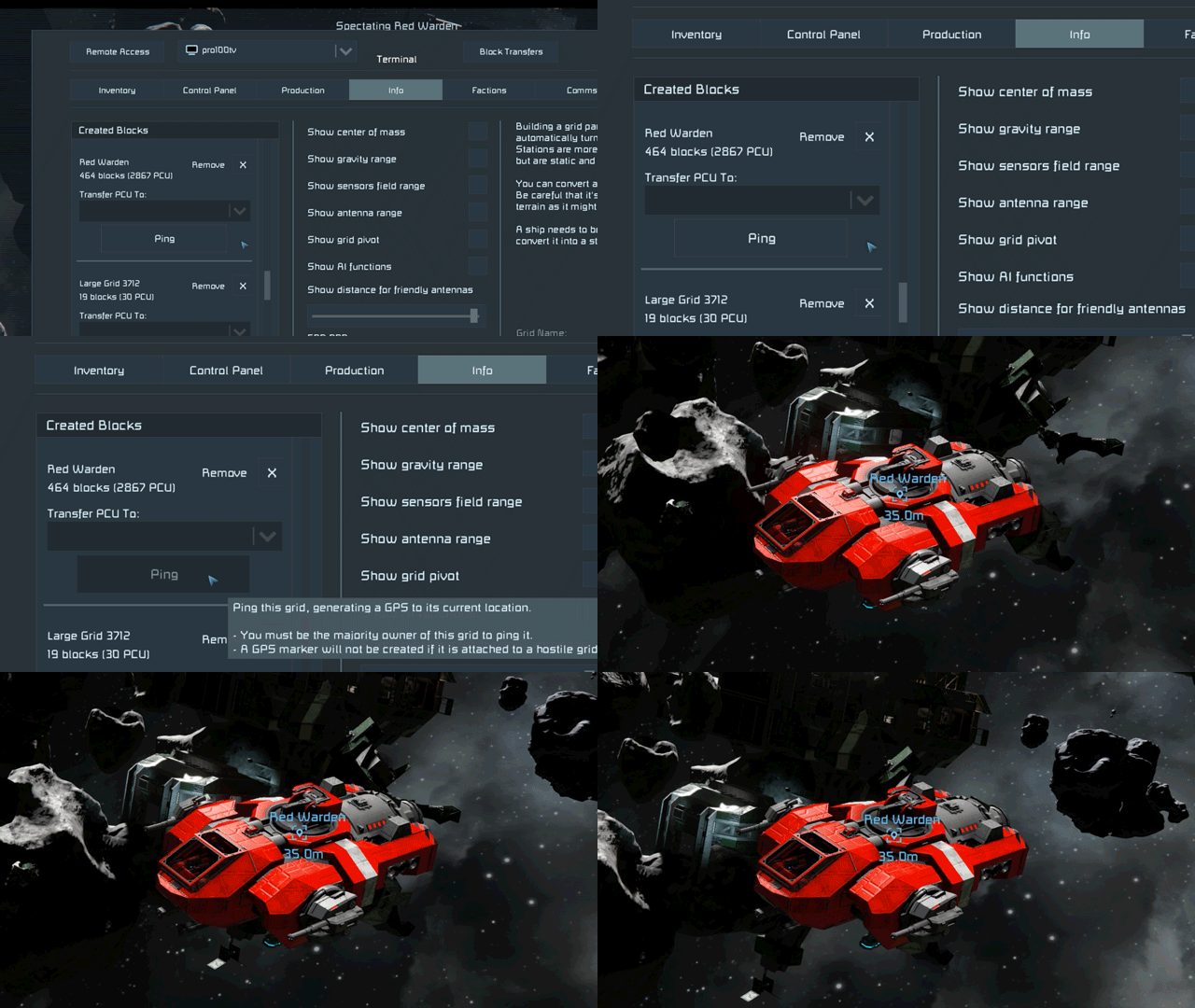
The new Ping Grid button helps with that. From the Info screen, you can now generate a GPS point for one of your grids, making it much easier to track down ships, rovers, stations, and other creations you may have misplaced during your adventures.
The GPS point marks the grid’s current location and stays available until you remove it, so you can find your way back later. It’s a simple improvement, but for anyone who has ever lost a mining ship, scout rover, or “temporary” construction platform - this one should save some headaches.
Modernized Space Respawn Ship
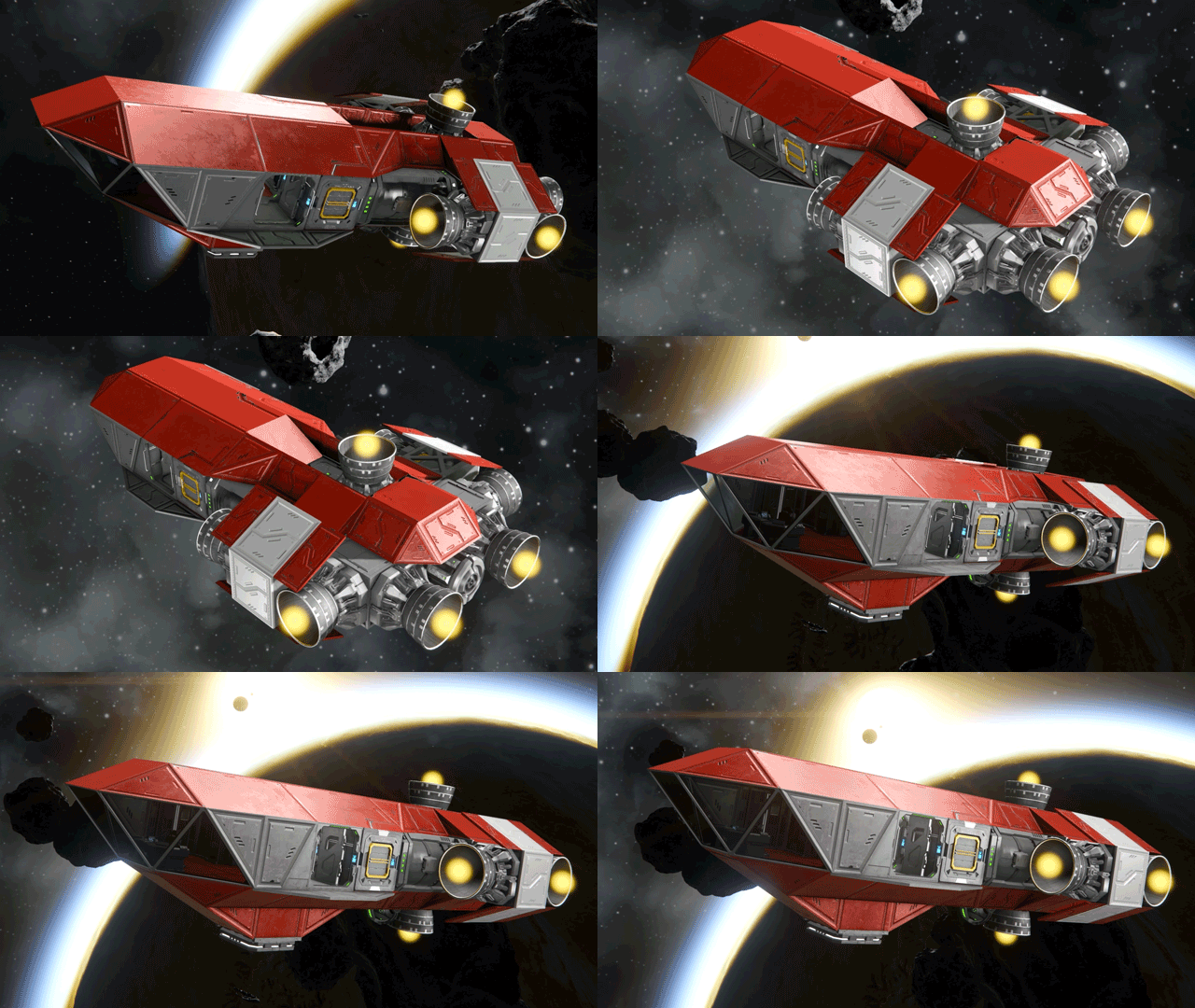
The Space Respawn Ship has been modernized and rebuilt with survival in mind. Important systems are easier to see at a glance, so new and returning engineers can better understand what the ship has, what it needs, and how to keep it flying. It should serve as a better starting point - giving you exactly what you need to start your adventure out in the void.
New Blocks
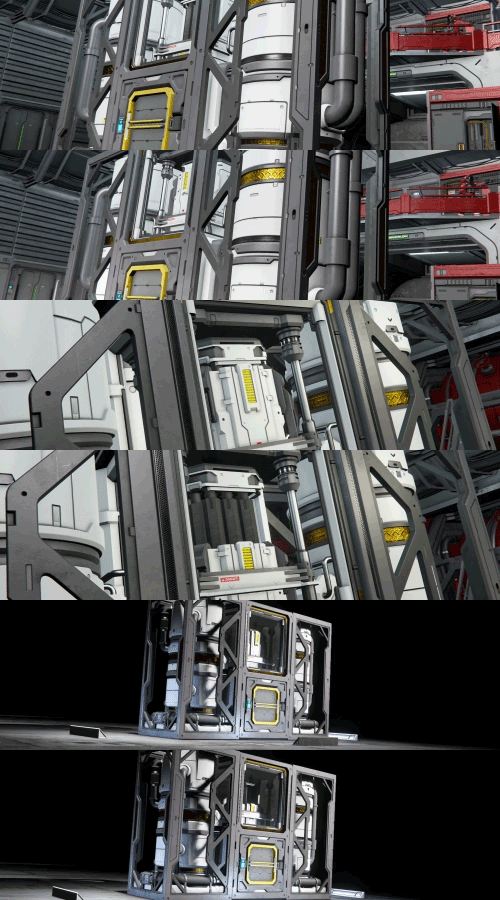
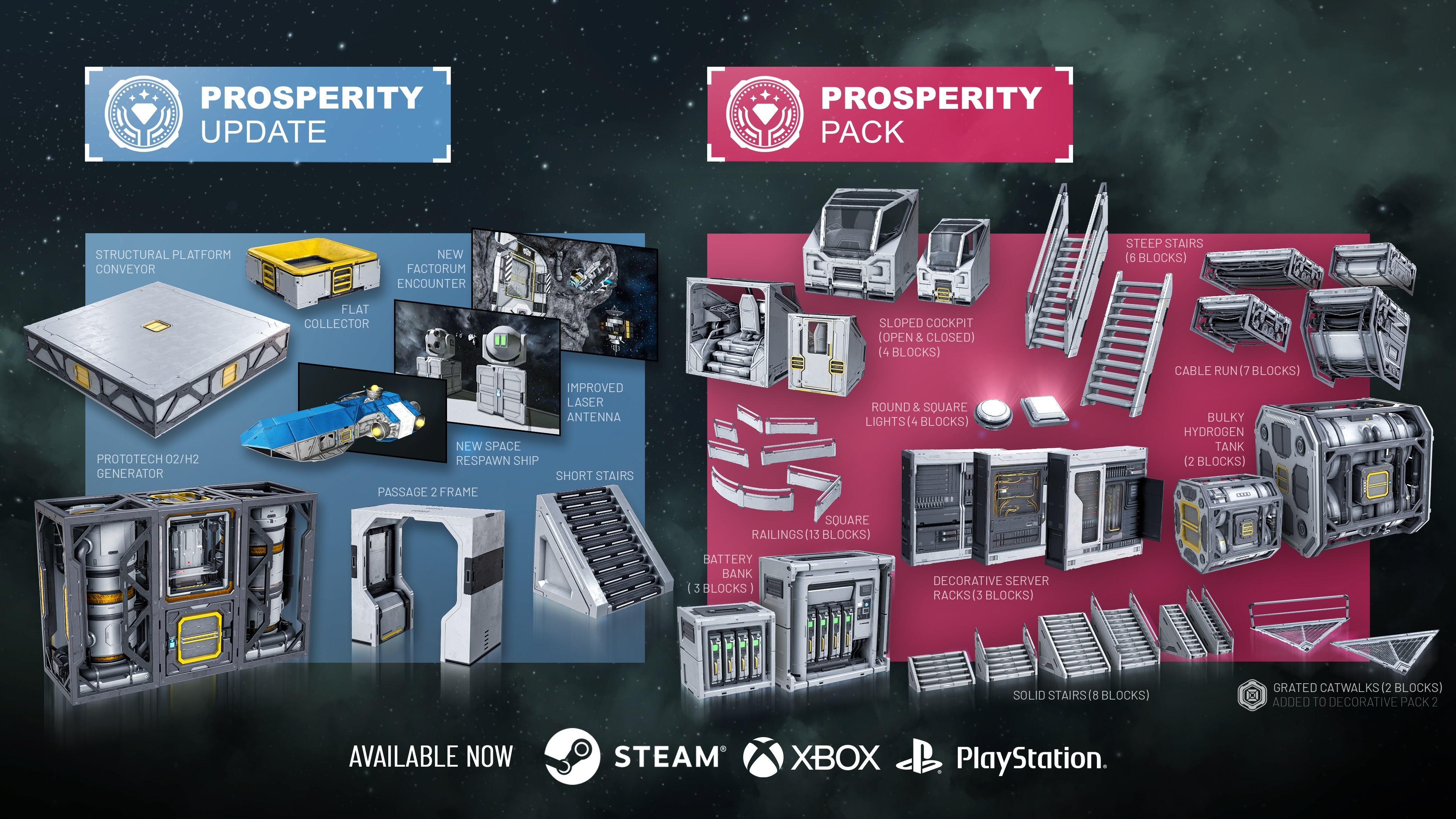
Prototech O2/H2 Generator (1 block, L grid) - The latest Factorum innovation is here! Refill fuel and oxygen up to 10x faster, using less power than a standard generator.
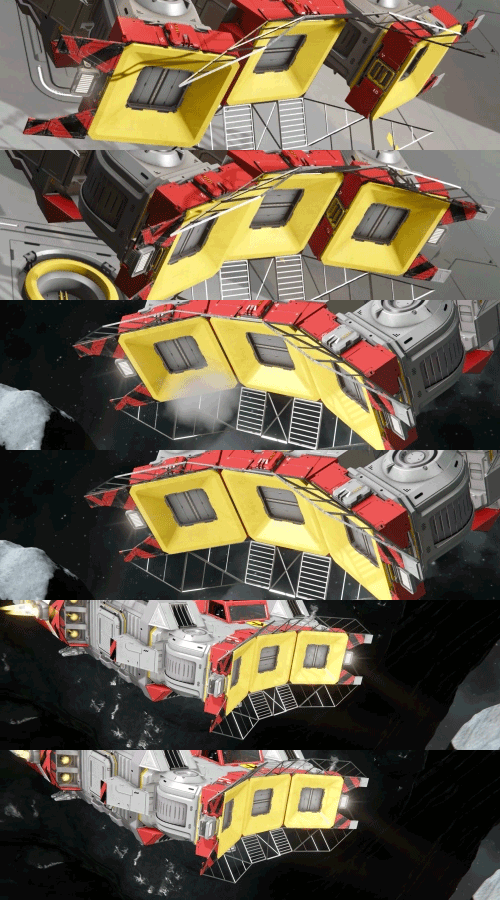
Flat Collector (1 block, S grid) - Slim, sleek, and easy to fit into compact builds. Harvest crops like a pro with this space-saving collector!
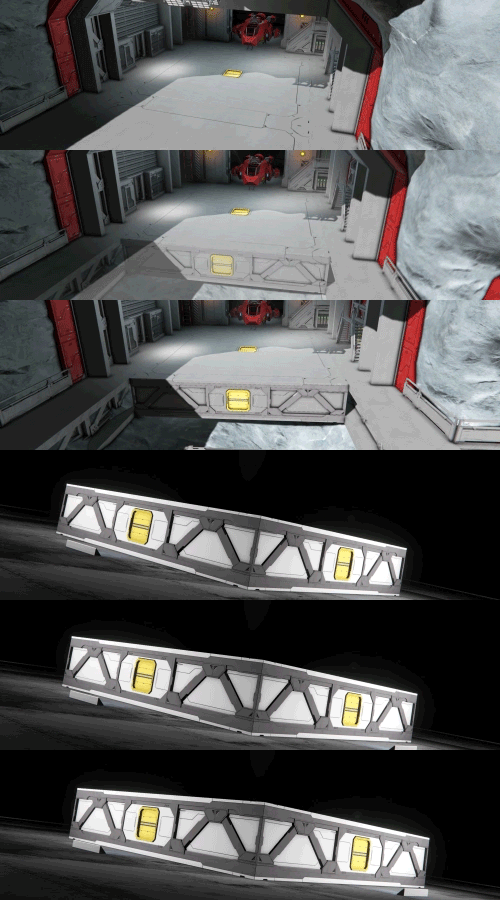
Structural Platform Conveyor (1 block, L grid) - You asked, and we heard you! Hide conveyor lines inside your Structural Platform foundations for cleaner, smarter ship and station layouts.

Short Stairs (1 block, L grid) - Small space? No problem. These airtight stairs keep compact builds walkable, connected, and pressurized.
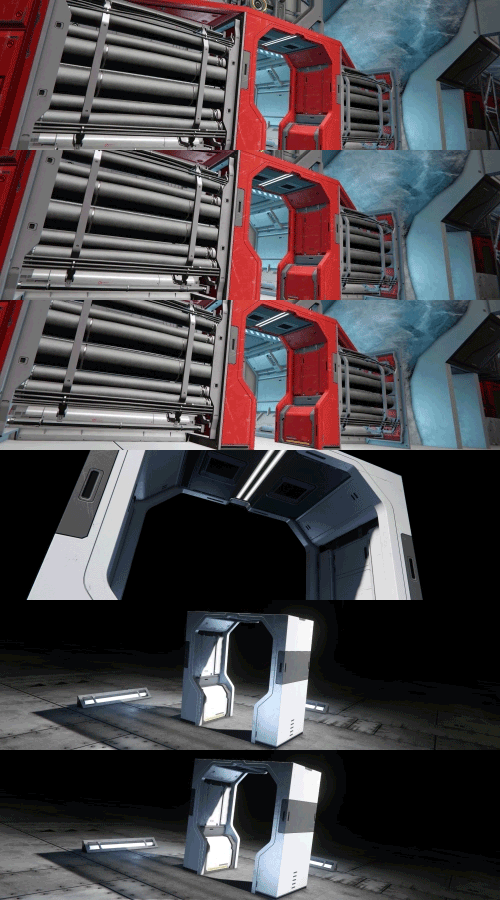
Passage 2 Frame (1 block, L grid) - A sleek, space-saving extension of the Passage 2 block. Use it to polish your interiors, create compact access points, or frame machinery and thrusters with style.
Additional Improvements
- Added skins/suit variations to NPC characters on Trade Stations.
- You can now find Story Datapads on Economy Stations
- Laser Antenna UX Improvements
- Wheel Indicators for better build orientation
- DLC Badges for Purchased DLCs can now be used as Faction Icons
- Improved lighting effects for Welder and Grinder particles (Softer light with lower flash intensity)
- Rebalanced audio effects for many of the game’s louder sounds.
There are many additional improvements and fixes in the Prosperity Update - you can explore everything included in the detailed Changelog.
What’s Next
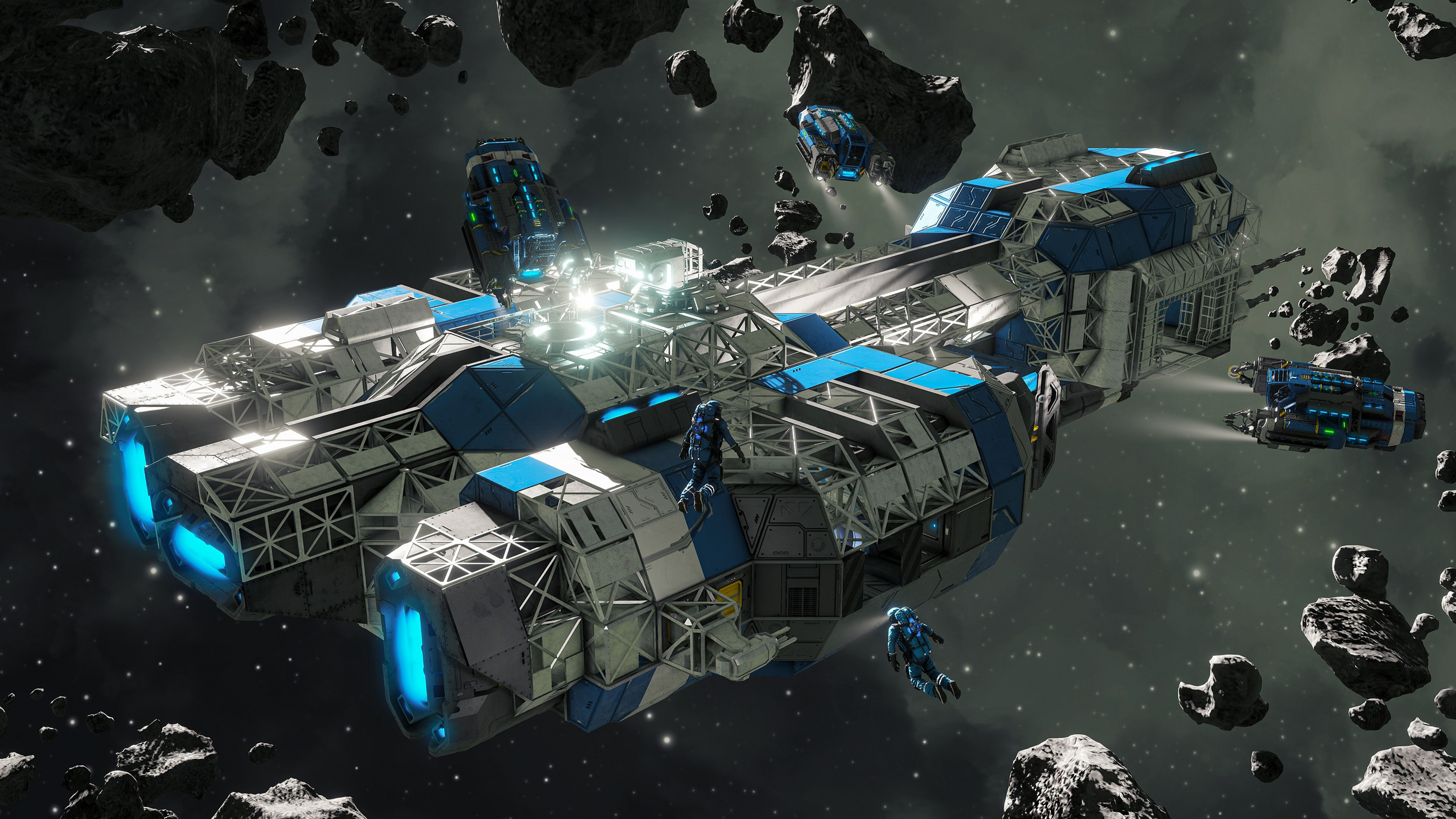
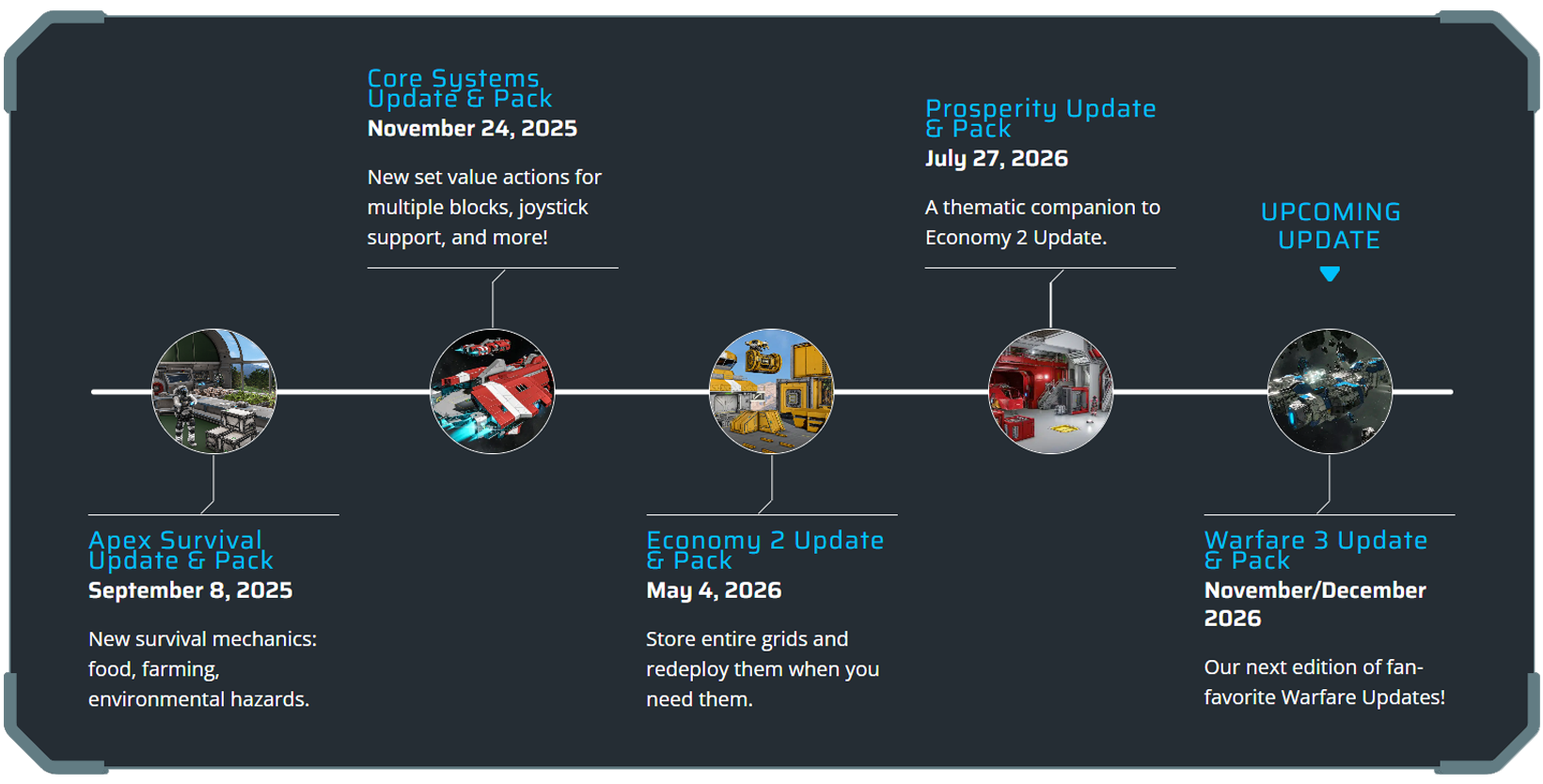
Our next Space Engineers update, Warfare 3, is shaping up to be a big one! We aim to deliver it to you in November/December 2026.
Expect new weapon types, new combat systems, and changes designed to make battles, PvP, and ship-to-ship engagements more dynamic. This time, your weapons may not be aimed only at other players... There are new threats on the horizon.
Check out our new Roadmap!

We are always looking for ways to improve, and that includes adding value to prior releases. During this update, we are adding new content to Decorative Pack #2.
Those who already own Decorative Pack 2 will get this content for free, as part of the update.
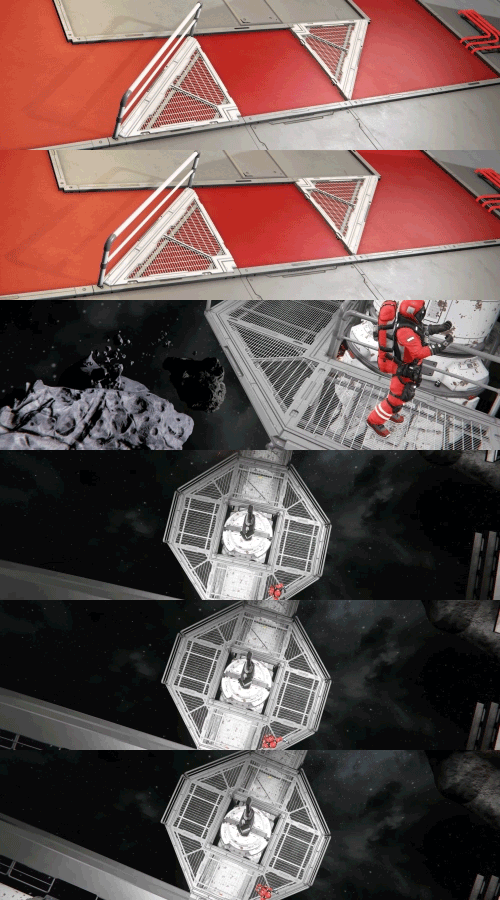
Triangular Grated Catwalks (2 blocks, L grid)
https://store.steampowered.com/app/1167910/Space_Engineers__Decorative_Pack_2/

The Prosperity Pack adds over 50 new blocks - Sloped Cockpits, Bulky Hydrogen Tanks, Steep and Solid Stairs, Battery Banks, Square Railings, Decorative Server Racks, Cable Runs, Round and Square Lights. These are cosmetic and decorative blocks that don't affect gameplay balance.
If you enjoy Space Engineers and want to support its continued development, this is a great way to do it - and you'll get a lot of new building options in return.
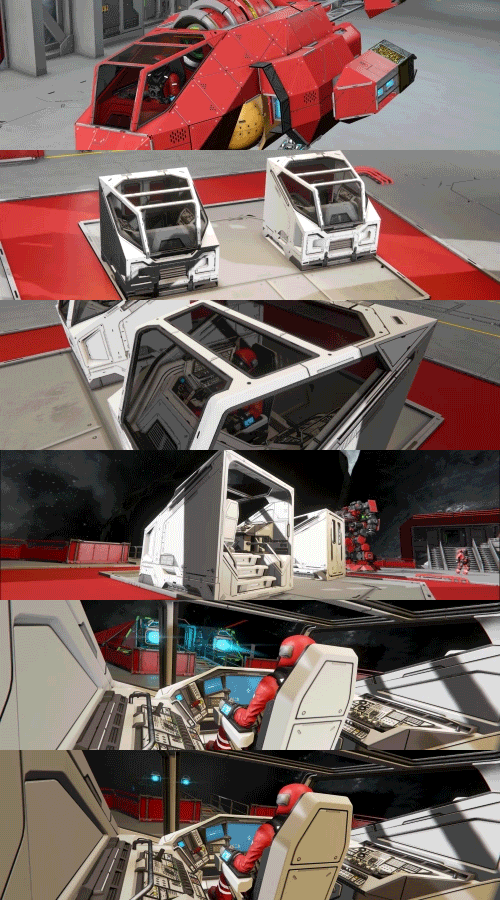
Sloped Cockpit (2 blocks, S grid + 2 blocks, L grid) - A sleek, modern cockpit for both grid sizes, with open and closed variants to match your build, your role, and your style.
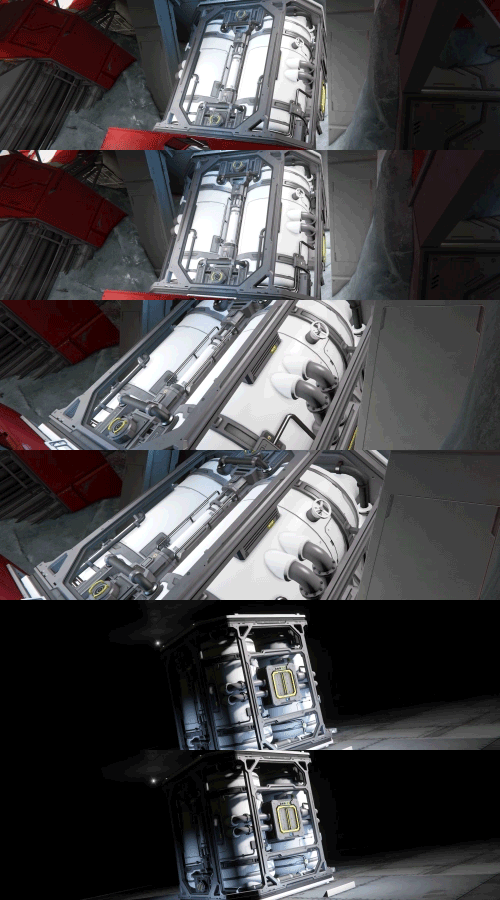
Bulky Hydrogen Tank (1 block, S grid + 1 block, L grid) - The bulky frame of this hydrogen tank houses four large fuel storage cylinders, giving industrial builds a fuller, heftier look.
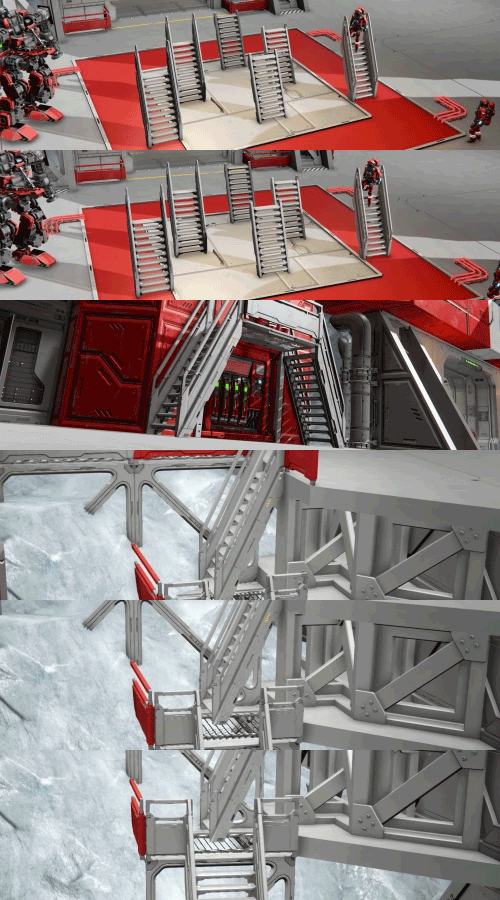
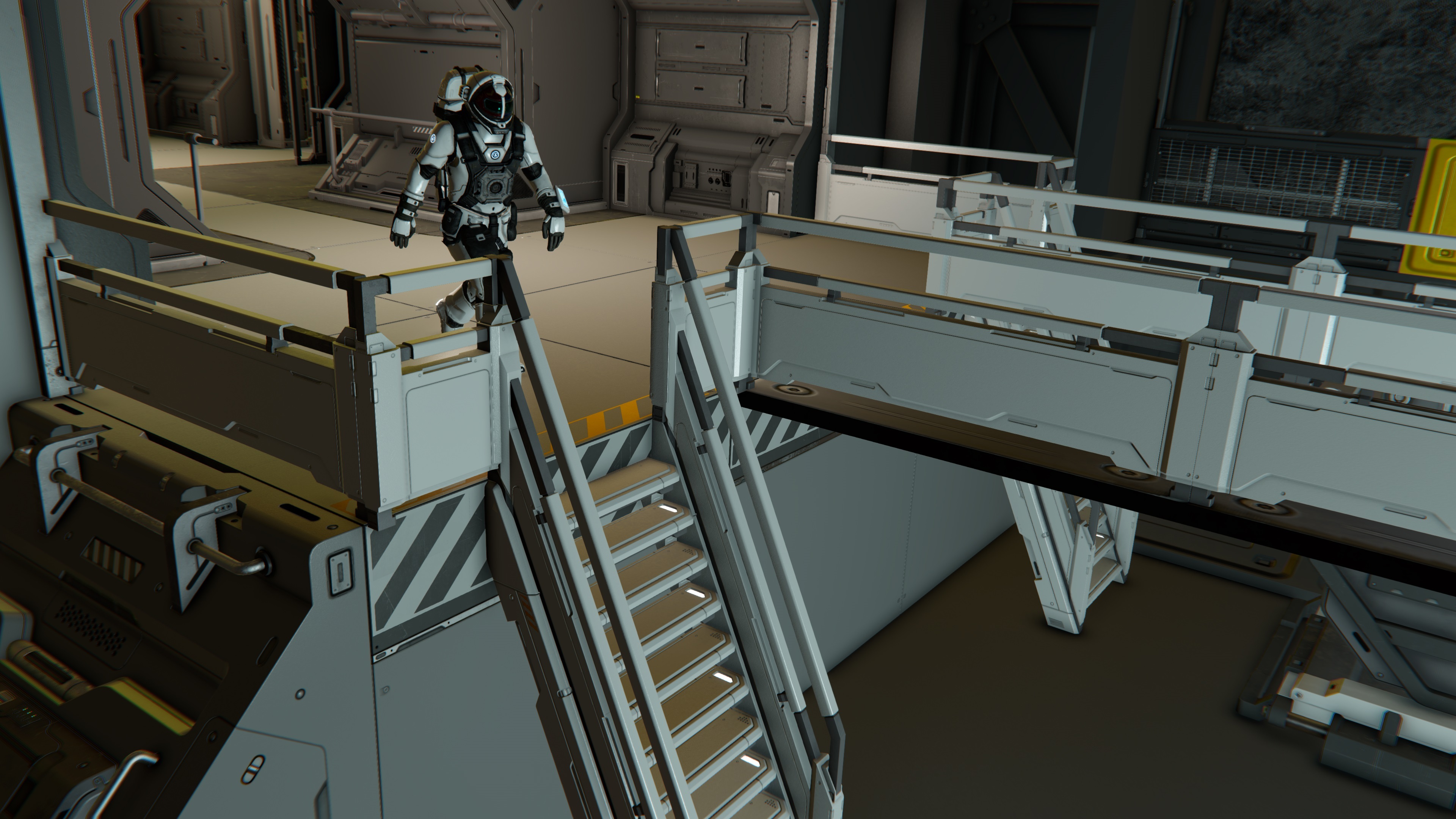
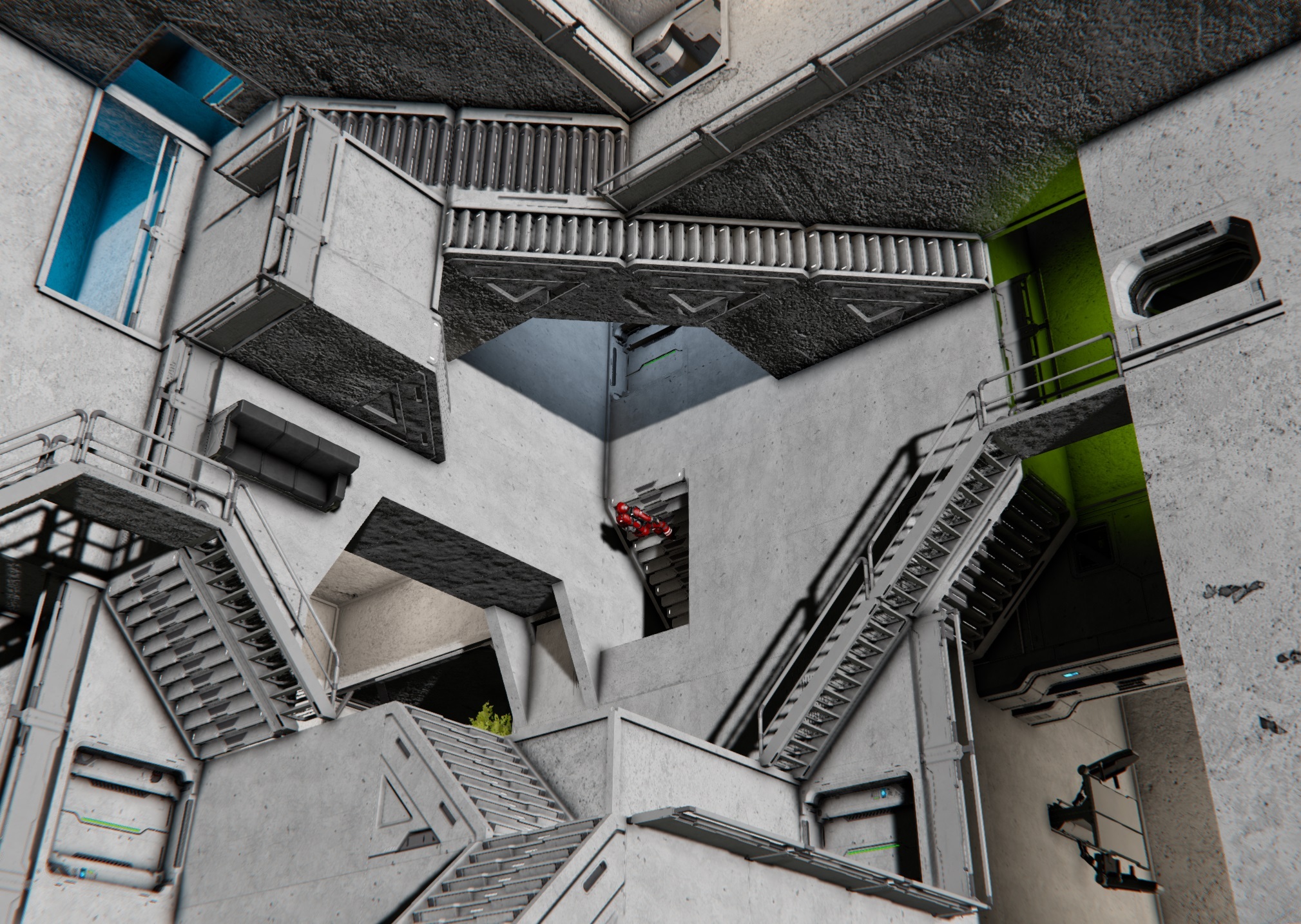
Steep Stairs (6 blocks, L grid) - Steep, narrow stairs built for tight spaces, giving compact builds a clean way to move vertically when every block counts.
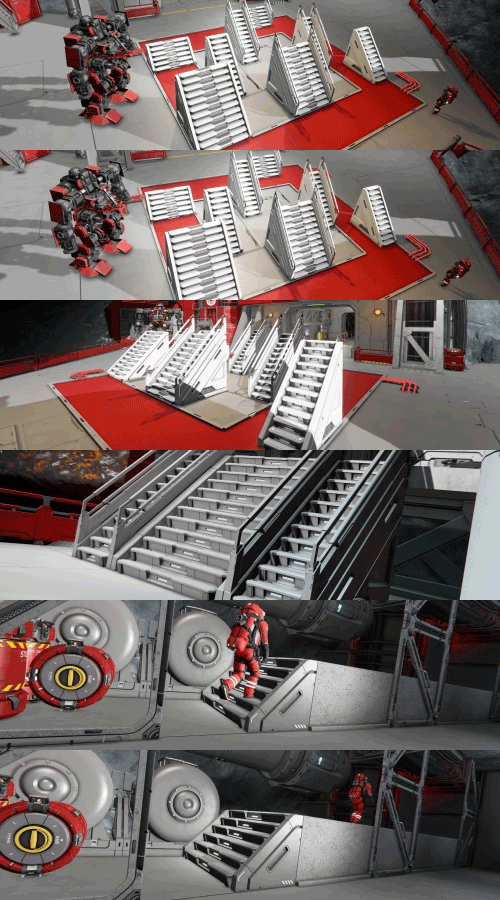
Solid Stairs (8 blocks, L grid) - Sleek solid stairs for clean, vertical transitions. Available in multiple variants with railed and railless options to fit more builds and interior styles.

Battery Bank (1 blocks, S grid + 2 block, L grid) - A compact battery bank made from smaller power modules, saving space while providing reliable power for smaller builds.
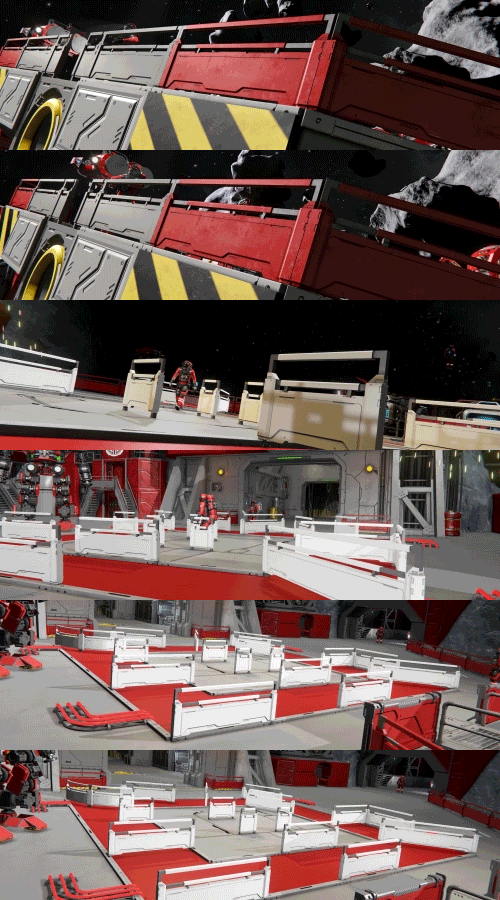
Square Railings (13 blocks, L grid) - A sturdy safety railing with a solid frame, perfect for adding structure, protection, and visual variety to walkways and platforms.
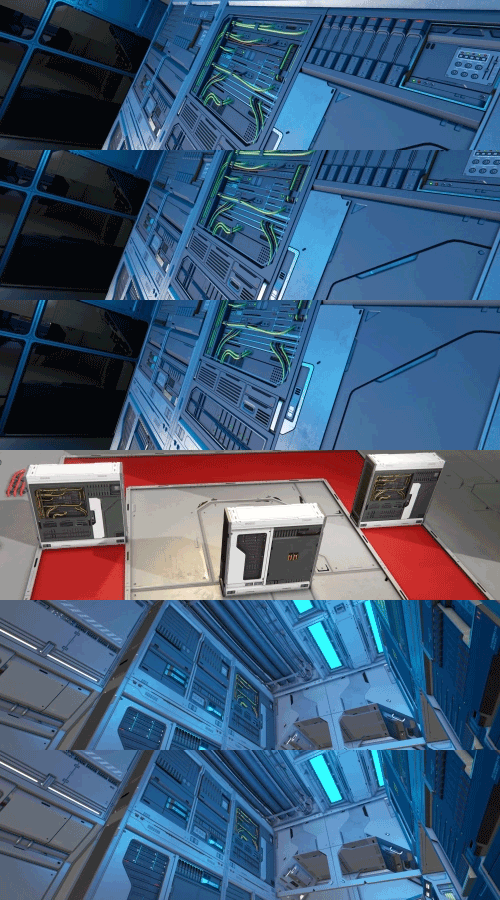
Decorative Server Racks (3 blocks, L grid) - Decorative server racks packed with hardware and details, perfect for building command rooms, data centers, and high-tech interiors.
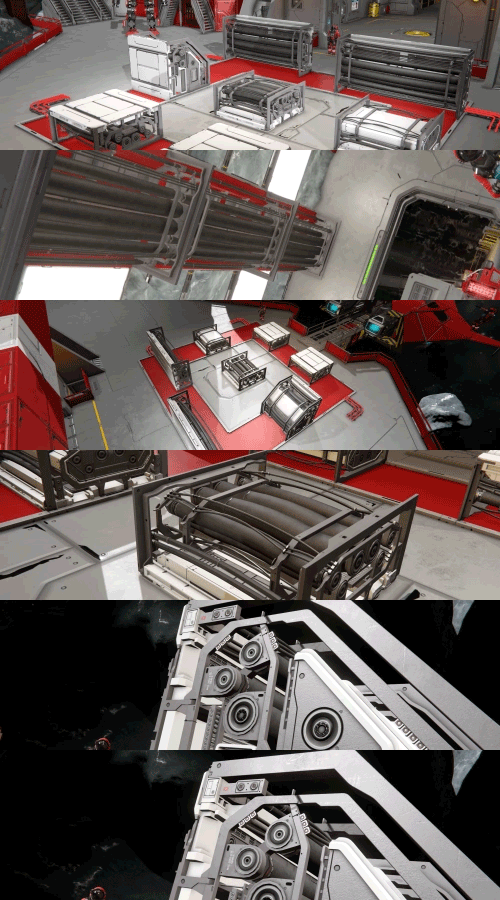
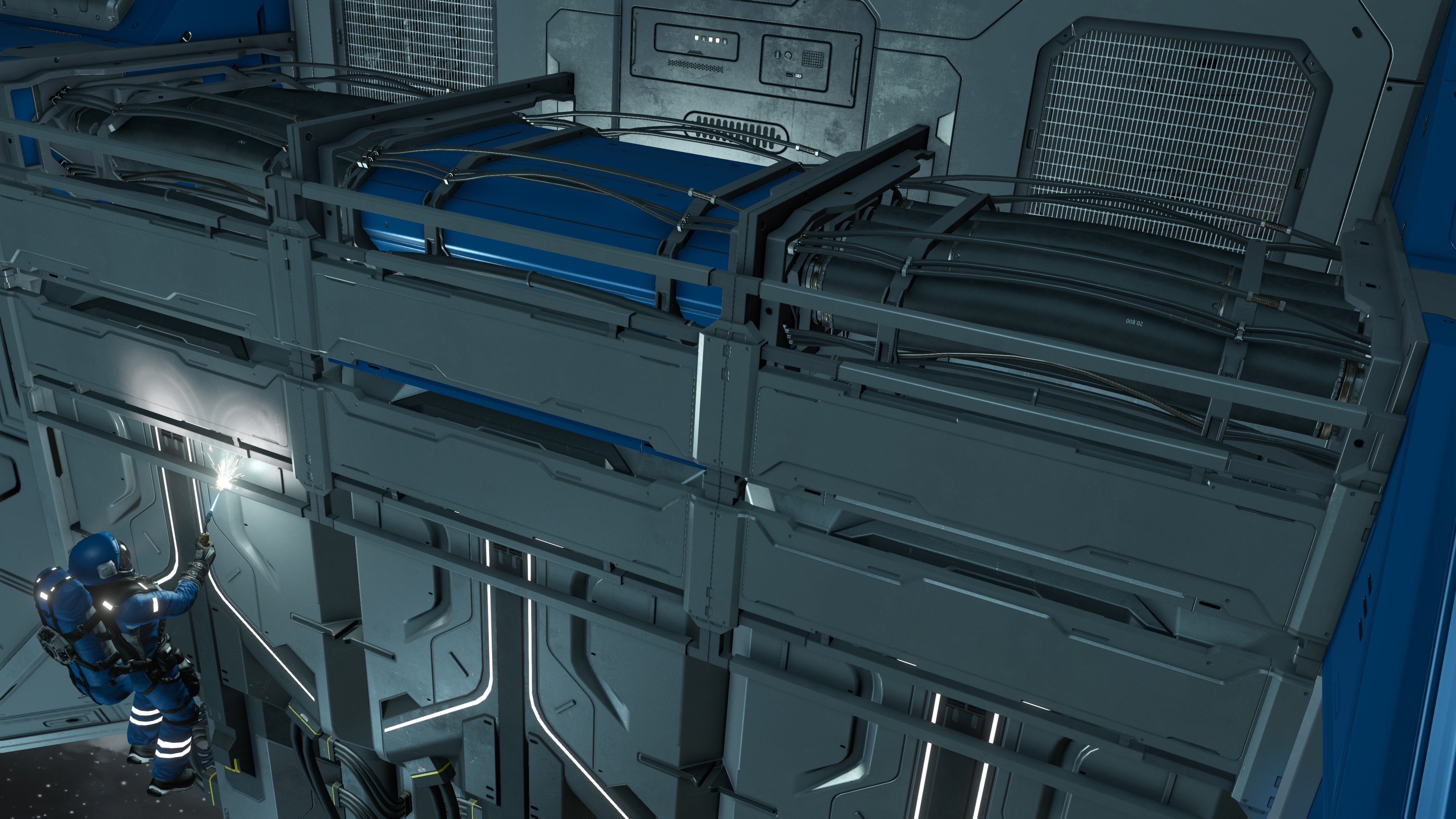
Cable Run (7 blocks, L grid) - Thick industrial frames packed with large cables, perfect for exposed parts or technical detail to corridors, machinery rooms, and workspaces.
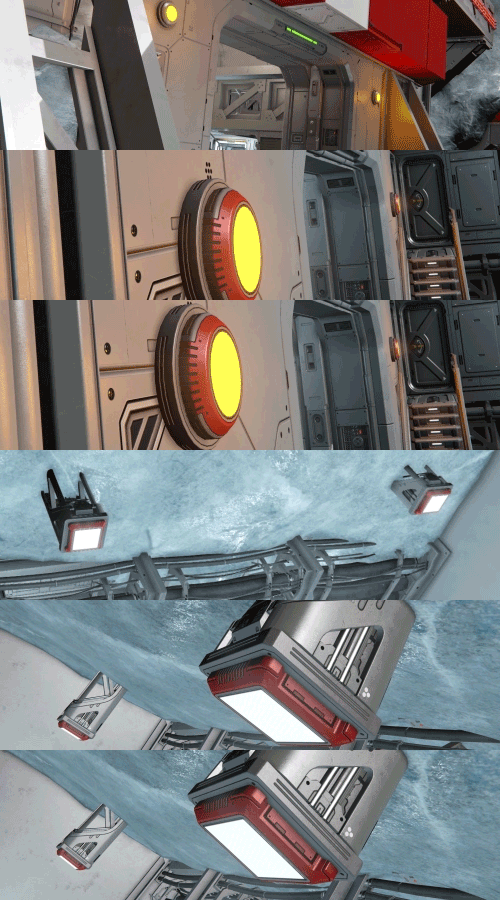
Round & Square Lights (2 blocks, L grid + 2 block, S grid) - Round and Square light fixtures with large, visible emitters. Perfect for illuminating interiors, adding strong visible light sources to runways or landing pads, and keeping your builds bright.
https://store.steampowered.com/app/4835530/Space_Engineers__Prosperity_Pack/

- Added a New Factorum Encounter
- Modernized the Space Respawn Ship
- Automatically Fill Bottles while Recharging
- Added a Ping Button for Lost Grids
- Automatic Subgrid Naming
- Improved NPC spawning, navigation, and collision avoidance
- Added an Option to Opt Out of Item Search
- Improved lighting effects for Welder and Grinder particles (Softer light with lower flash intensity)
- Reduced and adjusted sound volume levels on several loud sounds
- Contracts Adjustments and Improvements (including better mod support)
- Laser Antenna UX Improvements
- Added Wheel Indicators for better build orientation
- Improved language on store blocks and market search for clarity
- Services Terminal Improvements
- Precision Mode Marker’s location is now set to the player’s position
- Adjustments to Retrieval Timers
- Improved sorting of stored and active grids in the Services Terminal
- Changes to Ownership Requirements for Grid Storage, Repair, and Salvage
- Added Combat Delay, Grid Flag, and Status Report
- Improvements to the Repair Service Blacklist
- UI Improvements
- Dedicated Server Option: Prevent Sending Grids to Distant Locations
- Movement Restriction for deploying and storing grids
- Added Salvage/Repair Entity Components for Non-Trade Grids (modders can enable salvage and repair services for player stations)
New Blocks
- Prototech O2/H2 Generator (1xL)
- Flat Collector (1 x S)
- Structural Platform Conveyor (1xL)
- Short Stairs (1 x L)
- Passage 2 Frame (1 x L)
Added Content to existing DLCs:
- Additions to Decorative Pack 2: Triangular Grated Catwalks (2 x L)
Prosperity Pack
- Sloped Cockpit (2xS + 2L)
- Bulky Hydrogen Tank (1xS + 1xL)
- Steep Stairs (6xL)
- Solid Stairs (8xL)
- Battery Bank (1xS + 2xL)
- Square Railings (13xL)
- Decorative Server Racks (3xL)
- Cable Run (7xL)
- Round Light (1xS + 1xL)
- Square Light (1xS + 1xL)

Wheel Propulsion Overrides have been adjusted for consistency: forward now means forward and backward now means backward across all wheels. Existing builds using Propulsion Override may need adjustment, but new builds should be easier to configure for desired results.

- New flags in Services Terminal entity components allowing for player made variants. (EntityComponents.sbc)
- Improved RepairService blacklist controls, moving irreparable blocks from the Repair entity component to the targeted block’s definition. This change should make it easier to avoid conflicts between mods. (See Cubeblocks_Prototech.sbc for example).
- New flags and definition controls for item based Recovery Contracts, allowing for specific items to spawn inside specific spawn groups. For example: Smuggled Goods only appears inside Pirate Ships. This includes support for custom contract items. (ContractTypes.sbc / SessionComponents_Economy.sbc)
- New entity component for pump style animations on blocks. (EntityComponents.sbc).
- Added more controls for datapads and stories, allowing for economy elements (Station Name, GPS, etc) to be added to custom stories. (Stories.sbc)
- New controls allowing for NPC characters to wear custom suit skins. (Factions.sbc and FactionTypes.sbc)
- Null subtypes are now supported in EntityContainers.sbc, and no longer overwrite all blocks of that type if the subtype is null. This should fix issues where legacy blocks with null subtypes added their attributes to any modded block of the same block type. (EntityContainers.sbc).

Stability
- Fixed a crash when ramming another grid, causing race condition during block removal
- Fixed a crash when a block was deformed enough to be removed and then removed again through other damage
- Fixed a crash related to 3D audio processing during combat
- Fixed a crash when most contract strategy types are empty and defined earlier than a non-empty strategy type
- Fixed a crash caused by incompatible contract and strategy types
- Fixed a crash when all contract strategy types were empty
- Fixed a crash when removing a control seat together with the character in it
- Fixed a crash in the Monolith achievement after the block was removed
- Fixed a crash when the ore detector calculated the world position of a reverted ore deposit
- Fixed a crash when destroying block visuals of already removed blocks
- Fixed a crash in the AI Offensive Stay at Range behavior when target was removed
- Fixed a crash when accessing an interactive highlight outline
- Fixed a crash related to trying break a missing wheel constraint
- Fixed a crash in Drone AI waypoint updates when target was being removed
 Fixed a crash when the AI Offensive block unsubscribed from events during PMW impacting a drone
- Fixed a crash when the AI enemy search component changed targets
- Fixed a crash caused by modd-added non-public blocks appearing in the Radial Menu as an empty category was created for them
- Fixed a crash in Trash Removal processing Mod spawned grids which did not have the InScene flag
- Fixed a crash when adding a modded block to the Build Planner due to production blueprint ID collision
- Fixed a crash and memory leak when closing the Services Terminal
- Fixed a crash and memory leak in grid replication during block placement into voxel due to auto-merge
- Fixed a crash in turret re-targeting
- Fixed a race condition crash in component containers
- Fixed a crash when resolving Contract target conditions
- Fixed a crash in the Resource Sink component
- Fixed a crash when attempting to kidnap an NPC by luring it onto your grid and flying away
Performance
- Fixed an issue where Assemblers did not pull required components for production on very complex systems due to low performance
- Removed unnecessary animation data from multiple models to save memory
- Optimized collision shapes for Structural Blocks
- Reduced the triangle count of the Small Grid Suspended Control Seats
- Fixed performance issues caused by unpowered conveyor systems in combination with thrusters
- Removed redundant save data in stored grid details
- Improved audio memory handling for several sounds, ambient weather sounds now streamable
Functional
- Fixed an issue where a Services Terminal placed on a subgrid could store itself together with the main grid
- Fixed an issue where the Hand Drill detected ore without suit energy
- Fixed hinged subparts detaching and rotating freely after separating Merge Blocks
- Fixed incorrect Grid Storage retrieval time calculations
- Fixed Laser Antenna connections over very long distances
- Fixed server inventory lag when transferring items from a character inventory while seated in a cockpit
- Fixed the AI Offensive Stay at Range behavior becoming stuck at low distance settings
- Fixed incorrect Projector Yaw slider (was flipped)
- Fixed the AI Offensive block consistently missing targets in the negative Y world direction when using Prediction Guidance
- Fixed Assembler trying to process a queue even when below Operational Power
- Fixed Hinges displaying an incorrect angle when locked at a negative angle
- Fixed the damage incorrectly applying to the outer rim beyond the radius of Rocket explosions
- Fixed the Invite function on Steam Dedicated Servers
- Fixed jetpack Relative Dampeners moving character A increasingly lower when dampened to character B jumping
- Fixed Ship Weapon inventory issues stemming from older blocks not having the inventory entity component
- Fixed Gatling Guns, Warfare Gatling Guns, and Autocannons not firing after reconnecting or restarting
- Fixed the Disable Weapons advanced world option not working correctly
- Fixed the wrong block variant being selected when switching aim between Small and Large Grid
- Fixed grids being unable to disconnect or move away from a disabled Merge Block
- Fixed Take Control not using the Main Remote Control for Old Mining Base in Frostbite
- Fixed blocks with Setup Action or toolbar bypassing ownership access restrictions for unownable blocks
- Fixed Laser Antennas reporting no line of sight despite having a clear connection across planetary slopes
- Fixed Laser Antennas detecting their own mounting surface as an obstruction
- Fixed incorrect mount points on the Vending Machine
- Added a front mount point to the Control Seat
- Fixed the H-4 Advanced Miner becoming non-functional after retrieval from Grid Storage since it lacked backup battery
- Fixed damaged Neon Tubes remaining functional
- Fixed the third-person camera snapping into a close-up view when connected grids included a cockpit on a mechanical subgrid
- Restored the Select All controller shortcut in the Terminal
- Fixed syncing of turret direction and velocity for multiplayer lobby clients when Idle movement is enabled
- Fixed a leftover additional player character appearing in the First Jump scenario
- Fixed the mount points of the Conveyor Pipe T-Junction and Interior Turret
- Fixed a missing objective indicator for closing the door during the Pressurization task in Learning to Survive
- Fixed the Structural Platform Connector not respecting conveyor system pull requests
- Fixed incorrect mount points on the Fridge and Oven Blocks
- Fixed typos across many prefabs (Cargo ships, Drones, Encounters, Contracts, etc.)
- Fixed Blueprint/Block preview rotation controls not working after selecting and deselecting Voxel Hand
- Fixed some purchased Datapads not appearing in the player's inventory due to getting lost during data transfer
- Fixed loot Datapads using fallback localization instead of the Story Category system
- Fixed the inability to ignore PCU Limits as an admin hacking an NPC authored block
- Fixed Large Grid cockpits not pressurising from oxygen bottles in its inventory
- Fixed the random encounter generator trying to spawn REs around NPC characters
- Fixed inconsistent boulder sync for clients on DS
- Fixed PvE Bounties dependency on Enable Bounty Contracts toggle which now affects only the PvP variant
- Fixed grid thrusters not compensating for mass of attached subgrids with some but subpar thrust capabilities
- Fixed Thrusters capable of holding a ship with Dampeners not providing enough force when using Thrust Override
- Fixed physics issues when attaching Hinge parts
- Fixed Event Controller triggering actions after recoloring a tracked Merge Block
- Fixed inconsistent Railgun damage between static and dynamic grids (phasing)
- Fixed grid inventories not being usable to deliver Salvage Contract items
- Fixed block-bodied getters/setters never getting instruction/call-depth counters, escaping loop protection
- Fixed PvE Bounty Contracts not generating due to faulty cleanup of NPC member IDs in factions leading to long term accumulation
- Fixed destroying a Temporary Container holding a Salvage Contract item not failing the contract
- Fixed Grid and Item Triggered Contracts spawning while Economy was disabled
- Fixed Hauling Containers spawning in gravity when the contract was accepted on an orbital station
- Fixed explosive damage calculations for penetrative shells where even 1 defined damage would blow up whole armor block
- Fixed the explosion from penetrative ammo not being applied at the correct place in the grid
- Fixed NPC character definitions appearing as player character definitions in save data
- Fixed an issue where an Intel dedicated GPU would be seen as less powerful than integrated AMD GPU, prompting a message about running on worse HW
- Fixed station discoveries for the Item Search feature not surviving server restart
- Fixed enabling one overridden Atmospheric Thruster turning off gravity compensation for other Thrusters
- Fixed incorrect client write attempt for the Solar Food Generator
UI
- Adjusted name and tooltip for the Advanced World setting to Enable PvP Bounty Contracts to make it clear the setting is strictly PvP related
- Added missing Services Terminal localizations
- Fixed Event Controller Detailed Info synchronization on Dedicated Servers
- Fixed inconsistent spacing in the Advanced Controller section of the Joystick Help screen
- Fixed not displaying an informative message when searching for items too frequently in Item Search
- Fixed missing Market Watch tooltips when accessed through a Store Block
- Fixed scrolling issues in the Safe Zone's filter preventing scrolling to some entries in the list
- Fixed an out-of-bounds warning when rebinding modifiers to B1 or B3 with a generic joystick layout
- Removed the Setup Action button from unsupported Seat Blocks
- Fixed purchased Hydrogen values not updating immediately
- Fixed missing text in Recovery Grid Contracts
- Fixed Escape not closing the Workshop Browser search field while typing
- Fixed Grid Triggered Contract failure messages appearing twice
- Fixed inconsistent Wheel speed values in the UI (now shows both m/s and km/h)
- Fixed Contract unrelated GPS markers being impossible to delete
- Fixed Enable Unknown Signals being re-enabled after reloading a world
- Removed the Almagest Engineer Plushie from the Character Customization screen
- Fixed the controller binding show all signals being prevented by lookaround binding
- Fixed Projectors missing from some block categories
- Fixed missing spacing in the Jump Drive Detail Info
- Fixed missing spacing in Safe Zone Detailed Info
- Fixed button tooltips for cloud Blueprints on Consoles referencing local blueprints
- Fixed missing Build planner hint/control in the build radial menu when a subvariant of a block is selected
- Fixed gamepad navigation for the Deploy and Abort buttons in the Services Terminal
- Fixed missing Hydrogen and Oxygen entries in Store Block Administration when using a controller
- Fixed moving one HSV slider in the GPS color editor also changing other slider values
- Fixed the account balance not refreshing after using Expedite in the Services Terminal on Dedicated Servers
Art
- Fixed missing LOD1 for Construction Stage 2 of the Large Grid Light Armor Inverted Corner 2x1x1 Base
- Fixed flickering parts of the Offset Door when opened
- Fixed physics issues for the Bridge Sloped Corner Base Block
- Fixed broken normals on the Frostbite Gate
- Fixed Interior Turret placement issues caused by its collision model
- Fixed missing LODs on Locker construction stages
- Reduced the file size of the Flat Atmospheric Thruster model
- Fixed protruding geometry on some LODs of Construction Stage 1 for the Bridge Corner 2x1 Base Floorless variants
- Removed unused Structural Block blockout files
- Fixed small holes in the left and right Bridge Corner 2x1 Base models
- Fixed missing lower crossbars on Construction Stage 1 of the Bridge Corner 2x1 Base variants
- Fixed holes in the left and right Bridge Corner 2x1 Base Floorless models
- Fixed a typo on the Jump Drive Type II sticker
- Fixed the Landing Gear Type II extending outside its block space
- Fixed the Small Landing Gear Type II clipping through adjacent Armor Panels
- Fixed the offset cabinet subpart on the First Aid Station
- Fixed visual inconsistencies between the Bridge Raised Corner and Floorless variants
- Fixed LOD issues on Barrel Blocks
- Fixed inconsistent spacing in the Advanced Controller section of the Xbox Help screen
- Fixed incorrect highlights on the control panels of the Small Grid Angled Door A
- Fixed pattern inconsistencies between LODs of Colorable Solar Panels
- Fixed missing LODs on construction stages of the Bridge Window 1x1 Slope and Bridge Window 1x1 Face
- Fixed texture and UV alignment on Colorable Solar Panels
- Fixed the alignment of the Flush Cockpit conveyor port
- Fixed block seam details loading incorrectly on Diagonal Beam and Floor Blocks
- Updated the Chef Gloves icon to match the in-game model
- Fixed missing highlights on the Small Hydrogen Tank at Low and Medium model detail settings
- Fixed an issue where Ship Welders could not weld the first two construction stages of Wind Turbines from some angles
- Fixed missing collisions on the lower body of the Small Grid Rocket Turret Type II
- Fixed visual inconsistencies between the male and female Astronaut Ghost skins
- Fixed the placement rotation of the Inverted Half Troffer Light
- Fixed LOD issues on the Lab Experiment B Block
- Fixed texture issues on Bulk Cargo Container Blocks
- Fixed missing parts on LOD2 of the Large Grid Sci-Fi Hydrogen Thruster
Animation
- Fixed using the hand Welder or hand Grinder preventing some Emotes from playing fully
- Fixed the Male Engineer's left arm not swinging while holding a Welder
Audio
- Fixed Sound Block playback when using Realistic Sound
- Fixed looped Sound Block audio stopping after reloading a world
- Fixed combat music starting after welding or placing blocks
- Fixed low volume for the ParticleWeapExpl sound
- Fixed Music Competition tracks being stereo instead of mono
- Fixed inconsistent fuel warnings thresholds Critical/Low for jetpack from 5%/10% to 10%/25%
Removed
- Removed the unused Female Hardbass animation from the game content and ModSDK
- Removed unused and invalid Small Grid model files from Content
Modding
- Fixed an issue where modded gases could not be bought or sold
- Fixed the Wireframe button in the Model Viewer
- Fixed typos in mod related definitions for the new Structural Block group
- Fixed ModAPI not having a way to get contract IDs
- Fixed modded Grid Hauling Contracts not creating a drop-off destination and GPS
- Fixed modded Salvage Contracts not spawning the contract item
- Fixed modded Salvage Contract grids reporting incorrect GPS location due to being offset by gravity on DS

https://steamcommunity.com/sharedfiles/filedetails/?id=3770335597

https://steamcommunity.com/sharedfiles/filedetails/?id=3253006042
https://steamcommunity.com/sharedfiles/filedetails/?id=3715861916
https://steamcommunity.com/sharedfiles/filedetails/?id=3711906395
https://steamcommunity.com/sharedfiles/filedetails/?id=3743088436
https://steamcommunity.com/sharedfiles/filedetails/?id=3349481893
Community Hub & Spotlights
Check out our Community Hub!
- Official Keen Workshop
- Monthly Spotlights
- Creator Spotlights
- Official Guides
- and much more!

🛠️ Feedback & Support: https://support.keenswh.com/
🛰️ Discord: https://discord.gg/keenswh
📫 Newsletter: https://www.keenswh.com/newsletter
🚀 Community Hub: https://www.spaceengineersgame.com/community-hub/
➡️ Connect and find us on your platform of choice: https://www.keenswh.com/connect/